Higgsfield Review

Higgsfield is an AI video, image, and audio platform that aggregates more than 15 generation engines, including Kling 3.0, Sora 2, and Google Veo 3.1, under a single credit subscription. It is built for social media creators and brand marketing teams who want cinematic-looking short-form video without managing separate subscriptions to each AI model provider. The platform's central pitch is access and camera control: one login gives you the latest models, and 70+ cinematic presets give you directorial moves that most AI video tools do not offer.
That positioning matters because the AI video market has splintered badly. Runway focuses on editor-grade workflows, Pika targets fast social clips, and the underlying model providers (Kling, Sora, Veo) each run their own separate platforms. Higgsfield's argument is that a creator should not have to maintain four accounts to access four models. Whether that argument holds up depends almost entirely on how you count credits.
What the Higgsfield model library actually gives you
The model roster is the headline feature and the main reason people choose Higgsfield over a single-model competitor. At any given time, the platform includes:
- Kling 3.0 -strong on realistic human motion and controlled movement; the workhorse model for most social creators on the platform.
- Sora 2 - OpenAI's text-to-video model, best used for story-beat and narrative-style clips where scene coherence matters.
- Veo 3.1 - Google's model, which includes native audio synthesis: dialogue, ambient sound, and music generated alongside the video in a single pass.
- Seedance 2.0 - ByteDance's high-quality model, now available in 4K output, suited to high-gloss brand visuals.
- Soul V2 - Higgsfield's own lower-cost model, the one that qualifies for the "unlimited" generation advertised on Plus and Ultra plans.
- WAN 2.6, Hailuo 02, and others - a rotating set of additional models that expand the style range available to subscribers.
Switching between models takes seconds inside a project. This matters for iteration: if Kling 3.0 is not handling a specific action shot well, you can re-run the same prompt through Sora 2 without leaving the platform or opening a new account.
Cinema Studio and the 70+ preset library
Most AI video tools give you a text prompt and a generate button. Higgsfield adds a layer of directorial control that closer resembles a shot list than a search bar. The Cinema Studio interface presents over 70 named presets, each replicating a specific camera move or visual effect:
- Bullet Time - frozen-moment 360-degree rotation, common in action content and sports ads.
- Crash Zoom - fast lens push toward the subject, used in music video and sports contexts.
- Orbit 360 - a circular tracking move around the subject, useful for product showcase and character reveals.
- Earth Zoom - pulls back from a close shot to an aerial perspective, common in travel and landscape content.
- Viral presets - a separate library of social-first effects like Action Figure, Cardboard Cutout, and Sketch to Fabric, designed for trend-driven content.
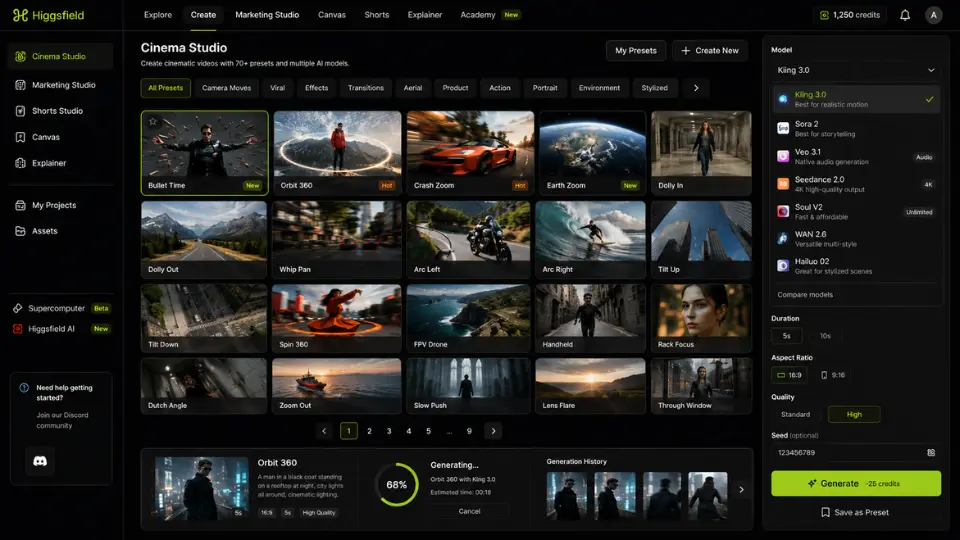
The presets lower the barrier for creators who understand what a shot should look like but cannot reliably prompt an AI model into producing it. For a brand producing product ads, being able to select "Orbit 360" rather than engineering camera-direction language into a prompt is a measurable time saving.
Marketing Studio and the Hermes Agent
Beyond video generation, Higgsfield offers a Marketing Studio specifically built for e-commerce. Paste a product URL, and the Hermes Agent extracts the product name, description, and images, then generates a ready-to-export ad video. You choose a creative direction: UGC style, CGI commercial, cinematic narrative, or an AI-directed Wild Card mode. This is the most differentiated part of the product for anyone selling physical goods online, and the one area where Canva's video tools do not directly compete. The platform also includes a Shorts Studio for quick social clips, a Canvas for image editing, and an Explainer tool for walkthrough videos, making it one of the broader creative suites in the AI video market.
Where Higgsfield falls short in practice
The honest assessment of Higgsfield requires separating the model library from the generation experience. Accessing Kling 3.0, Sora 2, and Veo 3.1 in one place is useful. The generation process itself carries constraints that affect daily use more than the feature list suggests.
The biggest practical limitation is clip length. Depending on the model, individual generations cap at 5 to 20 seconds. Building anything longer requires stitching multiple clips together in an external editor such as CapCut, DaVinci Resolve, or Adobe Premiere. Higgsfield offers no native editing timeline, so the workflow breaks at the point a user needs to assemble footage. This is not unique to Higgsfield, but it is more significant here because the platform's cinematic presets create an expectation of production-ready output that the clip cap frequently interrupts.
Character consistency across clips is also incomplete. Higgsfield offers Soul ID as a character-anchoring feature, but maintaining the same face, wardrobe, and lighting across multiple independently generated clips remains unreliable, particularly in complex scenes. For brand campaigns that need a consistent spokesperson across a 30-second video made from five stitched clips, this creates meaningful re-generation overhead.
The generation hit rate and what it means for credits
This is the part most Higgsfield reviews understate. Premium model generations on Kling 3.0 and Sora 2 do not produce usable clips on every attempt. Based on published creator reports and tutorial breakdowns, roughly 1 in 4 Kling 3.0 generations lands as a keeper, with the rest needing prompt adjustments, seed changes, or model switches. On Sora 2 and Veo 3.1, the hit rate is closer to 1 in 5.
The implication for credit budgeting is direct: to produce 10 finished Kling 3.0 clips, plan for 40 to 50 generations and 240 to 300 credits on the Plus plan. The Plus plan includes roughly 1,000 credits per month, which sounds generous until the iteration maths applies. A focused brand shoot of 15 to 20 final clips can exhaust Plus credits in a single session.
Dynamic motion scenes make this worse. Higgsfield, like all current AI video generators, handles quiet and conversational footage well. Complex movement, physics interactions, and action sequences still produce artefacts at high frequency. The platform performs best on controlled shots: product presentations, talking heads, slow environmental pans, and preset-driven effects where the motion is predictable.
Ease of use and the model-choice problem
Getting started on Higgsfield is straightforward. The Cinema Studio interface is organised and the presets are browsable without documentation. A first-time user can generate a creditable clip within ten minutes of signing up, which is a lower barrier than Runway's more editor-native interface. The Higgsfield Academy adds free tutorials on filmmaking technique with AI tools, which is an unusual and practical addition for creators who want to develop skill rather than consume presets.
The complexity arrives when you need to choose between models deliberately. Each model has different credit costs, different quality profiles, different strengths for specific shot types, and different generation speeds. The platform surfaces this choice at every generation, which means users who do not invest time in understanding the model differences end up making expensive credit decisions by trial and error. Ease of use scores well for the interface and scores less well for the decision layer underneath it.
The Supercomputer feature, a Higgsfield-built AI agent for creative workflow automation, adds a further layer. It supports multi-step generation pipelines and, via MCP and CLI integration, connects to external tools including Claude. For technically minded creators, this opens automation possibilities that simpler AI video tools do not offer. For most users, it remains an advanced feature they will not touch in the first month.
Data privacy and account management
Payment processing runs through Stripe, and Higgsfield does not store full card details on its own systems. The privacy policy covers data handling for generated content, though the platform's transparency on training data use and content retention is limited compared to enterprise-grade alternatives. The tool does not offer a dedicated privacy tier or on-premise option, which rules it out for regulated industries handling sensitive visual content. ElevenLabs integration for voice cloning introduces an additional data-sharing consideration for users who upload voice samples alongside video content.
Higgsfield pricing: what the tiers actually deliver
Higgsfield runs a credit-based subscription with three paid tiers, all billed annually. Pricing has changed multiple times since the platform launched in April 2025, so verify the current figures on the official pricing page before subscribing.
- Free trial - a small credit allocation to test generation quality; not sufficient for ongoing work.
- Starter: $15/month (annual) - approximately 200 credits per month. Enough for a handful of test generations. Useful for evaluating model quality before committing, not for regular production.
- Plus: $39/month (annual) - approximately 1,000 credits per month. Full model access, more parallel generation slots. The practical working tier for regular creators and small brand teams.
- Ultra: $99/month (annual) - approximately 3,000 credits per month, scaling to higher packages. The tier for studios and teams producing video daily.
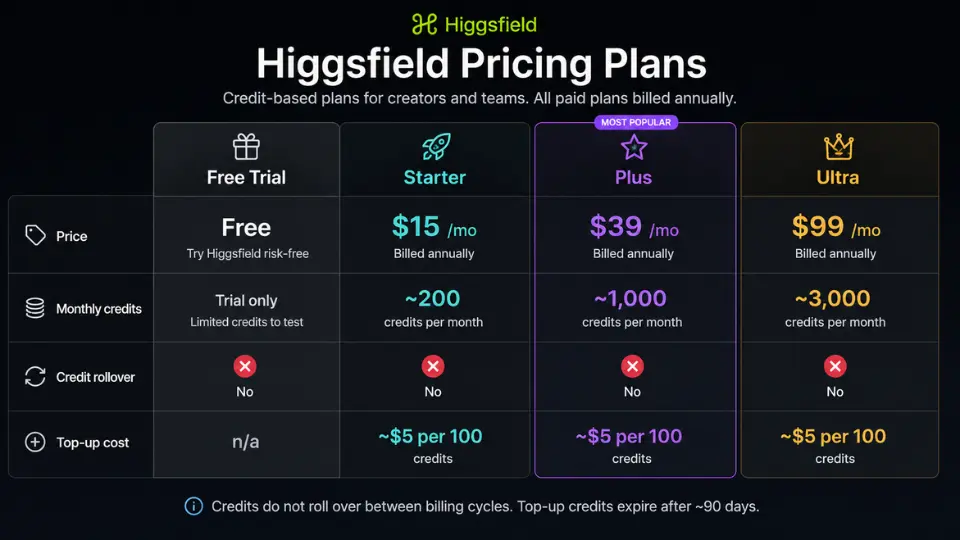
Two constraints affect every tier. Credits do not roll over between billing cycles, so unused allocation is lost each month. Top-up credit packs cost approximately $5 per 100 credits but expire after roughly 90 days, adding a second use-it-or-lose-it risk for occasional users.
The "365-day unlimited" and "7-day unlimited" language Higgsfield uses in its marketing refers primarily to image generation models and Soul V2, its own lowest-quality video model. Unlimited access to Kling 3.0, Sora 2, and Veo 3.1 does not exist at any tier. On Ultra, premium model credits are capped, and generation speed on unlimited plans is subject to dynamic throttling during high-traffic periods per Higgsfield's own pricing page disclosure.
Higgsfield versus Runway and Pika: who should pick which
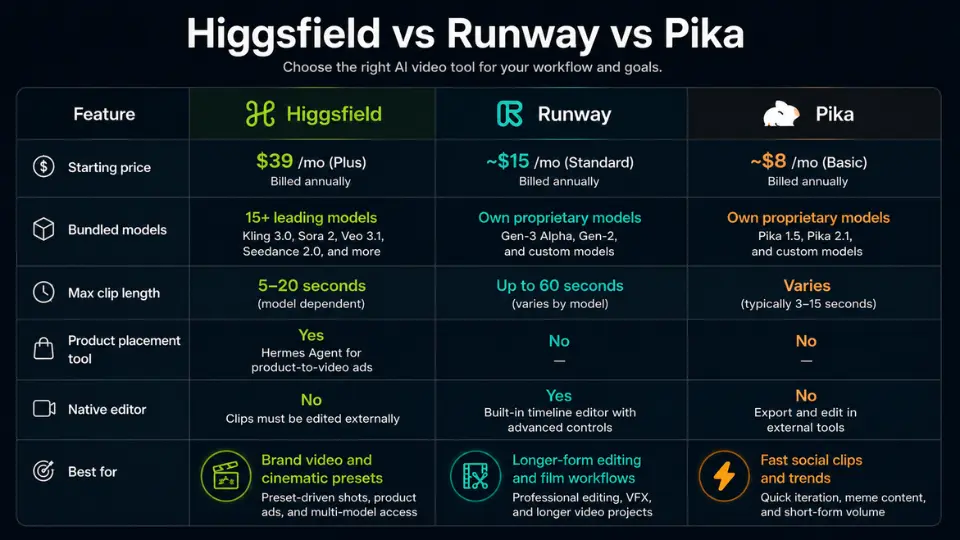
Runway is the more appropriate choice for creators who need a native editing timeline alongside generation. It handles longer-form assembly, colour grading integration, and more granular motion control via motion brushes and keyframed camera paths. Higgsfield's preset library is more accessible for beginners; Runway's ceiling is higher for experienced editors willing to invest in the interface. For plain text-to-video generation without product-placement tooling, Runway and Kling's native platform are often cheaper per finished clip.
Pika targets a lower price point and faster iteration for social-first clips. It lacks Higgsfield's model variety and cinematic preset depth, but produces fast, competent clips for creators who prioritise volume over directorial control. If your use case is quick trend content rather than brand-quality video, Pika is a cheaper starting point.
Higgsfield wins specifically when the requirement is product-placement video, preset-driven cinematic shots, or access to multiple current frontier models under one subscription. The Marketing Studio's Hermes Agent is a distinct feature with no direct equivalent in Runway or Pika at comparable price points. For e-commerce brands producing regular product ad content, this alone can justify the Plus tier.
Is Higgsfield worth the subscription?
For social media creators and brand marketing teams producing short-form content on a regular cadence, Plus at $39 per month is fair value, provided you account for the iteration overhead in your credit budget. Plan for 3 to 5 generations per finished clip when working with premium models, and track your credit consumption in the first week of a billing cycle to establish a realistic production rate before you run dry mid-month.
Higgsfield is not worth the subscription if you produce video occasionally or irregularly. The no-rollover credit policy means Starter and Plus credits go to waste in low-output months, and the per-clip cost rises sharply when you are not generating at volume. Occasional users are better served by Kling's native platform, Pika, or Midjourney for image-led content, paying per generation rather than absorbing a monthly credit reset. The Ultra tier at $99 per month is defensible only for teams publishing video daily. At that volume, the credit maths work in your favour and the model variety becomes a genuine production asset rather than a marketing feature.
How We Rated It:
More Tool Reviews


Subscribe to Stay in the loop
Get the latest AI and technology news, honest tool reviews, and practical guides delivered straight to your inbox.
Success! Check your Inbox!

Tezons Newsletter
The latest technology news, in-depth tool reviews, and practical guides - curated and delivered to your inbox.
Latest News




Have a question?
Have any questions?
Didn’t find what you were looking for? We’re just a message away.