
Cursor is an AI-native code editor built on VS Code that indexes your entire codebase on first open, not just the file you have on screen. It is built for professional software developers who write code daily: engineers on team projects, technical founders building products, and freelancers managing multiple client codebases where switching context between files costs real time. As of July 2026, Cursor is at version 3.7, has crossed $2 billion in annualised revenue, and sits in 64% of Fortune 500 engineering teams.
Most AI coding tools work at file level: they see what you have open and nothing else. Cursor builds a semantic map of your whole project from the start, and every question you ask, every agent task you trigger, every BugBot scan draws on that map. The result is an assistant that knows your specific architecture, naming conventions, and dependency structure rather than applying generic suggestions drawn from public code patterns.
Getting the most from Cursor requires two things most users underestimate: clear agent prompts, and attention to the credit-based billing model introduced in June 2025. Vague prompts produce inconsistent agent output; heavy use of manually selected frontier models can push monthly costs well above the headline plan price. Both are manageable once you know about them, but neither is obvious on the way in.
What Cursor does differently from other AI coding tools
The gap between Cursor and a file-level AI plugin starts with codebase indexing. Open a project in Cursor and it scans every file, computes a semantic map using embeddings, and stores it with an obfuscated file-path index. From that point, any question you ask draws on the full project rather than the visible tab. A question about unexpected service behaviour retrieves the relevant handler, the middleware it passes through, and the test covering the related path. A file-level plugin gives you a suggestion; Cursor gives you a suggestion that knows why the surrounding code exists.
This pays off most on tasks that span multiple files, which covers the majority of meaningful feature work: scaffolding a new API endpoint, refactoring a shared utility, tracing a bug that surfaces in one file but originates in another. Engineers at NVIDIA, Stripe, and Uber have adopted it at team scale because the gains compound on complex codebases rather than diminishing as the project grows.
The indexer updates incrementally every ten minutes, so new additions stay reflected without a full rescan. On very large codebases, the semantic retrieval can surface loosely relevant chunks instead of the most critical files, producing suggestions that are technically correct but architecturally inconsistent. Using explicit file references in prompts reduces this, though it requires knowing which files are relevant, which new users often do not.
Tab, Agent, BugBot, and Automations explained
Cursor runs four distinct systems that cover different parts of a developer's day, each one built specifically for that role rather than adapted from a general tool.

- Tab autocomplete uses Supermaven, a proprietary model trained on real coding behaviour and built for speed. It delivers inline completions in roughly 200 milliseconds, predicts entire function bodies, matches your code style, and handles bracket pairing and indentation correctly. Supermaven posts a 72% acceptance rate, which independent comparisons rank as the highest of any AI code editor in 2026. For developers spending the majority of their day writing code, this is the feature they interact with most.
- Agent mode handles multi-step tasks from a natural language description. You state what needs to happen: add rate limiting to the login endpoint, refactor the payment service to use the new client, write tests for the updated auth flow. Agent reads the relevant files, writes changes across multiple locations, and can run terminal commands to verify its work. The Agents Window, the primary interface since Cursor 3.0, lets you watch what the agent is doing and redirect mid-task. The /multitask command distributes work across parallel sub-agents, shifting the unit of productive work from a single sequential task to a coordinated set of concurrent ones. Agent accuracy runs at 75 to 85 percent on well-scoped tasks; specific prompts with concrete acceptance criteria consistently outperform vague ones. Cursor Rules, project-level instructions covering your testing framework, naming conventions, and architectural constraints, raise output quality significantly on tasks the agent handles repeatedly.
- BugBot is Cursor's automated code review agent, triggered on every pull request. At version 3.7, BugBot completes a review in around 90 seconds (down from five minutes at launch), finds an average of 0.62 bugs per run, and costs roughly 22% less per review than it did at launch. It ignores whitespace, formatting, and style, flagging only substantive bugs and security issues. The /review command runs BugBot locally before you push, so issues surface before they reach the PR. BugBot now covers both GitHub and GitLab repositories.
- Automations lets you configure agents to trigger automatically from GitHub events, Slack messages, Jira ticket assignments, or timers. One early use case is continuous security review: Cursor runs hundreds of automations per hour across enrolled repositories, catching security vulnerabilities, authentication regressions, and prompt injection risks without a developer manually starting a review. For teams running complex interconnected systems, this shifts security review from a periodic gate to an ongoing background process.
Model flexibility runs across all of the above. Within any session you can select Claude 4.x (Sonnet or Opus), GPT-4o, GPT-5, Gemini 2.5, or o1 reasoning models. Auto mode routes each request to the most appropriate model by task type, and on all paid plans Auto mode draws nothing from your credit pool.
Cursor pricing: what each plan costs and what the credit system means in practice
Cursor's headline prices are straightforward. The credit system underneath them is not, and misreading it is the most common cause of surprise invoices.
- Hobby – Free, no credit card required. Limited Agent requests and limited Tab completions. Enough to evaluate the editor on a real project before committing to a paid plan.
- Pro – $20/month ($16 billed annually). Extended Agent limits, frontier model access, cloud agents, MCP support, and custom Cursor Rules. The right starting point for individual professional developers.
- Pro+ – $60/month. Three times the usage allocation on OpenAI, Claude, and Gemini models. Suited to developers who hit credit limits regularly on Pro.
- Ultra – $200/month. Twenty times the base allocation with priority access to new features. Aimed at developers running agent-heavy workflows throughout the day.
- Teams – $40/user/month. Shared Cursor Rules, centralised billing, usage analytics, SAML/OIDC SSO, and org-wide Privacy Mode controls.
- Enterprise – Custom pricing. Adds pooled usage, invoice billing, SCIM provisioning, and audit logs.
The credit system replaced the previous flat request model in June 2025. Each paid plan includes a monthly credit pool equal to its price in dollars. Auto mode is unlimited on all paid plans and draws nothing from your pool. Credits only deplete when you manually select a specific frontier model such as Claude Opus or GPT-5. A Pro user who lets Auto mode handle most tasks will rarely reach their limit. A developer who manually picks a frontier model for every task can exhaust their pool well before month end, at which point on-demand overages are billed in arrears rather than hard-stopped.
Heavy agent users on Pro regularly face effective monthly costs of $40 to $50 after overages. The change cut the effective monthly request count from roughly 500 to around 225 at the Pro price point. The CEO issued a public apology following community backlash, and a portion of existing subscribers moved to Windsurf as a result. BugBot charges are drawn from your included credit pool rather than billed as a separate seat fee.
Four limitations worth knowing before you subscribe
- Credit unpredictability. The gap between what a moderate user pays and what a power user pays is wide, and overages arrive at month end rather than with a real-time cap. Teams with variable usage will find billing difficult to model in advance.
- Context degradation on large codebases. When a project exceeds a certain scale, the semantic retrieval surfaces loosely relevant files instead of the most important ones. Agent output becomes stylistically correct but architecturally inconsistent. Explicit file references in prompts help, but require already knowing which files are relevant.
- Agent output requires validation. On well-scoped tasks the agent handles 75 to 85 percent correctly. Edge cases, uncommon language patterns, and ambiguous prompts produce errors that need review before merging. Treat agent output as a first draft, not finished code.
- VS Code only. Developers whose primary environment is JetBrains, Xcode, or Vim face a real switching cost. Windsurf covers more than 40 IDEs natively, which for multi-IDE teams is a material difference.
Cursor against GitHub Copilot and Windsurf
The three dominant AI coding tools each serve a different developer profile. The right choice depends on workflow, not feature lists.
GitHub Copilot
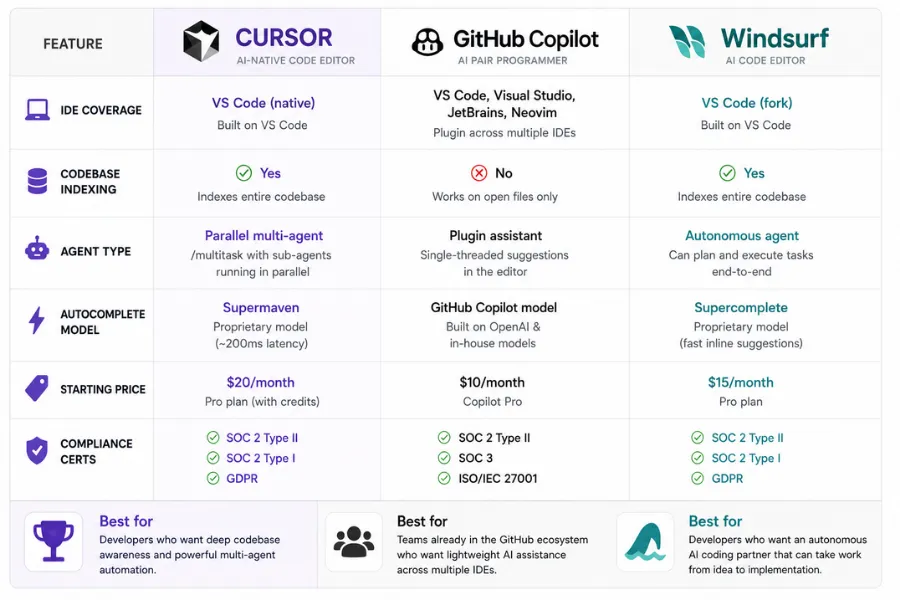
GitHub Copilot costs $10 per user per month for individuals and $19 for Business. It runs as a plugin across VS Code, JetBrains, Xcode, Neovim, and more, making it the widest-coverage tool available. It has the tightest GitHub DevSecOps integration and the easiest approval path for large-organisation IT budgets. Its agent capability improved significantly in 2026, but it does not index the full codebase, and multi-file agent tasks consistently produce weaker results in independent benchmarks. Copilot is the right choice when your team needs coverage across multiple IDEs, when the GitHub workflow integration is the primary driver, or when $10 per seat is a firm constraint.
Windsurf
Windsurf, acquired by Cognition for $3 billion in 2025, costs $20 per month at Pro tier and $25 to $30 per user per month at team level, meaningfully cheaper than Cursor at $40. Its Cascade agent prioritises autonomous execution with fewer interruptions: it pulls relevant context automatically rather than requiring manual file references, and handles longer multi-file tasks with less developer steering. Windsurf covers more than 40 IDEs natively, carries HIPAA and FedRAMP certification alongside SOC 2 Type II, and its Supercomplete autocomplete is fast, though independent testing rates Cursor's Supermaven as more accurate. Windsurf is the better pick when your team needs IDE flexibility beyond VS Code, when HIPAA or FedRAMP compliance is required, or when you want an agent that acts more autonomously with less directive input.
Replit and Bolt.new
Replit and Bolt.new both appear in comparisons but target a different user: browser-based development with built-in deployment, suited to building full-stack applications without a local toolchain. Cursor is a downloaded editor for developers already running local environments. They are not direct competitors.
Cursor is the stronger pick when autocomplete accuracy, agent parallelism, model flexibility, and depth of codebase context are the deciding factors, and your team works primarily in VS Code. For multi-IDE teams, or those with regulatory requirements beyond SOC 2 Type II, Windsurf closes those gaps at a lower price point.

How We Rated It:
More Tool Reviews






Subscribe to Stay in the loop
Get the latest AI and technology news, honest tool reviews, and practical guides delivered straight to your inbox.
Success! Check your Inbox!

Tezons Newsletter
The latest technology news, in-depth tool reviews, and practical guides - curated and delivered to your inbox.
Latest News




Have a question?
Have any questions?
Didn’t find what you were looking for? We’re just a message away.