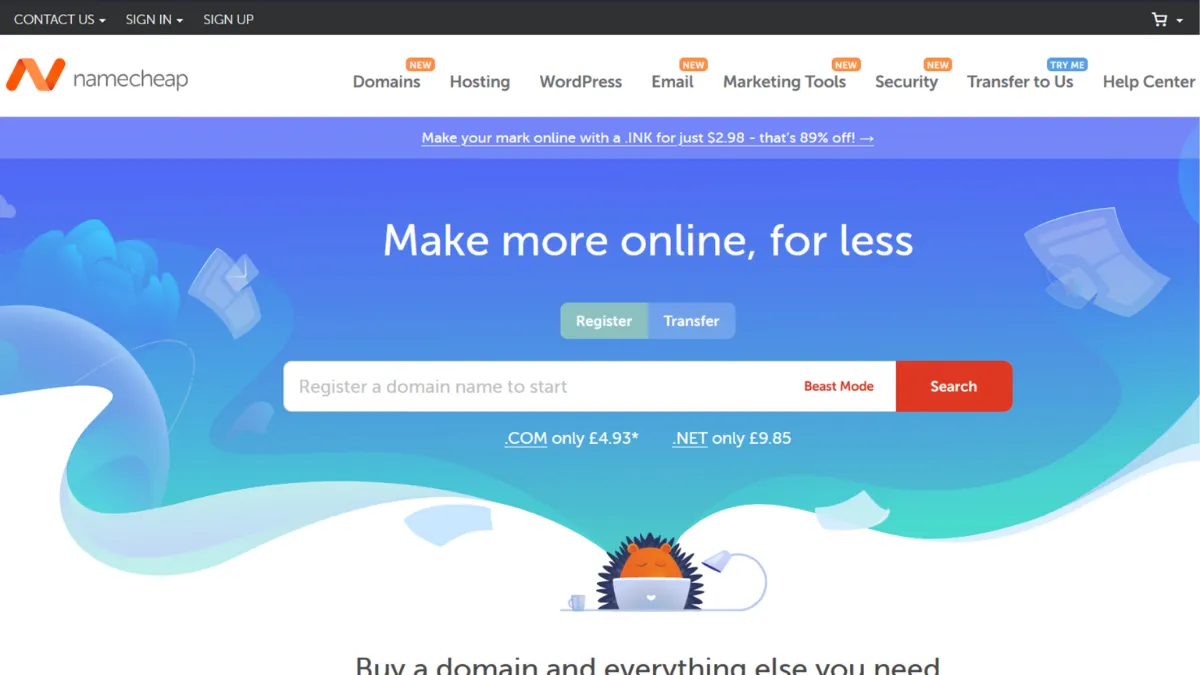
Domain registration is one of those decisions that feels trivial at purchase and consequential at renewal. Namecheap built its reputation on affordable first-year pricing and free WHOIS privacy protection, and for solo founders and early-stage teams registering their first handful of domains, that combination is hard to argue with. The platform covers far more than domain registration now, extending into shared hosting, managed WordPress, private email, SSL certificates, and a suite of ancillary tools. Most users come for the domains and stay for the ecosystem. Whether that ecosystem serves you well depends on what stage you are at and how sensitive you are to renewal pricing drift over time.
The core mechanism behind Namecheap's value is straightforward: competitive first-year domain pricing, WHOIS privacy included by default at no extra cost, and a control panel that handles DNS management, auto-renewal, domain transfers, and basic security under one login. Where many registrars treat privacy protection as a paid add-on, Namecheap includes it for eligible domains without requiring any separate subscription. That single detail saves a meaningful amount across a portfolio of 10 or more domains annually. The DNS management tools support standard A, CNAME, MX, and TXT records, with advanced features like DNSSEC available via a paid PremiumDNS upgrade. The account dashboard consolidates domain status, renewal dates, and hosting services, which reduces the cognitive load of managing multiple products.
Realistic expectations matter here. First-year .com pricing can be very competitive with promotional rates for new customers, but renewal pricing has increased noticeably over recent years. A .com renewal currently sits in the $13–15 range per year, which is still reasonable but no longer as clearly differentiated from competitors as it once was. Bulk domain management tools support searches of up to 5,000 domains at once, which makes Namecheap practical for portfolio operators. Hosting performance is adequate for low-to-medium-traffic sites, but teams running high-traffic applications or requiring staging environments will likely outgrow the shared plans quickly.
Namecheap suits founders registering their first domain and building an early web presence without wanting to juggle multiple vendor relationships. It also works well for small agencies managing domain portfolios across several clients, and for bootstrapped teams that want domain registration, basic hosting, and private email under one billing relationship. The free privacy protection is a meaningful differentiator for anyone managing domains linked to personal contact details.
The interface complexity is a genuine limitation. Namecheap offers a wide product range, and the account panel reflects that breadth. Finding specific settings, activating SSL certificates, or configuring hosting can involve several steps across different sections of the dashboard. New users frequently report friction during initial setup, particularly around SSL activation. The platform also does not offer telephone support, which matters if your infrastructure decisions require real-time voice escalation.
The sections below cover how the platform works mechanically, which features deliver the most practical value, and how Namecheap stacks up against the alternatives you are most likely to be considering.
What Is Namecheap?
Namecheap is a domain registrar and web services platform founded in 2000. It addresses the foundational requirement of any online presence: securing and managing a domain name. What separates it from a generic registrar is the combination of a large TLD catalogue, over 1,500 extensions at last count, and a suite of adjacent services that reduce the need to shop across multiple vendors. WHOIS privacy protection, which masks personal contact details from the public domain registry, is included free for eligible domains. This is a direct contrast to registrars that charge separately for the same feature. Namecheap has grown into one of the largest registrars by total domains under management, with millions of active domain names on its platform. The scale gives it negotiating leverage with registries and contributes to competitive base pricing. The practical question is not whether Namecheap is credible — it clearly is — but whether its current pricing and feature set still represent the best trade-off for your specific situation, which depends on how many domains you manage, whether you need hosting, and how much you value UI polish.
How Namecheap Works
Registering a domain on Namecheap begins with a search that returns availability across all supported TLDs simultaneously. You add domains to a cart, select registration length (one to ten years), and check out. WHOIS privacy is added automatically for eligible extensions. After purchase, the domain appears in your account dashboard where you can configure DNS records, set nameservers, enable two-factor authentication, and manage auto-renewal preferences. The DNS editor covers the full range of standard record types. Pointing a domain to an external host requires only updating nameservers, which propagates within a standard DNS TTL window.
Where Namecheap differs from a pure-play registrar is in what happens next. You can activate a hosting plan, set up private email with a custom domain, install a managed WordPress site via EasyWP, or add an SSL certificate, all from within the same account. The integration between these products is functional rather than seamless. Connecting a newly registered domain to a hosting plan, for example, involves navigating between the domain dashboard and the hosting dashboard, which are treated as separate sections rather than a unified view.
The counterintuitive thing most users get wrong is treating Namecheap's value as primarily about first-year pricing. The real long-term value is WHOIS privacy included for life. A portfolio of 20 domains with privacy protection included saves a meaningful amount annually compared to registrars that charge per domain for the same feature. If you are managing domains across multiple years and care about protecting personal contact details, that structural advantage compounds quietly in the background regardless of what first-year promotions are available at any given moment.
Namecheap Key Features
Domain Search and Registration. The domain search tool returns availability across all 1,500-plus TLDs in one query and supports bulk searches for up to 5,000 domains at once. This makes Namecheap practical for both single registrations and portfolio management. The checkout flow is clean and adds WHOIS privacy automatically, removing a common point of friction that other registrars use as an upsell opportunity. Registration length can be set from one to ten years at the point of purchase.
Free WHOIS Privacy Protection. For eligible domain extensions, Namecheap includes lifetime WHOIS privacy at no additional cost. This masks personal contact details, including name, address, phone number, and email, from the public WHOIS database. The protection is provided via Withheld for Privacy and applies automatically. A small number of TLDs cannot offer WHOIS privacy due to registry restrictions, which Namecheap documents on its privacy page.
DNS Management. The DNS editor supports A, AAAA, CNAME, MX, TXT, SRV, and CAA records, covering the needs of most small-to-medium web projects. Standard DNS is included with every domain. PremiumDNS, available as a paid add-on, unlocks DNSSEC, dynamic DNS, and higher query limits for teams that require them. The standard DNS tier is sufficient for the vast majority of use cases and does not require any additional spend.
EasyWP Managed WordPress Hosting. EasyWP is Namecheap's managed WordPress product, designed to separate WordPress hosting from the shared hosting stack. It provides a faster provisioning experience than shared hosting and includes automated backups on higher tiers. For teams that want a contained WordPress environment without configuring a server directly, it removes several setup steps. Performance is adequate for standard content sites, though teams with high traffic requirements should evaluate dedicated hosting options.
Private Email Hosting. Namecheap offers business email hosting with custom domains, separate from shared hosting. Entry-level plans provide storage per mailbox and cover standard IMAP and webmail access. This is useful for founders who want a professional email address tied to their domain without migrating to a full productivity suite. Pricing for email plans is competitive relative to standalone email providers, and the integration with a Namecheap-registered domain reduces configuration steps considerably. The integrations capability of Namecheap is deliberately limited: it operates as a standalone platform rather than connecting into third-party workflow tools, which is worth factoring in if your stack relies on connected tooling.
Namecheap Pros and Cons
What Namecheap gets right:
- Free lifetime WHOIS privacy on eligible domains. This is included by default rather than as an opt-in, and it applies across the full registration period. For anyone managing personal or business domains where contact detail exposure is a risk, this is a tangible saving over registrars that charge per domain.
- Large TLD catalogue. Over 1,500 extensions means you can register niche and emerging TLDs alongside standard ones without switching to a secondary registrar. Bulk search handles up to 5,000 domains at once, making this practical at scale.
- Competitive base pricing for standard TLDs. Standard extensions such as .com, .net, and .org are priced at the lower end of the market. First-year promotional rates for new customers can represent significant savings, particularly for registrations of multiple years.
- Integrated ecosystem. Domain registration, hosting, email, SSL, and DNS management under one login reduces the vendor management overhead for early-stage teams. While individual products are not always best-in-class, the convenience of consolidated billing has real value for small teams.
- Two-factor authentication and account security. 2FA via an authenticator app is available at no extra cost and is straightforward to enable. Combined with WHOIS privacy, the default security posture is stronger than many comparable registrars.
Where it falls short:
- Renewal price increases over time. First-year promotional pricing is not representative of long-term costs. Renewal rates for standard TLDs have increased noticeably and are no longer as differentiated from competitors as they once were. Portfolio operators should calculate total cost over a three-to-five year horizon, not just the first year.
- Interface complexity across products. The account panel reflects the breadth of Namecheap's product range, and navigating between domains, hosting, email, and SSL involves separate sections that do not share a unified view. New users consistently report friction during initial configuration, particularly around SSL activation.
- No telephone support. Live chat is available around the clock and is generally well-regarded, but the absence of phone support is a real gap for teams that manage critical infrastructure and occasionally need real-time voice escalation.
- Limited integrations with third-party tools. Namecheap does not connect natively to project management, CRM, or workflow platforms. If your stack relies on tools like Zapier or Notion for operations, domain management stays manual and separate.
- Hosting performance is adequate, not exceptional. Shared hosting plans are cost-effective but not optimised for high-traffic sites or applications that require staging, advanced caching, or one-click environment management. For hosting-heavy workloads, purpose-built hosts will serve you better.
How to Get the Most Out of Namecheap
Before you register anything, decide which TLD you actually need. Most founders buy a .com by default, but if your preferred name is taken, .io and .co are credible alternatives for technical and startup audiences. Check availability across several extensions in one search rather than settling for a hyphenated or abbreviated .com. Register your domain for two to five years upfront if you are confident in the name. Multi-year registrations lock in the current rate and protect against renewal price increases on a per-year basis.
Set up two-factor authentication on your account before doing anything else. Domain hijacking is a real risk for founders, and securing account access takes under two minutes. Enable auto-renewal for domains you cannot afford to lose, but also set calendar reminders 60 days before each renewal so you can compare renewal pricing against alternatives before committing automatically.
When configuring DNS records, use Namecheap's own nameservers if you want to manage DNS through the account dashboard. If you are hosting with an external provider, pointing nameservers to that provider is typically simpler than managing records across two platforms. For teams building on Webflow or similar site builders, external nameservers are the standard setup.
To get the best long-term value from Namecheap, treat domain registration and email hosting as its core strengths, and evaluate hosting separately if your site has meaningful traffic requirements. How to keep domain costs low on Namecheap comes down to a single habit: review renewal rates annually, compare them to the current market, and transfer domains where the difference exceeds the friction cost of a transfer. Namecheap's own documentation on domain transfers is thorough, but the transfer confirmation flow has attracted criticism for being non-obvious, so test the process with a low-stakes domain first if you plan to migrate a portfolio.
For teams using Google Analytics or other tracking setups, DNS-level configuration through Namecheap is straightforward once you understand the record types involved. Adding a CNAME or TXT verification record for a third-party service takes minutes through the DNS editor, and the knowledge base documents the process for common integrations clearly.
Who Should Use Namecheap?
This is for you if you are a solo founder or early-stage team registering your first domain and want a reputable registrar with free WHOIS privacy and competitive standard pricing. It suits a bootstrapped operator who wants domain, email, and basic hosting under one billing relationship without committing to a more complex hosting platform before you have validated your product. It also works well for a small agency or freelance web developer managing domain portfolios across multiple clients, where bulk search, a clean renewal dashboard, and per-domain privacy protection reduce ongoing admin significantly.
This is not for you if you are running a high-traffic site or web application that requires staging environments, advanced caching, or guaranteed performance SLAs. Namecheap's shared hosting is cost-effective but not built for those demands. It is also not the right choice if your team requires telephone support for infrastructure decisions. If you are a developer who prefers API-driven DNS management and wants the most transparent long-term pricing with no promotional complexity, Cloudflare Registrar's at-cost model serves that use case more directly.
Namecheap Pricing
Namecheap does not offer a free tier for domain registration. Domains are purchased and renewed on an annual basis. Standard TLD pricing for .com, .net, and .org typically sits in the $10–15 per year range for registration, with renewal rates at broadly similar levels. First-year promotional pricing for new customers can reduce .com registrations significantly, but these rates apply once per account and revert to standard pricing at renewal. WHOIS privacy is included free for eligible domains at all pricing tiers, which represents meaningful savings compared to registrars that charge separately for this feature.
Hosting plans start at the lower end of the shared hosting market on promotional rates, billed annually. EasyWP managed WordPress plans are priced separately. Private email hosting is available at entry-level rates per mailbox per year. PremiumDNS costs a few dollars per domain per year and is optional for most users. SSL certificates are available across a broad price range depending on certificate type. All current pricing should be confirmed on Namecheap's pricing pages, as rates are subject to change. When comparing Namecheap to alternatives, the cost-efficiency picture is strongest for domain registration with privacy included. Hosting value is more context-dependent and warrants direct comparison against purpose-built hosts before committing.
Namecheap vs Alternatives
The three registrars you are most likely to compare Namecheap against are GoDaddy, Cloudflare Registrar, and Squarespace Domains.
GoDaddy is the largest registrar by market share and the default choice many founders default to out of familiarity. Its pricing is broadly similar at renewal but has a reputation for aggressive upselling and a cluttered checkout flow. GoDaddy offers telephone support, which Namecheap does not. For teams that require voice escalation for critical domain matters, that gap is the main reason to consider it. For everyone else, Namecheap's cleaner interface and included WHOIS privacy make it the more straightforward choice.
Cloudflare Registrar charges at registry cost with no markup, which means renewal pricing is as low as it can be for any given TLD. There are no first-year promotional discounts, but there are also no renewal price increases beyond what registries set. The interface is minimal and the configuration assumes familiarity with DNS. For technically confident founders managing large domain portfolios over long timeframes, Cloudflare is the most cost-efficient option on pure renewal pricing. Namecheap wins on UX and on the breadth of adjacent services available under one account.
Hostinger competes more directly on the hosting side than on domain registration. Its hosting plans offer strong performance relative to price, and its website builder has more design flexibility than Namecheap's offering. If hosting quality is your primary concern and domain management is secondary, Hostinger warrants comparison. Namecheap wins when the priority is a domain-first workflow with privacy included and a broader product range under one login.
Namecheap Review: Final Verdict
Namecheap earns a 4.20 overall, which reflects a platform that does its core job reliably and provides genuine structural value through free WHOIS privacy and a large TLD catalogue, without reaching best-in-class status on interface quality or integrations. The 3.5 on integration capabilities is an accurate reflection of a platform that operates as a standalone product by design. The strongest dimension is privacy at 4.8, which is well earned and directly differentiates Namecheap from most of the competition.
The bottom line: if you need a reliable registrar with free WHOIS privacy, a broad TLD catalogue, and enough adjacent services to cover an early-stage web presence, Namecheap is a straightforward recommendation. If your primary concern is the lowest possible long-term renewal cost, run the numbers against Cloudflare Registrar before committing.
How We Rated It:
More Tool Reviews







Subscribe to Stay in the loop
Get the latest AI and technology news, honest tool reviews, and practical guides delivered straight to your inbox.
Success! Check your Inbox!

Tezons Newsletter
The latest technology news, in-depth tool reviews, and practical guides - curated and delivered to your inbox.
Latest News




Have a question?
Have any questions?
Didn’t find what you were looking for? We’re just a message away.