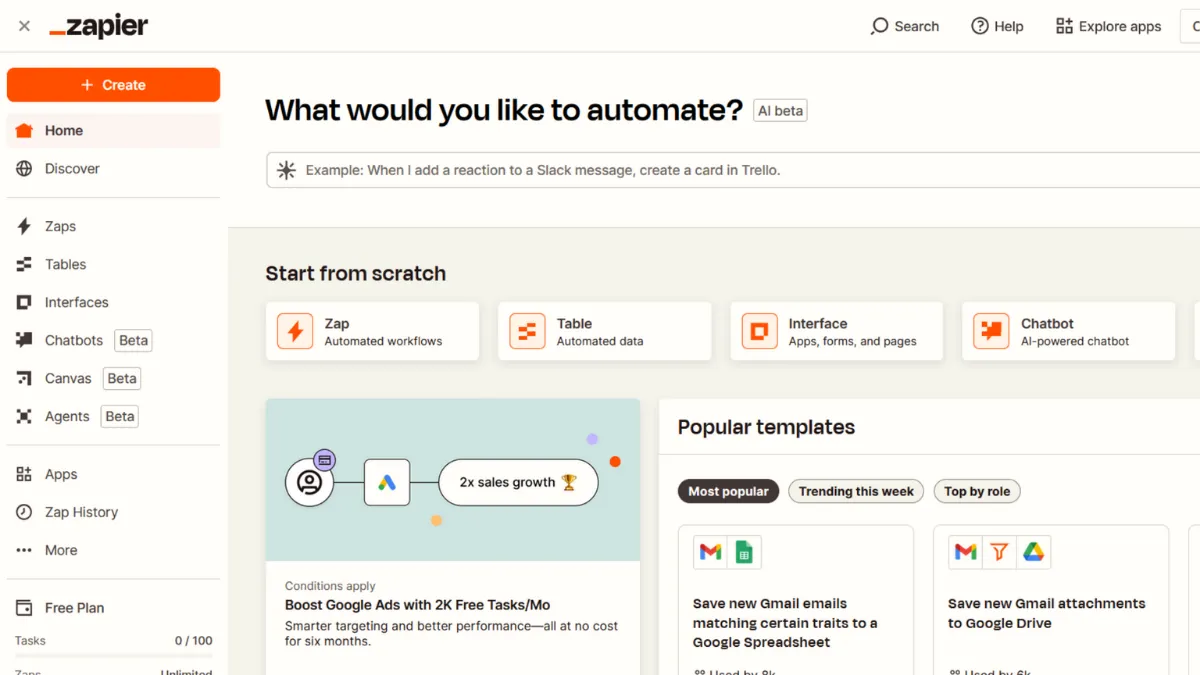
Automation tools live and die by one question: can a non-technical person build something genuinely useful without calling a developer? Zapier has answered that question more convincingly than any other platform in its category, and for most small teams it remains the default choice when connecting apps matters more than writing code. The integration library spans over 8,000 apps, the visual builder handles multi-step logic without syntax knowledge, and the free tier gives you enough to confirm whether automation will actually stick in your workflow before you spend a penny. That combination has made Zapier the category standard. The question is whether it stays the right tool as your usage scales.
The mechanism behind Zapier is straightforward: you define a trigger (something that happens in one app) and one or more actions (what Zapier does in response, across other apps). These chains are called Zaps. The distinction most users miss early on is that Zapier counts tasks, not Zaps. Every successful action step costs a task from your monthly allowance. A five-step Zap running 200 times a month consumes 1,000 tasks, not 200. That maths catches people out when they upgrade from simple two-step automations to more ambitious workflows. The saving grace is that built-in logic steps like Filters, Paths, Formatter, and Delay do not count toward task usage, which means you can add conditional branching and data transformation without quietly burning through your quota. Triggers do not count either.
Realistic expectations matter here. Zapier works best when you have a clear, repeatable process: new lead comes in, data gets written to a spreadsheet, a Slack message fires, a follow-up email goes out. For that pattern, it is close to unbeatable. Where it struggles is with logic-heavy automations that require looping over arrays, processing large data payloads, or reacting to conditions that shift mid-workflow. Those scenarios push you toward heavier tools. On the Professional plan, update intervals drop to two minutes, meaning automations do not run in real time. For most marketing, sales, and operational workflows that delay is irrelevant. For anything time-critical, it warrants checking before you build.
Zapier suits solo operators, small marketing teams, and ops professionals who need to connect SaaS tools without engineering support. The sweet spot is teams running between ten and fifty Zaps across tools like HubSpot, Notion, and Gmail, where manual data entry would otherwise cost hours each week. Founders who have just set up their first CRM or email tool and want workflows that run without supervision will find the free and Professional tiers cover most of what they need.
The limitation worth knowing upfront is cost at scale. Task-based pricing works in your favour at low volumes and against you once automations run frequently across complex workflows. Overage charges apply when you exceed your monthly task cap, and a busy campaign period or unexpected traffic spike can push costs well beyond what you budgeted. Some competitors offer unlimited tasks at flat rates, and that structure becomes meaningfully cheaper once you cross certain thresholds.
The sections below cover how Zapier works mechanically, which features drive results, how to set it up for lasting reliability, and how it compares to the main alternatives on pricing and scope.
What Is Zapier?
Zapier is a no-code workflow automation platform that connects web applications and moves data between them automatically. The problem it solves is the gap between tools that do not natively talk to each other: your form builder does not automatically update your CRM, your payment processor does not notify your project management tool, your email subscribers do not flow into your spreadsheet. Zapier bridges those gaps without custom API work. What sets it apart from a generic integration is the breadth of its app library, the depth of its conditional logic, and the fact that it requires no technical setup beyond knowing what you want the workflow to do. With over 8,000 supported apps, it is the most widely adopted automation middleware for small businesses and growth teams. The natural question from here is how the trigger-action engine actually works under the hood, and where the configuration decisions most affect reliability.
How Zapier Works
Every Zap starts with a trigger: an event in a connected app that tells Zapier to begin. When a new row is added to a Google Sheet, when a form submission comes through Typeform, when a deal moves stages in your CRM. Zapier polls connected apps at regular intervals to check for new trigger events. On the free plan that polling happens every fifteen minutes. On paid plans it drops to two minutes. There is no true real-time webhook delivery on standard plans unless the app itself pushes data to Zapier via a native webhook trigger, which many do.
Once the trigger fires, Zapier passes the data through your configured action steps in sequence. Each step can use data from any previous step, which is how you build transformations: take a name field from a form, format it, write it to a CRM, and send a confirmation email, all in one Zap. The Formatter step handles text manipulation, date conversion, and number operations without touching any code. The Paths step branches the workflow based on conditions, so one trigger can produce different outcomes depending on the data. Neither step costs a task.
The counterintuitive thing most builders get wrong is treating Zapier as a fire-and-forget system. Zaps can fail silently if a connected app's authentication lapses, if expected data fields change format, or if an upstream app modifies its API. Zapier sends error notifications, but they require action. The teams that get the most from Zapier build monitoring into their practice: check the task history weekly, set up error Zaps that notify a Slack channel when something breaks, and document what each Zap does so maintenance takes minutes rather than hours. That discipline separates teams running reliable automation from those constantly firefighting broken workflows. The features that make that discipline easier are worth examining in detail.
Zapier Key Features
Multi-Step Zaps with Conditional Logic. The core of Zapier's power on paid plans is the ability to chain multiple actions and add branching conditions inside a single Zap. Paths lets you create up to three conditional branches within one workflow, so a lead from one country can be routed to a different sales rep than a lead from another, without building two separate Zaps. This matters because it keeps your automation library manageable rather than sprawling. Use Paths early and you spend far less time later untangling a library of near-identical Zaps.
Formatter and Built-In Data Tools. Formatter handles the data transformation work that otherwise requires a developer: splitting full names into first and last, converting dates between formats, extracting numbers from strings, and trimming whitespace that breaks downstream fields. Because Formatter steps do not count toward task usage, you can add as many as a Zap needs without cost penalty. This is one of the most underused features among new users who default to accepting whatever format the trigger app provides.
Webhooks. Available on paid plans, Webhooks let Zapier send and receive data from any app that supports HTTP requests, even if that app has no native Zapier integration. This extends the platform far beyond the official app library. If you use a niche internal tool or a newer SaaS product that has not yet built a Zapier connector, Webhooks are often the bridge. The catch is that configuring them correctly requires understanding the app's API structure, so this feature is less accessible to non-technical users.
Zapier Tables and Interfaces. Tables is a lightweight database product built into the Zapier ecosystem, designed to hold data between automation steps or act as a simple backend for workflows. Interfaces lets you build basic input forms and dashboards that connect directly to your Zaps. Together they reduce the need for a separate tool like Airtable for simple data storage use cases, though for anything complex, a dedicated database tool will serve you better.
AI Steps and MCP Integration. Zapier has added AI action steps that connect to models like those behind ChatGPT, allowing you to pass data through an AI prompt and use the output in downstream steps. The recently launched MCP integration lets AI assistants trigger Zapier actions directly through natural language commands. These additions are early-stage but genuinely extend what non-technical teams can automate. The practical trade-off is that AI steps introduce variability into workflows that previously produced deterministic outputs, which requires more testing and error handling than standard action steps.
Zapier Pros and Cons
Where Zapier leads the category:
- Integration depth at scale. With over 8,000 connected apps, Zapier covers more of the SaaS stack than any direct competitor. For teams whose tools span multiple categories, that breadth removes the manual bridging work that would otherwise fall to a developer or a series of CSV exports.
- No-code logic that actually works. Filters, Paths, and Formatter handle the majority of conditional and transformation logic that real workflows require, without writing code. Most automation platforms either lack these tools or gate them behind technical interfaces.
- Reliability track record. Zapier has been running production automations for a long time. The infrastructure is stable, error notifications are clear, and the task history lets you diagnose failures with enough context to fix them. That operational maturity matters when you are running business-critical workflows.
- An often-overlooked advantage: the template library. Zapier offers thousands of pre-built Zap templates that reduce setup time for common workflows to minutes. Teams new to automation can get genuine value running on day one, before they build anything custom.
- Logic steps do not count as tasks. Filters, Formatter, Paths, and Delay are free to use regardless of volume. This makes complex workflows cheaper to run than the headline task pricing suggests.
Where Zapier falls short:
- Task-based pricing at volume. Once workflows run frequently or include many action steps, costs climb faster than comparable platforms. Teams running high-frequency automations will find flat-rate alternatives considerably cheaper, and this is the most common reason experienced users switch.
- Two-minute polling on paid plans is not real-time. For time-sensitive processes like customer support ticket routing or live inventory updates, the polling interval is a real constraint. The gap between an event firing and Zapier acting on it matters in those contexts.
- No looping or iteration natively. Processing a list of records and performing an action on each requires workarounds or third-party tools. Competitors like Make handle iteration natively, which gives them an edge for data-heavy workflows.
- Overage charges catch teams off guard. If your task usage spikes above your plan cap, Zapier keeps running and charges per-task overages rather than pausing automations. That behaviour protects continuity but can produce unexpected bills during busy periods.
- Tables and Interfaces are limited. As standalone database and form products they lack the depth of dedicated tools. Teams that outgrow basic storage needs will build workflows that depend on Zapier's ecosystem rather than the best tool for the job.
How to Get the Most Out of Zapier
Before building anything, map the workflow on paper. Identify every trigger, every data point the workflow needs, and every action step in sequence. Teams that go straight to the builder waste time reconfiguring Zaps because a required field was not available from the trigger app. A five-minute sketch prevents that entirely.
In your first week, build one high-value Zap and run it for several days before adding complexity. The most common mistake is building ten Zaps at once, having one fail, and not knowing which one or why. A single workflow gives you a clean feedback loop: you see what breaks, you understand why, and you build the diagnostic habit before the library gets large.
Over time, the teams that get lasting value from Zapier treat it like a system rather than a shortcut. Name every Zap descriptively, group them into folders by function, and add a note to each Zap explaining what it does and why. When a connected app changes its API or an authentication token expires, that documentation turns a confusing failure into a five-minute fix.
The mistake most Zapier users make is ignoring the error notifications. Zapier sends email alerts when a Zap fails, and most users either filter them to a folder or dismiss them without investigating. Build an error Zap that posts failures to a dedicated Slack channel: that single step transforms your automation reliability because failures become visible the moment they happen rather than when someone notices a process has quietly stopped working.
To measure success, check two numbers weekly: tasks used versus allowance, and the percentage of Zap runs that completed successfully. If task usage is trending toward your cap mid-month, audit which Zaps are consuming the most tasks. Often one or two high-frequency workflows account for the majority, and restructuring them to use Formatter and Filter steps instead of action steps cuts usage without reducing output. If run success rates are below 95%, treat that as a signal to review authentication and field mappings across failing Zaps.
If you want to know how to automate lead follow-up with Zapier, the approach is to trigger on a new CRM contact or form submission, use a Formatter step to personalise the message, then action a send via your email tool and a task creation in your project management app simultaneously. That three-step pattern handles the majority of follow-up automation without custom code or a developer.
Who Should Use Zapier?
Zapier suits three types of users particularly well. The first is a solo founder or freelancer running a stack of five to ten SaaS tools who spends time each week copying data between them manually. If you are moving leads from a form into a CRM, sending invoice notifications, or updating a tracker by hand, Zapier recovers that time with minimal setup. The second is a marketing or operations professional at a small business who owns the tech stack but has no engineering support. Zapier gives that person automation capability without opening a ticket. The third is a growth team at a startup that needs to connect tools like Klaviyo, a CRM, and a data warehouse without a custom integration project. Zapier handles that glue work reliably enough for production use.
Zapier is not the right fit for engineering teams building high-throughput data pipelines that require real-time processing, looping over large datasets, or custom error handling logic. It is also a poor choice for teams whose primary use case requires webhooks on the free plan, since those are gated behind paid tiers. If your workflow volume is high enough that task-based billing becomes your primary cost concern, a flat-rate alternative will serve you better from the start.
Zapier Pricing
Zapier operates a freemium model. The free plan provides 100 tasks per month and limits automations to two-step Zaps, which covers basic single-action workflows but excludes multi-step logic, premium app access, and Webhooks. For testing whether automation fits your workflow, the free tier is sufficient. For anything production-grade with real business impact, it is not.
The Professional plan unlocks multi-step Zaps, premium apps, Webhooks, Formatter, and Paths. It starts at a low entry price billed annually for 750 tasks per month, scaling upward as task volume increases. The Team plan adds shared workspaces, collaboration features, SAML SSO, and support for up to 25 users, at a higher monthly base that includes 2,000 tasks. Enterprise pricing is custom and adds governance tools, advanced permissions, and a dedicated account manager. Check Zapier's pricing page for current rates, as these tiers are updated periodically.
Free is enough if you are testing with simple two-step Zaps at low volume. Professional is the right tier for individual users and small teams running meaningful automation. The jump to Team is worth it when collaboration features and shared connections matter more than saving the difference in monthly cost. Relative to alternatives, Zapier's per-task pricing is competitive at low volume and less so at high volume, which is the framing worth keeping in mind when comparing options.
Zapier vs Alternatives
Make (formerly Integromat) is the most common alternative for teams that need advanced data manipulation, iteration over arrays, or complex branching logic. Make uses a scenario-based builder with a visual canvas that exposes more of the underlying logic than Zapier does, which makes it more powerful for technical users and harder for non-technical ones. Pricing is scenario-based rather than task-based, which makes costs more predictable at higher volumes. Choose Make when your workflows require looping or when task-based billing is pricing you out of Zapier.
N8N is an open-source automation platform that you can self-host, making it the strongest option for teams with data residency requirements or those whose task volumes make cloud-hosted automation prohibitively expensive. N8N's editor requires more technical comfort than Zapier's but offers greater flexibility for complex workflows. Zapier wins when ease of setup and integration breadth matter more than cost or control.
Make handles the visual complexity better than Zapier when workflows branch repeatedly or need to iterate, but Zapier's app library and onboarding remain unmatched for teams who need to move fast without technical resources. For straightforward multi-app connections with a low barrier to entry, Zapier is still the default first choice.
Pabbly Connect offers flat-rate pricing with unlimited workflows, which undercuts Zapier on total cost for high-volume users. The integration library is smaller, the reliability track record shorter, and the support quality more variable. It suits budget-conscious teams with simpler automation needs who have outgrown free tools. Zapier justifies its premium through reliability, breadth, and the operational maturity of a platform that has run production workflows at scale for years.
Zapier Review: Final Verdict
Zapier earns a 4.37 overall score, reflecting a platform that leads its category on integration breadth and ease of use while carrying a real limitation in cost efficiency at scale. The 4.9 on integration capabilities is the defining strength: no other tool in this category gives non-technical users access to as many app connections with as little friction. The 3.8 on cost efficiency reflects a pricing structure that rewards low-volume users and penalises high-volume ones, a trade-off worth understanding before you build anything mission-critical on the free or entry paid tier.
The bottom line: Zapier is the right starting point for most small teams connecting SaaS tools without engineering support. At scale, revisit the pricing maths.
How We Rated It:
More Tool Reviews







Subscribe to Stay in the loop
Get the latest AI and technology news, honest tool reviews, and practical guides delivered straight to your inbox.
Success! Check your Inbox!

Tezons Newsletter
The latest technology news, in-depth tool reviews, and practical guides - curated and delivered to your inbox.
Latest News




Have a question?
Have any questions?
Didn’t find what you were looking for? We’re just a message away.