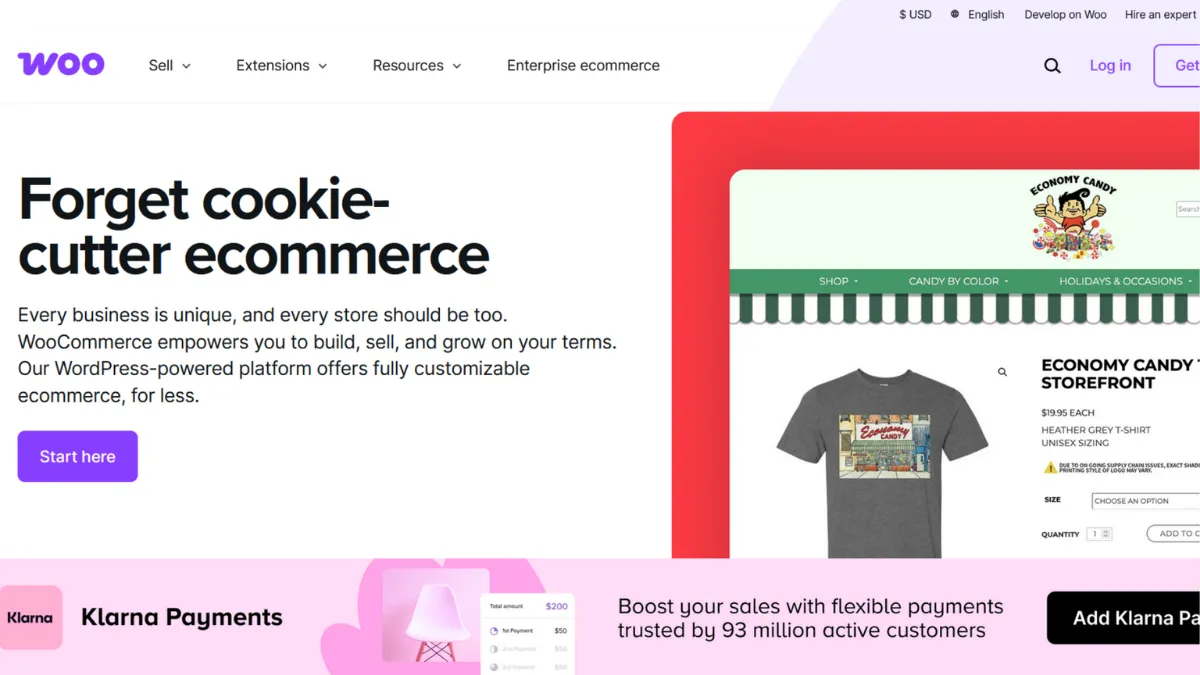
Building an online store on WordPress without a commerce layer means stitching together payment forms, inventory tracking, and order management from scratch. WooCommerce solves that problem in a single plugin install, and it does so while leaving every architectural decision in your hands. That combination of zero upfront cost and unlimited technical flexibility has made it the most-installed ecommerce solution in the world by volume. The catch is that flexibility is not the same as simplicity, and the gap between those two words is where most first-time WooCommerce store owners lose weeks.
The core mechanism is a WordPress plugin that adds a product catalogue, cart, checkout, and order management system to any WordPress site. Payment gateways including Stripe and PayPal connect natively, and the block-based editor now lets you customise product pages, cart, and checkout layouts without touching code. Beyond the core, a marketplace of thousands of free and paid extensions handles everything from subscriptions and bookings to advanced shipping rules and affiliate tracking. What most users get wrong is assuming the plugin alone constitutes a finished store. The free plugin provides the skeleton; the muscles are extensions, and those carry recurring annual costs that accumulate quickly.
Realistic expectations depend heavily on how you count costs. Entry-level stores running on shared hosting with free extensions can operate for under $150 per year in total platform spend. A mid-range store with four or five premium extensions, a quality theme, managed WordPress hosting, and a performance plugin lands somewhere between $500 and $2,000 annually before any developer time. Large stores with custom integrations, subscriptions, and high traffic volumes should budget for managed WooCommerce hosting at the higher end of market rates, plus ongoing developer involvement for updates and compatibility management. Performance at scale is achievable, but it requires deliberate infrastructure choices rather than default settings.
WooCommerce is specifically for founders who are already committed to the WordPress ecosystem, who have either developer skills themselves or a reliable developer on call, and who need the kind of deep content-commerce integration that hosted platforms struggle to match. Content-driven brands, bloggers monetising an audience, and businesses with complex product configurations that do not fit neatly into a standard SaaS template are the clearest beneficiaries.
The genuine limitation is maintenance overhead. Every WordPress and WooCommerce update, every extension update, and every hosting change is your responsibility to test and deploy. Plugin conflicts are real, and a botched update on a live store means lost sales. Hosted platforms absorb that operational burden; WooCommerce pushes it back to you.
The sections below cover how WooCommerce works mechanically, its key features, honest pros and cons, a strategy guide for getting results quickly, pricing transparency, and how it stacks up against the main alternatives.
What Is WooCommerce?
WooCommerce is a free, open-source ecommerce plugin built on top of WordPress. It converts any WordPress site into a fully functional online store, handling product listings, inventory, payments, shipping calculations, and order management from a single dashboard. The problem it solves is the absence of native commerce functionality in WordPress itself, which is a content management system by design, not a transactional platform. What distinguishes WooCommerce from a generic shopping cart solution is its deep integration with the WordPress content layer, meaning product pages, blog posts, landing pages, and customer account areas all share the same CMS, the same SEO infrastructure, and the same theme. That coherence is difficult to replicate when bolting a separate store onto a content site. WooCommerce powers a significant share of all WordPress-based stores globally, and that scale has produced one of the largest third-party extension ecosystems of any ecommerce platform. How that ecosystem translates into a working store for your specific use case is where the mechanics become important.
How WooCommerce Works
Installation is a WordPress plugin activation. Once active, WooCommerce runs a setup wizard that configures your store location, currency, payment gateways, and shipping zones. The wizard handles basic stores competently; more complex requirements need manual configuration through the WooCommerce settings panel.
Products are created in the WordPress admin, where you choose a product type: simple, variable (with attributes like size or colour), grouped, external, or virtual and downloadable. Variable products let you set different prices and stock levels per variation. The block-based product editor, introduced in recent versions, speeds up product creation with a cleaner interface. Categories, tags, and attributes power the storefront filtering that customers use to search and narrow results.
Order management lives in the WooCommerce orders panel. When a customer checks out, WooCommerce creates an order record, triggers payment processing through whichever gateway you have configured, updates stock, and sends transactional emails. The REST API exposes order and product data to external systems, which is how most ERP and CRM integrations connect. Tools like Zapier or Make can automate order-triggered workflows without custom code.
The counterintuitive insight most users discover late: WooCommerce performance is almost entirely a function of your hosting environment, not the plugin itself. A store on underpowered shared hosting will crawl under moderate traffic regardless of how well the store is configured. The plugin does not self-optimise. It relies on the server, caching layer, and database tuning you provide. Choosing the right host before launch determines whether your checkout holds up during your first traffic spike. That infrastructure question is what separates a store that works from a store that converts.
WooCommerce Key Features
Block-Based Store Editor. WooCommerce now uses the WordPress block editor across product pages, cart, and checkout. You can edit the layout of every critical conversion page visually, repositioning elements, adding custom blocks, and adjusting the checkout flow without writing PHP or hiring a developer. This closes a long-standing gap that previously required page builder plugins or custom theme code to achieve the same result. Founders who have avoided WooCommerce because of its historically developer-dependent customisation should revisit this now.
Flexible Product Types. The platform handles physical products with stock management and shipping calculations, digital downloads with secure file delivery, variable products with per-variation pricing and inventory, and virtual products with no shipping required. Subscription and booking functionality requires paid extensions, but the core variable product engine covers the majority of standard product configurations without additional cost.
Payment Gateway Ecosystem. WooCommerce connects natively to a wide range of payment processors. WooPayments, the platform's own gateway built on Stripe infrastructure, operates in dozens of countries and charges standard card processing rates. Beyond the first-party option, extensions for regional processors and alternative payment methods cover most market requirements. PayPal has a dedicated WooCommerce plugin maintained by PayPal directly, and the integration works reliably out of the box.
REST API and Headless Compatibility. Every product, order, customer, and coupon is accessible via a documented REST API. This enables headless commerce builds where WooCommerce handles the backend logic while a React or Next.js frontend handles the presentation layer. For teams that want to connect Airtable or similar tools as a lightweight product data layer alongside WooCommerce, the API makes that sync feasible without platform lock-in.
Built-In SEO Infrastructure. Because WooCommerce runs on WordPress, it inherits the full WordPress SEO stack. Product pages, category archives, and blog posts share a single URL structure, and plugins like Rank Math extend that further with structured data, schema markup, and sitemap control. This integration is WooCommerce's clearest advantage over hosted platforms for content-driven stores. The trade-off is that realising that SEO potential requires active configuration rather than sensible defaults, and the cost-efficiency of that investment depends on your willingness to learn the tooling.
WooCommerce Pros and Cons
WooCommerce earns its position for founders who need control and are willing to manage the platform.
- Zero plugin cost. The core plugin is free to download and use. For stores with simple requirements, a production store is achievable at hosting and domain cost alone, making the entry barrier lower than any major hosted alternative.
- Unmatched customisation depth. Every aspect of the store, from checkout field order to order status labels to email templates, is modifiable through hooks, filters, and extensions. No hosted platform gives you this level of access to the underlying logic.
- WordPress content integration. Product pages and editorial content share the same CMS, meaning a blog post can embed a product, a campaign landing page can pull live pricing, and your SEO work compounds across both. This is the feature that makes WooCommerce the correct choice for content-led commerce.
- Massive extension ecosystem. Thousands of plugins address niche requirements: multi-vendor marketplaces, point of sale, wholesale pricing, age verification, and more. Most categories have multiple competing options at different price points, which creates genuine choice rather than a single expensive vendor.
- Full data ownership. Your database, your server, your exports. No platform fee structure can lock you out of your own order history or customer records.
The cons are real and affect day-to-day operations, not just edge cases.
- Extension costs accumulate. The free plugin covers basics. Subscriptions, advanced shipping rules, bookings, and membership gating each require paid extensions billed annually. A store with five premium extensions can reach several hundred pounds per year in extension spend before hosting or themes are considered.
- Maintenance falls to you. WordPress core updates, WooCommerce updates, theme updates, and extension updates all need testing before deployment. An incompatible update on a live store can break checkout. Hosted platforms absorb this entirely; WooCommerce does not.
- Performance requires active management. The plugin does not self-optimise. Under-resourced hosting, unoptimised images, and too many plugins create slow page loads that damage conversions. Achieving good Core Web Vitals scores requires deliberate caching, CDN, and hosting configuration, none of which is automatic.
- No centralised support. WooCommerce support for the free plugin is community-based. Premium extension support varies by vendor. When an issue spans multiple plugins, there is no single team accountable for your store as a whole.
How to Get the Most Out of WooCommerce
Before you install WooCommerce, choose your hosting environment. This is the most consequential pre-launch decision you will make. Managed WordPress hosting with WooCommerce-specific caching, staging environments, and automatic backups removes most of the operational risk that frustrates first-time store owners. Shared hosting is adequate for testing; it is not adequate for a store where checkout failure costs you revenue.
In your first week, resist the urge to install every extension you think you might need. Start with the core plugin, your chosen payment gateway, a shipping configuration, and your theme. Test checkout from a real device on a real payment method before anything else. Most launch problems surface at this step, and finding them before you have customers is far less expensive than finding them after.
Building results over time means treating the extension library as a cost-managed resource, not a feature buffet. Audit your active plugins quarterly. Deactivate anything that is not contributing measurable value. Plugin count directly affects page load time and update maintenance burden. Fewer, well-chosen plugins outperform a crowded dashboard in both performance and stability.
Learning how to optimise a WooCommerce store for organic search is one of the highest-return activities available to a founder on this platform. The WordPress content layer makes compounding search traffic achievable in a way that hosted platforms cannot match. Set up structured data for products from day one, configure a sitemap, and connect Google Analytics with ecommerce tracking enabled before your first sale. Campaigns built on top of that organic foundation, rather than instead of it, produce lower customer acquisition costs over time.
Measure success through conversion rate at checkout, average order value, and organic search traffic to category and product pages. These three numbers tell you whether your store is performing or merely existing.
Who Should Use WooCommerce?
This is for you if you match one of these profiles. The content-commerce founder runs a WordPress blog or editorial site and wants to sell products, courses, or downloads without migrating to a separate platform. WooCommerce lets revenue and content share the same infrastructure, which matters for SEO and operational simplicity. The developer-led small business needs custom product configurations, complex pricing rules, or integrations with legacy business systems that hosted platforms cannot accommodate without expensive app connections. The bootstrapped founder wants to minimise recurring SaaS spend and is willing to trade management overhead for lower monthly costs at early stages, when keeping fixed costs down matters more than convenience.
WooCommerce is not for you if you have no WordPress experience and no developer to call on. A non-technical founder who needs to launch a straightforward store in under a week, wants guaranteed uptime managed by someone else, and does not require deep customisation will reach a better outcome faster on a hosted alternative. Dropshipping-first businesses using tools like Zendrop or AutoDS will also find that the hosted fulfilment integrations on those platforms work more cleanly with dedicated hosted storefronts than with a self-managed WordPress stack.
WooCommerce Pricing
The core WooCommerce plugin is free. Running a production store is not. Mandatory costs include hosting, a domain name, and an SSL certificate. Entry-level managed WordPress hosting suitable for a small store runs at roughly $10 to $50 per month depending on provider and plan. Premium themes add approximately $50 to $150 per year where required. Payment processing fees apply per transaction through whichever gateway you configure; standard card processing rates typically sit around 2.9% plus a small fixed fee per transaction, though exact rates vary by provider, region, and account type.
Extensions are where costs diverge significantly between stores. A basic store may operate with only free extensions. A store requiring subscriptions, advanced shipping configuration, bookings, or membership access will need premium extensions, each typically billed annually at rates that range from $50 to $200 per extension. Five premium extensions at the lower end of that range represents $250 to $500 in annual extension spend before any other cost. Total annual spend for a small but properly equipped WooCommerce store typically lands between $300 and $1,500 when you include hosting, theme, extensions, and basic tooling. Always check the WooCommerce extensions marketplace and your chosen hosting provider for current pricing, as rates change. Compared to Shopify, WooCommerce can be cheaper at low complexity and more expensive at high extension dependency. The cost advantage of the free plugin disappears quickly once you start adding the premium functionality that most real stores need.
WooCommerce vs Alternatives
Shopify is the clearest alternative for founders who want a managed platform with predictable monthly costs, built-in hosting, and centralised support. Shopify's setup friction is lower and one team is responsible for your store's operation. WooCommerce wins when you need deep WordPress integration, content-led SEO, or technical customisation that Shopify's architecture limits. Choose Shopify when speed to launch and operational simplicity matter more than flexibility.
Squarespace provides a polished all-in-one option for very small stores where design consistency and ease of use are the priorities. Squarespace is significantly less extensible than WooCommerce and suits stores with small catalogues and straightforward product types. WooCommerce wins on every dimension of technical depth; Squarespace wins on simplicity and visual quality without configuration.
Gumroad serves digital product sellers who want zero infrastructure management. It handles payments, file delivery, and basic audience tools in a single hosted product. WooCommerce can replicate all of those functions with extensions, but at higher setup complexity. Choose Gumroad when your entire business is digital downloads and you want to start selling quickly without a WordPress site.
Webflow with its native ecommerce layer occupies a useful middle ground. It offers design control closer to WooCommerce's flexibility with a more managed hosting model, though its ecommerce functionality is less mature and its extension ecosystem is smaller. WooCommerce wins for stores with large catalogues or complex product logic; Webflow wins for design-led brands that prioritise visual precision over commerce depth.
WooCommerce Review: Final Verdict
WooCommerce scores 4.24 out of 5 overall, a rating that captures a platform of genuine power paired with genuine demands on the person running it. Its customisation score of 4.8 reflects an extension ecosystem and technical access that no hosted platform matches. The support score of 3.7 reflects the fragmented reality of community-based help for a free core product: when something breaks across multiple plugins, there is no single team to call, and that gap has a cost.
The bottom line: WooCommerce is the correct choice for WordPress-committed founders who need content-commerce integration, technical flexibility, or cost control at early stages. Pick a hosted alternative if you want someone else to manage the infrastructure.
How We Rated It:
More Tool Reviews







Subscribe to Stay in the loop
Get the latest AI and technology news, honest tool reviews, and practical guides delivered straight to your inbox.
Success! Check your Inbox!

Tezons Newsletter
The latest technology news, in-depth tool reviews, and practical guides - curated and delivered to your inbox.
Latest News




Have a question?
Have any questions?
Didn’t find what you were looking for? We’re just a message away.