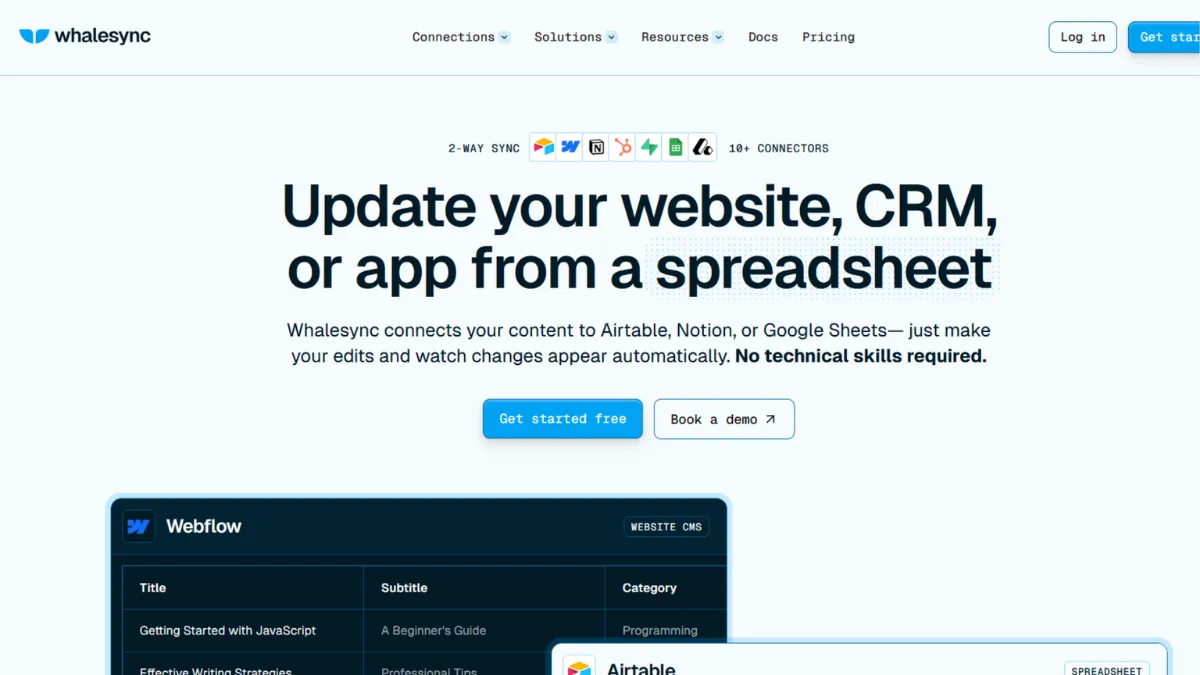
Every attempt to build two-way sync with trigger-based automation tools ends the same way: infinite loops, overwritten records, and a stack of conditional checks that breaks the moment anyone edits from the wrong end. Whalesync was built specifically for that failure mode. It is a purpose-built bidirectional sync platform that keeps Airtable, Webflow, Notion, Supabase, Google Sheets, WordPress, and a growing list of other tools in persistent data parity, without requiring code, automation scenarios, or manual reconciliation.
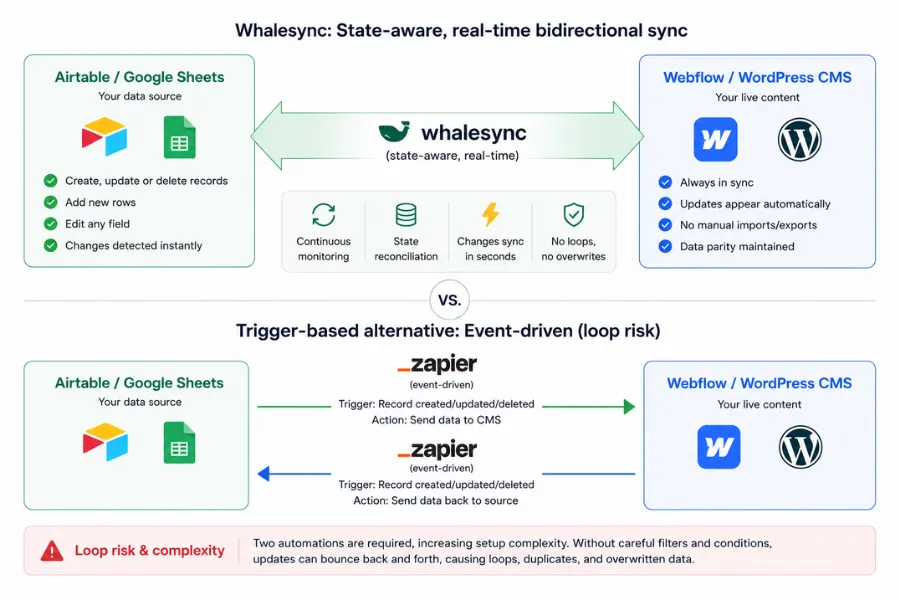
The distinction that matters is state-awareness. Tools like Zapier or Make are event-driven: a trigger fires, data moves once in one direction, and the platform forgets the transaction. Whalesync works differently. It maintains a continuous understanding of the data on both sides of a connection, monitors for any divergence, and writes the correction to whichever side has fallen behind. Changes made in either system propagate automatically. There is no authoritative side, no manual export step, no risk of overwriting work because the tool did not know the other system had already been updated.
That mechanism makes Whalesync particularly suited to three workflows. No-code builders who want a spreadsheet or Airtable base to function as the backend for a Webflow or WordPress CMS get a live content layer that updates without anyone touching the CMS. Operations teams who maintain the same records across multiple tools and spend hours reconciling discrepancies can stop that work entirely. Founders running programmatic SEO campaigns who need to push hundreds or thousands of structured data rows to a live CMS can do so without any engineering support. For all three groups, the alternative is either painful manual work or brittle automation that fails quietly and corrupts data before anyone notices.
There is one non-obvious limitation that G2 reviewers and independent practitioners consistently flag: Whalesync is not safe for rich text fields that contain images or code. When those fields sync, the destination is overwritten entirely with the current source content. A partially complete rich text entry, or one containing embedded images, can be wiped by an upstream update. Teams managing blog post bodies or formatted content through Whalesync need to exclude those fields from their sync mapping or accept the data loss risk on each sync cycle.
How the sync engine handles bidirectional updates
Setting up a connection starts by authenticating both tools through the Whalesync interface, selecting which tables or CMS collections to connect, and mapping fields from one side to the other. Whalesync then runs an initial sync that pulls existing records from both sources, reconciles the current state, and establishes a baseline. From that point, both sides are monitored continuously and any edit, new record, or deletion in either system triggers an update to the other within seconds.
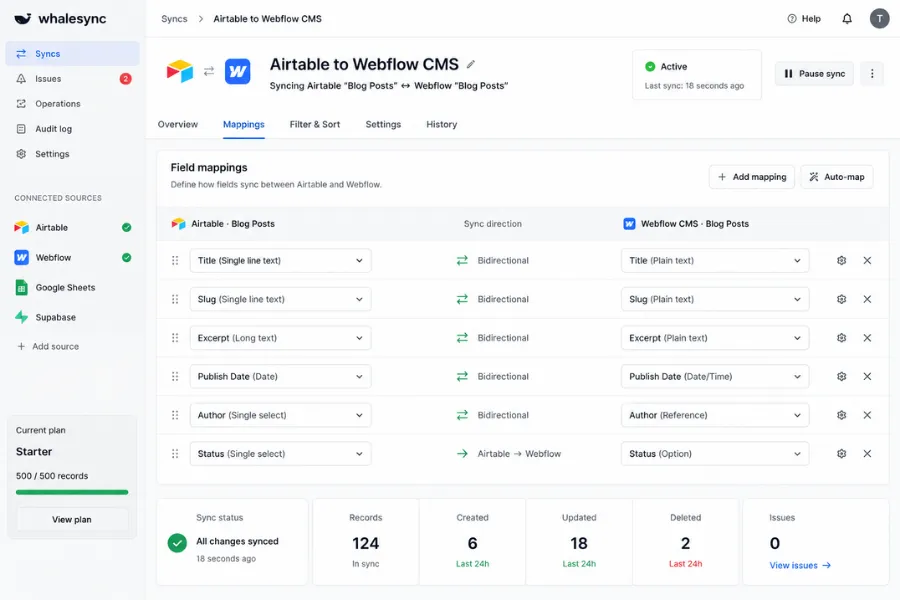
Field mapping is the main configuration lever. You choose which fields to connect and in which direction: full mirror, selective subset, or read-only on one side. For a programmatic SEO pipeline this typically means mapping content, slug, and metadata fields only, keeping the sync clean and bounded. Sensitive columns or fields that should never be overwritten can be left out of the mapping.
Conflict resolution uses recency. The most recently edited side wins. For most structured data workflows this is the correct default, but teams where multiple people edit both systems simultaneously should establish clear data ownership conventions before going live. Record limits vary by plan: the Personal tier supports 250 records, Starter supports 500, and Plus and Pro tiers scale to 50,000 depending on the record band chosen.
Error handling is surfaced in the dashboard rather than buried in logs. When a record fails to sync, the Issues page shows the specific reason alongside which record is affected and which connector raised the error. The platform continues syncing all other records while the failing ones wait for correction. This active error reporting is what separates Whalesync from DIY sync builds, where failures accumulate silently until a content gap becomes visible on a live site days later.
What Whalesync does well and where it earns its ratings
- True bidirectional sync without loop risk. The state-aware engine is the core differentiator. Where trigger-based tools require two one-way automations pointed at each other, a pattern that is loop-prone and widely discouraged for this use case, Whalesync handles both directions from a single connection. Teams who have previously tried to build this in Zapier will recognise the reliability difference within the first sync.
- Real-time updates on every plan tier. Sync latency is near-instant for supported connectors. Editing a field in Airtable and watching it appear in Webflow within seconds is a qualitatively different working experience from the polling delays that scheduled automations introduce.
- Field-level mapping control. You can expose a curated subset of your data to any connected tool. For CMS use cases, this means your content team works across all Airtable fields while the Webflow CMS receives only the fields that belong on the public-facing site, with no risk of internal metadata leaking into published pages.
- Active error monitoring that names the problem. The Issues page surfaces specific failure reasons per record rather than a generic failure count. This is operationally significant for programmatic SEO projects where a handful of failed records can create broken pages at scale with no visible signal on the source side.
- Programmatic SEO without developer involvement. The Airtable-to-Webflow or Google Sheets-to-WordPress pipeline is the primary use case the platform was built for. Maintain your content database in a spreadsheet, map each field to the CMS, and new rows appear as live pages automatically. Adding pages means adding rows. There is no CMS login, no manual publish step, and no developer dependency once the initial sync is configured.
- SOC 2 certification and GDPR compliance across all plan tiers. Security documentation is available on standard plans, not locked behind enterprise negotiation. For teams routing operational data through a third-party sync layer, this needs to be confirmed before any connection goes live.
Whalesync scores 4.5 on performance and reliability, which reflects how consistently the engine behaves in production over time. G2 reviewers rated it 4.9 out of 5 across 20 reviews, with stability and low maintenance overhead as recurring themes. The most telling review pattern is the combination of daily use and near-zero dashboard time: the sync simply runs, and users return to configure it only when their data schema changes.
Where Whalesync falls short
The connector list is the clearest constraint. Whalesync supports Airtable, Webflow, Notion, Supabase, Google Sheets, WordPress, Postgres, Memberstack, Stripe, Wix CMS, Attio, HubSpot, Pipedrive, and Salesforce. Outside that list, there is no connection available and no workaround within the platform. Teams whose stacks include niche vertical SaaS tools, custom-built internal systems, or the broad range of apps that Zapier covers will find the gaps material to their evaluation.
Conditional logic and data transformation are not available within the sync itself. You cannot filter records by field value before syncing them, route different record types to different CMS collections, or modify a field value mid-transfer. What exists in the source appears in the destination unchanged. Teams with complex routing requirements need a separate automation layer sitting alongside Whalesync to handle that logic before data reaches the sync connection.
Rich text fields containing images or embedded code carry a specific data loss risk. Whalesync overwrites the destination field entirely on each sync cycle. A formatted entry with embedded images will be replaced by whatever is currently in the source, including an empty or partial version. Exclude these fields from your mapping if formatted content is managed through either connected tool. This is the most consequential limitation for teams considering Whalesync for content management workflows rather than purely structured data.
The absence of a permanent free tier raises the evaluation barrier for some teams. The two-week trial is sufficient for straightforward single-table use cases but may not allow enough time for multi-table setups to complete a full editorial cycle and surface edge cases. G2 reviewers cite nonprofit clients as a recurring friction point: the Starter plan at $20/mo is more than some organisations can justify for clients in that sector, and the product lacks a lower-cost option that would suit occasional or low-volume use.
Whalesync pricing: what each plan limits
- Personal at $5/mo: 250 records in sync. Connectors: Airtable, Notion, Supabase, WordPress. Up to 3 users. No email support. Suitable for solo projects and lightweight internal syncs where Webflow is not needed.
- Starter at $20/mo: 500 records in sync. Everything in Personal, plus Google Sheets, Memberstack, Postgres, Stripe, Webflow, and Wix CMS. Up to 10 users, email support included. This is the first tier that covers the Airtable-to-Webflow workflow and the right starting point for most no-code CMS projects.
- Plus (priced by record band): 1,000 to 50,000 records in sync. Everything in Starter, plus Attio, HubSpot, and Pipedrive. Unlimited users, email and live chat support. Monthly cost scales with the record band selected. Current rates are calculated dynamically on the Whalesync pricing page rather than shown as fixed figures.
- Pro (priced by record band): 2,000 to 50,000 records in sync. All connectors including Salesforce. Priority support and security assessment available via NDA for teams with compliance requirements. Positions Whalesync for operations teams and agencies managing large data volumes across CRM and database integrations.
Annual billing reduces the monthly cost by up to 20%. Every plan includes a 2-week free trial with no credit card required at signup. Nonprofits qualify for a 20% discount on request. Plus and Pro pricing is not a fixed monthly figure but is calculated per record band on the pricing page at whalesync.com/pricing. Verify the current rate for your specific volume before purchasing, as tier structures and record band pricing have changed as the platform has grown.
Whalesync versus Zapier, Make, Unito, and n8n
Zapier is the most common comparison. It covers thousands of app integrations and handles one-directional trigger-based workflows reliably. For two-way sync, it requires two separate automations pointing at each other, which creates infinite-loop risk and is a configuration its own documentation advises against for this purpose. Whalesync wins when the requirement is persistent bidirectional record parity across its supported connectors. Zapier wins when the tooling goes outside Whalesync's connector list, or when your workflows are genuinely one-directional.
Make offers more powerful data transformation and conditional logic. Technically capable users can approximate two-way sync within it, but doing so reliably requires significant scenario-building and ongoing maintenance when data volumes grow. Make is the better choice when your flows need conditional branching or field-level value transformation. Whalesync is the better choice when clean bidirectional parity with minimal configuration overhead is the priority.
Unito is the most direct competitor in the dedicated two-way sync category and supports a broader connector set, particularly for project management tools like Jira, Asana, and GitHub. Teams syncing task boards or issue trackers across platforms will find Unito worth comparing directly. Whalesync's advantage is CMS and database connector depth: the Airtable-to-Webflow and Notion-to-WordPress pipelines are more thoroughly implemented and better documented than Unito's equivalents for web publishing use cases.
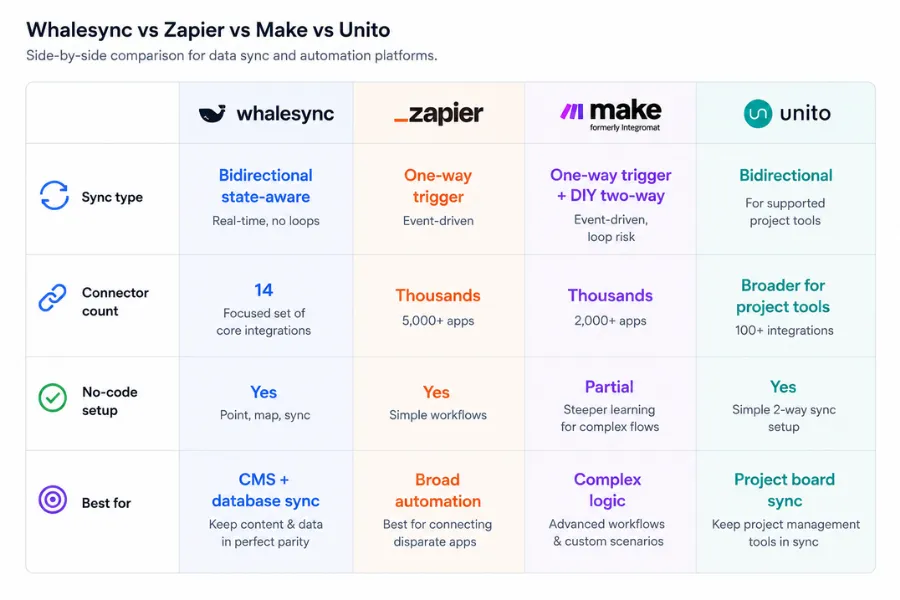
N8N suits teams with technical comfort who want self-hosted control and unlimited automation runs without per-record pricing. It requires infrastructure setup but offers flexibility that none of the above can match. Whalesync wins on ease of use and production reliability for its supported connectors. N8N wins on breadth and long-run cost for teams that can manage the infrastructure themselves.
Whalesync earns an overall score of 4.19. Performance and reliability lead at 4.5. Customisation is the weakest dimension at 3.6, which accurately reflects what the platform trades away to deliver its core capability: it does not try to be a workflow engine. If your stack runs on Airtable, Webflow, Notion, or Supabase, and the problem is keeping data consistent across two or more of them without manual work, the Starter plan at $20/mo solves it faster and more reliably than anything you could build in a general automation tool.
How We Rated It:
More Tool Reviews







Subscribe to Stay in the loop
Get the latest AI and technology news, honest tool reviews, and practical guides delivered straight to your inbox.
Success! Check your Inbox!

Tezons Newsletter
The latest technology news, in-depth tool reviews, and practical guides - curated and delivered to your inbox.
Latest News




Have a question?
Have any questions?
Didn’t find what you were looking for? We’re just a message away.