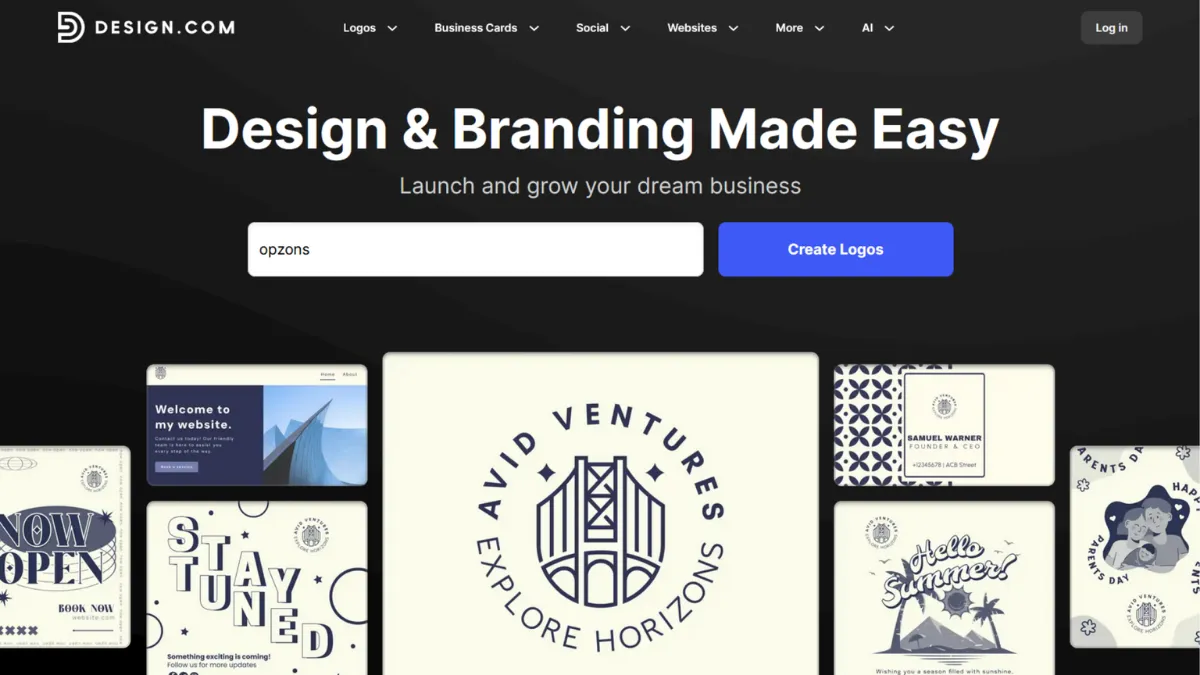
Brand identity tends to be the task founders delay longest, not because it is unimportant but because the path from idea to usable assets has historically required either a designer's budget or weeks of trial and error. Design.com shortens that path to a single session. The platform is an AI-first branding toolkit built for the moment a business decides it needs a logo, a website, a business card, and a social media presence, and needs them before the week is out. For that specific scenario, it is one of the more complete tools available at its price point.
The mechanism behind Design.com is template-based generation guided by AI inputs. You enter your business name, select a category, describe your style preferences, and the platform returns a large batch of logo options drawn from a library running to hundreds of thousands of templates. What most users miss is that the quality of the output depends almost entirely on how specific those initial inputs are. Vague style preferences produce generic results. Choosing a narrow industry category and selecting a precise aesthetic direction produces something closer to a finished identity. The AI does not invent logos from scratch; it matches your parameters against a pre-existing library. Understanding that distinction changes how you use the tool and what you expect from it. Branding inheritance then carries your chosen colours and fonts across all other asset types automatically, so business cards, letterheads, and social posts stay consistent without manual effort.
Realistic expectations matter here. Design.com is fast: most users have a usable logo within thirty minutes of signing up. The output is commercially licensed, so you can use assets in print and digital contexts without additional clearance. What it cannot do is produce the kind of bespoke, concept-driven identity work that a senior brand designer creates from research. The templates are broad and varied, but a founder in a crowded category may find that competitors could plausibly end up with something similar. The platform suits the earliest stage of brand building, where functional and fast matters more than singular and distinctive.
The right user for Design.com is a solo founder, a new small business owner, or a side-project creator who needs complete brand assets quickly and does not have a design background or a design budget. It also works well for anyone who needs a basic web presence alongside their logo, since the website builder is included in paid plans. Established businesses with existing brand guidelines and teams already using Canva or professional software will find the constraints frustrating rather than liberating.
The one limitation worth stating plainly is customisation depth. You can adjust colours, fonts, layouts, and shapes within each template, but the editing environment does not allow the kind of granular control that dedicated design tools offer. If your brand requires something genuinely unusual, the guardrails will become visible quickly. Users who have tried to push beyond the standard editing options consistently report hitting a ceiling.
The sections below cover how the tool works mechanically, what its key features actually deliver, pricing tiers, and how it sits against the main alternatives.
What Is Design.com?
Design.com is a web-based brand identity platform that lets users create logos, business cards, websites, social media graphics, and a range of supporting materials without prior design experience. The problem it solves is the cost and complexity of early-stage brand creation: hiring a designer for a full identity package is expensive, while stitching together free tools across multiple platforms is time-consuming and produces inconsistent results. Design.com consolidates those assets under one subscription, with AI tools handling the generation and an editing layer allowing post-generation adjustment. What separates it from a generic template editor is the combination of AI-guided generation, automatic branding inheritance across asset types, and built-in hosting for websites and digital business cards. The platform emerged from DesignCrowd's infrastructure, giving it a foundation in design-at-scale that purely AI-native competitors lack. With a template library reaching hundreds of thousands of logos and tens of thousands of supporting assets, the breadth of coverage across industries is one of its genuine differentiators. The practical question, though, is how much of that breadth translates into useful output quality once you get inside the editor.
How Design.com Works
Setup begins with the AI logo generator. You provide a business name, optionally a tagline, select your industry from a categorised list, and choose visual style preferences from a set of descriptive options. The platform then surfaces a batch of logo options drawn from its template library, filtered and ranked against your inputs. You can scroll through these, select a favourite, and enter an editing canvas where colours, fonts, icon elements, and layout can all be adjusted. The editing interface is browser-based and requires no installation.
From the logo, branding inheritance kicks in automatically. The colours and typefaces from your chosen logo populate across other asset types: business card templates, letterhead designs, social media post formats, email signatures, and presentation slides all inherit the same identity. This is the feature that saves the most time in practice, because maintaining visual consistency manually across a dozen asset types is where most non-designers lose track.
The website builder, included at higher-tier plans, uses the same AI-generation approach. You provide basic business information and the platform assembles a multi-page site with your branding applied. The AI website generator is considerably more capable than the standard builder, removing watermarks, unlocking page-number limits, and allowing custom domain connection. Domains can be purchased directly within the platform, which removes one external dependency from the setup process.
The counterintuitive thing most users assume wrong is that more template options means better results. The opposite is often true: narrowing your style inputs aggressively before generating produces a tighter, more usable batch than browsing broadly and editing heavily afterward. The editing tools are functional but not deep, so the closer the generated output is to what you want, the less you will need to rely on them. That has direct implications for which features actually deliver value, and which ones look broader on paper than they perform in use.
Design.com Key Features
AI Logo Generator. The logo generator is the platform's flagship feature and the entry point for most users. It takes brand inputs and returns a large selection of template-matched options with a single generation. The commercial licensing included with paid plans means the output is ready for business use across print and digital formats, including high-resolution and vector file downloads. Getting the best results requires treating the style-selection step seriously rather than skipping through it.
Branding Inheritance System. Once a logo is chosen, the platform carries its colour palette and typography across every other asset type automatically. Business cards, social media covers, letterheads, and presentation templates all update to reflect your brand without manual input. This is the feature that makes Design.com genuinely useful as a branding tool rather than just a logo maker, and it meaningfully reduces the time needed to build a consistent visual identity from scratch.
AI Website Builder. The website builder included in higher-tier plans generates a multi-page branded website from basic business information. It supports custom domain connection, contact forms, embedded video, and maps. The standard builder is more limited, but the AI-powered version produces a site that works adequately as a first web presence. Hosting is included, which removes a separate cost and decision from the early-stage setup process. For anyone combining a logo and website build in one session, this feature earns its place in the subscription.
Social Media Asset Suite. Design.com covers an unusually wide range of social media formats: post dimensions for Instagram, Facebook, LinkedIn, Pinterest, TikTok, YouTube, and others, plus animated logo formats for reels and shorts. The branding inheritance system means these assets stay on-brand without manual colour-matching. The templates are functional rather than distinctive, but for founders who need a consistent posting presence quickly, the coverage is broad enough to reduce external tool dependency. Scheduling or publishing is not handled within the platform, so you will need a separate tool like Buffer for distribution.
Print-Ready File Exports and Physical Printing. Paid plans include vector file downloads suitable for professional print use, covering formats required by most commercial printers. A built-in printing service also allows direct ordering of physical business cards and marketing materials from within the platform. The file format options, including SVG and PDF alongside standard raster formats, mean the assets produced are not locked to digital use. This closes a gap that several competitor platforms leave open, where digital-quality exports are easy but print-ready files require a separate workflow. The depth of customisation in the editor is the trade-off: broader file output comes at the cost of less granular editing control than tools like Figma provide.
Design.com Pros and Cons
The strengths of Design.com sit primarily in speed, coverage, and cost. The limitations are most visible for users who need creative control or professional-depth editing.
- Fast, complete brand output from a single session. Most users can generate a logo, apply it across business cards and social assets, and have a basic website live within a few hours. For early-stage founders, that speed has genuine commercial value compared to waiting weeks for a designer or learning design software from scratch.
- Branding inheritance removes manual consistency work. The automatic propagation of colours and fonts across asset types is an overlooked feature that saves meaningful time. Maintaining visual consistency manually across a dozen formats is where non-designers typically make errors, and the system handles it without additional input.
- Commercial licensing included on paid plans. All assets are licensed for business and commercial use, including print. This removes a significant friction point that free design tools often introduce, where output quality is adequate but licensing for commercial use requires additional steps or costs.
- Broad asset coverage reduces tool fragmentation. Logo, website, social graphics, business cards, letterheads, and print materials under one subscription means fewer separate accounts, fewer logins, and fewer consistency problems caused by working across multiple platforms.
- Entry-level pricing is genuinely accessible. The paid tier pricing places Design.com among the most affordable options in the branding tool category. For a bootstrapped business that needs professional-looking assets without a designer's retainer, the cost-to-output ratio holds up well.
The cons are real and worth weighing against your actual use case before committing.
- Customisation depth hits a ceiling quickly. The editing tools cover colour, font, layout, and basic shape adjustments, but granular control over individual design elements is limited. Founders who want something distinctive rather than competently generic will encounter constraints that cannot be edited around.
- Template genericness is a genuine risk in competitive categories. The template library is large, but the outputs can resemble each other across businesses in the same industry. A logo that reads as professional in isolation may read as familiar to customers who have seen similar marks from competitors using the same platform.
- Subscription transparency has drawn criticism. Multiple user reviews note confusion about what is included in free access versus paid tiers, and some report billing friction after cancellation. Reading the subscription terms carefully before purchasing is advisable.
- Third-party integrations are limited. Design.com does not connect meaningfully with external marketing stacks, CRMs, or project management tools. Assets need to be exported and uploaded manually to wherever they are used. This adds steps to any workflow that involves tools like Notion or Airtable for asset management.
- Website builder is basic compared to dedicated tools. The AI website generator is adequate for a first web presence, but founders who need e-commerce, membership functionality, or advanced page layouts will outgrow it quickly. Platforms built specifically for web publishing provide considerably more structural control.
How to Get the Most Out of Design.com
Before you open the logo generator, spend five minutes writing down three things: your brand's primary colour direction, the visual style you want (minimal, bold, classic, modern), and two or three industries whose visual identities you respect. Entering those inputs with precision produces a much tighter generation batch than leaving the style options at defaults. The platform returns what you ask for; vague inputs produce vague results.
In your first session, resist the urge to browse all logo options and instead filter by style category immediately. Select one logo, enter the editor, and lock the colours and fonts before touching anything else. Everything else in the platform, from business cards to social templates, inherits from that foundation. Changing it later propagates correctly, but starting with a clear direction avoids the common mistake of spending an hour on a logo and then rebuilding consistency across all other assets.
For the website, use the AI builder rather than the standard one from the start if your plan includes it. The AI version removes the watermark, expands the page limit, and unlocks the full feature set. Building on the standard version and then upgrading creates duplication work. Connect a custom domain as early as possible: a branded URL signals permanence to customers in a way that a platform subdomain does not.
If you want to know how to build a brand identity fast using Design.com, the answer is to treat the platform's branding inheritance as your primary workflow tool rather than the logo generator. The generator gets you to a starting point; the inheritance system is what makes the result feel like a brand rather than a collection of individual assets. Export your vector files from the logo editor before you do anything else. These are the highest-quality versions of your mark, and having them stored outside the platform protects you against subscription changes.
Measure success by the time it takes to produce a complete asset set, not by how closely the output resembles bespoke design work. Design.com wins on speed and cost, not on creative uniqueness. Set your benchmark accordingly, and the tool will consistently meet it.
Who Should Use Design.com?
Design.com fits a specific stage and situation rather than a broad category of users.
This is for you if you are a solo founder at pre-revenue or early-revenue stage who needs a complete visual identity before a launch deadline and has no design background or designer on hand. It is also for you if you run a local service business, a consultancy, or a side project where brand assets need to look professional without requiring ongoing design investment. A third clear fit is the creator or freelancer who needs a link-in-bio page, a digital business card, and a small set of social graphics, and wants them to stay visually consistent without managing separate tools for each.
Design.com is not for you if you are building a brand in a visually competitive category where differentiation depends on a distinctive identity. It is also not suited to any business that needs deep integration with an existing marketing or operations stack, since the platform exports assets but does not connect to external tools. Experienced designers who already use professional software will find the editing environment too constrained to be useful. If you are scaling past the early stage and need a website with e-commerce, membership logic, or complex content architecture, a dedicated platform will serve you better from the start.
Design.com Pricing
Design.com operates on a subscription model with paid tiers that unlock full asset downloads, vector file exports, and advanced platform features. A free tier exists but is deliberately limited: you can browse and generate designs, but downloading finished assets and accessing the full feature set requires a paid plan. This freemium gate is worth understanding before you invest time in generating a logo, as the output you see in preview is not the output you own until you subscribe.
Paid tier pricing is structured across entry, mid, and higher tiers, with annual billing offering a significantly lower monthly rate than month-to-month. The entry plan covers logo ownership, unlimited edits, high-resolution and vector downloads, and access to business card and social media templates. Higher tiers add the AI website builder, custom domain connection, link-in-bio, and digital business card features. The pricing sits at the affordable end of the branding tool category, particularly on annual billing. Always check the current rates directly on Design.com's pricing page, as these figures change and the annual versus monthly difference is significant enough to affect which plan makes sense for your situation.
The cost-efficiency is strongest for users who take advantage of the full asset suite rather than using the platform only as a logo maker. When weighed against the combined cost of separate logo, website hosting, and social template subscriptions, the bundled value holds up. Compared to alternatives like Looka, which focuses primarily on logo generation, Design.com's broader asset coverage generally justifies a comparable or slightly higher price point.
Design.com vs Alternatives
The branding tool category has several well-established options, and the right choice depends on what you need beyond a logo.
Canva is the most widely used visual design platform at this level and covers a broader range of design task types, including presentation decks, marketing documents, and team collaboration. Where Design.com has an edge is in the branding inheritance system and the all-in-one identity focus: Canva requires more manual effort to maintain cross-asset consistency. Canva wins for teams and for users who need a general-purpose design tool rather than a brand-specific one.
Looka focuses specifically on AI logo generation and brand kit creation. It produces higher-quality, more distinctive logo outputs than Design.com in many cases, and the brand kit delivery is polished. Design.com wins on breadth: website builder, social asset suite, and print services are not part of Looka's core offering. If a logo and brand guidelines are all you need, Looka is worth comparing directly.
Adobe Express sits between a template tool and a professional design environment. It offers more editing depth than Design.com and integrates with the broader Adobe ecosystem, which matters if your workflow already includes Adobe tools. For users without that context, the additional complexity is friction without payoff. Design.com wins on simplicity and speed for non-designers.
Squarespace is worth considering if your primary need is a website with a logo as a supporting asset rather than the other way around. The website builder is considerably more capable, and Squarespace's design quality for sites is noticeably higher. Design.com wins on logo-first brand identity creation and cost at the entry level.
Design.com Review: Final Verdict
Design.com earns a 4.06 overall score, which reflects a tool that delivers genuine value for its target user while carrying real limitations that affect a specific subset of that audience. Its ease of use score of 4.6 is the standout dimension, and the platform consistently delivers on its core promise: non-designers can produce a complete, commercially usable brand identity in a single session at an accessible price. The integrations score of 3.5 reflects the honest reality that the platform is largely self-contained and does not connect with external tools in any meaningful way.
The bottom line: Design.com is the right choice for founders who need brand assets fast and on a budget, and the wrong choice for anyone who needs either creative distinction or workflow integration. Know which situation you are in before you subscribe.
How We Rated It:
More Tool Reviews







Subscribe to Stay in the loop
Get the latest AI and technology news, honest tool reviews, and practical guides delivered straight to your inbox.
Success! Check your Inbox!

Tezons Newsletter
The latest technology news, in-depth tool reviews, and practical guides - curated and delivered to your inbox.
Latest News




Have a question?
Have any questions?
Didn’t find what you were looking for? We’re just a message away.