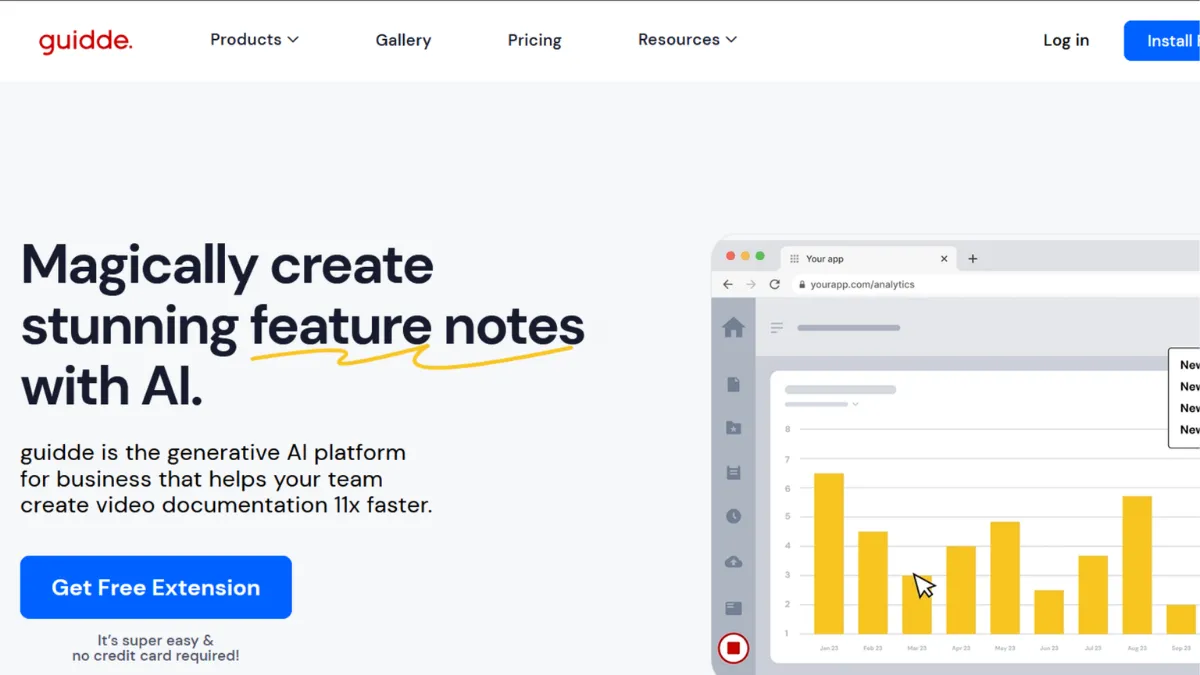
Most teams that need process documentation face the same two bad options: produce a polished video, which takes hours and requires skills most people do not have, or record a quick screencast that nobody watches, nobody updates, and nobody can find when they need it. Guidde sits between those two failure modes. It captures your workflow through a browser extension or desktop app, then uses generative AI to convert each click into a narrated, annotated video guide without you touching a timeline editor.
The result is a documentation format that a customer success manager or an L&D lead can produce at scale, not only the one person on the team who knows video editing software. That is the core value proposition, and for the right team, it holds up. The question is whether your team is the right one.

One thing Guidde underplays on its marketing pages: AI voiceover is locked to the Business plan at $59 per creator per month. The Pro plan at $29 removes the watermark and adds unlimited videos, but ships no AI voice generation. That gap matters enormously when evaluating whether the tool delivers on its central promise at the price point you are considering.
The documentation problem Guidde solves, and where it falls short
The mechanism is worth understanding before you commit. You install the Chrome extension or desktop app, click record, then go through whatever process you want to document. Guidde tracks each step and converts it into a slide with a screenshot, an automated highlight or zoom on the relevant action, and an AI-generated voiceover drawn from the step description. The platform offers 200-plus voices across 50-plus languages on Business, with 400-plus studio voices at Enterprise tier.
Editing means updating a slide, not scrubbing through footage. Each step is a discrete unit with editable text, so when a UI changes, you replace one screenshot and one description rather than re-recording the entire video. That maintainability is what makes Guidde viable for a documentation library rather than a collection of one-off tutorials that decay every time a product gets updated.
The hard constraint most evaluators miss: desktop app recording, required for capturing native software, thick clients, or anything outside a browser, is only available on Business and above. Teams evaluating Guidde on the Pro plan and expecting desktop capture will not get it. Teams whose core workflows live in legacy software, native Mac or Windows apps, or mobile interfaces will hit this limitation regardless of plan.
A second practical issue surfaces at scale. The AI step descriptions are generated automatically, but the system can over-expand simple workflows. One documented case involved an export tutorial that ballooned to 13 steps, with 10 covering the login process rather than the actual task. The edit is quick, but it is one that always needs making, and it compounds across a large guide library. Setting a naming convention and folder structure before your first recording session prevents the organisational issues that multiple G2 reviewers flag once libraries grow beyond a few dozen guides.
Guidde pricing: what each tier includes
Guidde charges per creator. Viewers consume no paid seats, which suits teams where a small group produces content for a much larger audience.
- Free ($0/creator/month): up to 25 how-to videos, web capture only, Guidde watermark on all output, no MP4 or PDF export. Enough for evaluating the core capture-to-guide workflow, not for team use.
- Pro ($29/creator/month, or $19 billed annually): unlimited videos, watermark removal, brand kit, video and PPT/PDF export, blur for sensitive information. No AI voiceover. No desktop capture. No analytics.
- Business ($59/creator/month, or $39 billed annually): everything in Pro plus AI text-to-voice generation across 200-plus voices, web and desktop app recording, PDF/PPT-to-video conversion, advanced privacy controls, and analytics. Includes up to 5 creators. A 7-day free trial is available with no credit card required.
- Enterprise (custom pricing): everything in Business plus SSO (Okta, Microsoft Entra ID, OneLogin), SCIM provisioning, Magic Redaction for automatic PII detection, 400-plus studio voices, multi-language auto-translation, SCORM export for LMS integration, Broadcast for in-app contextual delivery, custom AI avatars, and a dedicated CSM.
The step from Pro to Business is a 103% cost increase per creator on monthly billing. It is the step where the tool's most-marketed features switch on. Teams drawn to Guidde because of AI voiceover should budget for Business from the start, or the 7-day Business trial will surface capabilities the Pro plan they eventually purchase does not include.
Broadcast, the feature that delivers guides inside third-party web applications at the moment a user needs them, is Enterprise only. It is Guidde's most distinctive capability, and it sits behind the most expensive tier.
Guidde's core capabilities
- Workflow capture via browser extension and desktop app. The Chrome extension records web-based workflows click-by-click, converting each action into a structured slide. The desktop app extends this to native software on Business and above. Setup takes under five minutes. Non-technical team members can capture processes independently, which is the real driver of documentation at scale.
- AI voiceover generation (Business and above). Guidde generates narration from step descriptions using text-to-speech with 200-plus voices and 50-plus languages. You select a voice profile, adjust the script in the editor, and the platform renders audio without recording equipment. Quality is above what most users expect from AI voices, though some G2 reviewers note occasional robotic cadences in longer narration.
- Magic Mic. A feature that transcribes your speech during capture, cleans it up, and converts it into the AI voiceover for each step. Available on Business and above. Reduces the editing step for teams that prefer to narrate as they work rather than write descriptions afterward.
- Slide-based editor. Editing resembles Notion or PowerPoint rather than a video timeline. You add zoom effects, highlights, background music, and step transitions by modifying slides, not by scrubbing footage. This is the feature that makes Guidde's output maintainable rather than disposable.
- Embedding and sharing. Guides export as shareable links, embeddable HTML, MP4, GIF, PPT, or PDF depending on plan. Integration with Zendesk means guides surface inside knowledge base articles. Teams using HubSpot and Salesforce can embed guides directly into relevant records.
- Broadcast (Enterprise only). Delivers guides as an in-app widget inside third-party web applications, surfacing the right tutorial at the moment a user needs it. This is the capability that separates Guidde from a screen recorder and from Scribe. Neither competitor offers in-app delivery at this level.

Guidde against its two closest competitors
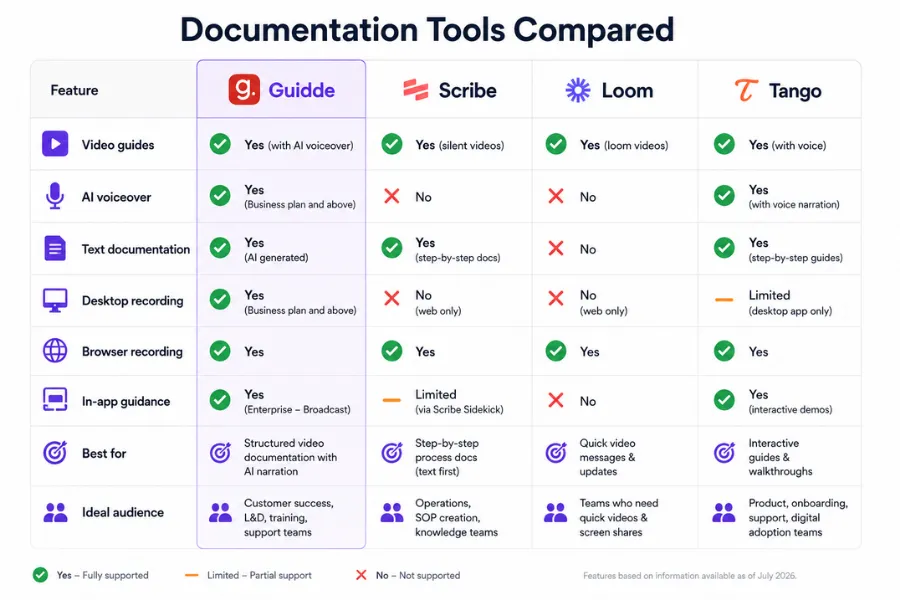
Scribe is the most common alternative in the same purchasing decision. It generates text-and-screenshot step guides rather than video, which makes output faster to produce and easier to scan for a reader who wants a quick reference. Scribe's Enterprise plan reportedly starts around $8,000 per year with a five-seat minimum, making Guidde considerably more cost-effective at Business tier for teams that need video narration. Scribe wins when your audience prefers reading over watching, when compliance requires text output, or when your workflows live in desktop applications. Scribe's Pro plan at $23 per user per month includes desktop capture, while Guidde gates it behind Business at $59. Guidde wins when AI voiceover, language coverage, or in-app delivery via Broadcast is the deciding factor.
Loom solves a different problem. It records and shares conversational video, which suits async feedback, nuanced explanation, and team communication rather than structured process documentation. Teams end up paying for both Loom and a documentation tool because the use cases are separate. If your requirement is repeatable process documentation rather than video messaging, Guidde is the more appropriate choice. It does not replace Make or Zapier for workflow automation, and it does not replace Loom for async communication.
Tango produces click-based step guides in a similar capture-via-extension workflow, with a generous free tier and a clean output format. It does not offer video narration or AI voiceover. Guidde's advantage over Tango is the video and audio layer. Tango's advantage is lower cost for teams whose documentation need is visual guides rather than narrated video. Neither Scribe nor Tango offers anything equivalent to Broadcast's in-app delivery, which remains Guidde's most differentiated feature.
For teams running onboarding inside ClickUp or similar project tools, Guidde guides embed in task descriptions and documentation pages, so users encounter training in context rather than hunting for it elsewhere. That friction reduction is where the tool earns its cost most clearly for teams doing high-volume onboarding.
Rating breakdown and the teams Guidde is built for
Guidde scores 4.2 out of 5 overall. Ease of use leads at 4.6, reflecting how consistently non-technical team members can move from workflow capture to finished guide without video editing skills. That is the platform's central promise, and it is the one delivered most reliably. Accuracy and reliability score 4.3, reflecting that the capture-to-guide pipeline works consistently, with the caveat that AI step descriptions need editing on complex workflows before publishing. Functionality and features reach 4.3, supported by Magic Mic, multilingual voice generation, and PDF/PPT-to-video conversion. The tier-gating of AI voice behind Business is a meaningful qualification on that score for anyone evaluating the Pro plan.
Customisation and flexibility sit at 4.2. The slide-based editor handles most documentation needs but gives limited control over timing, multi-track audio, or animation precision for teams needing polished external output. Data privacy and security score 4.1; Guidde holds SOC 2 Type II certification, is GDPR and CCPA compliant, and does not use customer content to train its AI models, which matters for enterprise buyers dealing with sensitive internal processes. Integration capabilities score 3.8, reflecting that native connections beyond help desk platforms and productivity tools are limited, and Broadcast requires Enterprise.
The tool is built for customer success managers at SaaS companies building self-service education without a video producer, L&D leads whose employees use complex web-based platforms and need documentation that can be updated without a production cycle, and support team leads replacing repetitive how-to answers with a maintained guide library. It is the wrong choice for teams whose core workflows are in native desktop software unless they commit to Business tier, and a poor fit for teams whose primary documentation need is narrative explanation rather than step-by-step process capture.
The 7-day Business trial, with no credit card required, is the right starting point. It puts AI voiceover and desktop capture in front of you rather than the stripped-down Pro experience that removes the watermark but leaves Guidde's most useful features behind a paywall.
How We Rated It:
More Tool Reviews







Subscribe to Stay in the loop
Get the latest AI and technology news, honest tool reviews, and practical guides delivered straight to your inbox.
Success! Check your Inbox!

Tezons Newsletter
The latest technology news, in-depth tool reviews, and practical guides - curated and delivered to your inbox.
Latest News




Have a question?
Have any questions?
Didn’t find what you were looking for? We’re just a message away.