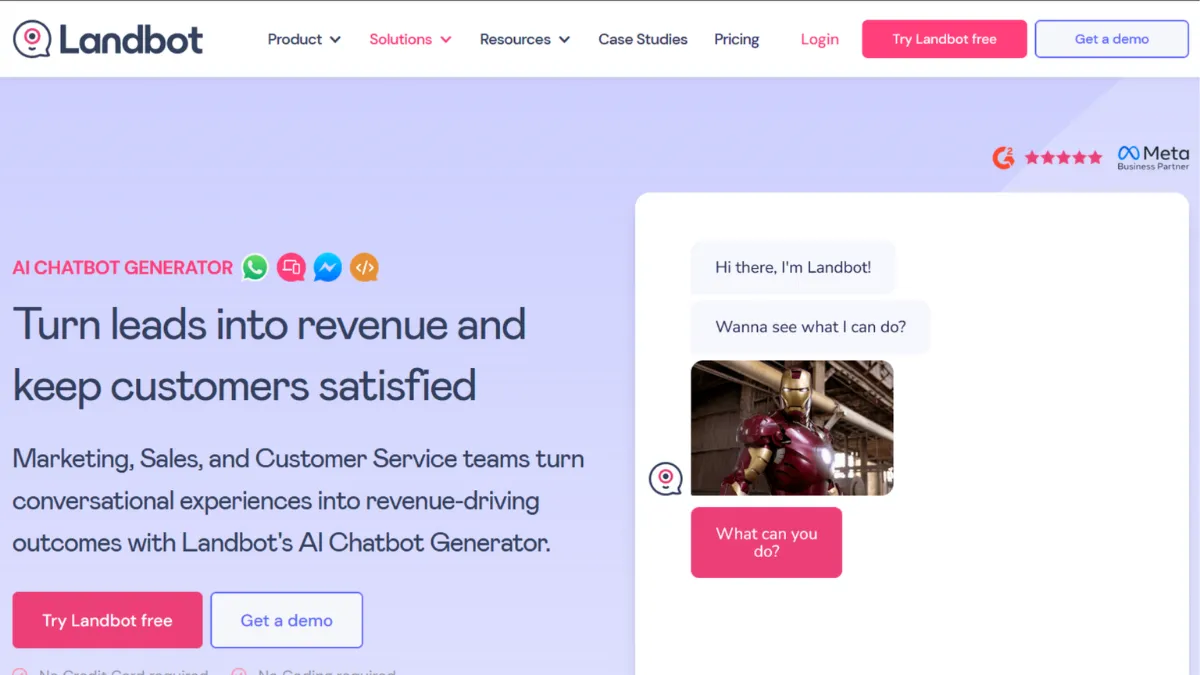
Conversational forms have a conversion problem that most marketers ignore until they see the numbers. Traditional form completion rates hover well below what chatbot-style interactions achieve, and Landbot exists precisely to close that gap. It is a no-code chatbot builder that turns linear data collection into a back-and-forth dialogue, deployed on your website, WhatsApp, or Facebook Messenger without a single line of code. The verdict: a strong choice for lead capture and qualification workflows, with real pricing friction once you grow beyond the basics or need WhatsApp at scale.
The mechanism that makes Landbot work is its visual flow builder. You construct a conversation as a branching flowchart, connecting message nodes, question blocks, conditional logic gates, and action steps. Each branch responds to what a user inputs, routing them down a tailored path. The quality of output depends almost entirely on how well you design those branches upfront. Most users underestimate the planning required: teams that sketch their conversation logic on paper before touching the builder consistently produce better bots than those who design on the fly inside the tool. Fields (formerly called variables) carry user-supplied data across the flow and into your connected tools, which is where genuine automation begins. Getting this data handoff right is the difference between a bot that captures leads and one that creates a data silo.
Realistic expectations matter here. Landbot is not an AI reasoning engine. The AI Agent feature, powered by GPT-based language models, handles natural language for open-ended queries, but the core product is rule-based. Conversations follow the paths you build. If a user goes off-script in a rule-based flow, the bot will not recover gracefully. On the positive side, well-designed flows on Landbot perform strongly for guided use cases: pricing calculators, onboarding questionnaires, lead qualification sequences, and support triage. Teams using it for structured interactions report meaningful lifts in completion rates compared to static forms, though your own results will depend on flow quality and traffic volume.
Landbot suits growth-stage teams and agencies building lead generation or qualification tooling for clients. If you manage multiple websites, the ability to clone and adapt flows across projects saves considerable time. Marketing operations teams at companies with moderate chat volumes, below a few thousand conversations a month, will find the Pro tier well-matched to their workload. It also works well for founders testing conversational landing pages before committing to a full development build, where tools like Webflow or Lovable might eventually handle the full page.
The limitation worth naming plainly: WhatsApp access carries a separate, significantly higher pricing tier. If WhatsApp is central to your customer communication strategy, the cost of entry is high enough to change the ROI calculation for smaller teams. Native integrations are also narrower than the marketing suggests, and complex workflows frequently require Zapier or Make as middleware rather than direct connections.
The sections below cover how the builder works mechanically, the key features worth understanding before you sign up, and how Landbot stacks up against alternatives in the no-code chatbot category.
What Is Landbot?
Landbot is a no-code chatbot platform built for creating conversational experiences on websites and messaging channels. It solves the problem of high form abandonment and low engagement by replacing static data-collection forms with interactive, dialogue-style flows that respond to each user input. Where a generic form builder like Typeform routes users through a linear sequence, Landbot adds conditional branching and multi-channel deployment, making it possible to serve a different conversation to different users based on their answers. The platform has built a broad user base across marketing, sales, and support use cases, with adoption spanning small agencies through mid-market companies. The obvious next question is how the builder actually constructs those conversations and what drives the quality of the output.
How Landbot Works
Setup begins with choosing your deployment channel: a website widget, a full-page chatbot embed, WhatsApp (on eligible plans), or Facebook Messenger. You then enter the visual flow builder, a canvas where you drag and drop blocks and draw connections between them. Blocks cover message output, question types (text, multiple choice, rating, file upload), conditional logic, webhook calls, and integration actions. The builder renders your conversation structure as a visible graph, so you can trace every possible path a user might follow.
Flow quality depends on three decisions made before you publish. First, how you branch on user intent: multiple choice blocks force users down predefined paths and produce clean data, while open text inputs require either AI Agent handling or manual review. Second, how you use fields to carry data forward: a name captured in block three can be injected into a personalised message in block fifteen, and passed to your CRM at the end. Third, where you set up your integrations: native connections to tools like HubSpot and Salesforce handle CRM handoffs, while webhook blocks cover anything outside the native integration list.
The counterintuitive insight most new users get wrong: more branches do not mean a better bot. Flows with excessive branching become difficult to maintain and create edge cases where users fall into dead ends. The highest-performing Landbot builds tend to be narrower in scope, handling one job well rather than attempting to replace an entire support system. The practical question this raises is which specific features give you the most leverage in building those focused, high-converting flows.
Landbot Key Features
Visual Flow Builder. The drag-and-drop canvas is Landbot's core interface. You connect blocks visually, which makes the logic of a conversation easier to audit and edit than code-based alternatives. The builder handles conditional logic through dedicated branch blocks, allowing you to route users based on specific answers, field values, or scores. For teams without engineering support, this is the primary reason to choose Landbot over a developer-built solution.
AI Agent Mode. On eligible plans, you can activate an AI Agent layer powered by GPT-based models. This allows the bot to handle open-ended questions without a predefined answer path, drawing on a knowledge base you configure. The AI features are capable for basic query resolution but remain relatively limited in reasoning depth compared to dedicated AI support platforms. Most users combine AI Agent blocks for open queries with rule-based flows for structured data collection, using each where it performs best.
Multi-Channel Deployment. A single Landbot account supports website widgets, full-page embeds, WhatsApp Business API, and Facebook Messenger. The ability to adapt a flow for WhatsApp and web from one workspace reduces duplication for teams serving users across channels. The caveat is that WhatsApp deployment sits behind a separate, higher-cost plan, so multi-channel capability is not available on entry-tier pricing.
Fields and Data Handling. Fields store user-supplied data across a conversation and make it available for personalisation, logic conditions, and downstream export. A well-structured field setup means every completed conversation produces a clean, structured data record that maps directly to your CRM or spreadsheet without manual cleaning. This is the feature most users underuse on first implementation.
Analytics Dashboard. Landbot provides conversation-level metrics: completion rates, drop-off points, and response distributions per block. The dashboard gives enough signal to identify where users abandon a flow and which branches see the most traffic. Reporting is adequate for iterative improvement but falls short of the segmentation depth available in dedicated analytics tools. Teams running high-volume campaigns often supplement Landbot data with Google Analytics for richer behavioural context. This reporting gap is one of the trade-offs worth weighing against the Pro tier price point, and S5 addresses that directly.
Landbot Pros and Cons
The strengths that make Landbot worth considering:
- Genuinely fast to build. A basic lead capture bot can go from blank canvas to live embed in under an hour. The visual builder removes the coordination overhead of a developer build cycle, which has real commercial value for agencies and growth teams.
- Free tier available for testing. The Sandbox plan allows you to build and publish with a meaningful enough feature set to validate a concept before spending. Few no-code chatbot platforms offer a functional free tier without aggressive time limits.
- Strong for structured data collection. When your goal is clean, typed data from users, Landbot's field system and multiple choice blocks produce better-formatted output than open-ended chat interfaces.
- Cloning and template reuse. Flows can be duplicated and adapted, which benefits agencies managing multiple client deployments. This is an underappreciated time saver that compounds across a portfolio.
- Native CRM connections on higher plans. Direct integrations with HubSpot and Salesforce reduce the need for middleware on the most common lead handoff workflows, keeping data pipelines simple.
The limitations that could affect your decision:
- WhatsApp pricing is a significant jump. Moving to WhatsApp requires a plan that costs substantially more than the web-only tiers. For smaller teams, this single requirement can price Landbot out of contention against competitors with more accessible WhatsApp entry points.
- Native integration count is limited. Outside of the headline CRM connections, most third-party tool handoffs require Zapier or Make as an intermediary. This adds cost and complexity that is not reflected in the base subscription price.
- Builder performance on complex flows. Multiple users report that the canvas slows noticeably as flows grow in size. For large-scale bots with many branches, this friction adds up across a build session.
- AI features are basic relative to category leaders. The AI Agent layer handles straightforward queries well but does not offer the reasoning depth or contextual memory of dedicated AI support tools. Teams with complex support automation needs will hit its ceiling.
- Analytics depth is limited. The built-in reporting gives drop-off data and completion rates but lacks the user-level segmentation that growing teams need for proper funnel analysis. This is a real gap at the Pro tier price point.
How to Get the Most Out of Landbot
Before you open the builder, map your conversation on paper. Identify the one outcome you want every completed flow to produce: a qualified lead record, a booked meeting, a support ticket with category and priority filled. Every block you add should serve that outcome. Teams that skip this step build sprawling flows that confuse users and produce messy data.
In your first session, build the shortest possible version of your flow and publish it. Resistance to shipping before the bot feels perfect is the most common reason Landbot projects stall. A five-block flow that goes live and collects fifty responses teaches you more than a thirty-block flow sitting in draft. Use the analytics dashboard to identify your first drop-off point and fix that before adding complexity.
Over time, the highest leverage action is refining your multiple choice options based on real response distributions. If one option in a branch captures the majority of users, the other branches may be unnecessary. Stripping them out simplifies the flow, reduces maintenance burden, and often improves completion rate by reducing the cognitive load on users.
The mistake most users make is treating the AI Agent as a replacement for good flow design. AI blocks handle ambiguity, but they do not rescue a poorly structured bot. Use AI Agent mode as a fallback for genuinely open-ended queries, not as a substitute for the branching work that drives reliable data capture.
To learn how to automate lead qualification with Landbot, the key is pairing your flow's field outputs with a CRM integration at the final step. Map each field to the corresponding CRM property before you go live, test with a dummy submission, and confirm the record appears correctly formatted. This single connection transforms Landbot from a conversation tool into a genuine pipeline asset. Measure success by your flow's completion rate and the data completeness of submitted records, not by conversation volume alone.
Who Should Use Landbot?
This is for you if you match one of these three profiles. First, a growth marketer at a seed-to-Series A company who needs lead qualification running on the website without waiting on engineering. You want something live in days, not sprints, and you are comfortable owning the bot logic yourself. Second, a marketing agency managing chatbot builds for multiple clients across different industries. Landbot's cloning and template system means each new client project starts from a proven base rather than a blank canvas. Third, an operations lead at a service business using structured intake forms to triage customer requests before routing to a human team. Landbot's field system and CRM integration handles the data handoff cleanly.
Not for you if you need WhatsApp as your primary channel on a tight budget, require advanced NLP for genuinely complex customer queries, or work in a regulated industry where HIPAA or SOC 2 compliance is a hard requirement. Enterprise support teams expecting the platform to replace a full help desk will also find the feature set undersized for that job.
Landbot Pricing
Landbot offers a free Sandbox plan with a capped monthly chat limit, one seat, and limited integrations. It carries Landbot branding on the widget and is best suited to testing and prototyping rather than live production traffic. The Starter plan moves you to a meaningful chat allowance with more integration access, and the Pro plan adds custom branding, more seats, and higher usage limits. Business pricing is available for enterprise volumes and is negotiated directly. Approximate monthly rates place the Starter tier around €40, Pro around €100, and WhatsApp plans starting substantially higher, with pricing information subject to change. Always verify current rates and chat limits on Landbot's pricing page before committing, as add-on costs for extra seats and additional AI chats can increase the effective monthly spend beyond the base plan rate.
At the Pro tier, the cost is reasonable for teams generating enough qualified leads to justify it. The value calculation shifts if you also need WhatsApp, where the entry price point puts it out of reach for smaller teams. Compared to alternatives in the category, Landbot's web-only pricing is competitive; its WhatsApp pricing is not, which matters when you are evaluating the tool against platforms that bundle multi-channel access more generously.
Landbot vs Alternatives
Typeform is the most natural comparison for teams whose primary use case is structured data collection. Typeform offers a more polished end-user experience for survey and form-style flows, with stronger analytics on the paid tiers. Landbot wins when you need conditional branching, multi-channel deployment, or live chat handoff within the same tool. Choose Typeform if your flows are essentially surveys and you prioritise completion rate data over CRM automation.
Tidio targets small e-commerce businesses that want live chat, chatbot automation, and AI support rolled into one product. It integrates more natively with Shopify and WooCommerce than Landbot does, making it a stronger pick for online retail. Landbot wins for marketing funnel use cases and more complex flow logic. Choose Tidio if your primary channel is an e-commerce store and customer support volume is high.
ManyChat focuses almost exclusively on WhatsApp, Instagram, and Facebook Messenger marketing automation. Its WhatsApp pricing is more accessible at the entry level than Landbot's dedicated WhatsApp plans, and its broadcast and sequence features are more mature for outbound messaging campaigns. Landbot wins on website chatbot flexibility and flow design depth. Choose ManyChat if messaging channel automation, not website conversion, is your core use case.
Intercom is a larger platform with a significantly higher price point, offering AI support, help centre content, and proactive messaging in one product. It is the upgrade path when Landbot's feature set becomes a ceiling. Landbot wins on simplicity and cost for teams that do not need Intercom's full surface area.
Landbot Review: Final Verdict
Landbot earns an overall score of 4.07 out of 5, which reflects a genuinely capable no-code chatbot builder with a narrow but meaningful set of limitations. Its ease of use score is a standout: few tools in this category move a non-technical user from signup to a live, functioning bot as quickly. The cost efficiency score of 3.8 reflects the real friction around WhatsApp pricing and the add-on cost structure that can push effective monthly spend above what the base plan implies.
The bottom line: if your use case is website lead capture, qualification, or structured intake, Landbot delivers strong results at a reasonable price. If WhatsApp is central to your strategy, model the total cost carefully before committing.
How We Rated It:
More Tool Reviews







Subscribe to Stay in the loop
Get the latest AI and technology news, honest tool reviews, and practical guides delivered straight to your inbox.
Success! Check your Inbox!

Tezons Newsletter
The latest technology news, in-depth tool reviews, and practical guides - curated and delivered to your inbox.
Latest News




Have a question?
Have any questions?
Didn’t find what you were looking for? We’re just a message away.