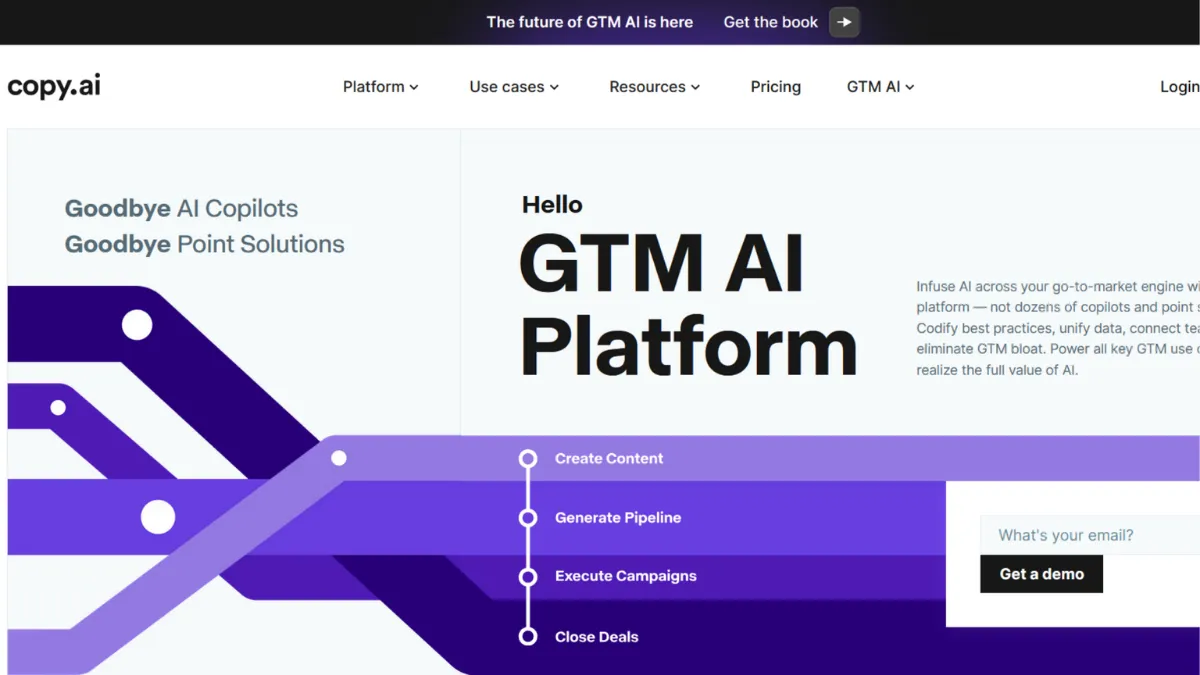
Automation separates the marketing teams that scale from those that drown in content queues. Copy.ai started life as a template-based AI copywriter and has repositioned itself as a go-to-market AI platform, a change that makes it either exactly what a growth-stage team needs or a more complicated tool than a solo founder bargained for. The platform sits in a category of its own: part AI writer, part workflow engine, part GTM operating system. If your content problems are high-volume, repetitive, and cross-functional, Copy.ai earns serious consideration. If you need to write one blog post a week, it is probably overbuilt for you.
What drives results in Copy.ai is the combination of its Workflow Builder with its Brand Voice and Infobase features. Brand Voice scans your existing website or documents to extract a tonal fingerprint, while Infobase acts as a knowledge store that keeps every generated output grounded in your company's actual information rather than AI generalisations. Workflows chain together multiple AI-powered steps: web research, data enrichment, content generation, CRM updates, and third-party actions can all run sequentially without a human in the loop. The teams that see the biggest efficiency gains are those who treat Copy.ai not as a chat window but as a process-replacement tool. The common mistake is using the chat interface for one-off tasks and never touching the workflow layer. That approach works, but it leaves most of the platform's value untouched.
Realistic expectations matter here. Copy.ai performs well on short and mid-form outputs: ad copy, email subject lines, product descriptions, social captions, and outreach sequences. Long-form content is a different story. Blog posts and articles generated through the platform tend to require significant editing for depth, accuracy, and originality. The workflow automation is genuinely powerful once configured, but configuration takes time. A team running high-volume outreach automation can reduce campaign creation time substantially, but expect to invest several sessions in setup and testing before workflows produce reliable output at scale.
Copy.ai targets growth-stage marketing and sales teams running significant content volume. Specifically: performance marketers iterating across dozens of ad variations, sales development teams automating personalised prospecting sequences, and content operations managers who need consistent brand output across multiple channels. The platform is also well-suited to agencies switching Brand Voices between clients without rebuilding context from scratch each time.
The GTM repositioning introduced a genuine learning curve. The original simple copywriting interface has been replaced by a more layered product, and new users often find the workflow credit system confusing. Credits consumed per task vary depending on complexity, with no transparent calculator to predict usage. Teams running high-volume automations can hit credit limits faster than expected on mid-tier plans.
Sections below cover the core mechanics, key features, pricing across tiers, and how Copy.ai stacks up against Jasper, Writesonic, and ChatGPT for different use cases.
What Is Copy.ai?
Copy.ai is an AI-powered go-to-market platform that helps marketing and sales teams produce content and automate GTM processes at scale. The problem it addresses is GTM bloat: too many disconnected tools, too much manual effort, and too little output consistency. Where a generic AI writing assistant gives you a chat window, Copy.ai adds a workflow layer, a brand alignment system, and a structured data table to power automation. The platform draws on multiple large language models, including options from OpenAI, Anthropic, and Google, so users can select models based on the task rather than being locked to a single provider. Adoption across marketing operations, sales development, and content teams has grown substantially as the platform has expanded beyond copywriting into full GTM automation. The question of how that automation actually operates mechanically is where most first-time evaluators have gaps.
How Copy.ai Works
At the chat level, Copy.ai functions like a marketing-optimised AI assistant. You prompt it, it generates output, and Brand Voice or Infobase context shapes the tone and content. For simple tasks, this is fast and effective. Setup takes minutes: connect your website URL or paste brand documentation, and the Brand Voice system extracts a tonal profile that persists across every future output in that workspace.
The deeper layer is the Workflow Builder. A workflow is a multi-step automation where each action feeds into the next. You define a trigger, map a sequence of AI-powered or integration-based steps, and the platform executes the chain. A sales workflow might pull a new lead from a CRM, enrich that lead's profile using web research, draft a personalised outreach email, and push the result back to your outreach tool. All of this runs without manual intervention once configured. Tables provide the data layer that powers these automations: a central repository where input data can be stored, updated, and referenced across multiple workflows. Copy Agents are a more targeted variant, pre-built to automate specific tasks such as prospect research or inbound lead processing, with less setup required than a custom workflow.
The counterintuitive insight most users miss is that Copy.ai's output quality depends less on prompting and more on what you put into Infobase and Brand Voice before you start. Teams that invest an hour upfront loading brand guidelines, product information, and sample copy consistently produce better output than teams who jump straight to generation. Treat the intelligence layer as infrastructure, not a one-time setup. That framing leads directly to the question of which specific features to configure first.
Copy.ai Key Features
Brand Voice and Infobase. Brand Voice is Copy.ai's most defensible differentiator in the AI writing category. It scans your site or uploaded documents to establish a consistent tonal fingerprint, then applies it across every chat output and workflow. Infobase complements this by storing factual company information, product details, and positioning so that AI outputs draw on accurate context rather than generic phrasing. Together, these two features eliminate the biggest failure mode in AI-generated marketing copy: content that sounds plausible but does not sound like your brand. Agencies managing multiple clients can configure separate Brand Voice profiles for each account and switch between them without rebuilding context.
Workflow Builder. The Workflow Builder is a no-code automation environment for chaining AI actions into repeatable processes. Users define steps, connect data sources, and set logic conditions without writing code. A workflow can combine web scraping, AI generation, CRM integration, and output routing into a single automated sequence. The platform ships with pre-built workflow templates for common GTM tasks: lead processing, outreach personalisation, content repurposing, and account-based marketing. Custom workflows take longer to build but offer substantially more flexibility. The credit consumption model means complex multi-step workflows cost more per run, a trade-off worth understanding before building at volume. This connects directly to Zapier and Make for teams wanting to extend workflows into broader tool ecosystems.
Multi-Model AI Access. Paid plans provide access to multiple large language models within a single interface. Rather than being locked to one provider's output quality, users can route tasks to the model best suited for that output type. This is particularly useful for teams producing both structured data-heavy outputs and creative brand copy, where different models tend to perform differently. The free tier restricts model access; full flexibility sits behind paid plans.
Content Agent Studio. The Content Agent Studio lets you build a reusable content engine around a specific output type. It extends Brand Voice into a more structured production system, useful for teams generating recurring content formats such as newsletters, product update posts, or sales cadences. Pre-built Copy Agents cover specific use cases out of the box, reducing configuration time for common tasks.
Tables. Tables is Copy.ai's internal data layer: a structured repository where you store the input data that powers workflows. It connects to external tools, enables bulk automation across large datasets, and keeps dynamic information available to the AI without manual re-entry. For teams running large outreach programmes or content production at scale, Tables is what makes the workflow layer genuinely operational rather than a demo feature. Understanding Tables is what separates light users from power users, and it surfaces a practical trade-off worth examining directly.
Copy.ai Pros and Cons
Where Copy.ai delivers clearly:
- Brand consistency at scale. The Brand Voice plus Infobase combination is the strongest brand-alignment system available in AI writing tools. Teams producing high volume across multiple channels maintain a consistent voice without manual editing on every output.
- Workflow automation depth. Multi-step GTM process automation is genuinely capable. Once configured, workflows replace significant manual work in lead processing, outreach personalisation, and content distribution.
- Multi-model flexibility. Access to multiple leading AI models within one platform lets teams match the model to the task, rather than accepting one provider's ceiling as their own.
- Unlimited generation on paid plans. No word count caps on paid tiers remove a friction point common in competing tools, making Copy.ai predictable for high-volume use.
- Free tool library. Over 90 single-purpose free tools give users a low-commitment way to validate the platform before committing to a paid plan.
Where Copy.ai falls short:
- Steep learning curve after repositioning. The shift from simple copywriter to GTM platform means new users face a more complex interface than the original product. Onboarding for workflow features requires meaningful time investment.
- Long-form quality is inconsistent. Blog posts and articles require significant editing. Generic phrasing, limited source depth, and occasional factual errors are common. This is not a replacement for dedicated long-form tools.
- Credit system opacity. Workflow credits consumed per run vary by task complexity, with no clear calculator. Teams running large automations can exhaust credits faster than expected and face costs before they have benchmarked usage.
- Enterprise pricing is opaque. Upper-tier and enterprise plans are not publicly listed. Budgeting without a sales call is difficult for larger teams.
- Free tier is genuinely limited. Two thousand words in chat disappears quickly. Two substantial prompting sessions can exhaust the monthly allowance, making the free tier inadequate for any real evaluation of the platform's capabilities.
How to Get the Most Out of Copy.ai
Before generating a single piece of content, invest time in the intelligence layer. Set up Brand Voice by pointing it at your actual website and uploading any brand guidelines you have. Populate Infobase with product descriptions, positioning statements, and common objections. This upfront work takes an hour and meaningfully improves every output that follows. Skip it and you will spend that time editing instead.
In your first week, prioritise understanding the workflow credit system. Build one simple workflow, run it a few times, and monitor credit consumption before scaling. This gives you a realistic baseline before committing to a plan tier. Start with a pre-built template rather than a custom workflow: the templates are well-structured for common tasks and teach you the logic before you start building your own sequences.
For content production, use the chat interface for quick one-off outputs and reserve the Workflow Builder for anything you repeat more than twice a week. Content you produce regularly, such as social posts, email sequences, or ad variations, should be systematised into a workflow so that it runs consistently and scales without additional effort. If your team uses a CRM, connect it early. The platform's value multiplies when workflow outputs feed directly into your existing sales or marketing stack rather than sitting in Copy.ai as a separate destination.
The mistake most teams make is treating Copy.ai as a faster version of a human writer. It is not. The real value is in how to automate GTM workflows with AI: removing manual steps from repeatable processes so your team's attention concentrates on judgement calls rather than production tasks. Measure success not by output word count but by time saved on specific processes and the consistency of on-brand delivery across channels. Teams that benchmark those two metrics find the ROI case straightforward. Those who measure it against a general AI chat tool often undervalue what the workflow layer does.
Who Should Use Copy.ai?
Copy.ai suits three types of operators particularly well. Marketing managers at growth-stage companies producing high volumes of ad copy, email campaigns, and social content will get immediate value from unlimited generation and Brand Voice consistency without hiring additional content staff. Sales development teams running personalised outreach at scale can automate the research-to-email sequence using workflows and pre-built agents, reducing the per-lead time on prospecting substantially. Agency operators managing multiple brand accounts benefit from the ability to configure separate Brand Voice profiles and switch between clients without context-rebuilding, which is a meaningful time saving at volume.
Copy.ai is not the right fit for everyone. Freelance writers or solo founders needing occasional blog posts will find the platform overbuilt and the pricing hard to justify relative to a general-purpose AI assistant. Teams whose primary need is long-form editorial content, detailed research articles, or thought leadership pieces should look elsewhere: Copy.ai's long-form quality requires too much editing to be a reliable production tool for those formats.
Copy.ai Pricing
Copy.ai offers a free tier with a 2,000-word monthly chat allowance and access to basic features including Brand Voice and Infobase. In practice, the free tier is enough to explore the interface but insufficient for a meaningful evaluation of what the platform produces at volume. Two detailed prompting sessions can exhaust the monthly allowance entirely.
The Starter plan, priced around $49 per month (with a discount for annual billing), gives one seat and unlimited words in chat with access to all available large language models. This tier suits individual operators who need consistent content output but do not yet require workflow automation. The Advanced plan, around $249 per month, adds team seats, a monthly allocation of workflow credits, access to the Workflow Builder, and pre-built GTM workflow templates. This is where the platform's real differentiation becomes accessible. Above this level, pricing scales through team and enterprise tiers with significantly higher seat counts and workflow credit volumes, though rates at those tiers require a conversation with sales. Always verify current pricing at copy.ai/prices before committing to a plan, as rates and tier structures have changed as the platform has evolved. Relative to alternatives, the mid-tier pricing sits meaningfully above a general AI subscription, which is the comparison most founders reach for first.
Copy.ai vs Alternatives
The most common comparisons Copy.ai faces are against Jasper, Writesonic, ChatGPT, and general automation tools like Zapier. Each comparison reveals a different trade-off.
Jasper targets content teams with a stronger long-form editorial focus. Its brand voice controls are robust, its document editor is more developed for writers, and it sits at a higher price point. Choose Jasper when long-form blog content and editorial quality are the primary output. Copy.ai wins when workflow automation and GTM process integration matter more than editorial depth.
Writesonic competes on price and covers many of the same short-form content use cases. It includes SEO-oriented features that Copy.ai does not foreground. Choose Writesonic when budget is a constraint and the need is primarily single-output content generation without automation. Copy.ai wins when you need a systematic, multi-step content and sales workflow rather than one-off generation.
ChatGPT handles roughly 80% of short-form copy tasks at a fraction of the cost. For founders who need quick ad copy or email drafts without brand consistency requirements or workflow automation, ChatGPT is the practical choice. Copy.ai wins when brand alignment, team collaboration, and automated GTM processes are the actual requirement, not just faster writing.
Copy.ai Review: Final Verdict
Copy.ai earns an overall score of 4.19 out of 5, a rating that reflects a genuinely capable GTM platform held back by onboarding complexity and an opaque credit system. Its highest dimension is functionality at 4.6, reflecting the depth of workflow automation, multi-model access, and brand alignment features available on paid plans. Its lowest is ease of use at 3.7, an honest reflection of the learning curve introduced by the GTM repositioning. The free tier will not give you an accurate picture of what the platform delivers at scale.
The bottom line: Copy.ai is the right choice for marketing and sales teams who produce content at volume and want to replace manual GTM processes with automated workflows. It is not a general-purpose writing assistant, and evaluating it as one sets it up to disappoint.
How We Rated It:
More Tool Reviews







Subscribe to Stay in the loop
Get the latest AI and technology news, honest tool reviews, and practical guides delivered straight to your inbox.
Success! Check your Inbox!

Tezons Newsletter
The latest technology news, in-depth tool reviews, and practical guides - curated and delivered to your inbox.
Latest News




Have a question?
Have any questions?
Didn’t find what you were looking for? We’re just a message away.