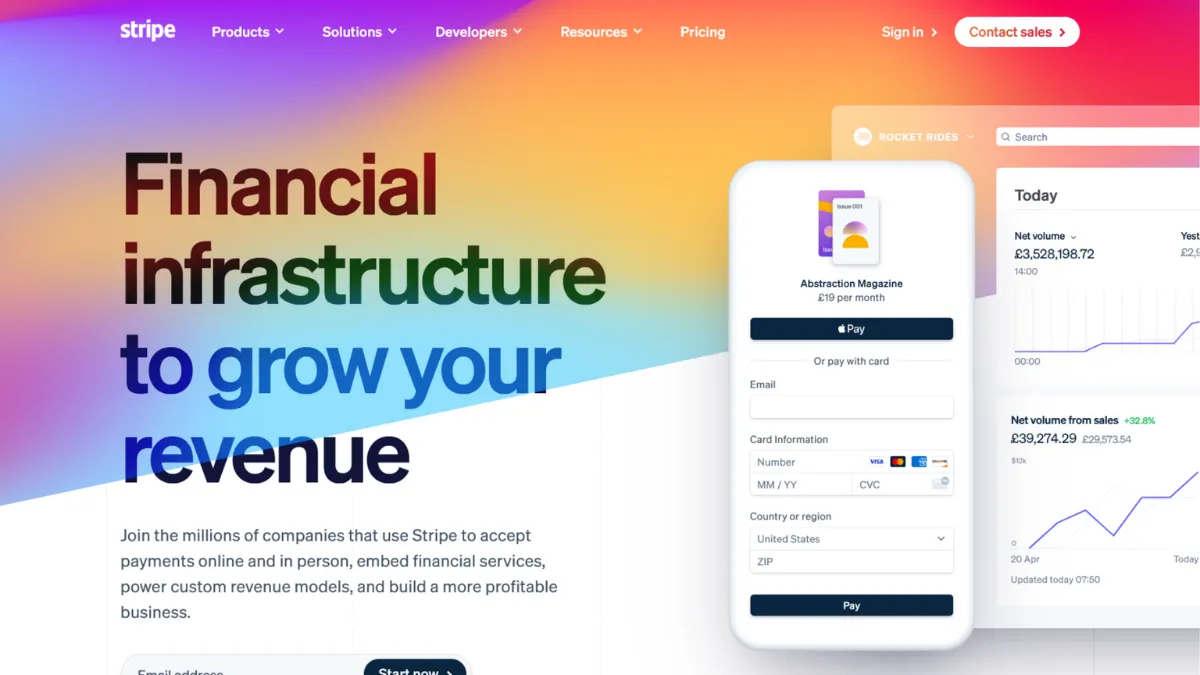
Payment infrastructure is the one technical decision most early-stage founders treat as an afterthought, and it is the decision that costs them the most when they get it wrong. Stripe is the dominant payment processing platform for internet businesses, and for good reason: its API is genuinely exceptional, its product suite covers everything from subscriptions to fraud prevention, and the onboarding experience is fast enough that you can go from signup to accepting live payments in an afternoon. The question is not whether Stripe is good. It is whether it is the right fit for your specific business model, and that answer is more nuanced than most reviews let on.
Stripe operates as a payment service provider, meaning it aggregates merchants under its own master merchant account rather than issuing you a dedicated merchant account. This is the mechanism behind its speed: no lengthy underwriting, no complex application process, no merchant services sales call. You sign up, complete identity verification, and start processing. The trade-off is that Stripe retains the ability to hold, freeze, or terminate accounts when its automated risk systems flag unusual activity. High chargeback rates, sudden volume spikes, inconsistent business information, or operating in a sector Stripe considers elevated-risk can all trigger a review. When that happens, your funds may be withheld for weeks. This is not a bug; it is a structural feature of the aggregator model. Understanding this upfront changes how you build your payment stack.
Realistic expectations matter here. Standard payouts arrive in two business days for most UK and US accounts. Instant Payouts exist for an additional fee, subject to daily limits and eligibility. Transaction fees at the standard tier sit at a percentage plus a fixed per-transaction amount, with additional costs for currency conversion, international cards, and add-on products like Stripe Billing for subscriptions. If you are processing low volumes, the pay-as-you-go model is excellent. As monthly volume climbs significantly, the per-transaction cost starts to weigh more heavily, and custom pricing becomes worth negotiating directly with Stripe.
Stripe is built for technical founders, SaaS companies, and e-commerce businesses that want programmatic control over their payment flows. Developers can customise checkout experiences down to individual field behaviour, build complex multi-party payment flows using Stripe Connect, and automate revenue operations through the API. Non-technical operators can get started using Stripe's no-code tools, but they will hit the ceiling of those tools faster than they expect once requirements grow specific.
The one limitation that catches founders off guard is account stability. Stripe is not designed for high-risk verticals, businesses with elevated chargeback ratios, or operations where a sudden revenue spike is likely. If your model involves any of those factors, treating Stripe as your sole processor is a meaningful operational risk. A backup gateway is not paranoia; it is basic infrastructure planning.
The sections below cover how Stripe's core products work, which features deliver the most value, how it compares against Adyen, PayPal, and Braintree, and which tier of pricing suits which stage of business.
What Is Stripe?
Stripe is a full-stack payments platform that lets businesses accept money online, in person, and across currencies without setting up a traditional merchant account. Its core product is a developer-first API that handles card processing, but the platform has expanded into subscriptions, invoicing, fraud detection, business financing, and marketplace payouts. What separates it from a generic payment gateway is the depth of its ecosystem: Stripe does not bolt on products around a processing core; it builds each product to share infrastructure, data, and identity across the entire account. A business using Stripe Billing, Stripe Radar, and Stripe Connect is not stitching together three tools; it is working within one data environment where fraud signals inform subscription renewal logic, and payout behaviour informs risk scoring. The platform is used by businesses from early-stage startups to large enterprises processing significant volumes. What it is not is a high-risk payment processor, a traditional merchant account provider, or the fastest option for purely in-person retail. The natural question is how the underlying mechanics of that ecosystem actually work in practice.
How Stripe Works
When a customer submits their card details through a Stripe-powered checkout, the data is tokenised client-side before it ever touches your server. Stripe's front-end libraries handle the encryption, which means your application handles a token, not raw card data, and your PCI compliance scope shrinks considerably as a result. That token is passed to Stripe's servers, which communicate with the relevant card network and issuing bank to authorise the transaction. If approved, Stripe batches the settlement and pays out to your connected bank account on its standard schedule.
The quality of your integration determines how much of Stripe's power you actually use. Many founders start with Stripe Checkout, the hosted payment page, because it handles card form rendering, 3D Secure authentication, and Apple Pay or Google Pay presentation automatically. That is fast to ship. The more interesting option for founders who want control is Stripe Elements or the newer Payment Element, which lets you build a fully custom form using Stripe's pre-validated input components, keeping your design intact while Stripe handles the compliance layer underneath.
Stripe's Radar fraud engine runs on every transaction automatically. It uses machine learning trained across the platform's entire network to assign a risk score before authorisation. You can write custom rules on top of that score: block transactions from specific IP ranges, require additional authentication above a certain order value, or flag card numbers associated with prior disputes. The counterintuitive thing most users misunderstand is that Radar's effectiveness scales with your transaction volume. The more data Stripe has on your customers' behaviour, the better it distinguishes your legitimate high-value orders from fraudulent ones. This means Radar performs better for established businesses than for new ones, which is relevant if you are evaluating it during a pre-launch period. The practical question that follows is which specific Stripe products deliver the most consistent value once you are live.
Stripe Key Features
Payment Processing and Checkout. Stripe's core processing supports cards, digital wallets, bank transfers, and a wide range of local payment methods depending on your region. The hosted Checkout product handles the entire payment page, including authentication flows required by regional regulations such as Strong Customer Authentication in Europe. For teams that want a custom UI, the Payment Element embeds a single component that automatically renders the right payment methods for each customer's location and device. Getting this right without building it yourself saves considerable engineering time and removes a recurring compliance burden.
Stripe Billing. Billing handles subscription logic: recurring charges, trial periods, mid-cycle upgrades and downgrades, proration calculations, and automatic payment retries with configurable retry schedules. It connects directly to Stripe's revenue reporting so you can track monthly recurring revenue, churn, and expansion without exporting data to a separate analytics tool. Founders often underestimate how much complexity lives in subscription billing edge cases, and Billing handles most of them reliably out of the box. Where it becomes expensive is on mid-market and enterprise plans where Billing is an add-on cost on top of base transaction fees, so verify current pricing on Stripe's site before building your financial model around it.
Stripe Connect. Connect is the product that powers marketplace and platform payments. If you collect money from customers and distribute it to sellers, service providers, or contractors, Connect handles the multi-party flow: account creation for payees, compliance verification across jurisdictions, split payments, and payout scheduling. It is what makes Stripe viable for two-sided businesses. The configuration complexity is real, and you should budget development time accordingly, but the alternative of building payout infrastructure from scratch is a much larger undertaking.
Stripe Radar. Radar's machine learning fraud detection is included in the standard transaction fee for most accounts. It blocks fraudulent transactions before they convert into chargebacks, which matters because chargebacks carry a fee and accumulate against your account's risk profile. The advanced tier, Radar for Fraud Teams, gives you a full rules engine and review queue, and is priced separately. For most early-stage businesses, the bundled version is sufficient. The limitation worth noting is that custom rule-writing requires familiarity with Stripe's query syntax, which is straightforward for developers but adds friction for non-technical operators.
Stripe Sigma and Reporting. Sigma gives you direct SQL access to your Stripe data for custom reporting. Pre-built dashboards cover revenue, disputes, and payout history, but Sigma lets you write queries against the raw event data, which is useful when your reporting requirements do not fit a standard template. This matters more as your business complexity grows. The practical implication is that smaller teams rarely need Sigma, while teams running multi-product businesses or marketplaces will find the standard dashboards quickly insufficient. The breadth of Stripe's feature set raises a natural tension: the more products you adopt, the more of your stack lives inside a single provider, which connects directly to the account stability question raised earlier.
Stripe Pros and Cons
Stripe's strengths are significant and its limitations are specific. Both matter for a clear-eyed decision.
- Developer experience is best-in-class. Stripe's API documentation is thorough, well-organised, and actively maintained. SDKs cover every major language, and the test mode replicates production behaviour accurately, which reduces the gap between development and live deployment. Teams that have worked with other payment APIs consistently rate Stripe's developer experience higher.
- Ecosystem depth reduces third-party dependencies. Billing, fraud detection, revenue reporting, and marketplace payouts are all first-party products that share data. You avoid the integration maintenance cost of connecting separate specialist tools, and the shared data model means Stripe's risk logic has more context about your customers than a standalone fraud tool would.
- Fast onboarding, no volume commitments. There are no setup fees, no monthly minimums on the standard plan, and no long-term contracts. You pay per transaction, which suits early-stage businesses where monthly volume is unpredictable. This is particularly useful when you are testing pricing models or launching to a new market without guaranteed volume.
- Stripe Connect handles marketplace complexity that alternatives struggle with. Multi-party payouts, KYC for connected accounts, and cross-border distribution are genuinely hard to build. Connect solves them in a way that very few competitors match at the same level of API quality. Tools like Zapier can extend Stripe's automation further for teams that need workflow triggers around payment events.
- Radar's network effect is a real fraud advantage. Because Stripe processes payments across a large volume of businesses globally, its machine learning has more signal data than most self-hosted fraud tools. A card that committed fraud on one Stripe merchant is flagged when it appears on another, which is a structural advantage that standalone fraud tools cannot replicate.
The limitations are worth taking seriously before you commit fully.
- Account freezes happen without warning. Automated risk systems can hold your funds or suspend processing while a review takes place. For a business with thin cash reserves or no backup processor, this is an existential operational risk. It disproportionately affects high-growth businesses that see sudden revenue spikes, and sectors Stripe classifies as elevated-risk.
- Add-on costs accumulate quickly. The base transaction rate is competitive, but Billing, Radar for Fraud Teams, Sigma, and other products carry separate fees. A business using the full suite pays considerably more per transaction than the headline rate suggests. Always model the total cost including every product you plan to use.
- Support is documentation-first, not human-first. Stripe does not offer phone support. Chat and email are the primary channels. For routine technical questions, the documentation is excellent. For account-level issues, especially disputes about holds or terminations, the support experience is inconsistent and can be slow.
- Not built for high-risk verticals. Businesses in sectors with elevated chargeback rates, regulated products, or unconventional revenue models will find Stripe's risk tolerance limited. The platform's terms of service include a meaningful list of prohibited and restricted categories.
- Standard payout timing is two business days. Instant Payouts carry an additional percentage fee and have daily limits. For businesses where cash flow timing is critical, this is a cost to model explicitly rather than assume away.
How to Get the Most Out of Stripe
Before you accept a single live payment, spend an hour in Stripe's test mode running through your full checkout flow, including edge cases: declined cards, authentication challenges, webhook failures, and refund scenarios. Most integration bugs appear in these edge cases, and finding them before launch costs nothing. Once you go live, set up webhook endpoints for the payment events your business actually needs to act on, at minimum successful payments, failed payments, and dispute creation. Ignoring webhooks and polling the API instead is the most common architectural mistake early Stripe integrations make.
In your first week live, configure Radar's custom rules even if you start conservatively. Block transactions with mismatched billing and shipping countries if your product does not warrant international shipping, require 3D Secure above a threshold order value, and set up email alerts for disputes. Chargebacks are cheaper to prevent than to fight. The Stripe Dashboard's dispute response workflow is functional but basic; if dispute volume grows, consider whether a dedicated tool integrates with your Stripe account for better response management.
Over time, the biggest lever for Stripe users is data quality. Every piece of metadata you attach to a charge, customer ID, product category, subscription tier, improves Radar's accuracy for your account and gives you cleaner reporting. Teams that treat Stripe as a pure payment processor and attach no metadata end up with dashboards that require significant manual work to interpret. Teams that instrument their integration properly find that Stripe's reporting becomes a usable source of truth for revenue operations.
If you want to understand how to reduce failed subscription payments in Stripe, the answer is almost always Smart Retries combined with customer email notifications. Stripe Billing's Smart Retries reschedule failed charges based on machine learning predictions of when the card is most likely to succeed. Pairing that with a dunning email sequence (either Stripe's built-in emails or a tool like Klaviyo triggered by Stripe webhooks) recovers a material proportion of revenue that would otherwise churn involuntarily. Most teams set this up once and ignore it; revisiting the retry schedule and email content every quarter delivers consistent incremental recovery.
The mistake most Stripe users make is treating the platform as fire-and-forget infrastructure. Stripe's dashboard surfaces disputes, unusual activity, and payout timing changes. Checking it weekly, rather than only when something goes wrong, means you catch account health issues before they escalate into holds.
Who Should Use Stripe?
Stripe fits three types of businesses particularly well. The first is a SaaS founder who needs subscription billing, revenue reporting, and the ability to iterate on pricing model quickly. Stripe Billing handles the subscription complexity and Sigma provides the revenue data without requiring a separate analytics stack. The second is a technical team building a marketplace or platform where money flows between multiple parties. Stripe Connect is the most developer-friendly solution for this use case, and the API documentation makes it possible for a small engineering team to build compliant, multi-currency payouts without specialist knowledge. The third is an e-commerce business at an early to mid stage that needs reliable global payments, fraud protection, and the flexibility to customise the checkout experience as conversion testing demands it.
Stripe is not the right choice if you operate in a sector with elevated chargeback risk or sell products on Stripe's restricted list. It is also a poor fit if your business is purely in-person retail, where a dedicated point-of-sale system with integrated payments will serve you better than Stripe Terminal. Founders whose business finances cannot absorb a two-to-four-week payment hold without operational disruption should either establish a backup processor before going live with Stripe or evaluate whether a dedicated merchant account with a traditional acquirer offers better account stability for their volume and risk profile.
Stripe Pricing
Stripe's standard plan carries no monthly fee and no setup cost. You pay a percentage plus a fixed amount per successful transaction, with the exact rate depending on your country. Additional costs apply for currency conversion when the card currency differs from your settlement currency, for international cards, and for specific payment methods like bank debits or digital wallets, which vary by region. Stripe's pricing page lists current rates, and you should verify them directly before building any financial model.
Stripe Billing, the subscription management product, is priced separately as a percentage of recurring revenue processed through it. Radar for Fraud Teams, Sigma for custom reporting, and Connect for marketplace payouts each carry their own pricing structures on top of base transaction fees. A business using the full suite will pay a total effective rate that is meaningfully higher than the headline transaction percentage. Custom pricing is available for businesses processing at high volume; if you are generating significant monthly revenue through Stripe, it is worth contacting their sales team to negotiate. The free tier covers basic payment processing adequately for most early-stage businesses, but as soon as you add Billing or Connect to your stack, model the total cost of the combined products. Compared to alternatives, Stripe's per-transaction rate is competitive for low and mid volumes, but Adyen's interchange-plus model often works out cheaper at enterprise scale.
Stripe vs Alternatives
The three most relevant comparisons for most businesses evaluating Stripe are Adyen, PayPal via Braintree, and specialist high-risk processors.
Adyen is the logical upgrade path for businesses that have outgrown Stripe's standard pricing or need a single platform for both online and in-person payments at scale. Adyen's interchange-plus pricing model becomes more cost-efficient at high volumes, and its direct acquiring relationships in over 40 markets reduce the number of intermediaries in the payment chain. The trade-off is a steeper onboarding process, a minimum monthly fee, and a more complex integration. Stripe wins on speed of setup and API quality; Adyen wins on total cost and enterprise-level controls for businesses processing significant volumes monthly.
Braintree, owned by PayPal, offers a comparable developer API to Stripe and is often chosen when PayPal wallet acceptance is a priority or when the business has an existing PayPal commercial relationship. Braintree's pricing model can be negotiated at lower volume thresholds than Stripe, and it offers interchange-plus pricing for qualifying merchants. Stripe's product ecosystem is broader and its documentation is generally better; Braintree is worth evaluating if PayPal integration depth is a requirement.
For high-risk sectors, neither Stripe nor Braintree is the right primary processor. Specialist high-risk merchant account providers offer the underwriting flexibility and account stability that the aggregator model does not. Businesses in those verticals often keep Stripe as a secondary processor for lower-risk transaction types while routing primary volume through a high-risk acquirer. Pairing Stripe with a tool like QuickBooks for accounting reconciliation helps manage the complexity of running multiple processors without creating a reporting nightmare.
Stripe Review: Final Verdict
Stripe earns an overall score of 4.43 out of 5, a result that reflects genuine best-in-class performance in several dimensions, particularly its API quality, fraud tooling, and integration ecosystem, alongside a real limitation in account stability that affects a meaningful subset of users. The 4.0 on Support reflects the documentation-first approach, which works well for technical queries but falls short when account-level problems require urgent human intervention.
The bottom line: Stripe is the right payment infrastructure for most internet businesses building subscription products, marketplaces, or developer-driven e-commerce, provided you treat account stability as a risk to manage, not an assumption to ignore. Go in with a backup processor plan and a clear view of the total product cost, and Stripe will serve you well for a long time.
How We Rated It:
More Tool Reviews







Subscribe to Stay in the loop
Get the latest AI and technology news, honest tool reviews, and practical guides delivered straight to your inbox.
Success! Check your Inbox!

Tezons Newsletter
The latest technology news, in-depth tool reviews, and practical guides - curated and delivered to your inbox.
Latest News




Have a question?
Have any questions?
Didn’t find what you were looking for? We’re just a message away.