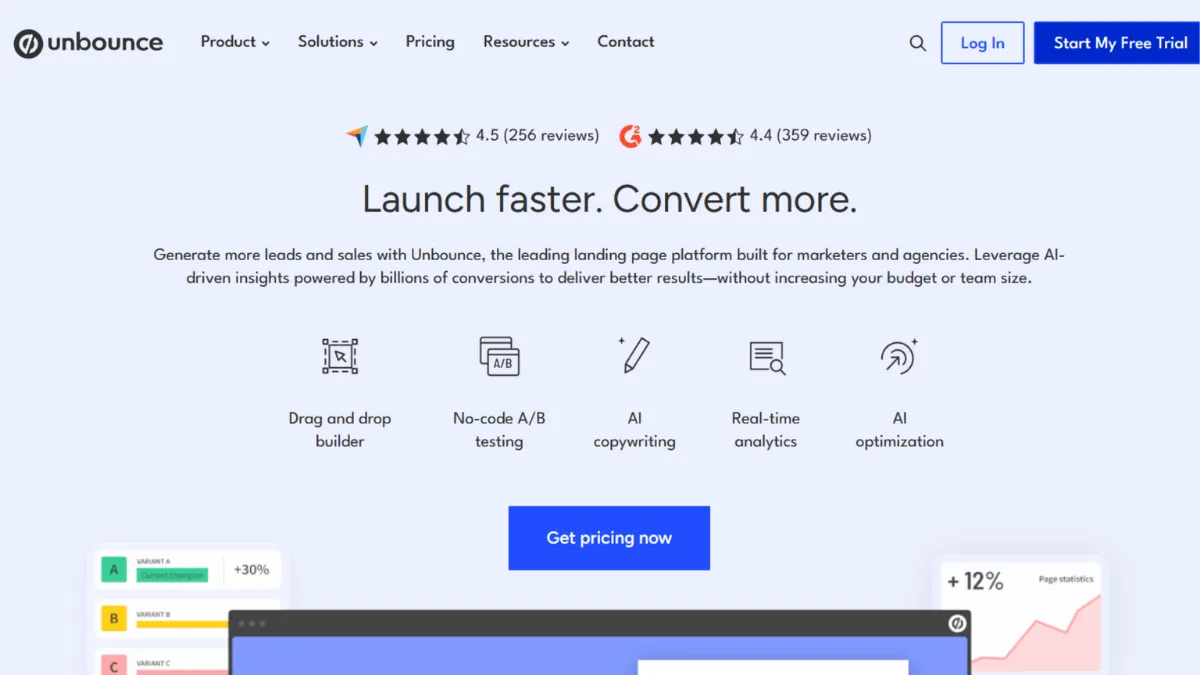
Paid traffic is expensive, and sending it to a generic page on your main website is one of the most reliable ways to waste your budget. Unbounce is the landing page builder built specifically for this problem: it gives performance marketers a fast, code-free environment to build dedicated campaign pages, run split tests, and let an AI routing layer automatically direct each visitor to the variant most likely to convert them. For teams spending meaningfully on Google Ads, Meta, or LinkedIn, Unbounce sits at the point where tooling costs become a rounding error compared to the conversion lift they recover. The platform earns its reputation not through aesthetic novelty but through a set of conversion-specific features that generic website builders simply do not offer.
The mechanism that separates Unbounce from a standard drag-and-drop builder is a combination of three systems working together. Dynamic Text Replacement (DTR) rewrites your headline in real time to reflect the search keyword that brought a visitor to the page, meaning a user who clicked on an ad for 'enterprise CRM software' sees exactly that phrase in the headline rather than a generic statement. Smart Traffic, the AI routing engine, analyses visitor attributes such as device type, location, and browsing behaviour, then sends each person to whichever page variant has historically performed best for visitors who match their profile. And traditional A/B testing sits beneath both, letting you validate specific hypotheses before handing control to the AI. Most users make the mistake of treating these as three separate tools. They work best as a layered system: A/B testing to generate variants, Smart Traffic to route once patterns emerge, and DTR to align copy with ad intent across all of them simultaneously.
Realistic expectations matter here. Smart Traffic requires approximately 50 visits before it begins routing meaningfully, and its advantage compounds over weeks rather than days. Teams running low-volume or infrequent campaigns will see slower returns. Conversion lifts vary considerably depending on how distinct your page variants are: if your three variants differ only in button colour, the AI has little to work with. The tools that generate the biggest results build fundamentally different value propositions across variants and let the AI discover which resonates with which audience segment.
Unbounce suits performance marketers, growth teams at SaaS companies, and agencies managing paid campaigns across multiple clients and domains. The sweet spot is anyone spending enough on paid acquisition that even a two or three percentage point improvement in conversion rate has a meaningful effect on cost per lead. The platform is not a website builder and does not pretend to be. It builds campaign-specific pages that sit outside your main CMS, and it expects you to know why you need that separation.
The clearest limitation is mobile. Unbounce does not auto-generate responsive mobile layouts from your desktop design. You build the mobile version separately, which doubles the editing work on every page. Teams who move fast across multiple campaigns feel this friction acutely. Combine that with visitor caps on lower tiers that can restrict high-volume campaigns, and the platform rewards commitment over casual use.
The sections below cover the key features, pricing structure, and the specific user types who will and will not get value from the platform. Pricing in particular deserves attention, because the entry price and the price at which you get the most important features are not the same number.
What Is Unbounce?
Unbounce is a dedicated landing page builder and conversion optimisation platform designed for digital marketers running paid campaigns. It solves a specific problem: the disconnect between ad messaging and the page a visitor lands on after clicking. Where a Webflow or a standard CMS gives you a full website with all its navigation, distractions, and competing calls to action, Unbounce gives you isolated, single-purpose pages built around one goal. Founded in Vancouver and now serving thousands of businesses globally, the platform has become a reference point in the landing page category. Its differentiator is not the builder itself, though that is capable, but the layer of conversion intelligence built on top of it: Smart Traffic AI routing, Dynamic Text Replacement, and built-in A/B testing that work as an integrated system rather than bolt-on additions. The natural question after understanding what it is becomes how, exactly, each of those systems operates under the hood.
How Unbounce Works
Unbounce offers two builders. The Classic Builder is a pixel-precise drag-and-drop editor where every element can be placed anywhere on the canvas. You have complete control over layout, and nothing snaps to a grid unless you want it to. The Smart Builder uses AI to generate a full page layout from a short description of your business, industry, and campaign goal, producing a starting point you then customise. Both builders publish pages to an Unbounce subdomain by default, with the option to map them to a custom domain. Pages load from Unbounce's own infrastructure, which is optimised for speed, an important factor when you are paying for every click.
Dynamic Text Replacement works through URL parameters. When you build a Google Ads campaign, you add a parameter to your destination URL that passes the matched keyword through to the page. Unbounce reads that parameter and swaps the designated text block on your landing page to reflect it. This keeps your headline aligned with the ad that generated the click, which improves Quality Score in Google Ads and, more practically, makes the experience feel coherent to the visitor. Setting this up takes perhaps fifteen minutes once you understand the parameter structure, but many users skip it entirely because it requires touching their ad URLs. That is the mistake: DTR is one of the highest-leverage features on the platform and one of the most underused.
Smart Traffic begins collecting data the moment you activate it across two or more page variants. It takes around 50 visits to exit the discovery phase, after which it routes new visitors based on patterns it has identified. The counterintuitive reality is that Smart Traffic does not declare a winner and stop testing the way traditional A/B testing does. It continues allocating traffic dynamically, so a variant that underperforms for desktop users in Germany might still receive traffic from a different segment where it converts better. This persistence is where many users misread the data: lower overall traffic to a variant does not mean the AI thinks it is worse. It means that variant is being served to the specific audience for whom it performs best. Treating Smart Traffic output like a standard A/B test result leads to premature decisions. The practical implication for your feature setup is how this changes what you actually need to configure from the start.
Unbounce Key Features
Smart Traffic AI Routing. Smart Traffic analyses visitor attributes in real time and routes each person to the landing page variant most likely to convert them. It replaces the need to manually declare a winner in an A/B test by continuously adapting allocation across segments. The feature sits on the Optimize plan, and enabling it requires at least two live variants. To use it well, build variants with meaningfully different value propositions rather than cosmetic changes. The AI needs genuine variation to identify signal.
Dynamic Text Replacement. DTR pulls a keyword or phrase from the URL parameter attached to your ad destination and rewrites a designated text block on your landing page to match it. This keeps your headline consistent with the ad a visitor clicked, which matters both for user experience and for Google Ads Quality Score. The setup lives in the Classic Builder and requires coordinating your ad URL parameters with the text block settings in Unbounce. This is a non-trivial workflow but one of the most direct conversion levers available on any landing page platform.
Drag-and-Drop Builders with Unlimited Pages. Both the Classic and Smart Builders allow unlimited landing pages, popups, and sticky bars on all paid plans. The Classic Builder offers pixel-level placement freedom. The Smart Builder accelerates first-draft production using AI layout generation. Popups and sticky bars carry their own targeting rules: you set triggers based on time on page, scroll depth, or exit intent, and specify which audience segments see them. Teams running multiple campaigns benefit from the duplication feature, which clones an existing page as a starting point rather than rebuilding from scratch.
A/B Testing with Variant Management. The Experiment plan and above include unlimited A/B test variants with manual traffic allocation controls. You split traffic across variants and monitor conversion rates with statistical context. Unlike Smart Traffic, traditional A/B testing requires you to monitor and make a call on the winning variant. The two approaches complement each other: A/B testing generates validated variants, Smart Traffic handles ongoing optimisation. Teams who run only one and not the other are leaving one half of the system idle. The trade-off worth understanding is that A/B testing at meaningful traffic volumes requires the Experiment tier or above, which sits at a higher price point than the entry plan.
Integrations and Lead Management. Unbounce connects with a wide range of marketing tools natively, including HubSpot, Mailchimp, Zapier, and Salesforce, among many others. Form submissions can route directly to your CRM or email platform, and Zapier extends this to virtually any downstream workflow. The platform also supports custom scripts and pixels, so adding Google Analytics tracking, Meta Pixel, or any tag manager is straightforward. The integration range is broad enough to fit into most established marketing stacks without requiring bespoke work. Whether that breadth alone justifies the platform's cost relative to simpler tools brings the conversation to its real trade-offs.
Unbounce Pros and Cons
Where Unbounce performs well:
- Smart Traffic is genuinely differentiated. No direct competitor replicates the real-time AI visitor routing with the same depth of visitor attribute analysis. For campaigns with sufficient traffic volume, the compounding effect on conversion rates is measurable without manual intervention.
- DTR makes paid search significantly more efficient. Keeping headlines aligned with matched keywords improves both user experience and Google Ads Quality Score. This is an underrated lever on overall campaign profitability, not just on-page conversion.
- Unlimited pages and popups across all plans removes friction at scale. Agencies and growth teams running many simultaneous campaigns do not hit artificial page limits. This is a meaningful advantage over platforms that cap page count on lower tiers.
- The Classic Builder offers genuine pixel-precision control. Unlike grid-constrained builders, you can place elements anywhere. This matters for teams who want to replicate exact design comps without compromise.
- Broad integration library covers most marketing stacks. Native connections to major CRMs, email platforms, and analytics tools, plus Zapier compatibility, mean Unbounce slots into existing workflows without requiring a rebuild of connected systems.
Where Unbounce falls short:
- Mobile editing is a real burden. The platform does not auto-adapt desktop designs to mobile. You build mobile layouts separately, which doubles the work on every page. For teams moving fast across campaigns, this compounds quickly into a meaningful time cost.
- Visitor caps on lower tiers are hard limits. The entry plan covers up to 20,000 monthly visitors. High-volume campaigns can exhaust this quickly, and exceeding the limit has billing consequences. Teams with unpredictable traffic spikes should model their expected volume before committing to a tier.
- Smart Traffic and DTR require setup discipline to deliver results. Both features underperform when configured casually. DTR needs ad URL coordination. Smart Traffic needs genuinely distinct variants. Teams who skip the setup detail get baseline results rather than the optimised outcome the platform advertises.
- The Smart Builder produces layouts with limited structural flexibility post-generation. Once the AI generates a page, adjusting the underlying structure is constrained compared to starting from scratch in the Classic Builder. Teams with specific design requirements should account for this when choosing their starting approach.
- Price rises steeply for advanced features. The features that define the platform, specifically Smart Traffic and unlimited A/B testing, sit on the Optimize and Experiment tiers respectively, not the entry plan. The cost difference between entry and the tier where Unbounce is genuinely at its best is significant.
How to Get the Most Out of Unbounce
Before you build a single page, define the one action you want visitors to take. Every element on an Unbounce page should serve that action or be removed. The platform makes it easy to add popups, sticky bars, and multiple CTAs, but campaigns that try to do too many things on one page consistently underperform those built around a single conversion goal.
Your first week should focus on three tasks: set up your custom domain, build at least two genuinely different page variants rather than cosmetic variations, and configure Dynamic Text Replacement if your traffic comes from search. These three steps unlock the platform's core advantage. Teams who publish one page with a single variant and no DTR are using Unbounce as an expensive page builder rather than a conversion optimisation system.
Smart Traffic needs data before it can route meaningfully. In the early weeks of a campaign, run standard A/B testing to accumulate visit data and begin identifying which variant attributes correlate with conversion. Once you have the data pattern established, activating Smart Traffic lets the AI take over the allocation work while you focus on generating new variants to test. The mistake most users make is activating Smart Traffic immediately on launch, before the platform has enough data to route with confidence.
To understand how to improve conversion rates with Unbounce, measure at the segment level rather than looking only at aggregate conversion rate. Smart Traffic's reporting shows which visitor segments are being routed to which variants. Patterns in that data reveal which audiences are underserved by your current variants, giving you a direct brief for the next page to build. Treat the reporting as a creative brief generator, not just a performance readout.
On the measurement side, connect Google Analytics on day one and set up goal tracking for your primary conversion event. Unbounce's native conversion data tells you what is happening on the page. Your analytics platform tells you what happened before visitors arrived and what they did after. Both are necessary to close the attribution loop and justify the platform cost internally.
Who Should Use Unbounce?
Unbounce fits you well if you manage paid search or social campaigns and your cost per acquisition is sensitive to landing page conversion rate. A performance marketer running Google Ads campaigns across multiple product lines will get direct, measurable value from DTR and Smart Traffic. A growth marketer at a SaaS company who runs frequent experiment cycles and needs to ship page variants without developer involvement will find the builder speed and unlimited page allowance genuinely useful. A digital marketing agency managing campaigns for multiple clients benefits from the multi-domain support on higher tiers and the ability to segment pages and reporting by client account.
Unbounce is not right for you if you are building your first marketing presence on a tight budget and do not yet run paid campaigns. The platform's advantage is in conversion optimisation for existing traffic, not in generating traffic. If you are sending organic or minimal paid traffic, the AI features have too little data to function effectively and the cost is hard to justify. You will get more from a simpler, cheaper builder until your paid spend is at a level where conversion rate differences translate into meaningful revenue impact.
Unbounce Pricing
Unbounce does not offer a permanent free tier. A free trial period is available on signup, but ongoing use requires a paid plan. The entry Build plan is priced at the equivalent of around $64 per month on annual billing, rising to $99 on a monthly commitment. This plan includes the drag-and-drop builder, unlimited pages and popups, and a visitor allowance that covers smaller campaigns. A/B testing at meaningful scale and Smart Traffic both sit on higher tiers: the Experiment plan, which adds unlimited A/B testing, and the Optimize plan, which adds Smart Traffic. The Optimize plan is where the platform's conversion AI becomes fully available, and its price point is considerably higher than the entry plan. Check the current pricing page on Unbounce directly, as tiers and included features have been adjusted over time.
For teams running active paid campaigns, the cost is defensible because the platform earns back its fee through conversion improvement. For teams not yet spending meaningfully on paid acquisition, the entry price is hard to recover through organic traffic alone. The pricing places Unbounce clearly in the mid-to-premium tier of landing page builders, which frames the comparison to alternatives directly.
Unbounce vs Alternatives
Leadpages is the most common entry-level alternative and offers unlimited traffic at a lower monthly price. It suits teams who want to publish landing pages without visitor cap anxiety and do not need AI routing or advanced A/B testing. Unbounce is the better choice the moment conversion optimisation, rather than page publishing, becomes the primary need. Leadpages does not replicate Smart Traffic or DTR at comparable depth.
Webflow serves a different purpose. It is a full CMS and design platform for teams who want complete creative control and are building brand experiences rather than campaign-specific conversion pages. Webflow produces more aesthetically sophisticated output but does not offer Smart Traffic or DTR, and its testing capabilities are not built for performance marketers. Choose Webflow for brand and content-led growth. Choose Unbounce when paid campaign conversion rate is the primary metric.
Instapage sits closest to Unbounce in feature scope and targets the enterprise end of the market. Its collaboration tools are stronger, its page experience analytics are more granular, and its pricing reflects that positioning. Teams running large-scale paid programmes with multiple stakeholders involved in page approval may find Instapage's workflow features worth the additional cost. Unbounce remains the stronger option for mid-market teams who want AI optimisation without enterprise pricing. HubSpot's landing page tool deserves a mention for teams already in that ecosystem. It lacks Unbounce's conversion intelligence but removes the need for a separate platform if HubSpot is already handling CRM, email, and analytics. The native data connection is a meaningful operational advantage for teams managing lead follow-up at volume.
Unbounce Review: Final Verdict
Unbounce earns a 4.18 out of 5 overall. Its highest score is in integrations and functionality, reflecting a platform that connects cleanly into professional marketing stacks and delivers conversion features that are genuinely difficult to find elsewhere at this price point. The cost efficiency score of 3.8 reflects the reality that the most valuable features sit on higher tiers, which pushes the true cost of the platform above its headline entry price. Ease of use scores 3.9 because mobile editing remains a manual, time-consuming process that adds friction to every campaign.
The bottom line: if you run paid campaigns and conversion rate is a metric you are actively measured on, Unbounce belongs in your stack. If you are not yet at that stage, the investment is premature.
How We Rated It:
More Tool Reviews







Subscribe to Stay in the loop
Get the latest AI and technology news, honest tool reviews, and practical guides delivered straight to your inbox.
Success! Check your Inbox!

Tezons Newsletter
The latest technology news, in-depth tool reviews, and practical guides - curated and delivered to your inbox.
Latest News




Have a question?
Have any questions?
Didn’t find what you were looking for? We’re just a message away.