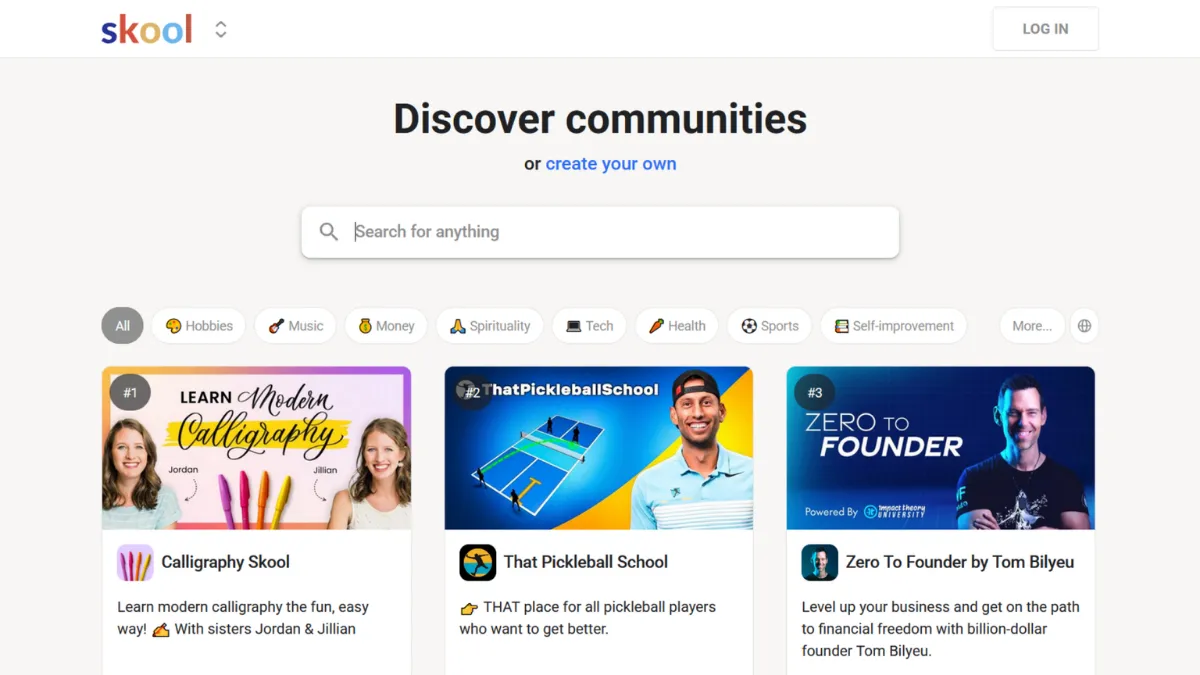
Community platforms have been promising the same thing for years: a single place where your audience learns, connects, and pays you. Most deliver a bloated dashboard and a retention problem. Skool works differently. It strips the product down to three tabs, gamifies participation so members return without being prompted, and charges a flat monthly fee regardless of how large your audience grows. The result is one of the cleaner community-and-course combinations available to independent creators and coaches today, though its simplicity is a deliberate constraint as much as a design virtue.
The mechanism behind Skool is worth understanding precisely, because most new community owners misread it. The platform centres on a points-and-levels system: members earn one point per like received on a post or comment, accumulate points to level up, and unlock courses or content at thresholds you set as the admin. This creates a self-sustaining engagement loop. Active contributors become visible on a public leaderboard, which feeds status incentives without requiring you to run contests manually. The most common mistake new owners make is treating the gamification layer as decoration. Creators who get results from Skool structure their course content as a series of unlockable modules, so members have a reason to post and comment before they can access the next lesson. This turns passive consumption into participation.
Realistic expectations matter here. Skool does not grow your audience for you. The platform has a public directory, but it does not push algorithmic recommendations or route prospective members to your community. Growth is your job; Skool handles retention. Creators who arrive with an existing audience, even a small one, can use the engagement mechanics to deepen relationships and reduce churn. Creators who are starting from zero need to treat external channels, whether a newsletter, a YouTube channel, or a podcast, as the primary acquisition engine, with Skool as the destination.
The platform suits coaches and educators who want a contained, professional alternative to Facebook Groups, and whose business model centres on membership access rather than complex course delivery. Fitness communities, business coaching programmes, and mastermind groups map well onto the Skool structure. If your revenue depends on cohort-based accountability, certifications, or graded assessments, the platform will force you into workarounds from day one.
The central limitation is not cosmetic. Skool has no built-in quiz or assessment tools, no email marketing, no funnel builder, and no native CRM integrations. You cannot issue course completion certificates. You cannot host your community on a custom domain; the Pro plan offers a custom subdomain path, but the root domain remains skool.com. These are not gaps the team has overlooked. They are the product of a deliberate philosophy that prioritises simplicity over breadth, and that philosophy will frustrate educators who need structured accountability or marketers who want their community embedded in a broader automation stack. Pairing Skool with a dedicated email platform like Mailchimp or Kit is effectively mandatory if you want any outbound communication beyond on-platform notifications.
The sections below cover how the product works mechanically, which features matter most in practice, and how Skool compares to the alternatives worth considering.
What Is Skool?
Skool is an all-in-one community and course platform built for creators, coaches, and educators who want to consolidate membership management, content delivery, and member engagement in a single product. It was founded by Sam Ovens and Daniel Kang, and its public profile grew considerably after entrepreneur Alex Hormozi made a substantial investment in the business. The problem it solves is the fragmentation most community operators face: course content on one tool, community discussion on another, event scheduling on a third. Skool collapses those three functions into one dashboard, charges a predictable flat fee, and imposes no member caps. What distinguishes it from a generic learning management system is the gamification layer, a points-and-levels engine that rewards participation rather than passive content consumption. That structural choice makes Skool behave more like a social network with a classroom attached than a traditional LMS with a forum bolted on. Understanding how those three tabs, community, classroom, and calendar, interact is the key to getting value from the product.
How Skool Works
Every Skool group is built around three linked areas. The community feed operates like a private social network: members post, comment, react, and tag each other, and each like a post or comment receives adds one point to the author's total. The classroom holds your courses, organised into modules and lessons. The calendar lists scheduled live events, which you can now host natively within the platform after Skool added its own meeting and webinar functionality, reducing the dependency on third-party video conferencing tools that earlier versions required.
Setup starts with creating a group and choosing whether it is free or paid. If paid, you set a subscription price and Skool handles billing, with a transaction fee that varies by plan. From there, you build your classroom by creating courses and uploading content. Videos can now be hosted natively on Skool, removing the earlier requirement to embed from YouTube or Vimeo, though external embeds remain supported. Modules can be locked behind membership levels, meaning a member must earn enough points to unlock the next section. This is the mechanic most administrators under-configure. Leaving all content open from day one eliminates the participation incentive entirely.
The counterintuitive insight most new owners miss is that the quality of the content matters less to early retention than the structure of the unlock gates. Members who are three levels from accessing a module they want will post and comment to earn points. Members who can access everything on day one have no reason to engage beyond passive reading. Structuring your course releases around engagement milestones, rather than release dates alone, is the single highest-leverage configuration decision you can make. The next section covers the specific features that shape how you build that structure.
Skool Key Features
Gamification and Leaderboard. The points system assigns one point per like received, and members progress through levels as their totals increase. Admins control what unlocks at each level: a specific course, a chat channel, or additional community access. The public leaderboard shows the top contributors and sits as a visible tab in the community. This is not a superficial add-on; it is the primary retention mechanism and the feature that most directly separates Skool from platforms like Thinkific, which treat community as secondary to content delivery.
Classroom and Course Builder. The classroom supports unlimited courses with text, file attachments, and native video hosting, a feature added more recently to the platform. Modules can be drip-released by join date, which suits cohort programmes. Access controls tie directly into the gamification layer, so you can require a specific level before a member can view a course section. The builder is straightforward but sparse: there are no quiz tools, no assignment submission, and no completion certificates. What you get is a well-organised content library with a clean member-facing interface.
Events and Live Sessions. Skool added native meeting and webinar functionality after operating as a platform that required external tools for live sessions. The meeting feature is available on the entry plan; webinars, suited to larger audiences or more formal live sessions, are available on the Pro plan. Both are accessible through the community calendar, which means members can see and join sessions without leaving the platform.
Monetisation and Payments. Skool handles subscription billing natively. You set a monthly or annual price, and members pay on-platform. Transaction fees differ by plan: the entry-level plan charges a higher percentage cut, while the Pro plan charges a lower processing fee. Skool added standalone course purchase options alongside subscriptions, giving creators more flexibility in how they package content. There is no checkout customisation, no upsell builder, and no affiliate management built in.
Mobile Apps. Skool has native iOS and Android apps that mirror the desktop experience, including community posts, courses, events, and push notifications. Mobile engagement is often higher than desktop in active Skool communities because push notifications pull members back to conversations in real time. This is an underrated operational advantage for creators whose members are not desk-based.
The feature set is tight and functional. The trade-off is that anything outside community, content, and events, including email automation, landing pages, and CRM connectivity, requires separate tools. That dependency is the practical implication explored in the next section.
Skool Pros and Cons
Skool has clear strengths worth naming directly, alongside limitations that affect specific use cases materially.
- Flat-rate pricing with no member caps. You pay the same monthly fee whether you have ten members or ten thousand. This makes the cost model predictable and significantly cheaper per member as a community scales, compared to platforms that charge per seat.
- Gamification that drives organic engagement. The points and levels system creates participation incentives that most platform operators would otherwise need to engineer manually through challenges or prompts. Members who want to unlock content have a structural reason to post.
- Simple, fast onboarding for members. The interface is familiar to anyone who has used a social network. New members rarely need instructions to find the feed, navigate to the classroom, or join an event. This reduces drop-off at the point of first access.
- Native live session tools. Adding meeting and webinar functionality directly to the platform reduces the friction of coordinating external video tools and keeps members in one environment for both asynchronous and live content.
- Mobile app quality. The iOS and Android apps are full-featured and reliable, supporting the kind of on-the-go engagement that keeps community momentum going between live sessions.
The limitations are equally specific and worth reading carefully before committing.
- No quiz or assessment tools. This is the most significant gap for educators. You cannot test comprehension, assign graded work, or issue completion certificates. Structured learning programmes that require accountability or accreditation cannot be delivered on Skool without third-party workarounds.
- No email marketing or automation. Skool does not send newsletters, drip sequences, or broadcast emails on your behalf. You need a separate email platform to communicate with members outside the platform, and there are no native integrations to connect the two.
- No custom domain. Your community lives at a skool.com address. The Pro plan allows a custom subdomain path, but you cannot host the community on your own domain. This limits white-label positioning and can affect trust signals for communities selling at higher price points.
- Limited customisation. You cannot apply custom CSS, change the layout, or restyle the interface. All communities look structurally similar. This is a considered design choice but a real constraint if brand presentation matters to your positioning.
- Single-community-per-subscription model. Each group requires a separate monthly subscription. Running multiple distinct communities multiplies your cost linearly. Operators managing several separate audiences will find this adds up quickly.
How to Get the Most Out of Skool
Before you launch, configure your level unlock gates before you publish a single piece of content. Decide which modules members can access immediately and which require points to unlock. Leave at least two or three high-value lessons behind a level threshold from day one. This single configuration step determines whether your community generates engagement or becomes a passive content library that members dip into once and forget.
In your first week, seed the community feed with five to ten posts that invite responses: questions, polls, and prompts that ask members to introduce themselves or share a result. Early posts set the tone and show new members what participation looks like. Use the calendar to schedule a live session within the first fortnight, even a short one. Members who attend a live event in their first two weeks retain at a significantly higher rate than those who only consume recorded content.
As the community grows, monitor the leaderboard weekly. The top contributors are your most engaged members and your best candidates for moderation roles or featured case studies. Recognising them publicly, even in a community post, reinforces the status incentives the platform is built around. Treat the leaderboard as a retention signal, not just a display feature.
If you want to learn how to build an engaged online community using Skool, the key practice is tying content access to contribution rather than to time. Platforms that drip content by date train members to wait. Skool's level system trains members to participate. Work with that architecture rather than against it by keeping your most valuable content behind meaningful engagement thresholds.
For email communication, connect a dedicated platform early. Skool does not send marketing emails, so you need a separate tool to reach members who have gone quiet, announce launches, or nurture prospects before they join. A tool like GetResponse or a similar email service handles this layer cleanly alongside Skool. Set up that connection before your membership grows large enough that manual outreach becomes unmanageable.
Who Should Use Skool?
Skool works well for three specific types of operator, and poorly for one that often considers it.
Coaches and consultants running membership programmes are the clearest fit. If you charge a monthly fee for access to your expertise, a community where members support each other, and a library of recorded sessions or frameworks, Skool gives you that structure without requiring you to stitch together multiple tools. The gamification layer keeps members active between coaching calls, which reduces the churn that plagues membership businesses where the coach is the only draw.
Creators with an existing audience who want to move their community off social media are also well served. Facebook Groups are free but noisy, subject to algorithm changes, and owned by a platform that can reduce your reach without notice. Skool provides a contained, professional environment where your members can interact without distraction, and where you control the experience. The migration works best when you give your existing audience a clear reason to move: exclusive content, live access, or course material they cannot get anywhere else.
Fitness, wellness, and lifestyle educators who run group programmes find Skool's event and community features well matched to their delivery model. Live sessions, community accountability, and content libraries align naturally with how these programmes operate.
Skool is not suitable for formal educators who need assessment tools, certificates, or compliance tracking. If you are building a structured curriculum where demonstrating comprehension matters, or where your students expect a certificate they can show an employer, the platform cannot deliver that without significant third-party tooling. Instructional designers and corporate learning and development teams should look elsewhere.
Skool Pricing
Skool currently offers two plans, both requiring a separate subscription for each community you create. The entry plan sits at a low monthly rate and includes unlimited members and unlimited courses, but takes a higher transaction fee on sales. The Pro plan sits at $99 per month and reduces the transaction fee substantially, to a rate comparable to standard payment processor fees, making it the more cost-effective option once your community generates meaningful revenue. Both plans include a 14-day free trial with no credit card required, which is enough time to build a community structure and run a small member cohort through the onboarding experience.
There is no annual billing discount, which is an unusual omission for a SaaS product at this price point. If you manage multiple communities, each requires its own subscription, so your cost scales with your portfolio rather than your audience size.
The absence of a free tier beyond the trial is notable. Platforms like Circle offer entry-level plans at lower monthly rates, which makes Skool's entry point a consideration for creators in the early stages of building their first paid community. Verify current rates on Skool's pricing page, as plan structures have been updated previously and may change again. Compared to the alternatives, the pricing holds up well once a community is generating revenue, but can feel steep at the zero-to-membership stage.
Skool vs Alternatives
The closest comparisons worth making are Circle, Kajabi, Mighty Networks, and Thinkific, depending on what is driving your evaluation.
Circle is the most direct competitor. It offers more customisation, deeper branding control, and native video hosting within its course spaces. Circle also includes assessment tools that Skool lacks. The trade-off is a more complex product with tiered pricing that escalates quickly as you add features. Choose Circle if white-label presentation or structured assessments are non-negotiable. Choose Skool if simplicity and engagement mechanics matter more than flexibility.
Thinkific competes on the course delivery side. It offers quizzes, certificates, completion tracking, and a more robust learning management feature set. Its community features are thinner than Skool's, and the gamification layer does not exist. If your primary product is a structured course with formal completion requirements, Thinkific is the stronger choice. If community retention is central to your business model, Skool wins.
Kajabi packages community, courses, email marketing, landing pages, and funnels in a single product. It is substantially more expensive than Skool and aims at a different operator: one who wants to run most of their online business from one tool. If you need email automation and sales funnels alongside your community, Kajabi removes the need for the stack of external tools that Skool requires. The added cost reflects that breadth.
Mighty Networks occupies similar territory to Skool, with community and course features and a slightly different interface philosophy. It offers more content formats and a more granular permission system, but its pricing structure is less straightforward than Skool's flat fee. Skool's gamification remains a distinguishing feature that Mighty Networks does not match directly.
Skool Review: Final Verdict
Skool earns an overall score of 4.10 out of 5, reflecting a product that excels in the specific things it has chosen to do and declines to do everything else. Its ease of use and performance are the standout dimensions: new members find it immediately familiar, and the platform handles community activity reliably at scale. The score reflects a real penalty in integrations and customisation, both of which score lower because the product is deliberately closed. That trade-off is worth making if community engagement is your primary objective and you are comfortable managing a separate email platform alongside it.
The bottom line: Skool is the right platform for creators and coaches who want engaged paying members, not passive course consumers. It will not serve educators who need assessment tools or marketers who need automation built in.
How We Rated It:
More Tool Reviews







Subscribe to Stay in the loop
Get the latest AI and technology news, honest tool reviews, and practical guides delivered straight to your inbox.
Success! Check your Inbox!

Tezons Newsletter
The latest technology news, in-depth tool reviews, and practical guides - curated and delivered to your inbox.
Latest News




Have a question?
Have any questions?
Didn’t find what you were looking for? We’re just a message away.