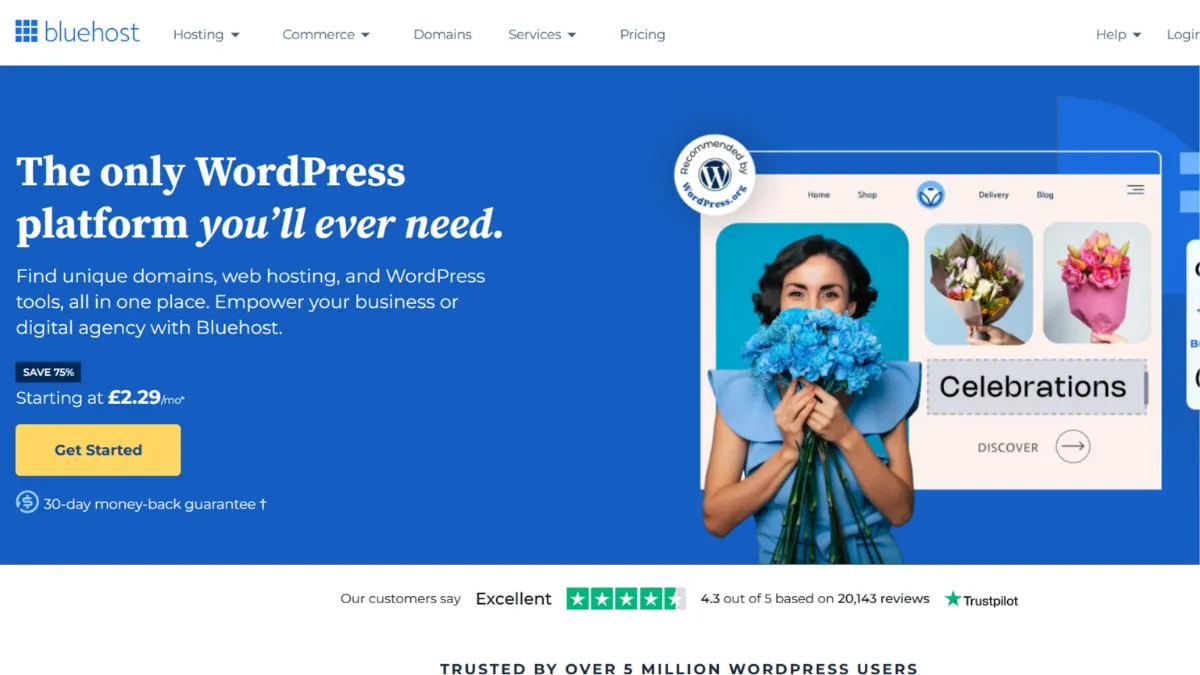
Shared web hosting rewards one decision above all others: getting the infrastructure right before the first visitor arrives. Bluehost has built its reputation on making that decision easy, and for the vast majority of first-time site owners, small business operators, and WordPress beginners, it delivers exactly what the category promises. One-click WordPress installation, a bundled free domain for the first year, a free SSL certificate, and a 24/7 support team collectively remove the friction that causes most new sites to stall before they go live. The platform is one of only a handful of hosts officially recommended by WordPress.org, a status earned through sustained compatibility and reliability rather than marketing spend. That endorsement matters when you are choosing where to plant your flag.
The mechanism behind Bluehost is straightforward: shared hosting infrastructure where multiple sites occupy the same server resources, managed through a customised cPanel dashboard that sits beneath a beginner-friendly account manager. NVMe storage ships across all plans, which is meaningfully faster than traditional SSD, and a global CDN is configured automatically to reduce load times for visitors across different regions. The one-click WordPress setup is genuinely one-click: the platform detects your intent, installs WordPress, and walks you through basic configuration in a wizard flow. Where Bluehost diverges from bare-bones competitors is in its layered ecosystem. Staging environments, WooCommerce activation, Yoast SEO pre-installation, and object caching are available at higher tiers, giving the platform room to grow with a site rather than forcing an immediate host migration when needs expand. Most users get this wrong by treating Bluehost as a commodity product. The plan tier you choose at signup determines performance headroom, not just storage limits.
Realistic expectations here matter. Bluehost performs well for sites with low-to-moderate traffic, and independent monitoring consistently confirms uptime in the high-99th percentile range, close to the 99.9% guarantee the platform advertises. Page load speeds are competitive at entry level but can degrade under shared load during traffic spikes. A new blog, a small portfolio, or an early-stage business site will find performance entirely adequate. A site receiving tens of thousands of daily visitors will start to feel the ceiling of shared infrastructure and should budget for an upgrade to one of Bluehost's higher-performance or VPS tiers. Treat the Starter plan as a launch vehicle, not a permanent home.
Bluehost suits first-time site builders who want a managed, low-configuration path to a live WordPress site. It is the right call for small business owners who need professional email, an SSL certificate, and a recognisable hosting provider without needing to understand server configuration. Founders building an early WooCommerce store will find the guided setup genuinely useful, particularly if they are combining the host with an email marketing platform like Mailchimp or a design tool like Canva to get their brand assets ready alongside the store.
The limitation worth naming plainly is pricing transparency. Introductory rates are significantly lower than renewal rates, and the gap is large enough to change your perception of value. A plan that appears affordable at signup can cost two to three times more at renewal, depending on term length. Bluehost is not deceptive about this, but the promotional price is prominent and the renewal rate takes some finding. Budget for the renewal rate from day one.
The sections below cover the feature set, the pricing structure in detail, and how Bluehost stacks up against its main competitors in the shared and managed WordPress hosting space.
What Is Bluehost?
Bluehost is a web hosting platform offering shared, WordPress, WooCommerce, VPS, cloud, and dedicated hosting plans. The problem it solves is the gap between wanting a website and knowing how to provision one: Bluehost handles the server infrastructure, security certificates, WordPress installation, and domain registration in a single workflow that requires no technical background. What separates it from a generic hosting provider is its deep WordPress orientation. The platform ships with WordPress tools pre-configured, integrates Yoast SEO on higher tiers, and provides cPanel access for users who want to go beyond the managed dashboard. Bluehost has hosted millions of websites across its history and carries the rare distinction of being an officially recommended WordPress.org host, a signal of sustained compatibility that few competitors can match. The natural question, given all that infrastructure, is how the mechanics of setup and day-to-day management actually play out for a non-technical user.
How Bluehost Works
Signing up to Bluehost takes around ten minutes. You select a hosting plan, register or transfer a domain, choose a billing term, and the account is provisioned immediately. From the account dashboard, you launch the WordPress installer, which handles database creation, file installation, and initial configuration automatically. The cPanel sits one level beneath the main dashboard and gives access to file management, DNS settings, email account creation, database tools, and error logs.
Output quality on Bluehost is affected by three things: the plan tier you choose, the WordPress theme and plugins you install, and whether you configure caching. The platform provides NVMe storage across all plans and connects to a CDN by default, but caching behaviour varies by tier. On the Starter plan, server-level caching is limited, which means a plugin-heavy WordPress installation can become slow if left unconfigured. Installing a caching plugin early is not optional if you want consistent performance.
Email hosting is included but carries storage limits on entry plans. Bluehost email runs through cPanel and supports standard IMAP/SMTP configuration for use with any email client. Professional email is one of the reasons small business owners choose the platform over a bare domain registrar, and it works reliably for that purpose. Storage limits on the Starter tier mean heavy email users should check the current plan specifications before committing.
The counterintuitive insight most users miss: Bluehost's promotional price structures are designed around term length, not just tier. The lowest monthly equivalent rates require committing to the longest available billing term upfront, paid in full. Users who select a shorter initial term to reduce upfront cost frequently pay more in aggregate over a three-year period than they would have paid on the longest term from the start. Locking in the longest term available at signup is the correct financial decision for anyone who intends to keep the site live. That calculation feeds directly into the practical question of which plan to buy, which the features breakdown below addresses.
Bluehost Key Features
One-Click WordPress and WooCommerce Installation. Every Bluehost plan supports single-click WordPress deployment via the account dashboard, with no FTP access or manual file transfer required. WooCommerce activation is built into the eCommerce-oriented plans and includes a setup wizard that walks you through store configuration, payment gateway connection, and product listing. This feature removes the most common point of failure for non-technical site owners: the gap between purchasing hosting and having a functioning site. Used well, it means a WordPress site or WooCommerce store can be live within an hour of account creation.
cPanel with NVMe Storage. Bluehost provides a customised cPanel interface accessible beneath the main dashboard, giving users control over file management, databases, DNS records, cron jobs, and PHP settings. The storage underlying this is NVMe across all plans, which offers faster read and write speeds than conventional SSD. For most shared hosting users this difference is invisible in normal operation, but it improves response times under simultaneous requests and reduces the risk of I/O bottlenecks on sites with multiple active plugins. Pair this with Google Analytics for site traffic monitoring and you have a workable performance baseline from the start.
Free SSL Certificate and Global CDN. All plans include a free SSL certificate and automatic CDN configuration, both provisioned during account setup without manual intervention. SSL is non-negotiable for any site handling user data or accepting payments, and Bluehost removes the configuration burden entirely. The CDN caches and serves assets from edge servers closer to the visitor's location, reducing latency for international audiences. These are table-stakes features in the hosting market, but the automatic provisioning is genuinely useful for beginners who would otherwise need to configure both separately.
Staging Environments. Higher-tier Bluehost plans include one-click staging, which creates a copy of a live WordPress site in a sandboxed environment for testing theme updates, plugin changes, or structural edits without risking the production site. This is a feature that historically lived only in managed WordPress hosting at higher price points. Its inclusion at mid-tier shared hosting pricing makes Bluehost meaningfully more practical for any site owner who iterates on their site after launch. The absent staging environment on the Starter plan is the clearest reason to consider upgrading from entry level, raising the question of where exactly Bluehost's pricing structure draws those lines.
Bluehost Pros and Cons
The platform's strengths are consistent and well-documented. Its limitations are real but mostly predictable.
- WordPress.org recommended. Bluehost is one of only a handful of officially recommended WordPress hosts. This signals sustained compatibility with WordPress core, reliable one-click installation, and a support team trained in WordPress-specific issues. For any site built on WordPress, this endorsement is a meaningful quality signal.
- Beginner onboarding is genuinely low-friction. The account setup wizard, WordPress installer, and guided store configuration collectively reduce the time from signup to live site to under an hour for most users. Non-technical founders consistently report being surprised by how little configuration is required.
- NVMe storage across all tiers. Faster underlying storage than many comparably priced competitors is an often-overlooked advantage. It improves plugin-heavy WordPress performance without requiring any configuration on the user's part.
- 24/7 support with tiered escalation. Live chat is available around the clock, and higher tiers connect users to Level 3 technicians more directly. For beginners encountering technical problems outside business hours, this is genuinely valuable rather than a marketing checkbox.
- WooCommerce ecosystem depth. Pre-installed WooCommerce, Cloudflare CDN, Yoast SEO, and CodeGuard backup on eCommerce plans create a functional store foundation that would cost meaningfully more to assemble piecemeal. This is an overlooked advantage for early-stage online retailers comparing Bluehost against bare shared hosting competitors.
The weaknesses are specific enough to matter depending on your use case.
- Renewal pricing is significantly higher than promotional rates. The introductory rate is the number shown prominently in marketing. The renewal rate, which kicks in after the first term, is typically two to three times higher depending on term length. Users who budget on promotional pricing face a materially higher bill at renewal. This is acknowledged in the pricing section below.
- Shared hosting performance has a ceiling. Sites receiving sustained high traffic will notice performance degradation on shared plans. Bluehost is not the right infrastructure for a site that has outgrown its entry context, and migrating later involves friction.
- Starter plan storage and email limits are restrictive. The entry plan's storage allocation and email account limits are modest. Users who need to host multiple high-media-volume sites or manage a large number of professional email accounts will need to upgrade sooner than they might expect.
- No monthly billing on entry shared plans. Bluehost requires an upfront commitment on lower-tier plans, with no true monthly payment option at the Starter level. This is a practical barrier for anyone who wants to test the platform before committing.
- Phone support limited to business hours. Despite 24/7 live chat, phone support is restricted to business hours. Users who prefer voice support for complex issues will find this limiting, particularly those in non-US time zones.
How to Get the Most Out of Bluehost
Before you sign up, decide on your billing term. The lowest long-run cost on Bluehost comes from committing to the longest available term at initial signup, paid upfront. Calculate the total cost over three years at the introductory term rate versus the renewal rate for shorter terms, and you will usually find the longest term wins by a meaningful margin. Do this before choosing a plan tier.
In the first session, install WordPress immediately, configure your caching plugin before publishing any content, and connect Google Analytics to establish your baseline traffic data from day one. The sequence matters: adding a caching plugin after content is published is more disruptive than starting with one. Bluehost's one-click WordPress install handles the platform itself; the plugin and analytics setup is the part most users defer and then forget.
Over the first month, audit your plugin count. WordPress performance on shared hosting degrades proportionally with the number of active plugins. Install only what you need, disable what you do not use, and delete deactivated plugins entirely. A lean plugin stack on Bluehost's NVMe infrastructure performs well for most small-to-medium site requirements.
The mistake most users make is treating the Starter plan as permanent. It is a launch vehicle. If your site begins attracting consistent traffic, generating revenue, or requiring staging capability, upgrade proactively rather than reactively. Performance degradation on shared hosting tends to compound: a slow site loses search rankings, which reduces traffic, which makes the problem feel smaller than it is.
If you want to know how to build a WordPress site that ranks in search, the combination of Bluehost hosting and a dedicated SEO tool like Semrush covers the infrastructure and keyword research sides of that problem efficiently. Bluehost provides the foundation; the SEO tool provides the roadmap for what to build on it. Measure success by tracking Core Web Vitals scores in Google Search Console alongside uptime logs, and treat any month where either metric drops as a prompt to investigate your plugin stack or upgrade your plan.
Who Should Use Bluehost?
This is for you if you are building your first WordPress site and want a guided, low-configuration path to going live. A founder launching a service business website, setting up professional email under their own domain, and embedding a contact form needs exactly what Bluehost's entry tiers deliver: managed WordPress, SSL, email, and a domain registrar in a single dashboard. Similarly, a small retail business starting a WooCommerce store for the first time will find the guided WooCommerce setup, pre-configured CDN, and bundled Yoast SEO worth the price premium over generic shared hosting. A content creator building an affiliate site or blog using Rank Math alongside their hosting will also find the platform's WordPress orientation genuinely useful rather than cosmetic.
Bluehost is not for you if you are running a high-traffic site, a large-volume eCommerce operation, or an application requiring root-level server customisation on shared infrastructure. If your site already receives consistent heavy traffic, the shared hosting ceiling will become visible quickly and the migration cost will exceed the saving from Bluehost's entry pricing. Developers who need full server control from day one should look at VPS or dedicated options rather than starting on shared plans and upgrading under pressure.
Bluehost Pricing
Bluehost does not offer a free hosting tier. The platform's entry point is a shared hosting Starter plan, with introductory pricing that varies by term length and is subject to change; always check the current rates on the Bluehost pricing page before signing up. At the introductory rate on the longest available term, shared hosting entry pricing is among the most competitive in the category. The Starter plan includes ten websites, NVMe storage, free SSL, global CDN access, and a free domain for the first year. Business and eCommerce plans add higher storage allocations, unlimited email accounts, staging environments, and WooCommerce tooling at incrementally higher price points.
The pricing issue that matters most is the renewal rate. Introductory pricing applies to your first term only. On renewal, shared hosting plans increase significantly, typically doubling or more depending on the term length selected at signup. A 36-month initial term carries the lowest renewal rate; shorter initial terms renew at higher monthly rates. Users who do not account for this face an unexpected bill at renewal that can make Bluehost feel poor value relative to competitors pricing at more consistent rates. The platform is transparent about renewal rates in its documentation, but the promotional number dominates the signup experience. Compared to alternatives in the next section, Bluehost's introductory pricing is excellent and its renewal pricing is average to slightly above average for the category.
Bluehost vs Alternatives
The most direct competitors for Bluehost's core shared and WordPress hosting market are Hostinger, SiteGround, and Wix.
Hostinger competes at a similar price point with comparable WordPress integration and, in many independent performance tests, delivers faster page load times on shared infrastructure. Hostinger's renewal pricing is generally lower than Bluehost's, making it a stronger choice for users who are price-sensitive over a three-year horizon. Bluehost wins on brand trust, WordPress.org endorsement, and depth of WooCommerce ecosystem tooling. Choose Hostinger if long-run cost is your primary variable and you are comfortable with a less established brand in the WordPress community.
SiteGround targets users who have outgrown entry-level shared hosting and want better performance without moving to VPS. Its Google Cloud infrastructure delivers consistently faster load times than Bluehost's shared environment, and its support tooling is more sophisticated. SiteGround's entry pricing is higher than Bluehost's introductory rate, but the renewal gap is smaller, making the three-year total cost more comparable than it appears at signup. Choose SiteGround if performance and support depth matter more than the lowest possible entry price.
Wix addresses a different user: one who wants a website without any WordPress complexity. If the managed visual builder approach suits your workflow and you have no intention of using WordPress, Wix removes all server-level configuration entirely. Bluehost wins when you need WordPress, WooCommerce, or cPanel access. Wix wins when you want a self-contained website builder with no hosting decisions to make.
Bluehost Review: Final Verdict
Bluehost earns an overall score of 4.19 out of 5, reflecting a platform that performs very well on ease of use (4.7) and accuracy (4.4) while scoring more modestly on cost-efficiency (3.8) once renewal pricing enters the calculation. For a first WordPress site, a small WooCommerce store, or a business owner who needs managed hosting without technical overhead, it remains one of the most complete entry-level packages in the category.
The bottom line: if you are starting a WordPress site and want the path of least resistance to a live, secure, professional-looking web presence, Bluehost delivers that reliably. Lock in the longest available billing term at signup, budget for the renewal rate, and treat the Starter plan as a launch pad rather than a permanent home.
How We Rated It:
More Tool Reviews







Subscribe to Stay in the loop
Get the latest AI and technology news, honest tool reviews, and practical guides delivered straight to your inbox.
Success! Check your Inbox!

Tezons Newsletter
The latest technology news, in-depth tool reviews, and practical guides - curated and delivered to your inbox.
Latest News




Have a question?
Have any questions?
Didn’t find what you were looking for? We’re just a message away.