Social media management platforms promise one thing and deliver another surprisingly often: a single dashboard that becomes the centre of a sprawling, expensive subscription as soon as your team grows. Hootsuite is the exception that mostly justifies its reputation. After more than a decade as the category leader, it remains the most capable all-in-one platform for teams that need scheduling, inbox management, analytics, and team collaboration without stitching together four separate tools. The caveat is real: the pricing structure punishes growth, and the features that make it genuinely powerful sit behind tiers most solo founders will never reach.
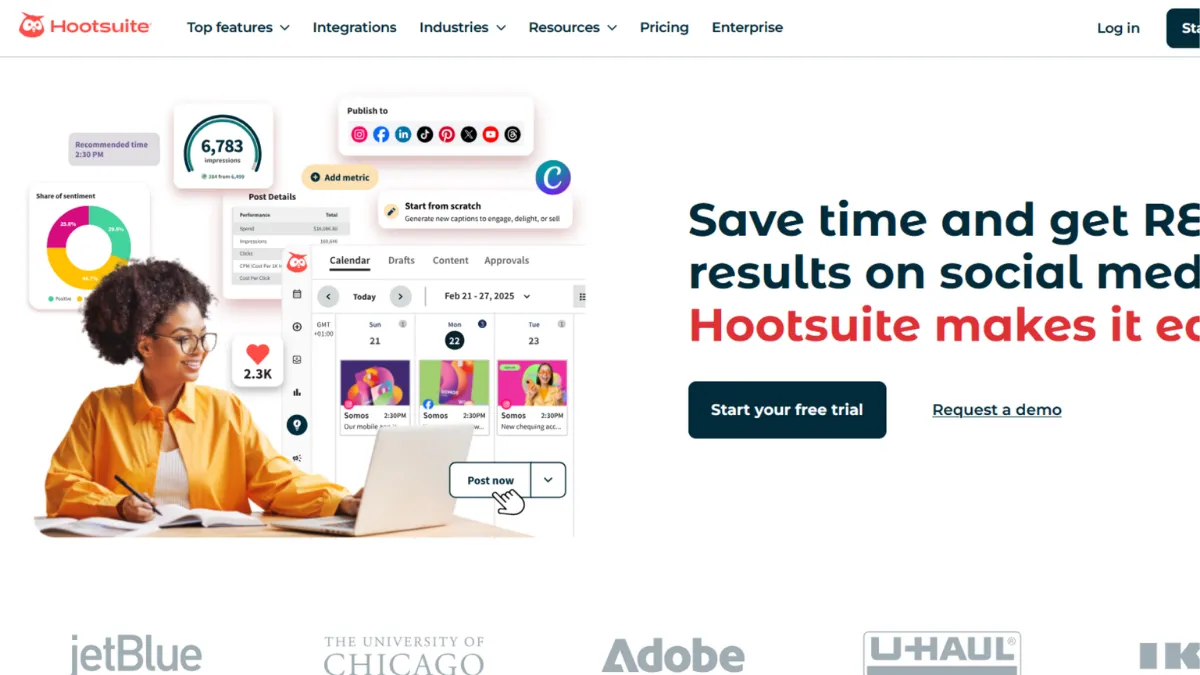
The mechanism behind Hootsuite is a centralised publishing and monitoring layer that connects to every major social network from a single interface. You schedule posts through a Composer that shows you platform-specific previews before anything goes live. The content calendar pulls in posts published outside Hootsuite, so the view is always complete rather than a partial picture of activity. Most users underestimate how much value sits in the unified inbox: every DM, comment, and mention from across all connected accounts flows into one place, filterable by network and message type. The mistake most teams make is treating Hootsuite as a scheduler and ignoring the inbox entirely, which means they lose half the platform's value on day one.
Realistic expectations depend on which tier you are on. The entry paid plan gives one user access to a set number of social accounts with standard scheduling and reporting. Advanced analytics, team collaboration features, and inbox assignment tools require higher tiers. A small team managing three or four social accounts will get meaningful value at the entry level. A marketing team running campaigns across ten or more accounts, with multiple people approving content, needs the Team plan or above. The jump in price between tiers is significant, so map your actual workflow to the feature list before committing.
Hootsuite is built for marketing teams at growth-stage companies and established businesses managing multiple brands or channels. It suits social media managers who need approval workflows, content calendars with cross-platform visibility, and reporting that goes beyond vanity metrics. Agencies managing accounts for several clients also fit the profile well, provided they can absorb the per-account scaling costs.
The platform's main weakness is pricing transparency. Features that feel standard in this category sit behind upgrade prompts. Advanced analytics, social listening at meaningful scale, and the full inbox experience are gated at higher tiers. Founders evaluating Hootsuite on the entry plan should understand they are seeing a limited version of the tool.
The sections below cover how Hootsuite works mechanically, which features deliver most of the value, and how it compares to the most relevant alternatives for different team sizes and budgets.
What Is Hootsuite?
Hootsuite is a social media management platform that lets teams schedule content, monitor engagement, analyse performance, and collaborate on approvals across multiple social networks from a single dashboard. The problem it solves is straightforward: managing five or six accounts natively through each platform's own tools is inefficient, creates gaps in monitoring, and makes cross-platform consistency nearly impossible. Hootsuite consolidates that work. What separates it from a basic scheduler like Buffer is the depth of its inbox, the breadth of its analytics, and the collaboration infrastructure built for teams rather than individuals. The platform connects with over 100 third-party apps and supports the major social networks including Instagram, Facebook, X, LinkedIn, TikTok, YouTube, and Pinterest. Scale signals are meaningful here: Hootsuite is used by a large proportion of Fortune 1000 companies, which reflects its capability at the enterprise end even if the mid-market is its natural home. Understanding how the platform actually processes and surfaces content is the question the next section addresses directly.
How Hootsuite Works
Setup begins with connecting your social accounts. Hootsuite authenticates directly with each platform's API, which means it operates within whatever posting permissions and rate limits each network sets. Once accounts are connected, you compose posts through the Composer, which lets you write once and adapt per platform before scheduling. The calendar view shows everything scheduled across all accounts on one timeline, and it syncs posts published outside Hootsuite so you always see the full picture rather than a blind spot where native posts live.
The inbox streams all incoming messages, comments, mentions, and DMs into a filterable view. At higher tiers, team members can be assigned messages, set response statuses, and use saved replies to handle common queries without drafting from scratch every time. Approval workflows route drafted posts through designated reviewers before anything publishes, which is the feature that makes Hootsuite viable for teams where brand safety matters.
Analytics sit in a separate reporting section. The dashboard pulls engagement, reach, follower growth, and post-performance data across all connected accounts. At higher tiers, custom reports can be built, benchmarked against industry averages, and exported. The AI-powered feature called OwlyGPT surfaces trend signals and content suggestions directly inside the platform, reducing the need to switch between Hootsuite and a separate tool like ChatGPT for content ideation.
The counterintuitive insight most users miss: Hootsuite's content calendar pulling in externally published posts is not just a convenience feature. It is the thing that makes the platform useful as a strategic planning tool rather than only an execution layer. Teams that post natively on some platforms and through Hootsuite on others can still see a unified view of their publishing cadence, which changes how you plan without changing how you post. The practical question that raises is which specific features unlock at which tier, and that is where the key features section becomes important.
Hootsuite Key Features
Composer and Scheduler. The Composer lets you draft a single post and customise it per platform before scheduling. You get a live preview of how content will render on each network, which catches formatting issues before they go live. Best-time-to-post recommendations are generated based on your audience's historical engagement patterns rather than generic averages, making them meaningfully more accurate than guesswork. Bulk scheduling via CSV upload is available, which matters for teams managing high-volume content calendars across multiple accounts.
Unified Inbox. All messages, comments, DMs, and mentions from every connected account route into a single inbox. You can filter by network, message type, and assignment status. Higher-tier plans allow message assignment to specific team members and automated routing for common query types. This is where Hootsuite's value separates most clearly from lightweight schedulers: it is a customer engagement tool, not only a publishing one.
Content Calendar. The calendar displays all scheduled and published content across every connected account. It pulls in posts made outside Hootsuite, so the view reflects reality rather than only what passed through the platform. Filters by account or network let teams narrow the view when needed. Campaign grouping and colour-coding help larger teams organise by initiative without losing the cross-account overview.
Analytics and Reporting. The analytics section covers engagement, reach, impressions, follower growth, and post-level performance. Custom report builders are available at higher tiers, along with industry benchmarking and GA4 data exports. The platform has continued expanding its analytics depth, with TikTok data now available in the Advanced Analytics tier. Where Hootsuite's analytics fall short relative to dedicated tools is granularity at the individual-post level, which connects to Google Analytics for web traffic attribution but lacks the social-specific depth of some specialist competitors.
Team Collaboration and Approvals. Role-based permissions control who can draft, approve, and publish. Approval workflows route content through designated reviewers before it goes live, which is the feature agencies and enterprise teams rely on most. The collaboration layer includes a shared content library for brand assets and a Whiteboard feature for early-stage campaign planning. The limitation worth naming: full collaboration depth, including approval chains and message assignment, requires the Team plan or above, not the entry tier.
Hootsuite Pros and Cons
Hootsuite earns its position at the top of the category on the strength of several genuine advantages, alongside limitations that affect specific user types more than others.
- Cross-platform scheduling depth. Hootsuite supports more social networks with more publishing options than most competitors. The ability to customise posts per platform inside a single Composer, with live previews, saves meaningful time for teams posting across five or more channels.
- Unified inbox for multi-account management. Routing every message, comment, and DM into one filterable inbox is genuinely useful for teams managing several accounts. It changes the inbox from a monitoring tool into an engagement workflow.
- Integration breadth. Connecting with over 100 apps, including Canva, Salesforce, and Google Drive, means Hootsuite fits into existing workflows without requiring a rebuild around it.
- The overlooked content calendar. The calendar pulling in natively published posts is a feature most users do not expect. It gives a true picture of publishing activity across platforms regardless of where the post originated.
- AI content assistance built in. OwlyGPT provides trend signals, caption suggestions, and content ideas inside the platform. For teams without a separate content strategy tool, this reduces the number of tabs open during content planning.
The platform has real limitations that affect certain users significantly.
- Pricing scales aggressively with team size. The entry plan suits one or two users managing a small number of accounts. Adding users and accounts pushes costs up quickly. Teams that outgrow the entry tier often find the next tier jump disproportionate to the incremental feature gain.
- Advanced features are gated at high tiers. Full inbox functionality, advanced analytics, and team collaboration tools require plans that carry a significant monthly cost. Evaluating Hootsuite on the entry plan gives a misleading picture of what the platform can do.
- Interface complexity for new users. The dashboard has a learning curve. Users coming from simpler tools often find the number of options and panel configurations overwhelming in the first week. Onboarding documentation exists but is dense.
- Support quality below the enterprise tier. Users on lower-tier plans report slower response times and less proactive support. If you are not on an enterprise contract, support is largely self-serve via documentation and community forums.
- Social listening is limited at standard tiers. Meaningful keyword and brand monitoring at scale requires the higher-tier plans. Teams that need listening as a core capability may find the entry offering insufficient for their needs.
How to Get the Most Out of Hootsuite
Before you schedule a single post, connect every social account you manage and spend time configuring the inbox filters. Most teams skip this step and end up managing messages natively on each platform anyway, which defeats the purpose of having a unified tool. Set up your streams first: keyword streams for brand mentions, competitor names, and industry terms give you a monitoring baseline even before you publish anything.
In your first week, build your content calendar by importing or drafting content for the next two to four weeks. Use the best-time-to-post recommendations for your first scheduling decisions, then review the analytics after two weeks and adjust. The recommendations improve as the platform accumulates more data about your specific audience, so early decisions are a starting point rather than a fixed rule.
Teams building a consistent publishing workflow should set up approval chains at the start rather than adding them later. Retrofitting approval workflows onto an existing publishing process creates confusion about which posts are cleared and which are still in draft. Configure roles and permissions before inviting team members.
Knowing how to schedule social media posts across multiple platforms efficiently is the core skill Hootsuite rewards. The platforms where you save the most time are the ones with the most formatting variation, such as Instagram carousels, LinkedIn articles, and TikTok videos, because the Composer lets you adapt content per platform without switching tabs. Build templates for recurring post formats, such as weekly roundups or product announcements, inside the content library so the starting point for each week is a structured draft rather than a blank page.
Measure success by tracking engagement rate and inbox response time, not follower count. Hootsuite's analytics are built around the metrics that reflect actual content performance. Set a benchmark in your first month and review it monthly. If your best-performing content format is not what you expected, adjust your scheduling mix rather than your strategy wholesale.
Who Should Use Hootsuite?
Hootsuite fits a specific range of users well and is a poor match for others. Understanding which side of that line you are on saves both money and frustration.
This is for you if you are a social media manager at a company with multiple active channels and more than one person touching content. You need scheduling, approval workflows, and inbox management in one place, and you cannot justify maintaining separate tools for each function. It is also for you if you are a marketing lead at a growth-stage company where the social strategy spans Instagram, LinkedIn, TikTok, and YouTube simultaneously, and where weekly reporting needs to show cross-platform performance in a single view. Agencies managing social content for several clients on separate account sets will also find Hootsuite workable, provided the account volume justifies the per-tier cost.
It is not for you if you are a solo founder managing one or two accounts with no team. A lighter tool handles that workflow at a fraction of the cost and complexity. It is also not the right choice if social listening at scale is your primary use case: the listening functionality at standard tiers is limited enough that you will likely need a dedicated monitoring tool alongside it, which makes the combined cost hard to justify.
Hootsuite Pricing
Hootsuite does not offer a permanently free tier. A trial period is available on paid plans, which gives you time to evaluate the platform before committing. Entry-level paid plans cover a single user and a set number of social accounts, with standard scheduling and basic analytics. The next tier up adds users, more accounts, team collaboration features, and expanded inbox functionality. Enterprise pricing covers large teams with advanced security, custom onboarding, dedicated support, and API access, and requires contacting sales for a quote.
The entry plan is sufficient if you are a solo social media manager scheduling content for a small account set and do not need collaboration or advanced reporting. As soon as a second person needs access to the platform or you need approval workflows, the cost increases substantially. The gap between entry and team-level pricing is one of the most common points of friction users report. Check Hootsuite's pricing page directly for current rates, as pricing in this category changes and third-party sources vary. At the entry level, the value is reasonable for what is delivered. At higher tiers, the value proposition depends on how much of the collaboration and analytics depth you will use. Compared to alternatives, Hootsuite sits at the premium end of the market, which is the context for understanding the alternatives below.
Hootsuite vs Alternatives
Buffer is the most common starting point for teams moving to Hootsuite. Buffer's scheduling interface is cleaner and the pricing is more transparent at the entry level. Where it falls short is the unified inbox: Buffer added engagement tools relatively recently and they remain limited compared to Hootsuite's streams and message assignment. If scheduling is your primary need and your team is small, Buffer wins on simplicity and cost. Hootsuite wins when inbox management and team collaboration matter.
Sprout Social targets the same enterprise and agency market as Hootsuite but positions itself on support quality and inbox sophistication. Sprout's unified inbox includes collision detection, sentiment analysis, and more advanced routing than Hootsuite's equivalent. The trade-off is price: Sprout Social is more expensive across comparable tiers. Choose Sprout if customer care is a central social media function. Choose Hootsuite if you need a broader publishing and analytics platform at a lower price point than Sprout.
Later is worth considering for teams where Instagram and TikTok are the dominant channels and visual content planning is the priority. Later's visual calendar and link-in-bio tools are purpose-built for image and video-first strategies. Hootsuite wins on cross-platform breadth and analytics depth, but Later is a sharper tool for teams whose entire strategy lives on two visual platforms. For teams building content strategies that also rely on Semrush for keyword and competitor research, pairing Later with an SEO tool is a realistic workflow. Hootsuite's broader platform means fewer external tool dependencies for most multi-channel teams.
Hootsuite Review: Final Verdict
Hootsuite earns a 4.19 overall rating across nine dimensions, reflecting a platform that delivers genuine capability at scale but carries pricing and complexity that penalise smaller teams. Its integration breadth scores 4.5, reflecting over 100 native app connections that make it fit existing workflows without friction. Support, at 3.7, reflects the documented gap in responsiveness below the enterprise tier, a real limitation that affects the majority of users on standard plans.
The bottom line: Hootsuite is the right choice for marketing teams managing multiple social accounts who need scheduling, inbox management, and analytics in one place. If you are a solo operator or your needs are primarily scheduling, the cost and complexity are harder to justify.
How We Rated It:
More Tool Reviews







Subscribe to Stay in the loop
Get the latest AI and technology news, honest tool reviews, and practical guides delivered straight to your inbox.
Success! Check your Inbox!

Tezons Newsletter
The latest technology news, in-depth tool reviews, and practical guides - curated and delivered to your inbox.
Latest News




Have a question?
Have any questions?
Didn’t find what you were looking for? We’re just a message away.