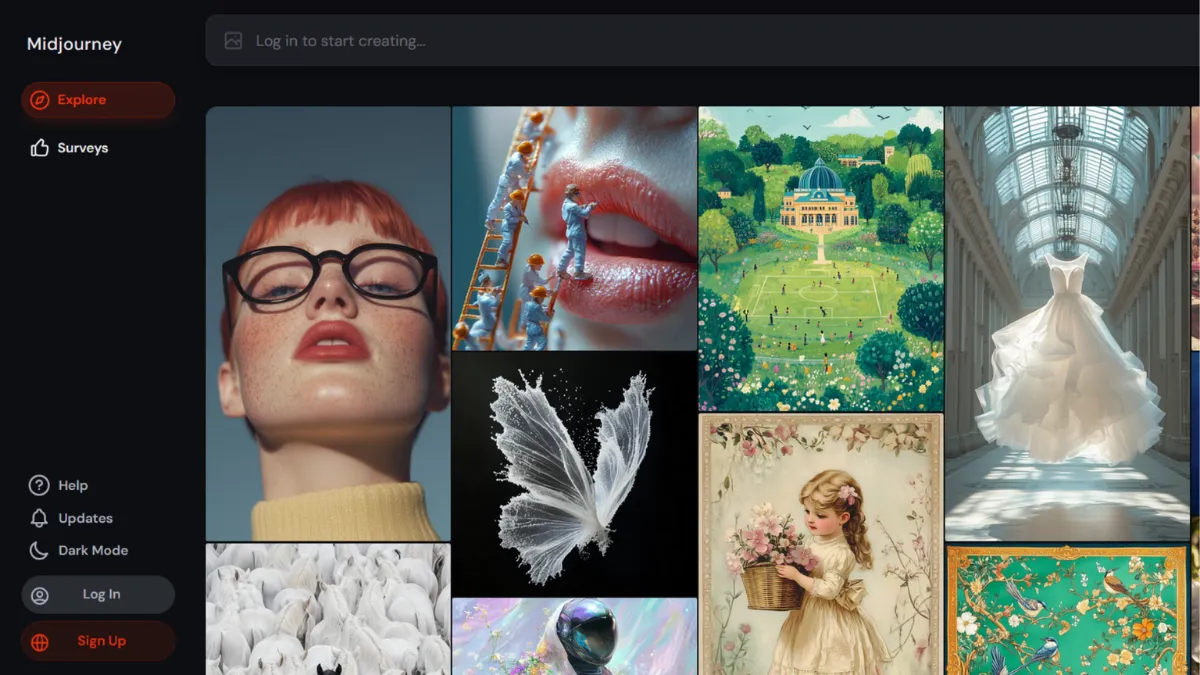
Aesthetic quality has always been the argument for Midjourney, and the current model generation makes that argument harder to dismiss than ever. While competing tools have narrowed the gap on prompt adherence and text rendering, Midjourney still produces images that look like a skilled art director chose the frame, the light, and the mood. For any creative professional who needs visuals that communicate beauty rather than just accuracy, no other subscription tool matches it at this price point. That is the verdict, and the rest of this review exists to tell you exactly where it holds and where it breaks.
The mechanism behind Midjourney's output quality is its model training approach, which consistently prioritises aesthetic coherence over literal instruction-following. When you write a prompt, Midjourney interprets it through a visual intelligence that asks what would make this image compelling rather than what exact arrangement of elements was specified. V7 is the current default model, with V8.1 in alpha testing for subscribers. Each generation returns four image variants, and you can upscale, vary, or edit any of them. The Style Reference and Omni Reference features allow you to feed the model an image that anchors either the visual style or a specific character or object, giving you far more directional control than text prompts alone can provide. Most users discover these reference features late and significantly underuse them, defaulting to text-only prompts and accepting inconsistent results when a style reference would have solved the problem in one step.
Realistic expectations matter here. Midjourney generates visually strong images quickly, typically within a minute in Fast mode. Volume depends on your subscription tier: the Basic plan covers roughly 200 fast generations per month, while Standard adds unlimited Relax mode generations at slower queue speeds. For a solo designer or content team generating a few hundred images monthly, Standard is the practical entry point. For agencies running campaigns at volume, the Pro or Mega tiers are necessary. The onboarding experience has improved considerably since the Discord-only era; the web interface at midjourney.com now handles most workflows cleanly, though Discord remains available for users who prefer it.
Midjourney works best for designers, brand teams, and creative directors who need high-volume visual asset production without a photography budget. It suits editorial teams building campaign concepts, indie game studios generating concept art, and Canva or Figma users who need strong source imagery to bring into layout work. If your output needs to be artistically credible, this is the right tool.
The core limitation is control. Midjourney interprets prompts rather than executing them literally, which means it will sometimes drop specific elements, reposition subjects, or render scenes with pleasing composition at the expense of accuracy. Text rendering inside images remains unreliable for anything beyond short labels or signage. There is no official public API, which makes programmatic integration difficult for development teams. And by default, all images generated on lower-tier plans are visible in the public gallery, which creates a genuine confidentiality problem for commercial work.
The sections below cover how the tool works mechanically, which features drive results, and how it compares against the closest alternatives.
What Is Midjourney?
Midjourney is an AI image generation platform run by an independent research lab, converting text prompts into high-resolution images using a proprietary diffusion model. The problem it solves is the cost and time gap between having a visual idea and having a production-ready image: a campaign concept that would take a photographer and art director a day to shoot can be explored in an hour at a fraction of the cost. What separates Midjourney from generic alternatives is its aesthetic model, which consistently produces images with strong compositional and tonal coherence rather than the flat, stock-photo quality common in lower-tier generators. The platform has attracted a community of millions of active users across its Discord server and web interface, making it one of the most-used AI creative tools in commercial circulation. The natural question that follows is how its generation process actually works under the hood.
How Midjourney Works
Midjourney uses a diffusion model architecture: starting from noise and iteratively refining toward an image that satisfies the conditions set by your prompt. The model was trained on a large dataset of images, giving it a visual vocabulary that covers photorealism, illustration, concept art, architectural rendering, and dozens of other categories. You write a text prompt, optionally attach image references, set parameters like aspect ratio or stylisation level, and the model returns four candidate images in roughly one to two minutes on Fast mode.
The parameter system is where experienced users gain meaningful control. The --stylize value (ranging from 0 to 1000) determines how strongly the model applies its aesthetic biases versus following the prompt literally. Low stylize values produce more literal interpretations; high values produce more artistically opinionated results that may diverge from the brief. The --chaos parameter introduces variation across the four outputs, useful when you want a wider range of concepts rather than four similar takes. Aspect ratio, quality level, and model version can all be set per prompt.
The reference system is the most underused part of the tool. Style Reference lets you upload an image whose visual tone the model should match, while Omni Reference (available in V7) lets you anchor a specific character or object from a reference image into new scenes. These features shift the interaction model from writing descriptive prose to curating and combining visual inputs. The counterintuitive truth most users miss: prompt length does not equal prompt quality. A 300-word prompt is not more effective than a 30-word prompt with a well-chosen style reference. The model weights visual references heavily, so pairing concise text with strong reference images typically outperforms verbose text-only prompting. That practical shift in technique leads directly to the question of which specific features most affect output.
Midjourney Key Features
V7 Model with Draft Mode. V7 is the current default model and the strongest Midjourney has shipped for photorealism and prompt adherence. Draft Mode generates lower-resolution images at roughly a quarter of the GPU cost, making it practical for rapid concept iteration before committing Fast hours to full-quality outputs. Most professional workflows benefit from using Draft Mode for the first two or three rounds and switching to full quality only for shortlisted results.
Style Reference and Omni Reference. Style Reference feeds a reference image into the model to anchor visual tone, colour palette, and rendering style. Omni Reference, which replaced the earlier Character Reference in V7, lets you pull a specific person, creature, or object from a reference image and place it into new scenes. The Omni weight parameter controls how strictly the model adheres to the reference, from a loose suggestion at low values to a near-literal match at high values. These two features together make consistent visual identity across a content series achievable without manual editing.
Web Editor with Inpainting and Outpainting. The web interface at midjourney.com includes an editing layer that allows region-based editing (inpainting) and canvas extension (outpainting). Selecting an area of an image and rerunning the prompt regenerates only that region, which is the most practical way to fix common generation problems like incorrect hand anatomy or unwanted background elements. Outpainting extends the canvas in any direction, useful when the original crop is too tight for a layout. These tools make the output more usable without requiring a separate editing application for most fixes, though users working with Adobe Express or Photoshop will still find those environments more controllable for precision work.
Personalisation and Moodboards. Midjourney's personalisation feature trains a style model on images you rate, gradually calibrating outputs toward your aesthetic preferences. Moodboards allow you to group multiple style references and blend their influence in a single generation. Both features take time to develop value: personalisation requires a meaningful volume of ratings before the calibration becomes perceptible. The immediate payoff is low, but for heavy users who generate images daily, the long-term result is outputs that require less iteration.
Niji Model for Anime and Illustration. Midjourney offers a parallel model series called Niji, developed with Spellbrush for Eastern-influenced and anime aesthetics. Niji 7 is the current version. If illustration or anime-style output is the primary use case, Niji handles it more reliably than the main model. The absence of a formal API limits how teams can automate generation at scale, which is worth noting before building any workflow that depends on programmatic access.
Midjourney Pros and Cons
Midjourney has genuine strengths that make it worth the subscription for the right user, alongside real limitations that will eliminate it as an option for others.
- Best-in-class aesthetic output. Midjourney consistently produces images with a level of compositional and tonal quality that competitors have not reliably matched. For campaign imagery, editorial visuals, and concept art, the quality differential is visible at full resolution.
- Relax mode makes Standard genuinely unlimited. Once Fast GPU hours run out on the Standard tier, Relax mode continues generating images at slower speeds with no additional cost. For users not working to tight deadlines, this removes the ceiling on monthly output.
- Style and Omni Reference reduce iteration time. Pairing visual references with text prompts produces more consistent results than text alone, cutting the number of generations needed to reach a usable output. Most users who complain about inconsistency have not adopted the reference workflow.
- Web interface removes Discord dependency. The full-featured web app handles prompt submission, image management, editing, and reference uploads without requiring Discord. This was a genuine barrier to professional adoption in earlier versions of the tool.
- Commercial use included on all paid plans. Every paid subscriber owns the images they generate and can use them commercially, without a separate licensing step. The only exception is companies generating more than $1 million in annual revenue, who must be on Pro or Mega.
The limitations are specific enough to rule Midjourney out for certain workflows.
- Text rendering is unreliable. Images requiring legible text, such as posters, logos, or infographics, remain problematic. V8.1 Alpha improves on earlier models, but multi-word text and complex typography are still prone to errors. If text accuracy inside images matters, look at alternatives built for that use case.
- No official public API. Programmatic access to Midjourney generation does not exist through an official API. Development teams needing to integrate image generation into an application cannot do so without third-party workarounds, which carry reliability risks.
- All images are public on Basic and Standard plans. Stealth Mode, which keeps generated images private, requires the Pro plan at $60 per month. Anything generated on cheaper plans appears in the public gallery, creating a confidentiality issue for commercial briefs.
- Prompt interpretation over prompt execution. The same aesthetic intelligence that produces beautiful images also means Midjourney will sometimes ignore specific instructions. Object counts, precise spatial arrangements, and exact detail specifications are handled less reliably than in tools built for instruction-following.
- No free trial. Midjourney removed its free trial tier due to demand and abuse. Testing the tool requires purchasing a paid plan, which raises the barrier for new users evaluating whether it fits their workflow.
How to Get the Most Out of Midjourney
Before generating a single image, set your default model and aspect ratio in the settings panel. Most professional content is not square, and adjusting the ratio from 1:1 to 16:9 or 4:5 before you start saves unnecessary cropping later. Spend the first session running Draft Mode at low stylise values to establish whether the model's default interpretation of your subject matches your brief. This costs a fraction of the Fast GPU hours that full-quality generation requires.
The most impactful technique shift for new users is moving from text-only prompts to reference-led prompts. Collect three to five images that represent the visual direction you want and use them as Style References rather than attempting to describe visual qualities in text. Concepts like photographic style, colour grading, and atmospheric mood are extremely difficult to specify verbally and extremely easy to communicate visually. This is how to get consistent results in Midjourney: anchor the style with an image, use the text prompt to specify subject and action, and iterate from there.
Over the first week, rate images using the platform's built-in rating system to begin training personalisation. The effect is not immediate, but after several hundred ratings, Midjourney begins filtering toward your aesthetic preferences by default, which reduces iteration time significantly over longer usage.
The mistake most users make is generating too many images without reviewing what is working. Saving strong outputs and using them as the basis for Omni Reference in subsequent sessions creates a compounding consistency effect: each generation anchors the next, and the visual language of a project becomes self-reinforcing.
To measure success, track the ratio of images generated to images used. If you are generating thirty images to find one keeper, prompt quality or reference quality is the problem. If you are generating five images and using three, the workflow is calibrated. Monitor your Fast GPU hours on the Standard plan: if you routinely burn through them in the first ten days of a billing cycle, upgrading to Pro is more cost-effective than managing around the Relax mode queue.
Who Should Use Midjourney?
Midjourney is for you if your work is judged on visual quality and you need images at a volume that makes photography impractical. A brand designer producing campaign concepts, a content team generating editorial imagery for a publication, or an indie game developer building concept art libraries will all find the tool fits the workflow. The aesthetic output quality is high enough to present to clients without significant post-processing, which is the bar that matters for professional use.
It also suits solo creators and freelancers who use tools like Buffer or Hootsuite to manage social content pipelines: generating a week of campaign imagery in a single session and scheduling distribution through a separate tool is a practical workflow that Midjourney enables without requiring a photography budget.
Midjourney is not for you if you need reliable text rendering inside images, precise instruction-following, or programmatic API access for an application build. Development teams integrating image generation into a product need a tool with a proper API. Marketing teams producing infographics, posters, or any creative where a specific piece of text must appear correctly inside the image will face consistent friction. Legal or compliance teams at larger organisations may also find the copyright ambiguity around Midjourney's training data a genuine business risk, in which case Adobe Firefly's indemnification model is the more defensible choice.
Midjourney Pricing
Midjourney offers four paid tiers with no free trial. The Basic plan covers roughly 200 fast generations per month and is the entry point, though it carries a notable restriction: there is no Relax mode, so once Fast hours are exhausted, generation stops until the billing cycle renews. Most regular users find Basic inadequate for sustained creative work.
Standard is the practical entry point for anyone generating images regularly. It includes more Fast GPU hours and, critically, unlimited Relax mode generations. Relax mode is slower but has no ceiling, which makes Standard a genuinely unlimited plan for users who can tolerate queue times. Pro and Mega tiers add Stealth Mode, more Fast GPU hours, and more concurrent jobs, with Mega providing 60 Fast hours per month at the highest price point. Annual billing reduces costs by 20% across all tiers. Businesses generating more than $1 million in annual revenue are required by Midjourney's terms to subscribe at Pro or above.
Check midjourney.com for current pricing, as rates are subject to change. Compared to alternatives, Midjourney's subscription model is competitive for the output quality delivered, but the absence of pay-per-use pricing means the cost does not scale down for low-volume users.
Midjourney vs Alternatives
The most direct quality competitor is DALL-E, now integrated into ChatGPT. DALL-E's core advantage is prompt adherence: it follows complex, multi-element descriptions more literally than Midjourney does, and it handles text rendering inside images far more reliably. For UX mockups, instructional illustrations, or any image where the brief must be executed precisely, DALL-E is the stronger choice. Midjourney wins clearly on aesthetic quality for artistic and photorealistic work where visual impact matters more than literal accuracy.
Adobe Firefly, which is built into Adobe Creative Cloud and accessible through Adobe Express, is the only major generator trained exclusively on licensed content. Adobe provides commercial indemnification for enterprise customers, which makes it the defensible choice for legal and compliance teams. The trade-off is creative range: Firefly's output is competent but does not match Midjourney's aesthetic ceiling, and generation credits are limited per plan tier.
Stable Diffusion is the open-source alternative for technically capable users who want complete control and privacy. It runs locally, requires no subscription, and can be fine-tuned on custom datasets. For a developer or researcher who needs full ownership of the generation pipeline, Stable Diffusion is the right tool. The learning curve and infrastructure requirement disqualify it for non-technical users.
Leonardo AI offers a middle ground: a subscription-based web platform with more generation controls than Midjourney and a free tier for new users. It suits teams that want API access and adjustable fine-tunes without managing local infrastructure. Midjourney's output quality still leads for purely artistic work, but Leonardo's flexibility and API availability make it worth evaluating for teams building image generation into products.
Midjourney Review: Final Verdict
Midjourney earns a 4.21 overall score, reflecting its position as the strongest tool in its category for aesthetic output quality while carrying real limitations in control, API access, and privacy on entry-tier plans. The Functionality score of 4.5 reflects the breadth of the reference and editing system; the Integrations score of 3.5 reflects the absence of an official API, which is a genuine gap for teams building automated workflows. For designers, brand teams, and content creators whose primary measure of success is visual quality, Midjourney is the right subscription. Teams that need text accuracy, programmatic access, or copyright indemnification should evaluate alternatives first.
How We Rated It:
More Tool Reviews







Subscribe to Stay in the loop
Get the latest AI and technology news, honest tool reviews, and practical guides delivered straight to your inbox.
Success! Check your Inbox!

Tezons Newsletter
The latest technology news, in-depth tool reviews, and practical guides - curated and delivered to your inbox.
Latest News




Have a question?
Have any questions?
Didn’t find what you were looking for? We’re just a message away.