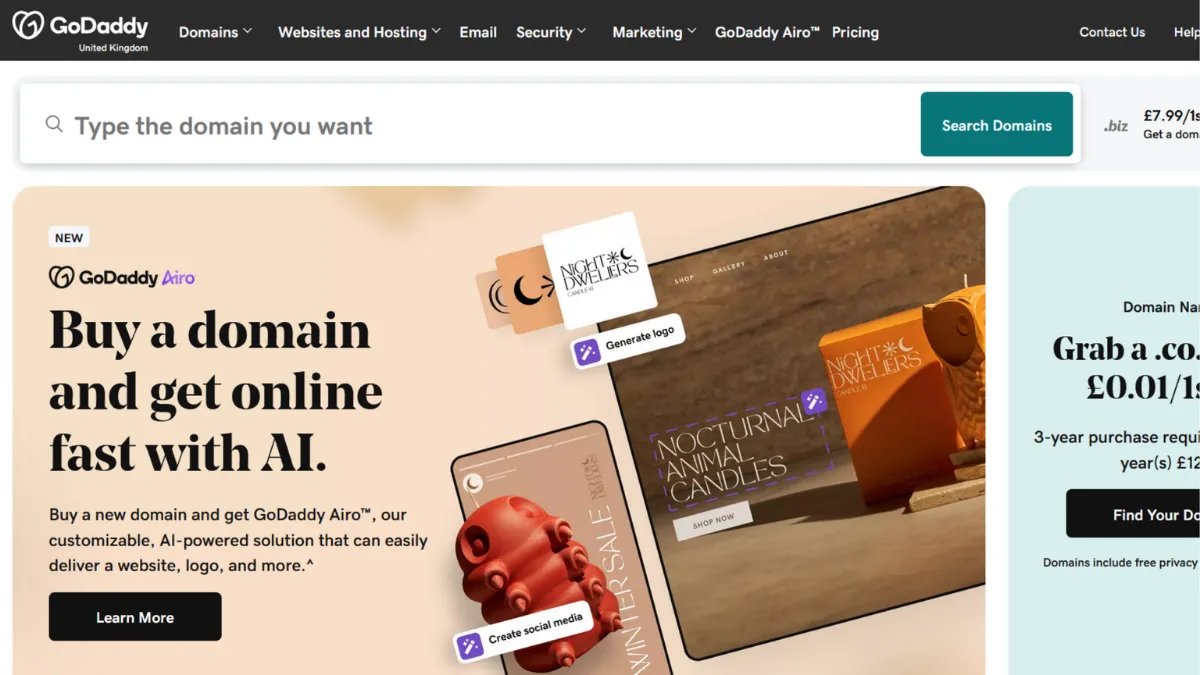
GoDaddy built its reputation as the world's largest domain registrar, and that origin still defines what it does best: getting a business online quickly, with every essential service available under one roof. The platform spans domain registration, web hosting, a website builder with AI generation, email, and marketing tools. For a solo founder who wants a professional web presence without the overhead of stitching together four separate vendors, GoDaddy is a serious option. The question is whether its breadth translates into enough depth for your specific use case.
The mechanism behind GoDaddy's appeal is consolidation. When your domain, hosting, SSL certificate, and business email all live in the same account, friction disappears: DNS propagation is handled automatically, there is no need to point nameservers across different platforms, and support calls go to one team. GoDaddy Airo, the platform's AI suite bundled with every new domain purchase, extends this logic by generating a logo, a one-page site, and initial marketing copy from a short business description. Where most founders get stuck is assuming that Airo's output is a finished product. It is a starting point. The quality of the generated site depends heavily on the detail you supply in the brief, and the proprietary website builder has real constraints on layout customisation that require manual effort to work around.
Expect to get a presentable, mobile-responsive site live within a day for a service-based business. Hosting performance is generally solid for low-to-moderate traffic, with a 99.9% uptime claim across shared plans. Managed WordPress hosting delivers noticeably faster load times for content-heavy sites. However, if your site needs to handle significant concurrent traffic or you are running complex e-commerce, shared hosting will eventually become a ceiling. Renewal pricing tends to be materially higher than introductory rates, so calculate your year-two cost before committing to a multi-year plan.
GoDaddy is the right tool for solopreneurs, freelancers, and small service businesses that need a credible online presence, a reliable domain, and basic marketing tools without a technical co-founder. It suits founders who already hold a domain with GoDaddy and want to consolidate their stack rather than manage separate hosting and email accounts. Early-stage founders validating an idea with a simple landing page will find the AI generation genuinely useful.
The website builder's customisation ceiling is a genuine constraint. Layout changes are limited to toggling pre-designed sections on and off. You cannot freely reposition elements, adjust individual font sizes without changing the entire site, or add custom code. Founders who want design control comparable to Webflow or Squarespace will hit this wall quickly.
The sections below cover how GoDaddy works mechanically, where it earns its scores across nine dimensions, and which competitors you should evaluate before deciding.
What Is GoDaddy?
GoDaddy is a web services platform and the world's largest domain registrar by volume, offering domain registration, web hosting, a drag-and-drop website builder, managed WordPress hosting, business email, and an AI-powered toolset called GoDaddy Airo. The core problem it solves is the fragmentation that plagues early-stage businesses: buying a domain in one place, hosting in another, and email somewhere else creates unnecessary complexity. GoDaddy bundles these into a single account and dashboard. What differentiates it from a generic hosting provider is scale and ecosystem depth. Millions of domains are registered through the platform, giving GoDaddy strong DNS infrastructure and a large ecosystem of add-on products ranging from SSL certificates to payment processing. The Airo suite, introduced as an AI layer across all services, generates branding assets and site content at the point of domain purchase. The natural question is how these AI-generated assets connect to GoDaddy's broader hosting and marketing infrastructure, which is where understanding the mechanics becomes important.
How GoDaddy Works
Setup begins with a domain search. GoDaddy Airo activates immediately after purchase, prompting you to describe your business in a few sentences. From that input it generates a logo, a colour palette, a one-page site, and draft social media posts. You can accept these outputs, modify them inside the website builder, or discard them and start from scratch. The website builder operates on a section-based model: you add pre-built content blocks (hero, services, testimonials, contact form) and customise the text and images within them. You cannot drag elements freely or edit the underlying HTML unless you opt for WordPress hosting instead.
For founders choosing WordPress, GoDaddy's managed WordPress plans provision the server environment, handle automatic core updates, and include a staging environment on higher tiers. WordPress opens the full plugin ecosystem, meaning you can layer in tools like Rank Math for SEO or connect to third-party analytics. The trade-off is that managed WordPress costs more than basic shared hosting and requires more ongoing maintenance than the proprietary builder.
Email hosting sits alongside the website in the same dashboard. You can provision a branded email address during the domain setup without switching tabs or copying DNS records manually. Marketing email, social scheduling, and basic CRM features are available within higher-tier website builder plans, consolidating outbound activity under the same login. The counterintuitive insight most users miss is that GoDaddy's tightest integration benefit is not the AI generation but the DNS consolidation: when domain and hosting share an account, SSL issuance and domain verification happen automatically, removing a step that trips up most first-time site owners on third-party hosts. What the platform does not integrate natively is any serious analytics layer, so connecting Google Analytics to your GoDaddy site is still a manual step you will need to complete separately.
GoDaddy Key Features
Domain Registration and Management. GoDaddy operates one of the largest domain inventories in the industry, covering standard TLDs as well as hundreds of country-code and new-generic extensions. The domain dashboard consolidates renewal management, DNS editing, WHOIS privacy, and domain forwarding in one place. Bulk domain management is available for founders holding multiple properties. The Airo Domain Search Agent recommends brandable domain names based on your business description and checks availability across popular extensions automatically.
GoDaddy Airo AI Suite. Airo generates a logo, a one-page site, business name suggestions, draft social posts, and basic marketing copy from a short text prompt at the point of domain purchase. The Airo App Builder extends this by converting a plain-language description into a hosted web application with forms and basic data storage. A Compliance Agent drafts privacy policies and terms of service based on business type, though these outputs require independent legal review before use. The suite is included with any new domain purchase rather than sitting behind a separate subscription.
Website Builder with Section-Based Editor. The proprietary website builder uses pre-designed content sections that you add, reorder, and populate with your own text and images. Templates are mobile-responsive. Higher-tier plans include appointment booking, social media scheduling, and basic email marketing. The editor requires no technical knowledge and a typical small business site can be published within a few hours. The constraint is that layout customisation is confined to what the section library allows, with no free-form element placement or custom code injection.
Hosting Options Across Multiple Tiers. GoDaddy offers shared hosting for basic sites, managed WordPress hosting with automatic updates and staging, VPS hosting for greater resource control, and dedicated servers for high-traffic or resource-intensive applications. Shared plans advertise a 99.9% uptime commitment and include a free SSL certificate. Managed WordPress plans provide faster load times relevant to content-heavy sites and are worth the additional cost if WordPress is your chosen CMS.
Business Email and Productivity Tools. Branded email provisioned through GoDaddy connects to the same domain and DNS setup without external configuration. Microsoft 365 plans are available as an add-on for teams that need full productivity software alongside their domain. The integration means new team members can receive a branded email address and calendar access from the same admin panel used to manage hosting. This consolidation is practically valuable for founders who do not want to manage separate G Suite or Microsoft tenancies early in their build. The limitation worth noting is that email marketing beyond basic campaign sending typically pushes you toward dedicated tools, and connecting platforms like Mailchimp or Klaviyo for more sophisticated automation requires standard third-party integration rather than a native workflow.
The section-based builder and the limited customisation it affords raise an immediate practical question: how far can it take you before the constraints become a problem?
GoDaddy Pros and Cons
Here is what works well for most founders using GoDaddy.
- Genuine one-stop consolidation. Domain, hosting, SSL, and email provisioned under one login removes vendor management overhead at the stage when founders have the least spare time. The DNS automation between GoDaddy services alone saves meaningful setup effort.
- Airo lowers the barrier to a live site. AI-generated logos, copy, and a one-page site from a single text prompt give non-technical founders a credible starting point in under an hour. The output quality is suitable for validation and early customer conversations.
- Strong uptime and performance at the entry level. Shared hosting performs reliably for small to moderate traffic loads, and managed WordPress plans deliver genuinely faster page speeds for content sites. GoDaddy's infrastructure scale means the basics are handled competently.
- 24/7 support access. Phone and chat support are available around the clock, which matters when a domain issue surfaces outside business hours. Response quality varies, but access does not.
- Free Airo suite with domain purchase. Receiving AI-generated branding, a one-page site, and a compliance agent at no additional cost with a domain purchase delivers strong early value, particularly for founders bootstrapping their initial web presence.
Here is where GoDaddy creates friction.
- Renewal pricing jumps significantly. Introductory rates are promotional. Year-two costs for both domain and hosting plans are often materially higher. Calculate the full multi-year cost before committing, especially on annual hosting plans.
- Website builder customisation is tightly constrained. The section-based editor does not allow free element placement, custom font sizing at the individual level, or code injection. Founders who outgrow the template library have no upgrade path within the proprietary builder.
- E-commerce tools are basic. Selling through the native website builder works for simple physical or digital product catalogues, but inventory management, advanced discount rules, and abandoned cart recovery are limited compared to dedicated platforms. Shopify or WooCommerce serve serious e-commerce needs far better.
- Add-on costs accumulate quickly. Advanced security features, site migration, and CDN integration sit behind additional purchases rather than being included in base plans. The entry price understates the true cost for a site with modest security requirements.
- Support quality is inconsistent. While 24/7 access is a genuine plus, response depth varies by channel and agent. Complex technical issues sometimes require multiple contacts to resolve, which is a real cost in a time-sensitive situation like a domain outage.
How to Get the Most Out of GoDaddy
Before you buy a domain, have a clear one-sentence description of your business ready. Airo's generation quality scales directly with prompt quality. A vague input like 'marketing agency' produces generic output. A specific input like 'B2B content marketing for SaaS companies, London-based, specialising in long-form SEO' produces assets that are actually usable. Take two minutes on this before purchasing and you will save an hour of editing.
In your first session, connect Google Analytics to your site through the settings panel. GoDaddy's built-in analytics cover basic page views, but you will want behavioural data and goal tracking from day one rather than retrofitting analytics after your first traffic spike. The integration requires pasting a tag rather than installing a plugin, so it takes under five minutes on any plan.
If you are asking how to build a small business website quickly without technical knowledge, GoDaddy's Airo workflow is one of the fastest available: domain search, brief, site generation, and publish can happen within a single session. The key is to treat the generated site as a draft. Swap the AI placeholder copy for your actual value proposition before sending any traffic to the URL.
For managed WordPress users, install a caching plugin and configure your chosen SEO tool in the first week rather than after launch. Page speed directly affects search ranking, and post-launch optimisation on a live site carries more risk than setting it up correctly from the start. Plan for renewal pricing in your annual budget from month one. The most common mistake is treating the introductory rate as the ongoing cost and then absorbing an unplanned expense at renewal. Set a calendar reminder thirty days before your plan renews to evaluate whether the tier still fits your traffic and feature requirements, or whether moving to a higher or lower tier makes more sense.
Who Should Use GoDaddy?
This is for you if you match one of these three profiles. First, you are a service-based founder, consultant, or freelancer who needs a professional domain, a clean site, and a branded email address up and running within a day, without a developer or separate hosting vendor. GoDaddy's consolidated setup handles this faster than any multi-vendor alternative. Second, you are an early-stage founder validating an idea who wants a credible landing page without committing to a complex CMS. Airo generates a usable one-page site from a prompt, which is sufficient for collecting early signups or sending to potential customers. Third, you are an existing GoDaddy domain holder who wants to consolidate hosting, email, and marketing under one login rather than managing separate accounts with separate billing cycles.
GoDaddy is not the right choice if you are building a content-heavy editorial site that depends on SEO performance and design flexibility, an e-commerce store with more than a basic product catalogue, or a web application with custom functionality. Developers who want full infrastructure control at a competitive price will find VPS and cloud providers such as DigitalOcean or AWS more capable at equivalent cost. Designers or brand-focused founders who need pixel-level layout control will be constrained by the section-based builder from day one and should look at Webflow or Squarespace instead.
GoDaddy Pricing
GoDaddy's pricing spans several distinct product categories, and the entry cost for each is structured as a promotional introductory rate. Domain registration for common TLDs starts at competitive prices, with renewal costs higher than the first-year promotional rate. Website builder plans include a free tier with significant limitations on storage, security, and domain customisation. Paid website builder tiers add a custom domain, increased storage, social scheduling, and e-commerce capability on higher plans. Managed WordPress hosting carries an additional premium over basic shared hosting but includes performance optimisations and automatic updates. Check GoDaddy's pricing page for current rates, as introductory and renewal figures change frequently.
The free website builder tier is sufficient only for testing the interface. Any serious use requires a paid plan to connect a custom domain and access basic security features. For most solo founders, the mid-tier website builder plan covers the essentials: custom domain, business email connection, and appointment or social scheduling tools. E-commerce capability is gated to higher tiers. Advanced security features like DDoS protection and CDN integration require separate purchases on top of the base plan cost, so factor those into your budget if site security is a concern. Relative to dedicated competitors, GoDaddy's pricing is reasonable when you account for the consolidation value but less competitive when purchased as a standalone website builder against tools like Squarespace.
GoDaddy vs Alternatives
The most relevant comparisons depend on which part of GoDaddy's stack you are evaluating. For domain registration alone, Namecheap consistently offers lower renewal pricing and a cleaner domain management interface. If renewal cost is your primary concern, Namecheap wins on price. GoDaddy wins when you want domain, hosting, and email provisioned together without manual DNS configuration.
For website building, Squarespace offers significantly more design control, better template quality, and a more polished editing experience. Squarespace suits founders for whom the site is a brand asset rather than a utility. GoDaddy suits founders who want the site live quickly and will not invest time in design refinement. For more advanced design flexibility without code, Webflow is the stronger tool, though its learning curve is steeper and its pricing higher.
For hosting specifically, Bluehost is a direct comparable for WordPress-focused founders who want beginner-friendly managed hosting at a similar price point. Bluehost's onboarding for WordPress is slightly more streamlined. GoDaddy's advantage is that domain and hosting management sit in the same dashboard if you already hold your domain there. For e-commerce, Shopify is the clear winner over GoDaddy's native store. GoDaddy's commerce tier works for a handful of products but does not scale to a serious product catalogue. Shopify's ecosystem, payment integrations, and inventory management are substantially more capable.
GoDaddy Review: Final Verdict
GoDaddy earns an overall score of 4.10 out of 5, reflecting a platform that delivers genuine value in consolidation and ease of setup, with real constraints in customisation and e-commerce depth. Its highest dimension score is ease of use, where the Airo workflow and unified dashboard make getting online faster than almost any comparable stack. Its lowest dimension is customisation at 3.6, which reflects the section-based builder's structural limits rather than a fixable configuration issue.
The bottom line: GoDaddy is the right call when speed of setup and vendor consolidation matter more than design control or advanced functionality. If your priority is a professional presence live this week, with domain, hosting, and email in one place, GoDaddy is a dependable choice. If you need a site that scales with your brand or an e-commerce operation with serious requirements, evaluate purpose-built alternatives before committing.
How We Rated It:
More Tool Reviews




Subscribe to Stay in the loop
Get the latest AI and technology news, honest tool reviews, and practical guides delivered straight to your inbox.
Success! Check your Inbox!

Tezons Newsletter
The latest technology news, in-depth tool reviews, and practical guides - curated and delivered to your inbox.
Latest News




Have a question?
Have any questions?
Didn’t find what you were looking for? We’re just a message away.