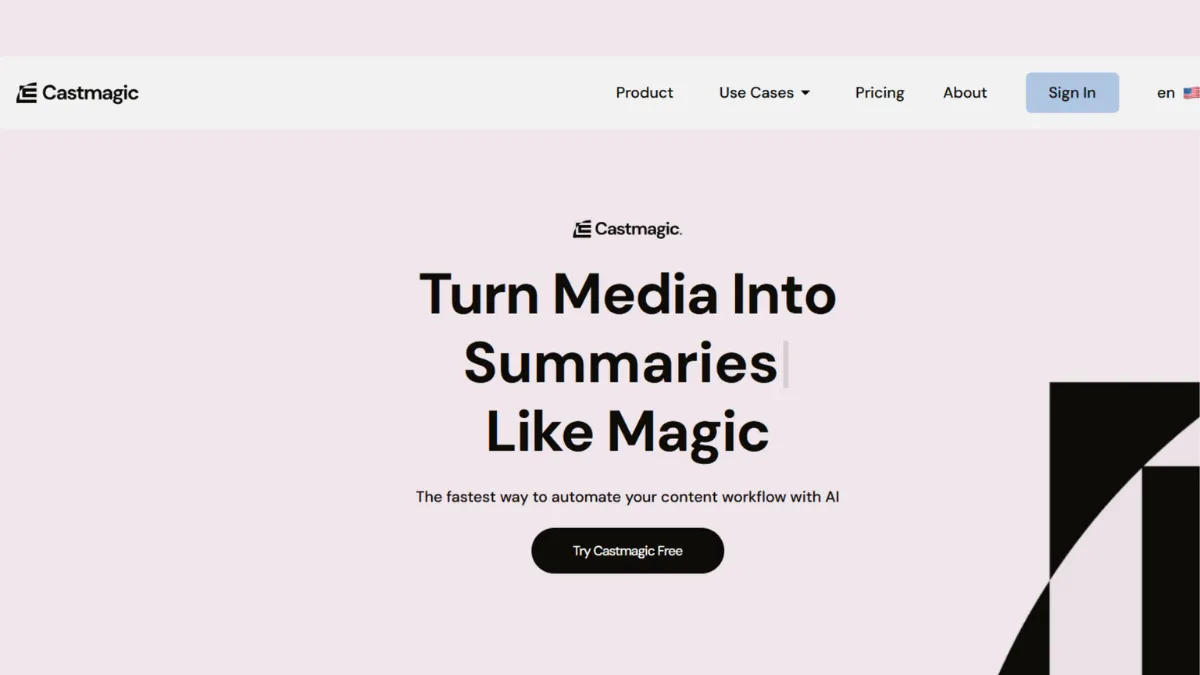
Most podcasters and video creators spend more time on the hour after recording than on the recording itself; writing show notes, pulling quotes, drafting social posts, turning a 45-minute conversation into a blog post. Castmagic is built to close that gap. You upload a finished audio or video file, the platform transcribes it and applies a library of AI-powered prompt templates, and you end up with show notes, a blog draft, social captions, email copy, and chapter markers without opening a second tool or typing a sentence from scratch.
The mechanism is transcript-first. Castmagic transcribes your file, assigns speaker labels to each voice, and then runs your chosen preset templates against that transcript to generate content in parallel. Every output, from a timestamped overview to a LinkedIn post, traces back to what your speakers actually said. The tool does not invent; it extracts and restructures. A well-recorded, tightly structured conversation produces assets you can ship with light editing. A rambling ninety-minute roundtable with four overlapping voices produces a messier transcript and messier outputs to match.
The platform serves over 75,000 creators and businesses and has processed more than ten million minutes of content. Users span weekly podcast hosts, B2B marketing teams turning webinar recordings into campaign assets, sales teams converting recorded calls into follow-up copy, and coaches distributing session recaps to clients. The common thread is recurring, high-volume recorded content: the tool pays for itself when it replaces two to four hours of manual post-production work per episode.
Castmagic suits creators and small teams producing at least two to three hours of recorded content per week. Below that threshold the time savings are real but the subscription cost may not justify itself over a general AI writing tool like ChatGPT paired with a pasted transcript. Above that threshold, the preset library, Magic Chat, and team pipeline make it the most purpose-built repurposing tool in the category.
What Castmagic does with a finished recording
Upload begins by submitting an audio file, video file, or URL import from YouTube, TikTok, or Instagram. Castmagic also connects to Zoom and Google Drive, so recordings from either platform can be pulled directly without manual downloading. Once submitted, the platform transcribes the file using AI speech recognition, applies speaker diarisation to separate multiple voices, and generates a timestamped, searchable transcript. Speaker labels can be named and saved, so returning guests or regular team members are identified correctly on future uploads without re-assigning them each time.
From the transcript, presets run in parallel. Castmagic ships with use-case-specific preset collections: one for podcasts, another for YouTube videos, another for meetings, another for sales calls, coaching sessions, and customer research. Each preset contains a bundle of AI prompts mapped to specific output types, such as show notes, key takeaways, blog drafts, email newsletters, LinkedIn posts, quote cards, YouTube descriptions, and chapter markers. You can edit every prompt inside a preset, write custom ones from scratch, and save configurations per workspace. A workspace can represent a different show, a different client, or a different content format, keeping brand voices and prompt libraries cleanly separated.
Magic Chat sits alongside the preset outputs for each uploaded file. It is a file-specific AI chat interface: you ask it anything about the recording and it answers from the transcript. Pull out the three strongest arguments from a debate. Generate a cold email follow-up from a sales call. Rewrite the opening paragraph in a more casual tone. Draft five potential episode titles. The presets handle repeatable, structured outputs; Magic Chat handles everything the presets cannot anticipate.
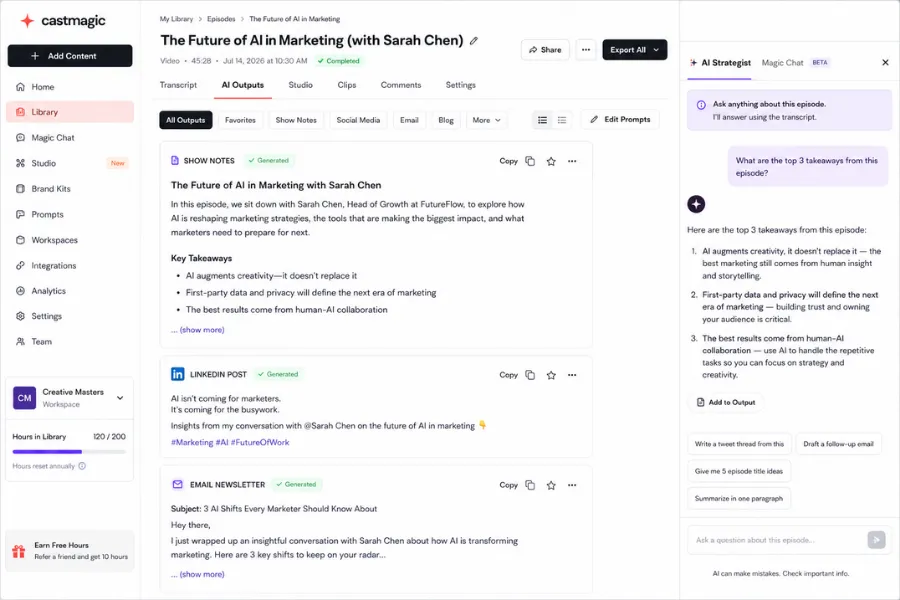
The step most users skip is transcript review before generating outputs. Three minutes spent correcting speaker label errors and obvious transcription mistakes pays dividends across every asset the tool subsequently generates. Attribution errors in quotes, a speaker misidentified mid-conversation, will cascade into show notes and social posts unless caught at the transcript stage. Treating transcript review as optional is the most reliable way to publish content with inaccuracies baked in.
Where Castmagic earns its score, and where it falls short
The rating across nine dimensions produces an overall score of 4.22 out of 5. That figure reflects a tool that does its specific job well while carrying real limitations on the periphery.
Functionality scores highest at 4.7. The preset library is broad and deeply configurable. Prompts are editable at the individual level, not just the template level, and the workspace system lets teams maintain separate brand voices per client or show. Magic Chat extends the tool into territory that no preset library can cover. The Studio feature adds audiogram generation and media clipping from specific transcript segments, creating a direct route from quote selection to shareable audio clip without a separate design tool. Castmagic also integrates with Claude, allowing users to run their full content library through Claude's reasoning to build long-form assets - a course outline, a lead magnet, a book chapter - from accumulated back-catalogue content. That is a meaningful capability leap beyond basic episode-by-episode repurposing.
Customisation and flexibility score 4.5. Driven by the depth of prompt editing available at every plan tier and the workspace architecture that prevents brand voice contamination across clients or shows.
Accuracy and reliability score 4.3. Transcription quality is strong for clear English-language audio with a single speaker or well-separated multiple speakers. Heavy accents, overlapping speech, low-quality microphones, and non-English content all reduce accuracy. The pre-built prompt templates are heavily optimised for English syntax and marketing structures; multilingual users get the transcription in their language, but the content generation prompts need custom writing to produce outputs that feel native rather than structurally translated. This is a real limitation for teams distributing to non-English-speaking audiences, and one worth testing before committing to the platform.
Ease of use scores 4.2. The upload-to-output workflow is fast once your presets are configured. New users encounter a learning curve in the preset editor: the prompts are powerful precisely because they are flexible, but that flexibility is not immediately obvious from the default interface. Documentation quality has been flagged by users as a gap, the help centre is functional, but guidance for prompt engineering lags behind what the tool is capable of.
Performance and speed score 4.3. Processing speed is fast for standard-length episodes, typically completing transcription and content generation within a few minutes of upload. Processing time scales with file length; long-form content above two hours takes proportionally longer. The platform is entirely cloud-based and requires a stable internet connection at all times.
Data privacy and security scores 4.0. Standard cloud-based data handling applies. Teams processing commercially sensitive sales calls or confidential coaching sessions should review the privacy policy before committing, as all uploaded content passes through Castmagic's processing infrastructure.
Support and resources score 4.0. Live chat support is available across all paid plans. The Slack community with over 1,700 members is an active resource for prompt-sharing and workflow advice. User reviews on Capterra consistently rate the founders and support team as responsive, with multiple reviewers citing direct founder engagement with product feedback. The documentation gap is the notable weakness here.
Cost efficiency scores 3.9. The value case depends almost entirely on volume. At two to four hours of recorded content per week, the Starter plan at $48 per month represents a strong return if that content would otherwise require equivalent manual post-production time. At lower volumes, the return weakens and a general AI writing tool handles the job for less.
Integration capabilities score 3.5, the weakest dimension. Castmagic connects to Zoom, Google Drive, Zapier, YouTube, TikTok, and Instagram for import, and the Starter tier and above include API access. What it does not do is push content to its destination. Generated show notes do not publish to your podcast host. Social posts do not go to your scheduler. Blog drafts do not upload to your CMS. Getting content from Castmagic to where it belongs requires a manual step or a custom Zapier automation. For teams running a tight production workflow, that last step is a real friction point worth planning for before building the process around the tool.
How to configure Castmagic so it actually saves time
The setup decision with the highest downstream impact is workspace configuration. Create a workspace per show, client, or content format before uploading the first file. A podcast workspace with a tuned show notes preset serves the podcast. A meeting workspace with a different prompt set serves the sales team. Mixing these into a single workspace causes prompt drift: your show notes preset starts producing outputs that blend tone and format from across the content you have processed. Untangling that later costs more time than the five minutes workspace setup takes upfront.
Your first session should be spent editing the default presets rather than accepting them. Every prompt inside a preset is editable. For each output type you care about, add context specific to your content: your audience, your preferred show notes format, your platform targets, your tone. A LinkedIn post prompt for a B2B marketing team should differ from one for a personality-led podcaster. Configuring this once means every subsequent upload benefits from it without additional effort.
Before generating outputs on any new upload, spend three minutes reviewing the transcript. Correct speaker label errors, fix misidentified proper nouns, and scan for passages where overlapping speech has produced garbled text. Every preset output, quote extraction, and Magic Chat response traces back to the transcript. Errors at that stage cascade into everything downstream, and most users who find Castmagic output unreliable are skipping this step.
Build a downstream step into your workflow from day one. Castmagic generates content; it does not deliver it. A folder in Google Drive, a board in Notion, or a Zapier automation that routes approved content to its target platform prevents generated assets from accumulating in the tool and never shipping. Without that downstream step, the time savings in generation are partly offset by the time spent hunting for outputs that never made it anywhere.
Castmagic pricing: what each tier actually covers
Castmagic uses a cumulative transcribed-hours model rather than a monthly cap that resets. Each plan builds a library of transcribed hours that accumulates over time, and additional hours can be purchased at any point without upgrading. All prices below reflect annual billing; monthly billing runs approximately 30% higher.
- Hobby - $19 per month (annual, $239/year): 30 total transcribed hours in your library, up to 3 seats, up to 3 workspaces, 50GB storage. Full access to AI content generation, Magic Chat, custom prompts, Studio clips, and audiogram generation. Zoom, Google Drive, Zapier, and RSS integrations included. Standard live chat support. Suited to solo creators publishing occasional content or testing the platform before committing to a higher tier.
- Starter - $48 per month (annual, $579/year): 100 total transcribed hours, up to 5 seats, up to 10 workspaces, 250GB storage. Adds API access and an onboarding call with the Castmagic team. A weekly one-hour podcast consumes roughly four hours of library per month, meaning a weekly publisher at this tier has meaningful headroom before needing to purchase additional hours.
- Team - $139 per month (annual, $1,669/year): 400 total transcribed hours, unlimited seats, up to 25 workspaces, 1TB storage. Adds priority support. Built for content agencies and studios managing multiple shows or clients simultaneously.
- Business and Scale from $699 per month: Custom transcription volumes, seats, and storage for high-volume studios, platforms, and publishing houses. Includes dedicated support, SLA, and custom implementation. Requires a demo booking rather than self-serve sign-up.
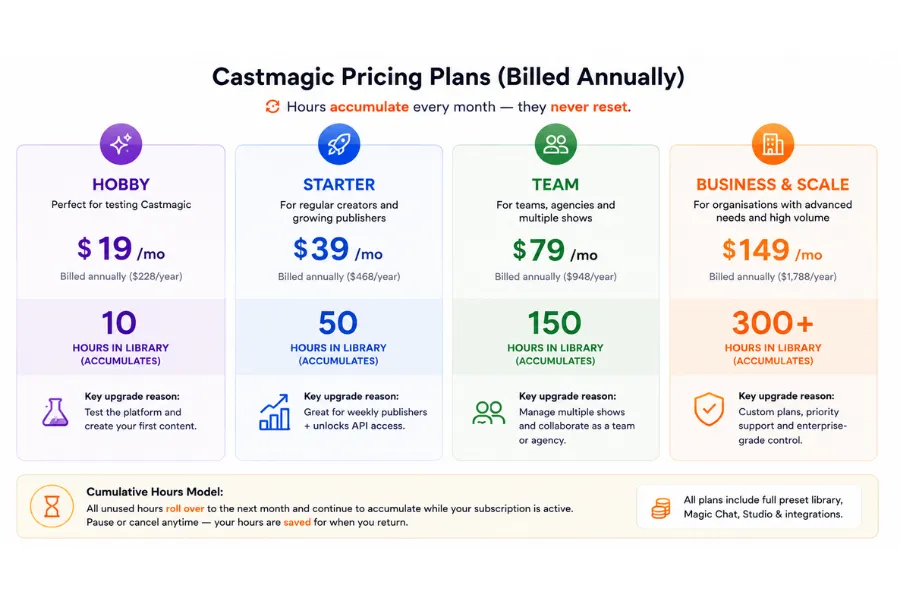
The Hobby library cap of 30 hours fills in roughly seven to eight months at a weekly one-hour podcast cadence, at which point buying additional hours or upgrading to Starter becomes the decision. Always verify current pricing directly at castmagic.io/pricing before committing, as plan structures and rates have changed more than once.
Descript, Otter.ai, and Riverside: where they each stop
The three tools that appear most often alongside Castmagic in creator workflows occupy clearly different parts of the production chain. Understanding where each starts and stops determines whether Castmagic complements them or replaces them.
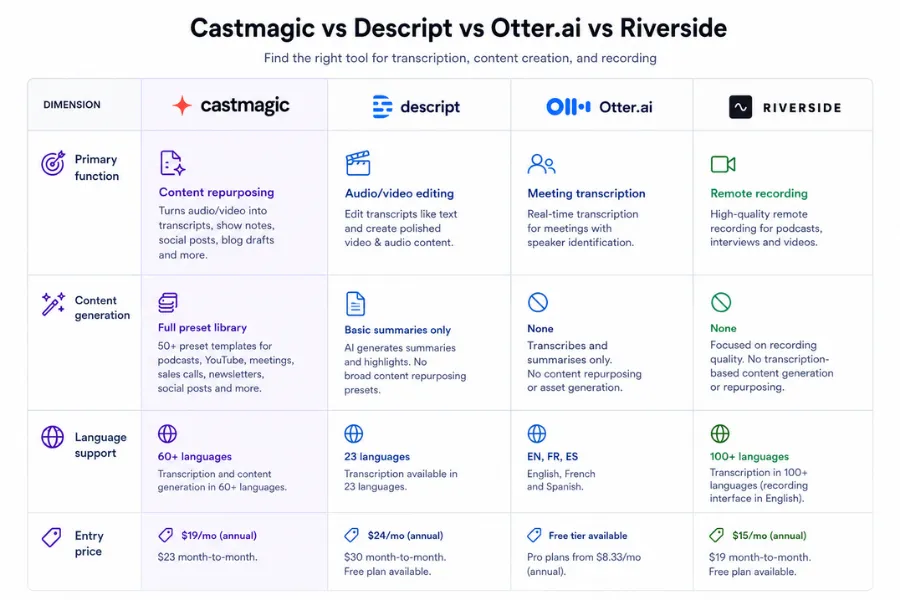
Descript is a production tool. Its defining capability is text-based audio and video editing: you cut recordings by deleting words in the transcript, and the corresponding audio and video are removed automatically. Studio Sound cleans up microphone quality with one click. Overdub corrects misspoken words by typing the correction. These are editing capabilities Castmagic does not have. Descript does generate AI show notes and summaries, but users consistently report that the output is too generic for direct marketing use without significant rewriting. Choose Descript when editing the recording itself is the primary task. Choose Castmagic when the recording is finished and derivative content at volume is the goal. The two tools sit at consecutive stages and pair naturally: Descript for editing, Castmagic for repurposing.
Otter.ai is a meeting transcription tool. It excels at real-time capture - it joins Zoom, Google Meet, and Microsoft Teams calls, transcribes live, and surfaces action items in a post-call summary. Its language support covers English, French, and Spanish, significantly narrower than Castmagic's 60-plus languages. Otter does not generate social posts, blog drafts, email newsletters, or show notes in any meaningful form. For teams whose primary use case is internal meeting notes, Otter is the more focused tool. For any creator who needs publishable content assets from recordings, Otter covers only the first step.
Riverside is a recording tool. It captures studio-quality audio from remote guests: separate tracks per participant, local recording that protects against connectivity issues, up to 4K video. Its content repurposing features are basic; automatic clips and transcription exist, but the prompt template library and Magic Chat capabilities that Castmagic provides are absent. For podcasters who prioritise recording quality above all else, Riverside and Castmagic complement each other. Riverside is not a repurposing tool.
Jasper is a general-purpose AI writing platform. It can generate blog posts, social content, and email drafts from a pasted transcript, but the workflow is manual: you bring the content to Jasper, whereas Castmagic generates outputs automatically from your upload in parallel. Jasper suits teams that want detailed editorial control over AI-assisted long-form writing. Castmagic suits teams that want high-volume output automation from existing recordings without managing a separate prompt environment per content type.
The bottom line: Castmagic earns a 4.22 out of 5. Its functionality and customisation scores reflect a tool that is the most capable purpose-built repurposing platform in the category. The integration score of 3.5 is the real-world caveat: the content generation is thorough, but delivering it to its destination still requires a separate step. For the right creator at the right volume, the Starter plan at $48 per month pays for itself in the first episode of the week.
How We Rated It:
More Tool Reviews







Subscribe to Stay in the loop
Get the latest AI and technology news, honest tool reviews, and practical guides delivered straight to your inbox.
Success! Check your Inbox!

Tezons Newsletter
The latest technology news, in-depth tool reviews, and practical guides - curated and delivered to your inbox.
Latest News




Have a question?
Have any questions?
Didn’t find what you were looking for? We’re just a message away.