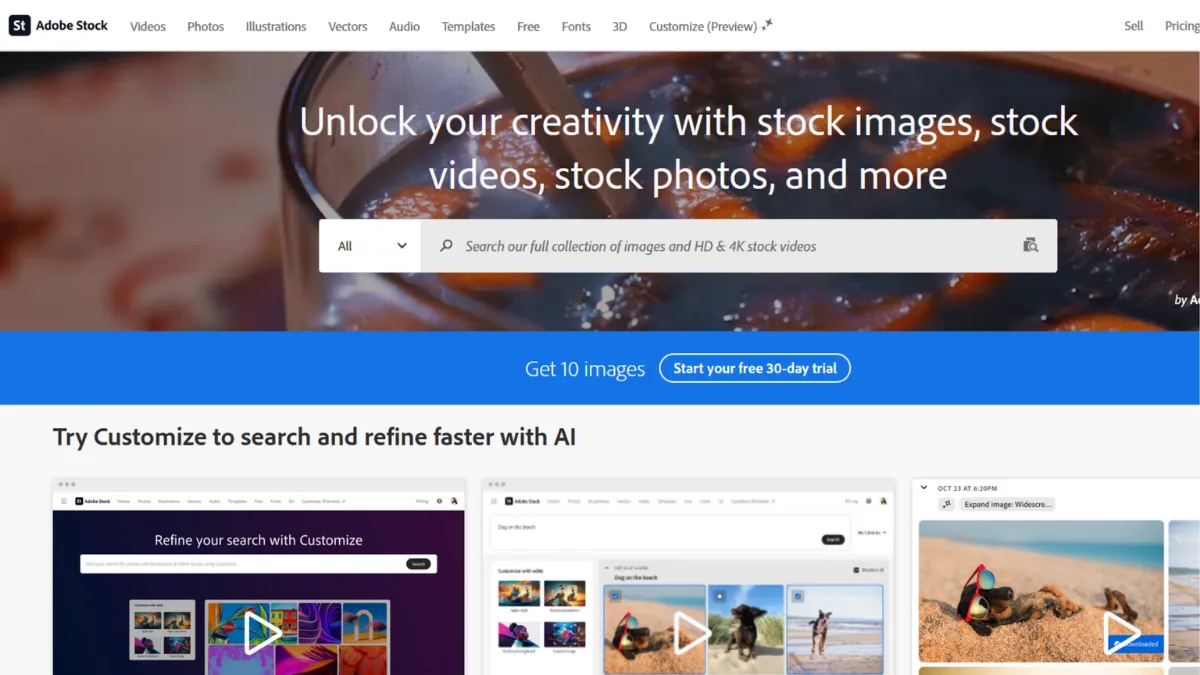
Stock media libraries are a commodity until you spend half your morning dragging files between browser tabs, your design application, and a folder hierarchy that makes sense only to you. Adobe Stock removes that friction entirely for anyone already inside Creative Cloud, embedding its catalogue directly into Photoshop, Illustrator, InDesign, Premiere Pro, and After Effects. The result is not merely convenience: it changes the rhythm of creative work, letting you place a watermarked asset into a live composition, test proportions and colour balance, and license it with one click only when you are certain it is the right choice. That workflow advantage is the reason Adobe Stock holds a strong position in a category with no shortage of well-stocked rivals.
The mechanism behind that advantage is Creative Cloud integration at the API level, not a browser-based add-on. When you search from within Photoshop, results appear in the Libraries panel. Watermarked previews are placed as Smart Objects, meaning your composition remains fully editable and the licensed version drops in at full resolution without repositioning. Licensed assets sync automatically across all Creative Cloud applications through your account, so an image licensed in Illustrator is immediately available in InDesign without any manual transfer. Most users underestimate how much time this saves across a project lifecycle; the benefit compounds over weeks rather than appearing in a single session.
Expect a catalogue of hundreds of millions of assets covering photographs, vectors, illustrations, video footage, audio tracks, motion graphics templates, and 3D models. The library includes both human-shot content and a substantial volume of AI-generated imagery, which Adobe labels clearly and offers under the same standard licence terms as traditional assets. Quality controls are applied before any asset reaches the public catalogue. Search uses AI-powered visual recognition, so you can upload a reference image to find stylistically similar content rather than relying on keyword matching alone. Realistically, you will find adequate results for most commercial briefs, though the catalogue skews toward design-forward and lifestyle imagery rather than the ultra-commercial, product-catalogue style where Shutterstock has a deeper bench.
Adobe Stock is built for creative professionals and small studio teams who spend the majority of their working hours inside Adobe applications. Freelance designers producing client deliverables, in-house brand teams managing a consistent visual identity, and video producers who need footage, audio, and motion templates from a single licensed source will get the clearest return. If your stack is entirely Adobe, the case is straightforward.
The primary limitation is cost relative to what the free tier actually delivers. The free collection is a small subset of the full catalogue, download limits apply, and paid plans carry a monthly price that sits at the higher end of the stock media category. Teams whose workflows live outside Adobe's ecosystem will find the integration advantage irrelevant, making the price harder to justify against competitors offering comparable library depth at lower per-asset costs.
The sections below cover how the platform works mechanically, what its key features deliver in practice, and how it compares to the main alternatives you should have on your shortlist.
What Is Adobe Stock?
Adobe Stock is a subscription-based stock media marketplace operated by Adobe, offering licenced photographs, vectors, illustrations, video clips, audio tracks, motion graphics templates, 3D assets, and design templates for commercial and editorial use. The platform's primary differentiator is its direct embedding inside Adobe Creative Cloud applications, which means creatives handle asset discovery, preview, and licensing without leaving the tools they work in daily. Unlike generic stock sites that require a separate browser session and manual file management, Adobe Stock functions as an integrated panel inside Photoshop, Illustrator, and the rest of the Creative Suite. The catalogue was substantially built on the former Fotolia library, giving it an established depth at launch, and has grown considerably since. The platform also accepts contributor submissions, including AI-generated imagery under defined guidelines, which expands the catalogue continuously. What remains less clear from the homepage is how the licensing mechanics interact with subscription tier limits and what happens to licensed assets if a subscription lapses, which the next section addresses directly.
How Adobe Stock Works
Setup requires an Adobe ID and an active subscription, either to Adobe Stock directly or as part of a Creative Cloud All Apps plan. Once connected, the stock library appears inside supported Adobe applications through the Libraries panel or via the dedicated stock search panel. You search, filter by asset type, orientation, colour, or licence type, and place a watermarked preview into your document with a single drag or click. No downloading, no folder management, no re-importing.
Licensing happens when you are ready to commit. Click the licence button in the panel, the watermark is removed, and the full-resolution asset replaces the preview in place. The licensed file saves to your Creative Cloud Libraries, making it accessible across every application linked to your account. Subscription plans operate on a monthly download quota. Assets downloaded within quota come from your allowance; additional assets can be purchased as credit packs. Unused monthly credits do not roll over on standard plans, which is a detail that catches many subscribers by surprise.
Search quality is driven by Adobe Sensei, the company's AI layer, which supports visual search, keyword search, and category browsing. The visual search is the more useful of the two for design work: upload a mood board image or a reference photograph and the engine surfaces stylistically aligned results rather than keyword-matched ones. This is considerably faster than iterating through synonyms when you have a clear visual direction but not the vocabulary to describe it.
The counterintuitive detail most new subscribers get wrong: licensed assets remain yours to use in perpetuity even after a subscription ends, but you lose the ability to download new assets the moment your plan lapses. Projects already in production are protected; future work is not. Teams that licence assets sporadically across long project timelines should factor this into their workflow planning rather than assuming a lapsed subscription creates a compliance problem for existing work.
Adobe Stock Key Features
Creative Cloud panel integration. Adobe Stock embeds directly into Photoshop, Illustrator, InDesign, Premiere Pro, After Effects, and other Creative Cloud applications. Assets are searchable, previewable as watermarked Smart Objects, and licensable without leaving the application. This is the platform's defining feature and the primary reason to choose it over a standalone stock site if your team works inside Adobe's ecosystem daily. To use it well, keep your Libraries panel open during early concepting phases rather than waiting until a design is near-final.
Visual search powered by AI. Beyond keyword search, Adobe Stock allows you to upload a reference image and receive visually similar results ranked by stylistic and compositional similarity. This is materially useful when you have a clear visual direction from a client brief or mood board but cannot translate it into reliable search terms. The engine handles colour palette, composition style, and subject matter simultaneously, which speeds up asset selection on tight deadlines.
Multi-format library. The catalogue spans photographs, vectors, illustrations, video footage, audio tracks, motion graphics templates, and 3D assets, all accessible under the same subscription. For video producers who need footage, music, and motion graphics from a single platform with unified licensing, this breadth removes the administrative overhead of managing multiple stock subscriptions with separate rights documentation.
AI-generated content with labelling. Adobe Stock includes a large volume of AI-generated imagery, labelled clearly and offered under the same standard licence terms as traditionally produced assets. Contributors must disclose AI-generated submissions, and Adobe applies its standard quality moderation before assets enter the public catalogue. This gives buyers access to a wider stylistic range, including imagery that would be difficult or expensive to commission photographically, while maintaining licence clarity. You can filter AI-generated content out of search results if you prefer human-created assets only.
Licence security and indemnification. Every asset on Adobe Stock comes with a royalty-free commercial licence, and Adobe provides legal indemnification for content that passes its review process. For agencies and in-house teams producing work for clients, this matters: the licence travels with the asset documentation and provides a clear paper trail. The specifics of indemnification coverage and limits are worth verifying on Adobe's licensing terms page before relying on it for high-stakes campaigns. The absence of a strong and transparent indemnification statement in plain language is one area where Shutterstock's communication is somewhat clearer.
Adobe Stock Pros and Cons
Where Adobe Stock earns its subscription price:
- Deep Creative Cloud integration. Placing and licensing assets without leaving Photoshop or Premiere Pro saves meaningful time across a project. For studios where designers bill by the hour, this is a measurable productivity gain rather than a quality-of-life convenience.
- Unified multi-format catalogue. Access to photographs, vectors, video, audio, and motion templates under one plan reduces the number of separate licences a team manages. Smaller studios can consolidate what might otherwise be three or four separate subscriptions.
- AI-powered visual search. The visual reference search is faster and more accurate than keyword iteration for design-led briefs. Teams with strong mood-board processes will use this constantly.
- Perpetual licence on downloaded assets. Content licensed during an active subscription remains usable after the subscription ends. This protects work in production when budgets shift or plans are cancelled.
- Labelled AI content with consistent licensing. AI-generated assets carry the same licence terms as traditional content, removing the ambiguity that surrounds standalone AI image generators for commercial use.
Where the platform has genuine gaps:
- Higher price point than most competitors. Adobe Stock's plans cost more per asset than several comparable platforms at equivalent download volumes. Teams that need high asset volumes monthly will find the per-image cost harder to justify unless the integration value is material to their workflow.
- Credits do not roll over. Unused monthly download credits expire at the end of each billing period on standard plans. Light users effectively subsidise heavier months rather than banking credits for campaign-heavy periods.
- Smaller raw image count than Shutterstock. For highly specific keyword searches, Shutterstock's larger traditional image library returns more results. Adobe Stock's catalogue is strong on design-led imagery; it is thinner on ultra-specific commercial or editorial photography.
- Support response times draw complaints. Community forums and user reviews consistently flag slow response times from Adobe's customer support team. Self-service documentation is thorough, but resolving billing or licensing disputes through a human agent takes longer than users expect from a premium-priced platform.
- Limited value outside the Adobe ecosystem. If your team uses Figma, Canva, or other design tools as primary applications, the integration advantage disappears entirely. At that point you are paying Adobe's pricing for a standalone stock library, and alternatives become more competitive on pure value grounds.
How to Get the Most Out of Adobe Stock
Before your first download, connect your Adobe Stock subscription to your Creative Cloud account and verify the Libraries panel is enabled in each application you use regularly. This takes five minutes and is the step most new subscribers skip, then wonder why they are still downloading files manually to a desktop folder.
In your first week, use the visual search feature with existing reference images from past projects or client mood boards. This trains your intuition for what the catalogue contains at the stylistic level your briefs typically demand. You will quickly learn where the catalogue is strong (design-forward lifestyle, clean product backgrounds, motion graphic templates) and where keyword iteration is still necessary (niche editorial, regional specificity, highly technical subjects).
Building results over time means building a shared team library inside Creative Cloud. When a designer licences an asset, it should go into a shared library folder rather than a personal one. This prevents duplicate licensing of the same asset across team members and creates a reusable asset repository that compounds in value across projects.
The mistake most subscribers make is treating Adobe Stock as a search engine they visit when stuck. The better habit is to open the stock panel at the concepting stage, before layouts are fixed. Watermarked previews are free to place, so you can test five or six candidate images in a real composition before committing to a licence. This changes the quality of licensing decisions and reduces the frequency of downloading assets that look right in isolation but wrong in context.
Measuring success is straightforward: track licensed assets per project and cross-reference against your monthly plan allowance. If you consistently use fewer than half your monthly credits, you are overpaying for your tier. If you regularly hit your quota in the first two weeks, upgrade or add a credit pack rather than hunting for free alternatives that carry licence risk. Understanding how to get the most out of Adobe Stock's integration with Creative Cloud tools is largely about aligning your subscription tier to your actual usage pattern rather than a projected one.
Who Should Use Adobe Stock?
This is for you if your work centres on Adobe Creative Cloud applications and you need a reliable, legally clean source of diverse media assets. Three roles get the clearest return:
The freelance graphic designer billing client work through Photoshop or Illustrator will eliminate most of the manual file management that accompanies stock licensing. The ability to place watermarked previews and only licence what survives the client review round saves both time and licence spend. The visual search feature is particularly valuable when translating a client mood board into licensable assets quickly.
The in-house creative team at a brand running regular campaign production will benefit from the shared Libraries feature, which keeps the team's licensed asset pool organised and prevents duplicate purchases. A team producing across photography, video, and motion simultaneously will value the single-catalogue access that covers all three formats under one subscription agreement.
The video producer or content creator working primarily in Premiere Pro or After Effects gains access to footage, audio, and motion graphics templates from the same panel, removing the need to manage separate accounts with footage-only or audio-only stock services.
Adobe Stock is not the right choice for teams whose primary design tools are outside the Adobe ecosystem. If Figma is your main design environment and you have no regular Adobe application usage, the integration advantage is irrelevant and you will pay a premium for a library that competitors serve at lower cost. It is also a poor fit for buyers who need very high monthly download volumes at the lowest possible per-asset price: the credit structure is not built for bulk consumption at that scale.
Adobe Stock Pricing
Adobe Stock offers a limited free collection with download caps applied per period. The free tier covers a fraction of the full catalogue and is oriented toward breadth of subject matter rather than creative depth, so most professional users will outgrow it quickly. Paid plans operate on a subscription model with monthly download quotas at multiple tiers, with annual commitment plans priced lower per asset than month-to-month plans. Entry-level plans covering a modest number of standard assets per month sit at the lower end of Adobe's range; higher-volume plans and team plans carry progressively higher monthly fees. Credit packs are available for one-off purchases outside a subscription, which suits buyers with sporadic or project-specific needs. Premium assets and extended licences carry separate pricing above the standard subscription allowance. Because Adobe adjusts plan structures and pricing periodically, always verify current rates directly on the Adobe Stock pricing page before committing. Relative to alternatives, Adobe Stock's pricing sits at the higher end of the market for equivalent download volumes. The premium is defensible if Creative Cloud integration delivers measurable workflow savings; it is harder to justify purely on catalogue size, where competitors offer comparable depth at lower cost.
Adobe Stock vs Alternatives
The most direct competitor is Shutterstock. On raw catalogue size, Shutterstock holds an advantage for traditional photographs, with a larger volume of images overall. Its customer support is more responsive than Adobe's, and its standalone editor and AI image generation tools give it a stronger position for teams that do not rely on Creative Cloud. When your workflow is centred on Photoshop and Illustrator, Adobe Stock wins clearly. Outside that context, Shutterstock is a more flexible standalone option with comparable pricing.
Getty Images targets a different buyer segment: agencies, publishers, and brands that need exclusive or rights-managed content and are willing to pay premium per-asset rates for it. Getty's editorial and archival depth is unmatched, but the pricing structure makes it impractical as a primary source for most small teams. Use Getty when a brief specifically demands content unavailable elsewhere.
iStock, Getty's subscription-facing product, occupies a middle position: lower pricing than both Adobe Stock and Getty premium tiers, with a split between Essentials and Signature content tiers. For teams outside the Adobe ecosystem that need a cost-efficient subscription, iStock competes on price. The catalogue quality is solid, though the platform's integration capabilities are more limited.
Pexels and similar free platforms work for blog content, internal presentations, and low-stakes digital use. They do not offer the legal indemnification, editorial depth, or commercial licence reliability that client-facing creative work requires. The moment an asset appears on a client billboard or paid campaign, the risk calculus changes and a licenced platform is the appropriate choice.
Adobe Stock Review: Final Verdict
Adobe Stock earns an overall score of 4.24 out of 5, with its strongest dimension being integration capabilities at 4.7, which reflects an integration experience that is genuinely best-in-class within its ecosystem. Support scores lowest at 3.8, and the response-time complaints from users are consistent enough that this is a real consideration for teams who may need to resolve licence or billing issues under deadline pressure.
The bottom line: if Creative Cloud is your primary working environment, Adobe Stock is the most coherent and productive stock solution available. If it is not, compare on catalogue and price alone before committing.
How We Rated It:
More Tool Reviews







Subscribe to Stay in the loop
Get the latest AI and technology news, honest tool reviews, and practical guides delivered straight to your inbox.
Success! Check your Inbox!

Tezons Newsletter
The latest technology news, in-depth tool reviews, and practical guides - curated and delivered to your inbox.
Latest News




Have a question?
Have any questions?
Didn’t find what you were looking for? We’re just a message away.