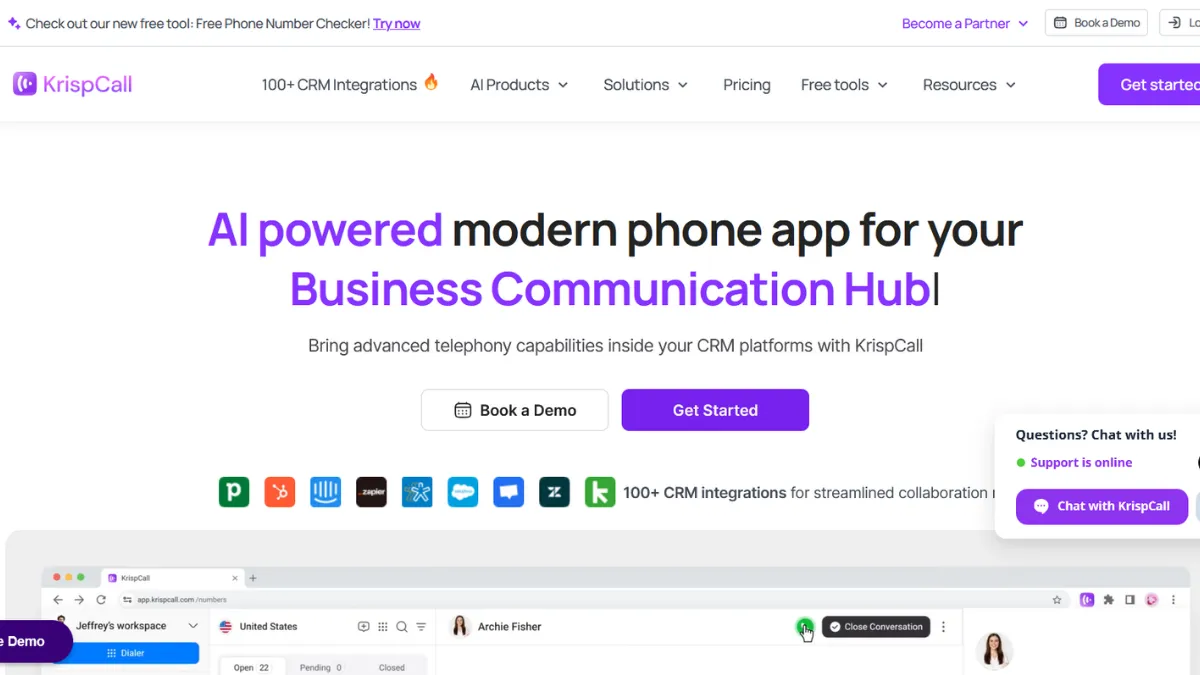
Cloud phone systems have a reputation for promising global reach and delivering regional headaches. KrispCall breaks that pattern for small and mid-sized teams, offering virtual numbers across more than 100 countries, solid CRM integrations, and a unified call workspace at a price point that undercuts most established competitors. The platform suits founders and sales managers who need a professional phone presence without hardware, IT overhead, or enterprise-tier pricing. That said, it is not a flawless product: call quality complaints appear consistently enough in verified reviews to treat them as a structural caveat rather than isolated incidents.
The mechanism behind KrispCall is a cloud PBX delivered entirely through browser, desktop app, iOS, Android, and a Chrome extension. You buy virtual numbers, assign them to team members or shared inboxes called Callboxes, and route calls using multi-level IVR. Every call, SMS, and voicemail feeds back into a centralised workspace where managers can monitor live calls, whisper coaching to agents, or barge into a call when needed. Most users get the core setup running within a day, which matters for early-stage teams with no IT resource to lean on. The quality of your results depends heavily on your internet connection: KrispCall runs over VoIP, so a weak or congested network degrades audio quickly, and several verified G2 reviews note sluggishness and occasional voice instability during peak hours.
Realistic expectations for a team moving from a traditional phone system or a consumer SIM: onboarding is fast, CRM sync with tools like HubSpot and Salesforce works well once configured, and international calling becomes manageable without multiple SIMs or forwarding hacks. Number porting, however, can take several days and leaves you without service during the transition window. Factor that into your go-live plan. Bulk SMS and power dialling features on the Standard plan suit outbound sales teams running high volumes, though the per-minute and per-message charges that apply on top of the subscription fee will push costs up for heavy diallers.
KrispCall fits best for solo founders, small sales teams, and lean customer support operations that need a credible multi-country phone presence without committing to a Dialpad or RingCentral contract. The Salesforce AppExchange listing is recent, which tells you the platform is maturing quickly. Remote-first teams that handle inbound support across time zones benefit particularly from the shared Callbox model, which lets multiple agents cover a single number without calls going unanswered.
The honest limitation: call quality is not consistent enough for teams where every dropped call represents lost revenue. Verified Capterra reviews document dropped calls as a recurring problem, not an edge case, and G2's aggregated feedback places reliability as a top concern alongside ease of use. If your business runs on high-call-volume outbound sequences where connection rates directly affect pipeline, stress-test KrispCall on a small group before rolling it out across your team.
The sections below cover the full feature set, pricing, and how KrispCall compares to Aircall, OpenPhone, and JustCall so you can decide whether the cost savings justify the trade-offs.
What Is KrispCall?
KrispCall is a cloud telephony platform built for businesses that want virtual phone numbers across multiple countries without investing in physical infrastructure. It solves a specific problem: being reachable with a local number in markets you operate in, while managing all those numbers and conversations from a single dashboard. Where a generic VoIP provider hands you a number and leaves you to figure out the rest, KrispCall wraps calling, SMS, voicemail, call recording, analytics, and CRM sync into one workspace. The platform targets startups, growing SMBs, and remote teams, and it has gained traction particularly among businesses expanding into new geographies who want a local presence fast. Available across web, mobile, and desktop with no hardware requirement, KrispCall is designed to let a team become operational within hours. The question worth examining is how the underlying call management mechanics actually work, and what drives the quality differences users report.
How KrispCall Works
You create a workspace, purchase virtual numbers in whichever countries you need, and assign them to team members or shared inboxes. The Callbox is the core UI element: a unified thread that groups all calls, texts, voicemails, and notes for a given number or contact in one place, similar to a WhatsApp thread but for business telephony. This makes it easier for multiple agents to handle the same number without losing context between handoffs.
Call routing runs through a multi-level IVR builder, which lets you create menus, business hours rules, and ring groups without writing code. Managers get a live monitoring panel with three modes: listen silently, whisper instructions to the agent only, or barge into the call as a full participant. These tools are genuinely useful for onboarding new sales reps or quality-checking support agents without scheduling a separate review session.
Outbound calling uses a power dialler on the Standard plan that moves automatically through a contact list, which reduces idle time between calls compared to manual dialling. Bulk SMS lets you send campaigns or follow-ups at volume, and all activity logs to your connected CRM automatically via native integrations or webhook. The integration layer covers a wide range of tools including Zoho CRM, Pipedrive, and Monday.com alongside HubSpot and Salesforce.
The counterintuitive part: most users assume KrispCall's call quality is primarily a function of the platform itself. It is not. Audio quality on a VoIP system depends more on your local network conditions, ISP routing, and the call path to the destination country than on the software layer. KrispCall provides echo and noise cancellation settings in the app, but if your office network is congested or your ISP routes calls inefficiently, those settings will not rescue the call. Teams in markets with unstable internet infrastructure should pilot the platform thoroughly before committing. The practical implication for S4 is which features are genuinely differentiated and which require the right conditions to perform as advertised.
KrispCall Key Features
Unified Callbox. The Callbox brings all calls, SMS, voicemails, and notes for a number or contact into a single threaded view. For teams where multiple agents handle the same inbound line, this prevents the fragmented context that happens when calls land in separate inboxes. The practical value is faster handoffs: an agent picking up a follow-up call can see every prior interaction without switching to a CRM tab. To use it well, set up contact tags and assign ownership rules upfront, otherwise shared inboxes become cluttered quickly.
Multi-level IVR and Call Routing. KrispCall's IVR builder lets you create branching phone menus, route calls by time of day or day of week, and set up ring groups for teams. This handles the standard inbound routing requirements for a growing support or sales team without requiring a separate contact centre platform. The configuration is done through a visual builder, which is accessible to non-technical admins. Complex routing logic with conditional branches based on caller data is available on higher plans, so verify your requirements against the current plan tiers on the KrispCall pricing page.
Live Call Monitoring. The monitor, whisper, and barge feature set is where KrispCall earns its keep for sales managers. Listening silently to a live call without the agent knowing lets you assess performance without disrupting the interaction. Whispering allows coaching in real time while the customer hears only the agent. Barge lets you join as a full participant for escalations. These tools are normally found in dedicated contact centre software at significantly higher price points.
Power Dialler and Bulk SMS. Available on the Standard plan, the power dialler automatically moves through a dialling list without requiring the agent to manually initiate each call. This compresses outbound session time for sales teams working through cold or warm lead lists. Bulk SMS enables campaign-style messaging at volume, which suits teams running appointment reminders, follow-ups, or promotional outreach. Both features incur per-minute and per-message charges on top of the base subscription, so model the actual cost for your call volume before treating this as a flat-rate service.
CRM Integrations and Analytics. KrispCall connects natively to a range of CRM platforms and syncs call data, recordings, and notes automatically. The analytics dashboard covers inbound versus outbound volume, average call duration, missed call tracking, and agent-level leaderboards. The leaderboard feature in particular surfaces performance data in a format that is useful for weekly team reviews. Reporting customisation is noted as limited by some users, which is a relevant gap for teams that need bespoke dashboards. That limitation feeds directly into the trade-offs covered in the next section.
KrispCall Pros and Cons
KrispCall's strengths are real, but so are the friction points that recur across verified reviews.
- Competitive entry pricing. The Essential plan starts at a low monthly per-user rate on annual billing, undercutting Aircall and RingCentral by a meaningful margin. For early-stage teams with limited budget, this makes professional cloud telephony accessible without a lengthy procurement process.
- Fast onboarding with no hardware. Teams get a working phone system in hours. The web and mobile apps cover all primary use cases without requiring physical handsets or specialist IT setup, which matters for distributed or fully remote teams.
- Strong CRM sync, including Salesforce AppExchange listing. The Salesforce integration, now listed on AppExchange, allows Salesforce users to make calls, log interactions, and access recordings without leaving the CRM. HubSpot two-way sync is equally solid. This removes a common data quality problem where call notes live outside the CRM.
- Live monitoring tools at SMB pricing. Monitor, whisper, and barge are features typically reserved for contact centre platforms costing significantly more per seat. Getting them at KrispCall's price point is a genuine advantage for teams building out a sales or support function for the first time.
- Virtual numbers in 100-plus countries. For businesses expanding internationally, the breadth of country coverage means you can establish a local presence in a new market quickly, which can improve answer rates on outbound calls.
The cons are specific enough to affect the decision for certain use cases.
- Call quality inconsistency. Verified reviews on G2 and Capterra document dropped calls and audio degradation during peak usage periods. These are not fringe complaints. Teams with high call volumes or businesses where every call is customer-facing should pilot the platform on a subset of users before full rollout.
- Per-minute and per-message charges on top of the subscription. The headline per-user price does not reflect total cost for active callers. International calling charges accumulate quickly, and several users have flagged billing surprises when monthly usage exceeded expectations.
- Mobile app limitations. Mobile app issues appear 18 times as a tagged concern in verified G2 reviews. For teams that rely on calling from mobile devices rather than desktop or browser, this is worth testing before committing to an annual plan.
- Limited reporting customisation. The analytics dashboard covers the standard metrics but does not offer custom report builders or flexible date-range filtering at the depth that larger teams expect. Businesses that run weekly KPI reviews from telephony data may find this constraining.
- Trust and review credibility concerns. The platform was flagged on the r/VOIP subreddit for coordinated review activity, prompting a moderation block. KrispCall's marketing team acknowledged the incident. Weight platform praise with appropriate scepticism and rely on verified sources like G2 and Capterra.
How to Get the Most Out of KrispCall
Before you start, map your call flow on paper: which numbers you need, who owns each, how inbound calls should route, and what your business hours rules are. Getting this clear before you touch the IVR builder saves significant rework. Buy numbers in every country you plan to operate in during the first session, because adding countries later mid-campaign can create gaps in coverage.
In your first week, connect your CRM before you make a single call. This ensures every interaction logs automatically from day one and avoids the retroactive data-tidying that plagues teams who wire up integrations after they have already built call history. Set up contact tags for lead stage or customer type so your Callbox stays navigable as volume grows.
For teams asking how to set up a cloud call centre without expensive hardware, KrispCall's combination of IVR, shared Callboxes, and live monitoring gives you a functional inbound and outbound operation for a fraction of legacy contact centre costs. The monitor and whisper tools are particularly effective for training: have a manager listen to the first twenty calls a new rep takes and deliver feedback immediately after each rather than in a weekly debrief.
The mistake most users make is treating per-minute charges as negligible. Run a realistic estimate of monthly call volume in minutes per user before finalising a plan. For teams making substantial international calls daily, the per-minute costs can exceed the subscription fee itself. Review your monthly usage report in the analytics dashboard and set a cost alert if the platform offers one.
Measure success by tracking missed call rate and average response time rather than total call volume. KrispCall's analytics surface both. A falling missed call rate after configuring ring groups and business hours routing is the clearest signal that the setup is working. Connect Google Analytics or your attribution tool to track whether inbound call volume correlates with campaign activity, giving you a fuller picture of channel performance.
Who Should Use KrispCall?
KrispCall suits three types of operator well, and actively does not suit two others.
A solo founder running a consultancy or service business who needs a professional phone number, voicemail, and the ability to field calls from a mobile app without buying a second SIM will find KrispCall handles that cleanly at the entry plan price. A small sales team of two to ten people working outbound across multiple countries, where the power dialler and bulk SMS reduce the manual work of high-frequency prospecting, is the natural home for the Standard plan. A lean customer support operation for a SaaS or e-commerce brand that needs shared inboxes, call recording for QA, and CRM sync to keep customer histories accurate will get direct value from the Callbox model and live monitoring tools.
KrispCall is not the right fit for a 20-person sales floor where uptime and call quality are revenue-critical. The reliability complaints in verified reviews are specific enough to matter at that scale. Equally, large enterprises with complex compliance requirements around call data retention, regional data residency, or bespoke reporting should speak to KrispCall's enterprise team and verify capabilities against their current requirements before committing, rather than assuming the platform matches what a dedicated contact centre solution provides.
KrispCall Pricing
KrispCall offers an Essential plan, a Standard plan, and a custom Enterprise option. Pricing differs between monthly and annual billing, with annual billing offering a meaningful discount. Based on publicly available sources at the time of writing, the Essential plan sits in the range of twelve to eighteen dollars per user per month depending on the billing cycle, while the Standard plan runs from roughly thirty to forty-two dollars per user per month. These figures vary across sources and may have changed, so check the KrispCall pricing page directly for current rates before making a purchasing decision.
The Essential plan covers core calling, SMS, voicemail, call forwarding, and basic CRM integrations, and is adequate for solo operators or small teams with moderate call volumes. The Standard plan adds the power dialler, unlimited call recording storage, phone trees, API and webhook access, and advanced analytics, which makes it the right choice for sales or support teams running structured call workflows. Both plans carry per-minute and per-message charges on top of the subscription fee, which is a key cost variable for high-volume teams. Enterprise pricing is bespoke. A 14-day refund policy applies, which gives you a low-risk window to validate call quality and CRM sync in your actual environment before committing to a full billing cycle. Relative to the alternatives below, KrispCall positions itself as the most affordable option with a comparable feature set, though that positioning erodes when per-usage charges are factored into total monthly spend.
KrispCall vs Alternatives
The VoIP and cloud phone category includes several well-established competitors, each with a distinct positioning.
Aircall is the most direct competitor for sales and support teams. It offers a polished interface, strong integration depth, and AI-powered conversation intelligence on higher tiers. Aircall's entry pricing is higher than KrispCall's, and it requires a minimum number of licences, which makes it less accessible for very small teams. Choose Aircall when integration reliability and call quality consistency are non-negotiable and budget allows; KrispCall wins when you need comparable features at a lower per-seat cost and are willing to pilot call quality in your specific network environment.
OpenPhone targets freelancers and very small teams with a simple, clean product at a low price. It lacks the IVR depth, live monitoring, and bulk SMS that KrispCall provides. OpenPhone wins for a solo operator who needs a professional number and basic texting. KrispCall wins for any team that needs shared inboxes or outbound automation.
VoiceSpin competes more directly at the contact centre level, with a predictive dialler and omnichannel features aimed at larger outbound teams. It carries a higher price point and more complex setup. KrispCall is the better choice for teams that do not need predictive dialling at scale; VoiceSpin suits high-volume outbound operations with dedicated dialling sessions. For teams already running their sales workflow through HubSpot or Salesforce, the integration quality of each platform relative to your CRM of choice should be a primary selection criterion rather than per-seat pricing alone.
KrispCall Review: Final Verdict
KrispCall earns an overall score of 4.10 out of 5, reflecting a platform that delivers real value at a competitive price point with one meaningful caveat: call quality is not consistently reliable enough for teams where every connection matters. Its highest-rated dimension is ease of use, where fast onboarding and a clean interface make the platform accessible without technical support. Cost-efficiency scores well for teams on the Essential plan, though the per-minute charges make that score context-dependent for high-volume callers.
The bottom line: KrispCall is the strongest budget option in cloud telephony for small teams that need international numbers, CRM sync, and basic call centre tools. Run a pilot before committing to an annual plan, and model your per-minute costs honestly.
How We Rated It:
More Tool Reviews







Subscribe to Stay in the loop
Get the latest AI and technology news, honest tool reviews, and practical guides delivered straight to your inbox.
Success! Check your Inbox!

Tezons Newsletter
The latest technology news, in-depth tool reviews, and practical guides - curated and delivered to your inbox.
Latest News




Have a question?
Have any questions?
Didn’t find what you were looking for? We’re just a message away.