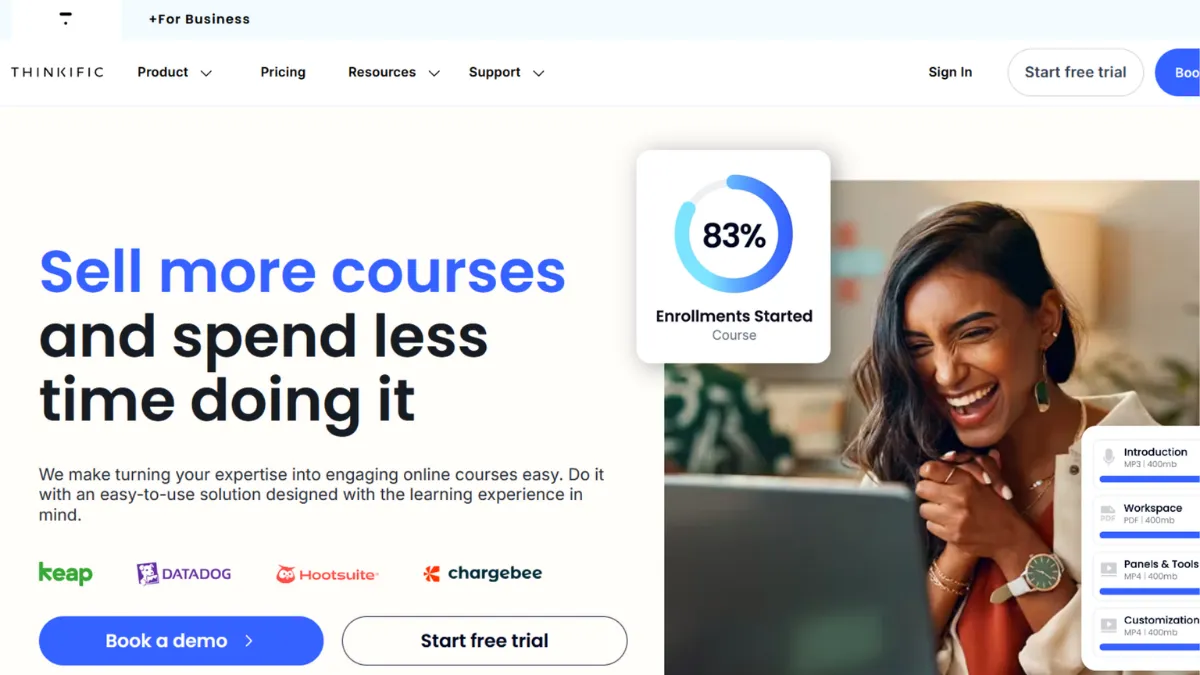
Selling knowledge online sounds straightforward until you realise that the platform you choose shapes every aspect of your student's experience, your revenue model, and how much technical debt you carry from day one. Thinkific earns its reputation as one of the most balanced course platforms on the market: strong enough for creators who need communities, memberships, and coaching alongside their courses, yet approachable enough that a first-time creator can publish something in an afternoon. It sits in the productive middle ground between Teachable's simplicity and Kajabi's all-in-one complexity, and for a wide band of knowledge entrepreneurs, that middle ground is exactly the right place to be.
The mechanism that makes Thinkific work is its modular product architecture. You are not locked into a single course format. You can sell a standalone video course, bundle it with a community, attach a coaching programme, and gate the whole thing behind a membership subscription, all from one account. The drag-and-drop course builder handles text, video, audio, quizzes, surveys, assignments, and downloadable files. Video is hosted natively, so you are not paying for a separate Vimeo account on top of your subscription. The native payment gateway, TCommerce, runs on Stripe's infrastructure and accepts credit cards, buy-now-pay-later options, and order bumps at checkout. One thing most new users miss: if you choose to use your own Stripe or PayPal account instead of TCommerce, Thinkific applies a transaction fee. Routing payments through TCommerce is the cleaner and cheaper option on most plans.
Realistic expectations matter here. Thinkific gives you the infrastructure to build a profitable course business, but it does not do your marketing for you. The built-in email automation covers onboarding sequences and abandoned cart recovery, but it is not a replacement for a dedicated email platform if segmentation and behavioural triggers are central to your strategy. Tools like Klaviyo or Kit handle that layer better and connect to Thinkific via integration. Expect to spend a few hours in setup before your first course goes live: configuring your school domain, building your sales page, connecting payments, and drafting your welcome email sequence. Students can be inside your course within days of signing up to the platform.
Thinkific suits course creators, coaches, and small teams who want one platform to handle course delivery, community, and payments without stitching together five separate tools. It works particularly well for educators building a catalogue of courses over time, since unlimited courses ship on every paid plan. Corporate trainers running internal programmes will also find the analytics and group enrolment features useful at the higher tiers.
The website builder is a genuine weak point. The themes are limited, the page sections are functional rather than impressive, and creators who care about conversion-optimised landing pages often end up pairing Thinkific with a separate tool for that purpose. The builder is not good enough to be your primary web presence.
The sections below cover how Thinkific works mechanically, which features carry the most weight, how to run a course launch effectively on the platform, and how it stacks up against the main alternatives.
What Is Thinkific?
Thinkific is a cloud-based course and learning management platform that lets individuals and businesses create, sell, and deliver online learning products. The core problem it solves is consolidation: most course creators start out using one tool to host video, another to collect payments, a third to email students, and a fourth to build a community. Thinkific brings those functions under one roof at a price point that makes sense before you are generating significant revenue. What sets it apart from a generic learning management system is its creator-first design: the interface is built for someone publishing their own expertise, not an IT administrator managing enterprise training. Thinkific now serves a large base of course creators across dozens of countries and supports multiple currencies through TCommerce. The natural follow-on question is how that infrastructure actually works once you log in and start building.
How Thinkific Works
Setup begins with creating your Thinkific school, which is effectively a branded subdomain where your courses live. You can map a custom domain from the Basic plan upward. The course builder organises content into chapters and lessons, and you drag items into order within a visual interface. Each lesson type has its own editor: video lessons upload directly to Thinkific's hosting, text lessons use a rich-text editor, and quiz lessons use a dedicated question builder with multiple choice, true or false, and free-text options.
What drives the quality of student experience is not just the content you upload but the completion logic you set. Thinkific lets you drip content on a schedule, require quiz passage before a student advances, and issue completion certificates automatically when a course is finished. These settings are what separate a well-structured programme from a content dump. Creators who configure prerequisites and drip schedules see measurably better completion rates than those who unlock everything at once.
The community feature operates as a separate but connected space. Students enrol in a community either automatically alongside a course or through a standalone purchase. Spaces within the community serve as topic channels, and you can post announcements, run events, and respond to threads. The community and the course do not share a single unified interface, which is the architectural limitation most users cite: a student watching a lesson cannot post a question in the community without switching contexts.
The counterintuitive insight most creators miss is this: Thinkific's pricing tiers restrict products and communities, not courses. Unlimited courses are available from the entry paid plan, but the number of communities, digital downloads, and coaching products you can publish scales with your tier. Founders who choose a lower plan assuming they can add a community later without upgrading are often caught out. Plan your full product architecture before you commit to a tier, not after you hit a wall. That architecture question directly shapes which features you actually need access to, which is where the next section begins.
Thinkific Key Features
Thinkific covers the full arc from course creation to payment collection, with several features that do genuinely useful work rather than simply filling a checkbox on a feature comparison page.
Drag-and-Drop Course Builder. The builder handles every standard lesson type without requiring code or external software. Video uploads directly to Thinkific's servers, which removes the cost and complexity of a separate hosting provider. You can mix lesson types within a single chapter, duplicate lessons across courses, and reorder content by dragging. The limitation is that the player itself offers limited visual customisation: fonts, colours, and layout follow the platform's templates rather than your brand guidelines at lower tiers.
TCommerce Native Payments. Thinkific's built-in payment gateway processes transactions without routing through a third-party account, which matters because using external Stripe or PayPal connections triggers additional transaction fees on most plans. TCommerce supports order bumps, payment plans, and buy-now-pay-later options, which meaningfully reduce checkout abandonment. Revenue partners can also be added directly, so affiliate payouts and co-creator splits are handled inside the platform without separate accounting tools.
Built-In Email Marketing. Thinkific added a native email marketing layer that covers onboarding sequences, promotional broadcasts, and abandoned cart recovery. For creators in early stages who do not yet have a dedicated email platform, this is enough to run basic campaigns. Creators with more sophisticated segmentation needs will still want to connect a specialist tool, since the automation depth is more limited than a platform built specifically for email.
Communities and Memberships. Each paid tier supports at least one community with topic-based spaces where students can post, comment, and attend events. Membership subscriptions allow recurring billing, which gives creators a predictable revenue base beyond one-off course sales. The number of communities and spaces scales with plan tier, so verify your community architecture matches your plan before launch. Connecting community access to Zapier workflows or the Thinkific API is possible on higher plans, which opens up more automated enrolment logic.
Analytics and Student Tracking. Thinkific surfaces completion rates, lesson-by-level engagement, and revenue data within the dashboard. Higher tier plans add more granular reporting and group-level analytics for corporate training scenarios. The data is genuinely useful for identifying where students drop off and which lessons need revision, though the analytics do not replace a dedicated tool like Google Analytics for understanding traffic and acquisition sources.
The practical trade-off across all these features is that Thinkific does each of them adequately rather than exceptionally. Creators who need best-in-class email automation, advanced funnel building, or deeply gamified community features will feel the ceiling. That is the tension the next section examines directly.
Thinkific Pros and Cons
Thinkific earns consistent praise for its balance of power and approachability, but it carries real limitations that affect specific use cases.
- Unlimited courses on all paid plans. You can build a full catalogue without worrying about hitting a course cap. This matters enormously for creators who plan to release multiple programmes over time, since many competing platforms gate course volume behind higher tiers.
- TCommerce removes transaction fee anxiety. Using the native gateway means you keep more revenue per sale on lower plans. The checkout experience supports modern payment methods, which reduces friction for buyers and improves conversion rates.
- Native video hosting at no extra cost. Hosting video directly on Thinkific eliminates a recurring line item that compounds quickly as your library grows. Creators on comparable platforms often pay separately for Vimeo Pro or similar services.
- Strong student management and certification tools. Completion certificates, drip scheduling, prerequisite gating, and group enrolment give you enough control to build structured, professional programmes without custom development.
- App store extends core functionality. Third-party apps in the Thinkific marketplace let you add features the core platform lacks, from advanced page sections to gamification layers. This flexibility is an underrated strength for creators who need specific functionality without switching platforms entirely.
The limitations are real and worth understanding before you commit.
- Website builder is a weak point. The themes are generic and the page editor lacks the depth of a dedicated landing page tool. Creators who care about conversion-optimised sales pages will find the builder inadequate and should plan to use a separate tool or invest time in CSS overrides at higher tiers.
- Community and course interfaces are separate. Students cannot post a question in the community from within a lesson without switching sections. This architectural gap makes contextual peer learning harder to facilitate than on platforms where community is embedded in the course player.
- Mobile app has feature gaps. The student-facing mobile app does not support all lesson types, and deeper community interactions are restricted. Creators whose audiences are primarily mobile learners should test the student experience before launching.
- Marketing automation depth is limited. The built-in email tools cover the basics, but behavioural segmentation and complex automation sequences require connecting a third-party platform, which adds cost and setup complexity.
- White labelling and advanced branding require a higher tier. Thinkific branding remains visible at lower plans. Removing it and accessing API-level customisation requires moving to a plan that may feel expensive for early-stage creators.
How to Get the Most Out of Thinkific
The most important pre-launch decision is mapping your product architecture before you choose a plan. Write out every product you intend to sell in the next twelve months: standalone courses, bundles, coaching packages, communities, memberships. That list determines which plan tier you actually need, since communities and advanced products are gated by tier rather than course count. Choosing a plan that fits your first product and then upgrading mid-launch creates unnecessary disruption.
Once inside the platform, prioritise completion logic over content volume. Configure drip schedules and quiz prerequisites from the start rather than unlocking everything at once. Students who move through a structured programme complete it at higher rates, which drives better testimonials, lower refund requests, and stronger word-of-mouth. Most creators publish all content immediately and then wonder why completion rates are low.
For your sales page, accept that Thinkific's built-in builder will get you to adequate, not exceptional. Spend time on the elements that conversion data consistently identifies as high impact: a clear headline that names the outcome, two or three specific testimonials with concrete results, and a straightforward pricing section with no ambiguous upsells. If you want to learn how to build an online course sales page that converts, the structure matters more than the design tool you use.
Connect Google Analytics to your Thinkific school from day one. The platform's internal analytics show you student behaviour after enrolment, but you need external tracking to understand where buyers come from, which traffic sources convert, and where prospective students abandon the sales page. Without that data layer, you are optimising blind.
Use TCommerce for payment processing and configure at least one order bump at checkout. An order bump offering a related resource or coaching session at a reduced price adds revenue per transaction without requiring the buyer to visit a separate page. This single configuration step compounds across every sale you make.
Measure success at 30, 60, and 90 days by tracking three numbers: enrolment volume, completion rate, and refund rate. If enrolment is low, the problem is marketing or pricing. If completion is low, the problem is course structure or student expectation mismatch. If refunds are high, the problem is the sales page overpromising what the course delivers.
Who Should Use Thinkific?
Thinkific delivers strongest results for three types of creator, each at a distinct stage and with a specific problem to solve.
The first is an independent educator or consultant who has validated demand for their knowledge and wants to productise it without hiring a developer. They have a topic, an audience, and a need to deliver structured learning at scale. They want to spend time on content, not on platform configuration. Thinkific's course builder and TCommerce let this person publish a paid course, collect payments, and drip content to students within a week of signing up.
The second is a small team or coaching business that wants to combine courses with a recurring membership. They need community, subscription billing, and enough analytics to understand how students are progressing. The Start or Grow plan covers this use case and keeps everything inside one monthly invoice rather than four separate tools.
The third is a corporate training team delivering internal programmes to a defined employee group. They need group enrolment, completion tracking, and certificates. The higher tiers with advanced analytics and bulk enrolment serve this need well, and the platform's reliability makes it suitable for professional training environments.
Thinkific is not a strong fit if you are building a content marketplace where students browse and discover courses from multiple creators, like Udemy's model. It is also not the right choice if your primary revenue model relies on complex, multi-step marketing funnels with high automation depth, since the native tools do not reach that level without significant third-party integration. If your business is primarily marketing-led rather than product-led, a platform with deeper funnel capabilities will serve you better.
Thinkific Pricing
Thinkific no longer offers a permanent free plan. The entry paid tier provides unlimited courses, basic digital downloads, email automation, and the TCommerce payment gateway. Moving up through the paid tiers adds live lessons, membership subscriptions, more community spaces, advanced analytics, white-label branding, and API access. The highest tier is aimed at enterprise teams and includes CRM integrations and SSO. Annual billing reduces the monthly cost meaningfully compared to month-to-month, and a 30-day trial is available through some channels without requiring a credit card. Always verify current pricing on Thinkific's own pricing page, as rates and plan structures change.
The entry plan is a reasonable starting point for a creator with a clear product and an existing audience. The cost becomes harder to justify if you are still validating whether anyone will pay for your course at all, since there is no free tier to test with. The white-label removal and API features locked behind higher tiers are the main reasons creators outgrow lower plans, and that upgrade cost is worth considering against alternatives like Kajabi, which packages more marketing tools into its pricing from the start.
Thinkific vs Alternatives
Teachable is the closest direct comparison. Both platforms target independent course creators, both offer similar course builder mechanics, and both have moved toward adding community and membership features. Teachable applies transaction fees on its entry plan, which Thinkific avoids with TCommerce. Thinkific generally wins on ease of use and support quality. Teachable wins for creators who prefer its interface and want access to its specific app ecosystem. For pure course delivery with minimal configuration, either platform works, and the decision often comes down to personal preference after a trial.
Kajabi positions itself as the all-in-one marketing platform for creators. It bundles landing page funnels, email marketing, and course delivery into a single product that is more cohesive than Thinkific's stack. The trade-off is price: Kajabi's entry plan costs significantly more than Thinkific's. Kajabi wins when marketing automation is central to your revenue model. Thinkific wins when you want solid course delivery at a lower monthly commitment and do not need deep funnel capabilities.
Skool takes a community-first approach where courses exist within a gamified social environment. If peer interaction and community engagement are more important to your business model than structured learning delivery, Skool is a more purpose-built option. Thinkific wins when course structure, certifications, and multi-product catalogues take priority over social features.
Gumroad suits creators who want to sell digital products with zero monthly platform cost, accepting a transaction fee per sale instead. Gumroad is faster to set up and has no subscription fee, but it lacks course structure, community, and student analytics. Thinkific wins when you need a structured learning experience rather than a file download.
Thinkific Review: Final Verdict
Thinkific scores 4.16 out of 5 overall, which reflects a genuinely capable course platform with one clear structural weakness. Its ease of use at 4.5 is the standout dimension, and it earns that score: a non-technical creator can build, configure, and publish a paid course faster on Thinkific than on most competing platforms. The website builder's limitations and the additional cost required to remove platform branding pull the customisation and cost-efficiency scores below the platform's otherwise strong performance. If you need a reliable, well-supported platform to sell structured online learning products and you are willing to supplement it with a separate tool for advanced marketing, Thinkific is a strong choice. If funnel sophistication is your priority, look at Kajabi before you commit.
How We Rated It:
More Tool Reviews







Subscribe to Stay in the loop
Get the latest AI and technology news, honest tool reviews, and practical guides delivered straight to your inbox.
Success! Check your Inbox!

Tezons Newsletter
The latest technology news, in-depth tool reviews, and practical guides - curated and delivered to your inbox.
Latest News




Have a question?
Have any questions?
Didn’t find what you were looking for? We’re just a message away.