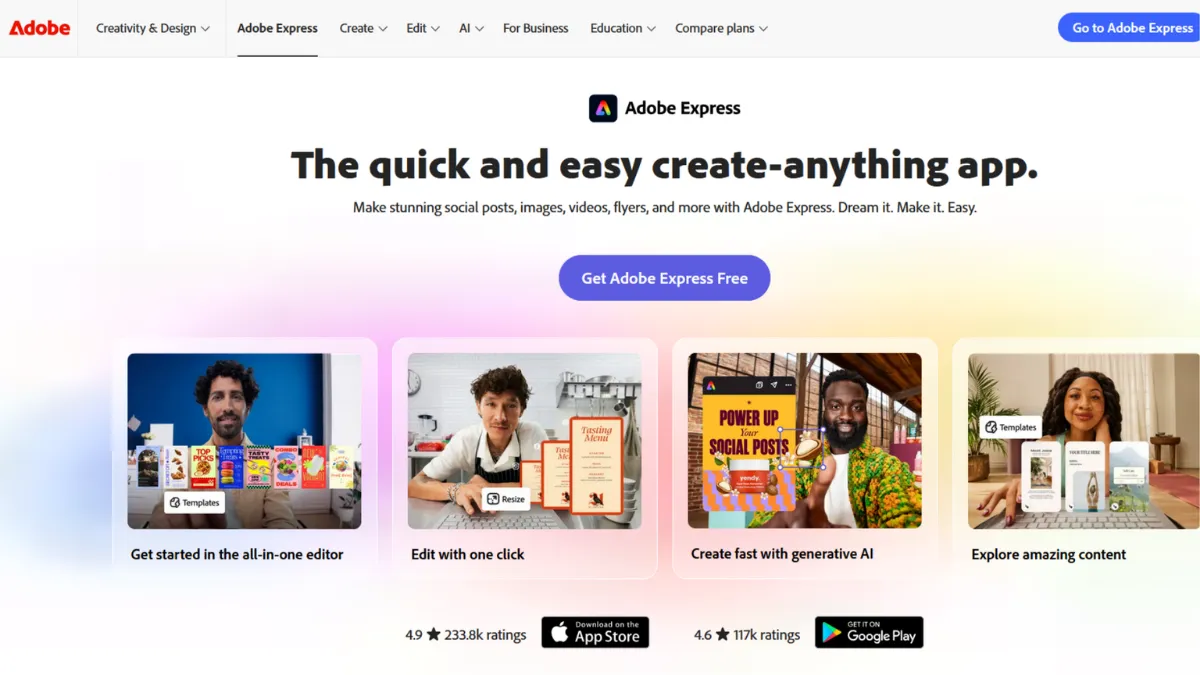
Adobe Express occupies a specific and valuable position in the design tool market: it gives non-designers a fast path to professional-looking output without requiring them to learn a full creative suite. The tool handles social graphics, short video clips, branded documents, and print-ready files from a single workspace. Where it earns its place is not raw creative power, that belongs to tools like Figma or Illustrator, but in the speed at which someone with no design training can produce work that meets a commercial standard. If your bottleneck is getting content out the door rather than achieving pixel-perfect craft, Adobe Express removes that bottleneck efficiently.
The mechanism behind Adobe Express is template-first design. You start from a library of pre-built layouts organised by format and use case, then swap your brand colours, fonts, and images into the structure. Adobe's integration with its own asset libraries, including licensed photography and a growing generative AI feature set, means you rarely need to leave the platform to source raw materials. Most users underestimate how much of the heavy lifting the template structure does. The tool is not a blank canvas; it is a constrained system that trades flexibility for speed, and that trade-off is the point. Users who fight that constraint and try to use it as a full design tool end up frustrated. Users who accept it and work within it produce consistent branded content at a pace that would otherwise require a designer on staff.
Realistic expectations matter here. Adobe Express will not replace a brand designer for a company that needs distinctive visual identity work. Output from heavily-used templates will start to look familiar to anyone who spends time in the space. The generative AI features, which allow text-to-image creation and background removal, add meaningful capability but are not at the level of a dedicated tool like Midjourney for creative image generation. What you can expect is a reliable, fast workflow for social media content, presentations, flyers, short promotional videos, and branded documents, delivered at a quality level well above basic alternatives.
The primary audience is small business owners, solo marketers, content creators, and anyone inside a larger organisation who needs to produce marketing materials without a design team. It suits people who have a clear brand identity and need to apply it consistently across formats, not people still figuring out what their brand looks like.
The main limitation is creative ceiling. Adobe Express is a production tool, not an ideation tool. When you need to produce something genuinely novel or highly tailored, you will hit the edges of what templates and preset logic can deliver. The platform also ties some of its most useful features, including premium templates, brand kit storage, and advanced AI tools, to a paid subscription, so the free tier is a preview rather than a working solution for most business use cases.
The sections below cover how the tool works mechanically, which features matter most, who gets the best return from it, and how it compares to the alternatives worth considering.
What Is Adobe Express?
Adobe Express is a web and mobile design platform built for users who need to create visual content quickly without professional design skills. It addresses the gap between full creative suites, which require training and time, and basic drag-and-drop editors, which often produce output that looks generic or low quality. Adobe Express bridges that gap by combining a large template library with access to Adobe's licensed asset base, brand management tools, and AI-assisted features, all inside an interface that a first-time user can operate within minutes. The platform covers static graphics, animated content, short video, and printable documents. What separates it from a generic alternative is the depth of the template library and the quality of the assets behind it, both of which reflect Adobe's position as the company that has supplied the creative industry with software for decades. The practical question, given that strong foundation, is how the system actually works when you sit down to produce something.
How Adobe Express Works
Setup is fast. You create an account, and the platform places you immediately in a template browser organised by content type: social posts, videos, flyers, logos, presentations, and more. Selecting a template opens the editor, where every element is individually editable. You replace placeholder text, swap images, adjust colours, and resize elements. The brand kit feature, available on paid plans, lets you store your logo, colour palette, and fonts so that every new project pulls those in automatically rather than requiring manual input each time.
The asset layer is where Adobe Express differentiates itself from simpler tools. You have access to a large library of licensed stock photography and vector graphics without leaving the editor. The generative AI features, accessible through a dedicated panel, allow you to generate background images from text prompts, remove backgrounds from photos, and apply style effects to images. These are useful for content creators who need varied visuals at volume and do not have time or budget to source custom photography.
Video creation works on a similar template-first model. You select a video template, replace the text and media with your own, and export. The timeline is simpler than a dedicated video editor, but for social video content, short product clips, or animated posts, the output quality is appropriate. You can add voiceover, music from a built-in audio library, and animated text effects without touching a timeline in any traditional sense.
The counterintuitive insight most users miss is that the tool performs best when you resist the urge to customise heavily. Templates are engineered to maintain visual coherence even when you change colours and images. The more you move elements off their default positions, the more that coherence breaks down. The fastest path to good output is minimal deviation from the template structure. The question that raises, of course, is what features are available to work with and how they stack up in practice.
Adobe Express Key Features
Template Library. Adobe Express offers thousands of templates spanning dozens of content formats, from Instagram stories and LinkedIn banners to printable menus and presentation slides. Each template is fully editable and resizable, and many include format-specific variants so you can adapt a single design across multiple platforms in a few clicks. The library is one of the strongest in the category, and new templates are added regularly to reflect current design trends.
Brand Kit. The brand kit stores your logo, colours, and typography in one place so that every new project starts on-brand rather than requiring manual setup. On paid plans you can save multiple brand kits, which is useful for agencies or anyone managing more than one brand. This feature alone justifies the paid plan for small marketing teams who produce content at volume, since the time saved across dozens of projects compounds quickly.
Adobe Firefly AI Tools. Adobe has integrated its Firefly generative AI engine into Express, enabling text-to-image generation, background removal, generative fill, and style transfer. These tools are available directly in the editor without switching applications. The generated images are commercially safe by Adobe's terms, which matters for marketing use. The quality is solid for contextual background images and product mockups, though it does not match a dedicated AI image tool for complex creative briefs.
Video and Animation. The platform handles short-form video creation with a template-driven timeline. You can animate static designs, add transitions, sync text to audio, and export in formats suited to social platforms. For creators producing regular short video content, this is a meaningful capability that would otherwise require a separate application such as CapCut.
PDF and Document Creation. Beyond social content, Adobe Express supports creation of multi-page documents including flyers, brochures, and presentations. These can be exported as PDFs or shared as links. The document templates are well-structured and save significant time compared to building layouts from scratch in a word processor. This feature makes the tool a credible option for small businesses that need simple marketing collateral without a print design budget. The limitation worth addressing directly is that the most capable features are paywalled, which the next section covers.
Adobe Express Pros and Cons
The strengths of Adobe Express are real, but so are its constraints. Here is an honest assessment of both.
- Fast time to output. A first-time user can produce a finished, usable graphic within minutes of signing up. The template-first approach removes every decision that would otherwise slow down a non-designer, and the results hold up to a professional standard at first glance.
- Deep asset library. Access to Adobe's stock photography, icons, and fonts inside the editor means you rarely need to source materials externally. The quality and variety of the library is a significant advantage over lighter-weight competitors.
- Commercially safe AI generation. Firefly-generated images are covered by Adobe's commercial use terms, removing a legal uncertainty that applies to some other AI image tools. For marketing teams this is not a minor detail.
- Cross-format flexibility. The ability to resize and adapt a design across multiple formats from a single workspace reduces the time cost of producing content at scale.
- Mobile app quality. The mobile application is functional rather than stripped-down. Creators who produce content directly on mobile devices will find the experience close to the desktop version, which is uncommon at this tier.
On the other side, there are genuine trade-offs worth knowing before you commit.
- Free tier is limited in practice. The free plan gives you a preview of the tool, but premium templates, brand kit functionality, and the full AI feature set all require a paid subscription. Many users discover this after investing time in the platform.
- Creative ceiling is low. Adobe Express is optimised for speed and consistency, not originality. If your brief requires something genuinely custom or visually distinctive, you will run into the edges of what template-based design can deliver.
- Not a replacement for professional Adobe tools. Users expecting the flexibility of Photoshop or Illustrator will find Express restrictive. It is a separate product with a different purpose, and conflating the two leads to disappointment.
- Template saturation risk. Because the templates are widely available, output can look familiar to audiences who consume a lot of social content. Standing out requires more intentional customisation than the default workflow encourages.
- Collaboration features are basic. For teams working on design assets together, the collaboration tools are thin compared to dedicated platforms. Sharing and feedback workflows are simpler than users of more collaborative tools might expect.
How to Get the Most Out of Adobe Express
Before you open the editor, upload your brand assets: logo files, your exact colour hex codes, and any custom fonts you use. Doing this first means every template you touch becomes on-brand immediately. Users who skip this step and customise each project manually spend far more time on repetitive adjustments and produce less consistent output.
In your first week, resist the temptation to explore the full template library. Pick two or three formats you publish regularly, social post, story, and email header for example, and master the resize workflow for those. Adobe Express can adapt a single design to multiple formats in a few clicks, but only if you have set up the source design cleanly. Spending your early time on a small number of well-configured templates pays off faster than sampling dozens.
For teams managing social content, connect your publishing workflow to a scheduling tool. Adobe Express does not have native scheduling, so you will need to export and move assets to a platform like Buffer. Building that handoff into your routine removes friction and keeps the content pipeline moving without manual chasing.
The mistake most users make is trying to work around the template structure rather than inside it. When a layout does not look right, the instinct is to move elements manually until it does. The faster fix is to choose a different template that is closer to what you need. Adobe's library is large enough that a better starting point almost always exists.
If your goal is to learn how to create social media graphics with Adobe Express, the most efficient path is to treat the template as a brief rather than a constraint. Read what the template communicates visually, swap in your content while preserving that communication, and export. Measuring success is straightforward: track whether your social content produces the engagement or response you need. If it does not, the problem is rarely the tool. It is usually the message, the format, or the timing. Pairing Express output with analytics from Google Analytics gives you the data to make that call confidently.
Who Should Use Adobe Express?
This is for you if you are a solo founder or small business owner producing your own marketing content without a design team. You need branded social posts, promotional flyers, and the occasional short video, and you need them fast enough to keep up with a real publishing schedule. Adobe Express gives you a system that handles the visual production so you can focus on the message.
It is also a strong fit for in-house marketers at companies that have an established brand identity but no dedicated graphic designer. If the visual standards are set and you need to apply them consistently across formats, the brand kit and template system do exactly that job without requiring specialist software knowledge.
Content creators who publish across multiple platforms and need format variants of the same content will find the resize and adapt workflow useful. Producing one design and exporting it in five different dimensions is a real time saving at volume.
Adobe Express is not the right tool if you are a professional designer or agency producing work where visual originality and precise control matter. You will find the constraints frustrating rather than useful, and the output will not meet the standard your clients expect. If you are looking for a full video editing suite, the video features here are designed for short social clips, not longer or more complex productions.
Adobe Express Pricing
Adobe Express offers a free tier that provides access to a selection of templates, basic editing tools, and a limited version of the AI features. The free plan is workable for occasional use and useful for evaluating the tool, but it excludes the brand kit, premium templates, and the full Firefly AI capability, which are the features that drive the most value for regular users.
The paid plan unlocks the complete feature set including unlimited premium templates, full brand kit storage, advanced AI generation, and additional storage. Adobe also offers Express as part of broader Creative Cloud subscriptions, which may represent better value if you use other Adobe products. Pricing changes, so check the Adobe Express pricing page directly for current rates before committing.
For most small business users producing content regularly, the free tier functions as a trial rather than a long-term solution. The paid plan cost is low relative to hiring a designer or subscribing to a full creative suite, and the value it delivers at that price point is strong. Compared to the alternatives in this category, Express sits at a competitive price for what it includes, though some competitors offer more generous free tiers, which the next section addresses directly.
Adobe Express vs Alternatives
The most direct competitor is Canva, and the comparison is genuinely close. Canva has a larger template library and a more generous free tier, and its collaboration features are stronger. Adobe Express counters with deeper asset integration, commercially safe AI generation through Firefly, and tighter brand consistency tools. Choose Canva if team collaboration and free-tier access are priorities. Choose Adobe Express if you are already in the Adobe ecosystem or if AI-assisted content creation with commercial clearance matters to your workflow.
Adobe Stock is worth mentioning separately because it extends Adobe Express with a premium licensed asset library. If your content requires high-quality photography beyond what the standard library provides, the two products work well together. Adobe Stock is not an Express alternative; it is a complement that removes sourcing friction for asset-heavy projects.
For logo and brand identity creation specifically, Looka addresses a narrower use case more deeply. If your primary need is building a visual identity from scratch rather than producing ongoing content, Looka is a more appropriate starting point. Adobe Express is better suited to the production phase that follows once a brand identity exists.
Designers who outgrow Express and need proper vector control and collaborative workflows should look at Figma. Figma requires more skill and time investment but removes the creative ceiling that Express imposes. It is the natural next step for anyone whose content needs have grown beyond template-based production.
Adobe Express Review: Final Verdict
Adobe Express earns an overall score of 4.27 out of 5, which reflects a tool that delivers strong results within a clearly defined scope. Its highest marks come from ease of use and performance, where it is best-in-class for non-designers who need fast, professional output. The customisation score of 3.8 reflects the real creative ceiling that template-based design imposes, and that limitation is worth understanding before you commit.
The bottom line: if you need a fast, reliable system for producing branded visual content without a designer, Adobe Express is one of the strongest options available at this price point. Work within its constraints and it delivers consistently.
How We Rated It:
More Tool Reviews







Subscribe to Stay in the loop
Get the latest AI and technology news, honest tool reviews, and practical guides delivered straight to your inbox.
Success! Check your Inbox!

Tezons Newsletter
The latest technology news, in-depth tool reviews, and practical guides - curated and delivered to your inbox.
Latest News




Have a question?
Have any questions?
Didn’t find what you were looking for? We’re just a message away.