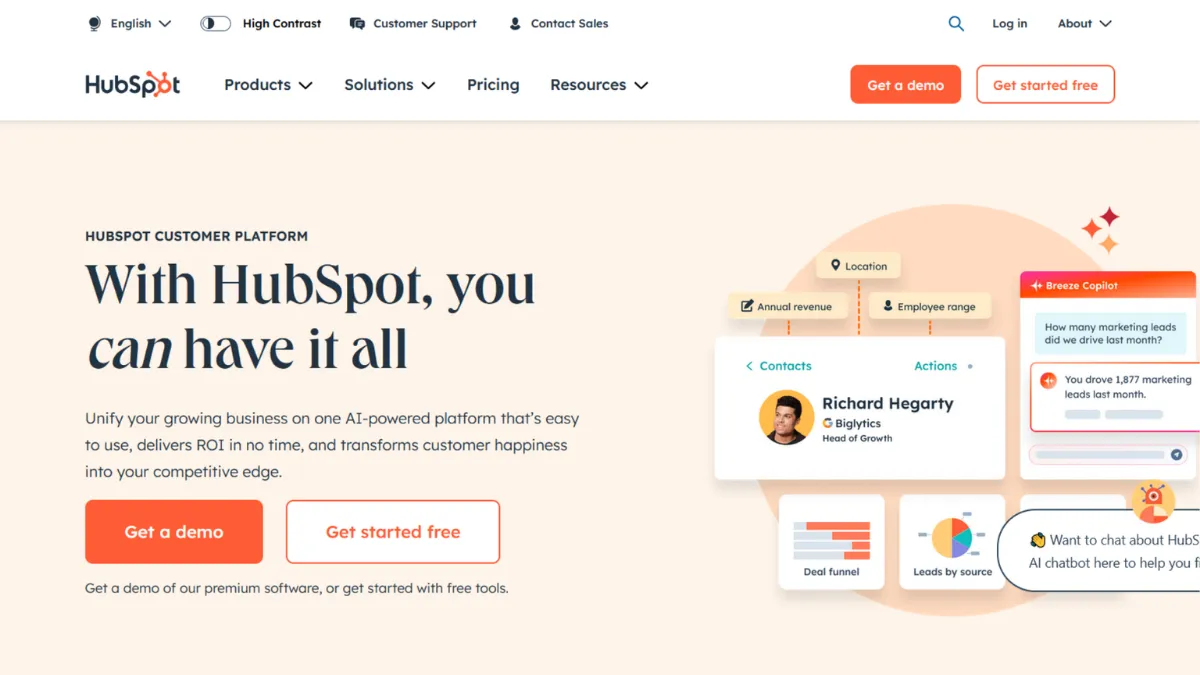
The gap between a CRM that stores contacts and one that actively drives revenue is wider than most founders expect when they first sign up. HubSpot sits at one of the most recognised positions in that gap: a platform that begins free, feels intuitive within an afternoon, and scales into a genuinely powerful growth engine, provided you can afford to follow it upward. For the right team, it removes the need for a patchwork of disconnected tools across marketing, sales, and customer service. For the wrong one, it becomes an expensive commitment made before the price cliff came into view.
HubSpot is built around the idea that marketing, sales, and service data should live in one place. Its Smart CRM sits at the centre, with each Hub (Marketing, Sales, Service, Content, Operations) feeding data into shared contact records. When a lead fills out a form, opens an email, visits a pricing page, or replies to a sequence, HubSpot logs all of it against one record. Sales reps see the full picture before they dial. Marketers see which sequences convert. The mechanism works because the data model is unified from the start, not bolted together from acquisitions. Where most teams go wrong is treating the free tier as a long-term home rather than an onboarding ramp. The free CRM is genuinely useful, but the features that make HubSpot worth its reputation, such as custom workflows, sequences, A/B testing, and custom reporting, sit behind the Professional tier.
Realistic expectations matter here. A small team on the free plan can manage contacts, track deals, and send one-off emails effectively. Paid Starter tiers add basic automation and remove HubSpot branding. The Professional tier is where the platform earns its authority, but it comes at a price that shocks many users making the jump from Starter. Automation depth, reporting flexibility, and pipeline sophistication all land at Professional. Teams that commit to that level and use it consistently tend to get strong returns. Teams that upgrade hoping the tool will do the work for them rarely do.
HubSpot is built for revenue-focused teams at small to mid-sized businesses who want marketing and sales to operate from shared data without hiring a dedicated RevOps engineer to wire everything together. It suits companies growing fast enough to need sequences, lead scoring, and reporting, but not so complex that they require the deep custom objects and territory management of an enterprise CRM. Founders running outbound-heavy motions alongside inbound content strategies will find the unified data model particularly valuable.
The pricing structure is the single biggest friction point. The jump from Starter to Professional is steep, and the contact-based pricing on the Marketing Hub means your monthly bill scales with list growth, creating a cost structure that runs counter to the goal of audience building. Annual contracts are standard from Professional upward, and mandatory onboarding fees apply at higher tiers. You need to run the numbers before you commit, because the cost at scale looks nothing like the cost at entry.
The sections below cover how the platform works mechanically, what each key feature actually delivers, who gets the most value, and how it sits against the main alternatives in the CRM and marketing automation category.
What Is HubSpot?
HubSpot is an all-in-one customer platform combining CRM, marketing automation, sales enablement, customer service, content management, and operational tools into a single system. It was built on the premise that inbound marketing, attracting leads through content rather than interrupting them with cold outreach, works better when every touchpoint is tracked in one place. What separates it from a generic CRM is the breadth of its native toolset: you can run email campaigns, manage a blog, build landing pages, track deals, and handle support tickets without leaving the platform or stitching together separate subscriptions. HubSpot serves a large number of businesses globally across industries, which gives it one of the larger ecosystems of third-party integrations and certified partner agencies of any platform in its category. The question of how all of those capabilities actually interact in practice is what most vendor overviews gloss over.
How HubSpot Works
Every object in HubSpot, whether a contact, company, deal, or ticket, sits inside the Smart CRM and carries a timeline of every interaction logged against it. When you connect your email, your calendar, your website forms, and your ad accounts, HubSpot enriches those records automatically. A contact record shows you the pages they visited, the emails they opened, the deal stage they sit in, and the support tickets they have raised, without you manually entering any of it.
The Hubs are modular but share that central data layer. You can buy Marketing Hub alone, or pair it with Sales Hub, or take the full Customer Platform bundle. Each Hub adds tools relevant to that function: Marketing Hub contributes email campaigns, workflows, forms, and landing pages; Sales Hub adds sequences, deal pipelines, meeting scheduling, and call recording; Service Hub provides ticketing, a knowledge base, and customer feedback surveys. The Operations Hub handles data sync, programmable automation, and data quality management, which is often the piece that binds the others together reliably.
Setup involves connecting your domain, importing your contact database, and configuring your deal pipeline stages. The onboarding experience is polished and well-documented, and most non-technical users can reach a working state within a week. What takes longer is building the automation logic: workflows that enrol contacts based on behaviour, score them against your ideal profile, route them to the right rep, and trigger follow-up sequences at the right moment. That work compounds over time. The counterintuitive truth most new HubSpot users discover is that the platform does not reward passive use. Teams that set it up, leave it running, and check results monthly consistently underperform the teams that actively refine their workflows, clean their data, and update their sequences based on what the reporting shows. HubSpot gives you the infrastructure; the results come from what you build on top of it. That practical question, what to build first, is exactly what the features section addresses.
HubSpot Key Features
Smart CRM and Contact Management. The contact database is the foundation everything else relies on. Each record aggregates activity from email, website, calls, and deals into a single timeline. You can create custom properties to capture data specific to your business, segment contacts into lists based on any combination of attributes, and build views filtered by deal stage, lifecycle stage, or lead score. The practical value is that your sales team goes into every conversation with full context, not a name and a company. Custom properties and objects become more powerful at Professional and Enterprise tiers, so teams with complex data structures should account for that before choosing a plan.
Marketing Automation and Workflows. Workflows are the engine of HubSpot's marketing capability. You define a trigger, such as a form submission, a page visit, or a deal stage change, and the workflow takes action: sending an email, updating a property, creating a task, enrolling the contact in a sequence, or notifying a rep. At Professional tier, the branching logic becomes sophisticated enough to handle most B2B nurture programmes without external automation tools. Teams that previously relied on Zapier for basic CRM triggers often find they can consolidate that logic natively at this level. The limitation is that the most complex programmable automations, such as custom-coded actions, require Operations Hub Professional.
Sales Sequences and Pipeline Management. Sequences are timed, personalised outreach cadences that pause automatically when a contact replies or books a meeting. Combined with the deal pipeline, which gives you a visual Kanban of every active opportunity, this is where HubSpot earns its keep for outbound sales teams. You can customise pipeline stages, set deal rotation rules, and track forecast categories. Connecting Google Analytics alongside HubSpot gives you the web behaviour layer that helps attribute pipeline to specific content or campaign sources more precisely.
Breeze AI. HubSpot's AI layer, branded as Breeze, runs across the platform rather than existing as a separate module. The Breeze Assistant handles conversational queries about your CRM data, content generation, and record summarisation. Breeze Agents operate autonomously on specific tasks: the Prospecting Agent researches leads and drafts outreach, the Content Agent generates blog posts and social copy, and the Customer Agent handles tier-one support queries using your knowledge base. Breeze Intelligence enriches contact records with third-party data to fill gaps in your database. The depth of what Breeze can do scales with how much data you have in HubSpot, because the AI draws on your own records for context rather than generic templates.
Reporting and Dashboards. HubSpot's reporting tools let you build dashboards tracking anything from email open rates to revenue attribution across channels. At Professional tier, custom reports allow cross-object analysis, so you can, for example, see which lead source produces the highest average deal value. The attribution modelling covers first touch, last touch, and multi-touch across web, email, and ad channels. Teams that previously used separate analytics tools often find the native reporting sufficient for most operational decisions, though deep statistical analysis still benefits from a dedicated BI layer. This trade-off between native convenience and analytical depth is exactly what the pros and cons section addresses.
HubSpot Pros and Cons
Where HubSpot earns its reputation:
- Unified data model from day one. Marketing, sales, and service share a single contact record with no manual syncing required. This removes the most common source of data disagreements between teams and gives everyone the same picture of a customer's history.
- Genuinely useful free tier. The free CRM is not a stripped demo. You can manage contacts, track deals, send emails, and schedule meetings without paying anything. For early-stage teams validating a sales motion, it provides a real foundation.
- Polished onboarding and documentation. HubSpot Academy offers structured certifications, and the knowledge base covers almost every configuration question a new user will encounter. Compared to enterprise CRMs that require external consultants to get started, the self-serve learning path is a significant advantage.
- Breadth of native integrations. The app marketplace includes connections to most tools a growing business already uses, from payment processors to ad platforms to communication tools. Teams using Airtable for project data or Notion for knowledge management can connect both without custom development.
- Active product development. HubSpot ships features regularly, and the Breeze AI expansion shows sustained investment in the platform's direction. Users benefit from a roadmap that is clearly funded and moving.
Where it falls short or requires careful consideration:
- Steep pricing jumps between tiers. The move from Starter to Professional is among the largest in the SaaS CRM category. Teams that outgrow Starter often face a bill increase that requires a formal budget conversation, not just a credit card update.
- Contact-based pricing penalises list growth. Marketing Hub charges scale with your number of marketing contacts. A growing email list directly increases your monthly costs, which creates friction at exactly the point your marketing efforts are working.
- Annual contracts and mandatory onboarding fees. Professional and Enterprise tiers require annual commitments. The mandatory onboarding fees at higher tiers add a significant upfront cost that many teams do not anticipate during the evaluation stage.
- Support quality varies significantly by plan. Free and Starter users have limited access to live support. Multiple verified user reviews cite inconsistent responses and billing disputes as ongoing frustrations, particularly when issues arise at renewal time.
- Customisation has hard limits below Enterprise. Custom objects, advanced permissions, and programmable automation all gate at Enterprise pricing. Businesses with complex data models or unusual sales processes may find the Professional tier constraining before they expected to.
How to Get the Most Out of HubSpot
Before you import a single contact, define your lifecycle stages and deal pipeline stages clearly. HubSpot's power compounds when every team agrees on what a Marketing Qualified Lead, Sales Qualified Lead, and Opportunity mean in your business. Teams that skip this step spend months arguing about data rather than acting on it.
In the first two weeks, connect your email, calendar, website tracking code, and any ad accounts you run. These connections populate your contact records with behavioural data passively, which means your sequences and workflows have meaningful context to work with from the start. Build your first workflow around your highest-volume inbound action, whether that is a demo request form, a content download, or a pricing page visit, and make sure it routes leads to the right person and sends a confirmation within minutes.
Building results over time comes down to two habits: regular workflow audits and consistent reporting review. Most teams set up automation in the first month and rarely revisit it. Workflows that made sense at fifty contacts per month may be misfiring at five hundred. Scheduling a monthly review of enrolment rates, email performance, and deal velocity keeps the system accurate as your volume grows.
The mistake most users make is treating the free or Starter tier as permanent. Teams that stay there too long build workarounds, such as using Make for automation logic that HubSpot could handle natively at Professional, and end up with a fragmented stack that is harder to debug than if they had upgraded earlier.
If you want to know how to generate leads with HubSpot effectively, the answer is almost always the same: use the full attribution chain. Connect your ad accounts, enable the tracking pixel, and build UTM conventions into every campaign. Once HubSpot can trace a deal back to a specific ad or piece of content, you have the data to cut what is not working and scale what is. That closed-loop visibility is what separates HubSpot from using separate email, CRM, and analytics tools that never quite agree on the numbers.
Measure success by pipeline velocity, not activity metrics. The platform makes it easy to track email opens and call volume, but the number that matters is how fast deals move from first contact to close, and whether that is improving month on month.
Who Should Use HubSpot?
This is for you if you are running a B2B sales motion at a company with five to two hundred employees and need your marketing and sales teams to operate from the same data without a dedicated technical resource to maintain the integration. A founder-led sales team closing deals between four and five figures will find the pipeline management and sequences immediately useful. A marketing team running content-driven inbound alongside paid acquisition will benefit from the attribution reporting that ties campaigns to revenue. A customer success manager handling a portfolio of accounts will use the service ticketing and feedback tools to keep retention data in the same system as acquisition data.
HubSpot is also well-suited to teams that are scaling fast enough to feel the pain of disconnected tools but not yet large enough to justify a Salesforce implementation with external consultants. The onboarding is fast enough that a non-technical operator can run it without engineering support.
Not for you if you are a solo operator or a two-person team in the earliest stages of finding product-market fit. The free tier will not hold you back, but you will not unlock the platform's real value until you have consistent lead volume and a defined sales process to automate. Similarly, if your business runs on highly customised data objects, complex territory hierarchies, or enterprise compliance requirements, you will reach HubSpot's ceiling before your needs do.
HubSpot Pricing
HubSpot offers a free CRM that includes contact management, deal tracking, meeting scheduling, email integration, and limited marketing tools. The free tier supports up to five users and one deal pipeline, and it excludes live customer support entirely. It is a genuine starting point, but the features that define the platform sit elsewhere.
Paid tiers begin at the Starter level, where per-seat pricing applies and basic automation becomes available. The Professional tier is where the platform's real capability unlocks: custom workflows, sequences, A/B testing, advanced reporting, and the Breeze AI features all require this level or above. The Enterprise tier adds custom objects, advanced permissions, predictive lead scoring, and multi-touch revenue attribution. Pricing across all tiers is subject to change, and the contact-based element of Marketing Hub pricing means your bill scales with list size, so always check the current rates on HubSpot's pricing page before committing.
The mandatory professional onboarding fees at Professional and Enterprise tiers are a non-negotiable addition to the upfront cost and should be factored into any budget calculation. Annual contracts are standard. Compared to alternatives at a similar capability level, HubSpot's Professional tier represents reasonable value for teams that use the full breadth of what it offers, but poor value for teams that only need one or two of its Hubs. That cost-to-feature ratio sits at the centre of most comparisons with competitors.
HubSpot vs Alternatives
Salesforce is the most powerful CRM in the enterprise category and offers deeper customisation than HubSpot at every tier. If your business runs complex territory structures, custom object hierarchies, or has a dedicated admin team, Salesforce wins on flexibility. HubSpot wins when speed of implementation and ease of use matter more than raw configurability, which is most companies under a few hundred employees.
Zoho CRM targets the same small to mid-market segment as HubSpot but at a lower price point. Zoho's feature depth is competitive, and its suite of adjacent tools (Zoho Books, Zoho Desk, Zoho Campaigns) mirrors HubSpot's Hub model. Choose Zoho if budget is the primary constraint and you have the patience for a less polished onboarding experience. Choose HubSpot if you want faster time to value and a larger ecosystem of certified partners.
Klaviyo is a specialist email and SMS marketing platform with deep e-commerce data integrations, particularly for Shopify merchants. If your primary need is behavioural email automation tied to purchase data rather than a full CRM, Klaviyo outperforms HubSpot's Marketing Hub for that specific use case and at a lower cost. HubSpot wins when you need sales pipeline management alongside marketing automation in one system.
Pipedrive focuses exclusively on sales pipeline management without the marketing automation layer. It is simpler, cheaper, and faster to set up than HubSpot for teams that only need to manage deals and not run campaigns. HubSpot wins the moment you need to connect inbound marketing activity to pipeline outcomes in the same platform.
HubSpot Review: Final Verdict
HubSpot earns an overall score of 4.38 out of 5, reflecting a platform that is genuinely strong across most dimensions but carries a real weakness in cost-efficiency once teams grow beyond the Starter tier. Its ease of use score leads the ratings because very few platforms of this capability level are accessible to non-technical users without outside help. The pricing structure, particularly the steep Professional jump and contact-based scaling, is the single reason to evaluate alternatives before committing.
The bottom line: if your team is between five and two hundred people and needs marketing and sales to run from shared data, HubSpot is the most complete and fastest-to-deploy option in its category. Run the numbers at your projected contact volume and team size before you sign an annual contract.
How We Rated It:
More Tool Reviews







Subscribe to Stay in the loop
Get the latest AI and technology news, honest tool reviews, and practical guides delivered straight to your inbox.
Success! Check your Inbox!

Tezons Newsletter
The latest technology news, in-depth tool reviews, and practical guides - curated and delivered to your inbox.
Latest News




Have a question?
Have any questions?
Didn’t find what you were looking for? We’re just a message away.