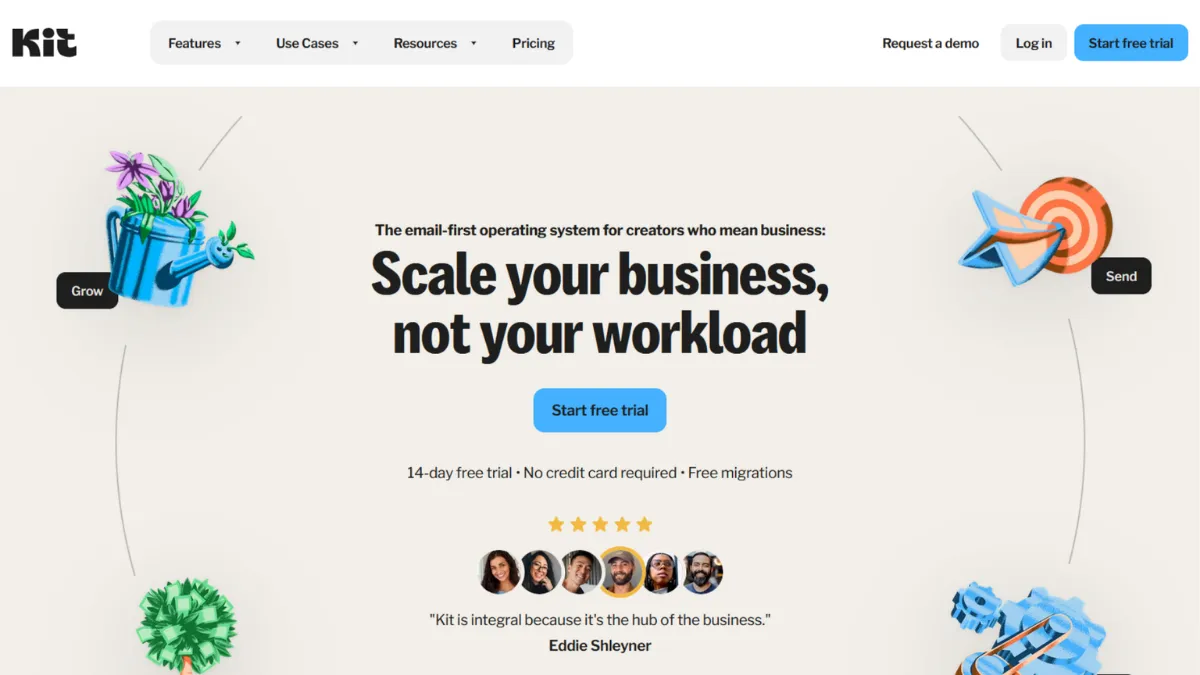
Audience-building without monetisation built in is half a strategy. Kit, formerly ConvertKit, sits at the intersection of email marketing and creator commerce: it is the platform that lets you grow a list, automate sequences, and sell digital products without stitching three tools together. The verdict is clear: Kit is the most complete email-first operating system for independent creators, and for writers, course sellers, coaches, and newsletter publishers, it removes more friction than any comparable platform at its price point. That said, it is not cheap as your list scales, and if your business centres on physical goods or demands advanced CRM features, it will leave you wanting.
The mechanism that makes Kit work is its subscriber-centric model rather than a list-centric one. Where tools like Mailchimp historically billed you for the same contact sitting on multiple lists, Kit counts each subscriber once regardless of how many tags or segments they carry. Tags drive everything: you tag subscribers based on actions, interests, or purchase history, then fire automations off those tags. The visual automation builder lets you map out conditional paths, from welcome sequences to post-purchase upsells, with a drag-and-drop interface that is genuinely easier to learn than most competitors. The mistake most users make is treating Kit like a broadcast tool and ignoring automations entirely. The real value surfaces when you build even a basic nurture sequence tied to a tag trigger.
Realistic expectations matter here. Kit will not magically grow your list: it gives you the infrastructure to convert traffic into subscribers and subscribers into customers, but you still need to drive the traffic. Deliverability is strong, and most creators report open rates above industry averages, though those figures depend heavily on list quality and sending frequency. The Creator Network, Kit's cross-promotion feature, can accelerate growth by connecting you with other creators for mutual recommendations, but results vary by niche and audience size. Budget for at least two to three months of consistent publishing before automation sequencing pays measurable dividends.
Kit is built for the solo creator or small creator team: the newsletter writer monetising through paid subscriptions, the course builder selling via email, the coach running an evergreen funnel, the YouTuber who wants a place to own their audience relationship outside the algorithm. It suits people who want sophisticated automation without hiring a developer, and who need commerce features baked into the same dashboard they use to write emails.
The genuine limitation is cost at scale. Pricing climbs steeply as subscriber counts grow, and the paid plans saw a significant price increase recently. Teams managing lists above fifty thousand subscribers often find better value elsewhere. The email template editor is also limited compared to design-led tools: Kit prioritises plain-text and lightly formatted emails, which suits deliverability but frustrates anyone who wants heavily branded HTML campaigns.
The sections below cover how Kit works mechanically, which features matter most, where to spend your setup time, and how it compares to the alternatives you are most likely to consider.
What Is Kit?
Kit is an email marketing and creator commerce platform designed for independent builders who earn from their audience. It started as ConvertKit, a tool specifically for bloggers who found Mailchimp too blunt for their segmentation needs, and rebranded to Kit to reflect its expanded scope as a broader operating system for creator businesses. The core problem it solves is the gap between growing an email list and monetising it: most email tools handle the sending but force you to bolt on separate tools for selling digital products, managing paid newsletter subscriptions, or running referral programmes. Kit folds all of that into one dashboard. What makes it different from a generic email service provider is the subscriber tagging architecture, which allows precise targeting without the list duplication costs common in older platforms. Kit now serves a significant base of newsletter publishers and online course creators, and its Creator Network has grown to include thousands of newsletters across verticals. The practical question is how it actually handles that complexity under the hood.
How Kit Works
Setup begins with importing your existing subscriber list or building from scratch using Kit's landing page and form builder. Both are included at every plan tier. Forms can be embedded on external sites or hosted natively, and the landing page templates are clean and conversion-focused without requiring any design skill. Connecting a custom domain to a Kit landing page takes under ten minutes.
The tagging system is the backbone. Every subscriber sits in a single database; tags and segments then organise them dynamically. You apply tags manually, through import, or automatically via automation rules. A rule might say: when a subscriber clicks a specific link in an email, add the tag 'interested-in-course-X'. That tag then triggers an automation sequence without any manual intervention. Sequences are linear email chains with fixed delays; visual automations are the more powerful option, allowing branching logic based on conditions, events, and tag states.
Commerce features live in the Earn section of the dashboard. You can create digital products, set pricing, and generate a checkout link that connects to your email list automatically on purchase. Paid newsletter subscriptions, handled through Stripe, let you gate content behind a paywall and bill subscribers monthly or annually. Kit handles the payment processing relationship but check the current transaction fee structure on their pricing page, as it has changed across plan tiers.
The counterintuitive insight most users miss: Kit's visual automations are not a replacement for sequences. They are the architecture that connects sequences, tags, and products together. Treating them as one or the other produces a tool that underperforms what you paid for. The practical implication is that setup investment upfront, mapping out your subscriber journey before building anything, determines almost entirely how much leverage you get from Kit's feature set. The question of which specific features deserve that investment is worth addressing directly.
Kit Key Features
Visual Automation Builder. Kit's automation builder uses a drag-and-drop canvas where you connect triggers, conditions, actions, and delays to build subscriber journeys. Triggers include form submissions, tag additions, link clicks, and product purchases. The builder supports branching logic, so you can send different sequences to subscribers based on their behaviour. Pre-built automation templates lower the starting effort significantly. The unlocked version, available on Creator plan and above, removes the single-automation cap that constrains the free tier.
Subscriber Tagging and Segmentation. Tags are the organisational layer that makes precise targeting possible without maintaining separate lists. You can create segments dynamically using tag combinations, so a subscriber tagged both 'lead' and 'webinar-attendee' lands in a different sequence from one tagged only 'lead'. This flexibility is where Kit consistently outperforms simpler newsletter tools. Most creators who migrate from list-based platforms find their segmentation becomes meaningfully more actionable within the first month.
Landing Pages and Forms. Every plan tier includes unlimited landing pages and opt-in forms. Templates are minimal and mobile-responsive. The editor is straightforward rather than feature-rich: you get text, image, button, and basic layout control, but not the granular design freedom of a dedicated page builder like Leadpages. For most email-focused creators, this is sufficient. Where the feature earns its value is speed: a functioning opt-in page can be live in under fifteen minutes.
Creator Network and Recommendations. Kit's Creator Network allows you to recommend other Kit newsletters to your subscribers at the point of confirmation or unsubscribe, and to receive recommendations in return. This is a growth lever that does not require paid advertising: if your audience overlaps meaningfully with another creator's, mutual recommendations can drive consistent subscriber additions. Access to paid cross-promotion placements requires a Creator plan or above.
Digital Product Sales and Paid Subscriptions. From within Kit, you can list digital products (ebooks, templates, courses) and charge for paid newsletter tiers. Payment processing runs through Stripe. The product creation flow is simple: set a name, price, and delivery method, then embed the buy link in your emails or landing pages. This integration matters because it keeps subscriber status and purchase history in the same database, enabling post-purchase automations without connecting separate tools. Note that Kit charges a transaction fee on the free plan; paid plans reduce or remove it, so check the current rates on the pricing page before choosing a tier.
The features above paint a capable picture, but they also reveal the central trade-off worth examining: Kit gives you a focused, well-integrated set of tools optimised for creator workflows, which means there are genuine gaps for users who need more than that scope covers.
Kit Pros and Cons
Where Kit earns its position:
- Free plan generosity is genuinely unusual. Ten thousand subscribers, unlimited emails, unlimited landing pages, and the ability to sell digital products on the free tier put Kit ahead of most competitors at the zero-cost entry point. Creators validating a newsletter concept before committing to a paid tool have a meaningful runway.
- Single-subscriber billing removes a painful cost trap. Because Kit counts each subscriber once regardless of tags or segments, you do not get penalised for good list organisation. This is a structural advantage over older platforms that inflate bills by counting duplicates across lists.
- Commerce features are native, not bolted on. Selling digital products, collecting tips, and gating paid newsletter content all happen without leaving Kit or connecting a third-party e-commerce tool. For creators whose revenue flows directly from their email audience, this reduces the number of moving parts significantly.
- The Creator Network compounds over time. Cross-promotion recommendations can generate steady organic subscriber growth once you are inside a relevant creator community. Most users underuse this feature; those who engage with it actively report measurable list growth without paid acquisition spend.
- Migration support on paid plans lowers switching cost. Kit offers to handle list migration from another email platform at no extra charge on Creator and above, which removes a meaningful barrier for people sitting on established lists on legacy tools.
Where the cracks show:
- Pricing climbs fast at higher subscriber counts. The cost structure is predictable but steep. By the time you reach a moderately sized list, the monthly bill competes with more capable marketing automation platforms. The recent price increases have sharpened this concern for existing users.
- Email template design is deliberately limited. Kit leans toward plain-text and lightly styled emails, which benefits deliverability but makes it a poor fit for brands that rely on rich HTML design. Competitors offer far more visual control in the editor.
- A/B testing is gated to Creator Pro. Subject line and content split testing is only available at the highest paid tier. For creators who want to optimise based on data early, this forces either a more expensive plan or manual comparison.
- Analytics are basic on lower tiers. Open rates, click rates, and unsubscribe data are present, but deeper engagement scoring, subscriber lifetime value tracking, and revenue attribution require Creator Pro. Founders who make decisions from data will feel this constraint.
- No SMS, push, or multi-channel capabilities. Kit is email-only. If your audience expects text messages, in-app notifications, or other channels, you will need a separate tool or a different platform entirely.
How to Get the Most Out of Kit
Before you import a single subscriber, map your subscriber journey on paper. Sketch out what happens when someone opts in, what they receive in the first seven days, and what action you want them to take after that. Kit rewards preparation: the more clearly you define the path, the faster you can build the automations to walk subscribers through it. Skipping this step is why most users end up using Kit as a simple broadcast tool and never touch the visual automation builder.
In your first week, build three things: a primary opt-in form, a welcome sequence of at least three emails, and one tag-based automation rule. The rule can be simple: anyone who clicks a specific link gets tagged and enters a different sequence. This creates the foundation for segmentation without overwhelming you with complexity before you understand how your audience behaves.
Building results over time requires consistent tagging hygiene. Every time you run a campaign, think about what the click behaviour tells you about subscriber intent, and apply a tag accordingly. Over three to six months, this builds a database that is genuinely segmented by interest rather than just by join date. That is when Kit's automation power becomes commercially meaningful.
The mistake most users make is launching the free plan with the intention of upgrading later, and then not upgrading because the free plan feels sufficient. The free plan's single-automation cap means your nurture sequences effectively stop after one path. If you are serious about monetising your list, the Creator plan is the real starting point.
To measure success, track two numbers weekly: list growth rate and link click rate per email. Open rates are increasingly unreliable as a metric due to mail client tracking prevention. Click rate tells you whether your content is driving intent, and list growth rate tells you whether your acquisition channels are working.
If you want to know how to grow an email list with Kit specifically, the combination of native landing pages, Creator Network recommendations, and tagged opt-in sources gives you enough data to identify which channels deliver your best subscribers, not just your most subscribers. Run that analysis monthly and redistribute your acquisition effort accordingly.
Who Should Use Kit?
This is for you if you fit one of three profiles. You are a newsletter writer with a growing subscriber base and you want to introduce paid subscription tiers without managing a separate billing tool: Kit's native paid newsletter feature handles this cleanly and keeps your subscriber data in one place. You are a course creator or coach who sells digital products directly to an email audience: the combination of tagging, automation sequences, and product checkout means you can run a complete sales funnel inside a single dashboard. You are a content creator, whether a YouTuber, podcaster, or blogger, who wants to own an audience relationship independent of platform algorithms: Kit gives you the infrastructure to build that owned channel and monetise it without requiring technical setup beyond basic forms and landing pages.
Not for you if: you run an e-commerce store selling physical products and need deep Shopify or WooCommerce workflow automation, abandoned cart triggers, or purchase-behaviour segmentation at scale. Kit's commerce layer is built for digital goods and subscriptions; physical product workflows are better served by platforms built around that use case. Also not for you if your primary requirement is richly designed HTML emails with granular brand control, or if you are managing a list above fifty thousand subscribers on a constrained budget and need to keep per-subscriber costs low.
Kit Pricing
Kit offers three tiers. The free Newsletter plan supports up to ten thousand subscribers with unlimited email sending, unlimited landing pages and forms, audience tagging, digital product sales, and community support. The limitation that matters most is the single automation cap: you can run one basic automated path, which is enough to test the product but not enough to build a real nurture system. Kit branding also appears on emails at this tier.
The Creator plan is where the platform becomes fully functional. It unlocks unlimited visual automations, unlimited sequences, the Creator Network cross-promotion feature, RSS-to-email campaigns, third-party integrations, full API access, and live chat support. Pricing starts at a monthly rate for up to one thousand subscribers and increases in increments as your list grows; check Kit's pricing page for current rates, as prices have changed recently and will likely continue to adjust. The Creator Pro plan adds A/B testing, advanced analytics, engagement scoring, referral programme tools, and priority support. It is the tier for creators who run their business from email data and need deeper reporting.
The free plan is enough to validate a newsletter concept and begin building a list. It is not enough to run a monetised creator business. The Creator plan is the practical starting point for anyone treating email as a revenue channel. Compared to alternatives at similar subscriber counts, Kit is mid-to-premium priced, which matters when evaluating the competition.
Kit vs Alternatives
Beehiiv has become the most direct competitor, particularly for newsletter publishers. It includes a built-in ad network, more generous free tier analytics, and a web-based publication layer that Kit does not match. Beehiiv wins if advertising revenue is part of your newsletter monetisation strategy and you want a media-publication feel. Kit wins when your income comes from digital products, courses, or paid subscriptions rather than ad placements, because its commerce infrastructure is more mature.
Mailchimp is the platform most creators migrate away from toward Kit. Mailchimp's free tier is more limited on automation, its list-based billing can inflate costs for active segmenters, and its design tools, while more polished, produce heavier emails that can affect deliverability. Kit wins on automation flexibility and subscriber-based billing. Mailchimp wins on visual design and name recognition, which occasionally matters for brand-conscious clients.
Klaviyo serves a different primary use case: e-commerce brands with deep behavioural data needs. Its segmentation and automation are more powerful than Kit's for purchase-driven workflows, and its Shopify integration is best-in-class. Kit wins for creators selling digital goods; Klaviyo wins for brands with physical product catalogues and complex customer journey requirements. The price point is also considerably higher on Klaviyo, which makes the comparison moot for most solo creators.
GetResponse offers a broader feature set at a competitive price, including webinar hosting and a website builder, but its creator-specific positioning is weaker. Teams that need multi-channel marketing under one roof may prefer it; creators who want a tool built specifically for newsletter and audience monetisation will find Kit's focus more directly useful.
Kit Review: Final Verdict
Kit earns an overall score of 4.19 out of 5, which reflects a strong, well-focused platform with one meaningful weakness: cost efficiency at scale. Pricing scores at 3.8, and that reflects the reality that recent increases make Kit mid-to-premium priced against competitors who have caught up on features. What Kit delivers in return is a coherent, well-integrated creator stack: tagging, automation, landing pages, and commerce in one place, with a genuinely useful free tier to start.
The bottom line: if your business model is audience monetisation through email, Kit is the most capable single tool you can use without hiring a developer. If your list is large and your margins are tight, price the alternatives carefully before committing.
How We Rated It:
More Tool Reviews







Subscribe to Stay in the loop
Get the latest AI and technology news, honest tool reviews, and practical guides delivered straight to your inbox.
Success! Check your Inbox!

Tezons Newsletter
The latest technology news, in-depth tool reviews, and practical guides - curated and delivered to your inbox.
Latest News




Have a question?
Have any questions?
Didn’t find what you were looking for? We’re just a message away.