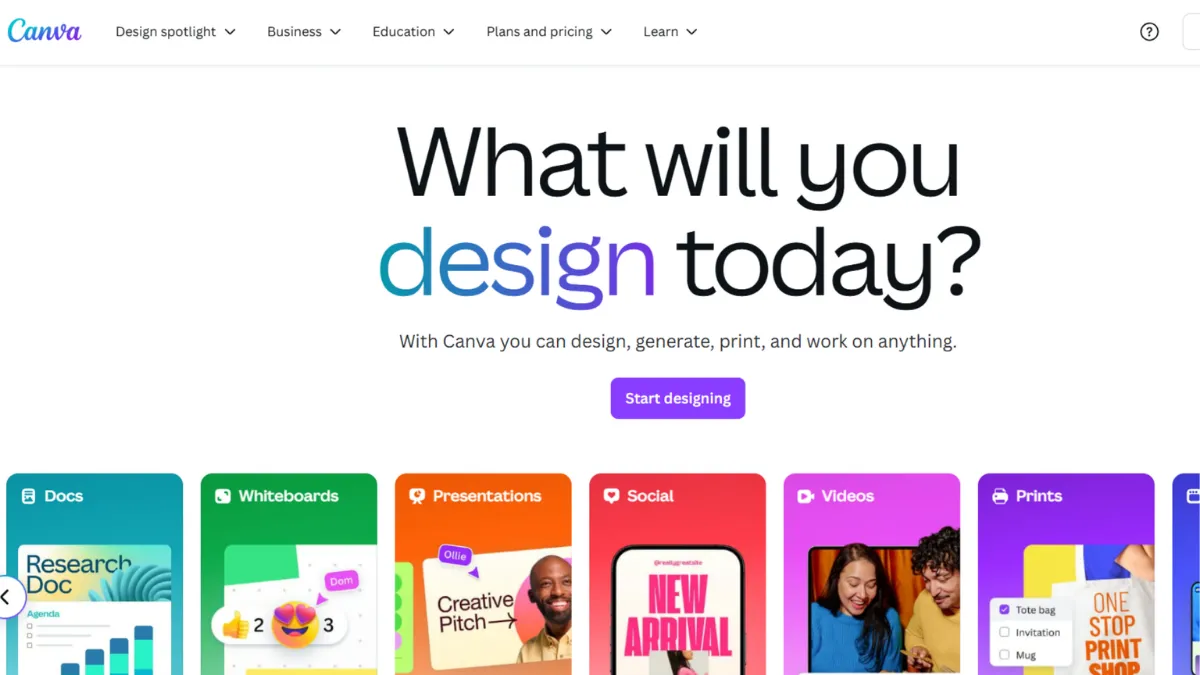
Graphic design used to demand either years of skill or a budget for someone who had it. Canva removed that barrier so completely that it now serves over 135 million monthly active users, from solo founders producing their first pitch deck to marketing teams pumping out a hundred social assets a week. That scale is not accidental. The platform is built around a core insight: most business design work is not creative from scratch, it is assembly under constraints, and assembly can be templated, systematised, and accelerated with the right tools. Canva delivers on that insight better than any tool in its category.
The mechanism behind Canva is a drag-and-drop editor layered over an enormous asset library, a growing suite of AI tools grouped under the Magic Studio umbrella, and a brand consistency system called Brand Kit. You start with a template, swap in your brand colours and fonts, pull from a library of tens of millions of stock images and graphics, and export in whatever format you need, from a print-ready PDF to a social-media-optimised MP4. The AI layer, which includes tools for image generation, background removal, format resizing, and copy assistance, handles the mechanical work that used to eat time. What most new users get wrong is treating Canva as a template picker rather than a design system. The templates are a starting point. The real productivity comes from setting up your Brand Kit properly, locking your logo and type scale, and using Magic Switch to reformat a single hero design across every channel at once.
Realistic expectations matter here. Canva will not replace a professional designer on a brand identity project or produce print artwork requiring CMYK precision and bleed control. The AI image tools produce usable results quickly, but the output quality sits below dedicated image generators like Midjourney and is not the right choice when prompt accuracy is critical. What Canva does reliably is take a non-designer from idea to polished, on-brand asset in minutes. Most users who invest one session in configuring their Brand Kit see a step-change in how quickly repeatable content gets produced. Teams that skip that setup spend far longer manually correcting brand inconsistencies on every asset they make.
Canva is built for marketers, early-stage founders, and small creative teams who need a steady volume of brand-consistent content without a full-time designer. It suits people publishing regularly across social media, email, presentations, and print collateral. It is particularly strong for teams where multiple people need to touch the same assets, because the collaboration and commenting tools are practical and low-friction, and template locking prevents off-brand edits.
The one genuine limitation worth naming upfront is that Canva's advanced features, including the full Magic Studio suite, Brand Kit, and the background remover, sit behind a paid plan. The free tier is genuinely useful but it will frustrate you at the moments that matter most. The Teams pricing increase, which moved from a flat annual fee to per-seat pricing, made the platform significantly more expensive for small teams and is worth factoring into your decision.
The sections below cover how Canva works mechanically, which features actually move the needle, what the pricing structure looks like after its recent changes, and how it compares to the alternatives worth considering.
What Is Canva?
Canva is a browser-based graphic design platform that lets anyone create professional-quality visual content without design training. The problem it solves is the gap between having something to communicate and having the skills to communicate it visually. A generic alternative would be something like PowerPoint or Google Slides for presentations, or hiring a freelancer on Fiverr for one-off assets. What makes Canva different is the combination of a template library spanning hundreds of content types, a collaborative workspace, a built-in stock asset library, and an AI layer that handles resizing, background removal, image generation, and copy suggestions inside a single tool. The platform reports over 135 million monthly active users, which gives it a network effect: the template and element libraries grow continuously, and third-party app integrations expand the platform's reach into broader marketing workflows. The question of how all those pieces fit together mechanically is worth understanding before you commit to a plan.
How Canva Works
Canva operates as a web app with optional desktop and mobile versions. You start by selecting a content format, social post, presentation, flyer, video, and so on, and you are immediately dropped into the editor with a selection of pre-built templates for that format. The editor is canvas-based: every element, text, image, shape, or video clip, sits on a layered canvas and is repositioned by dragging. You add elements from a sidebar that pulls from both the built-in library and any assets you have uploaded.
Brand Kit is the feature that changes how the tool feels for repeat users. You define your brand colours, fonts, and logos once, and they appear as a persistent first option every time you reach for a design element. On the Teams plan, you can lock specific template elements so collaborators cannot move the logo or change the primary typeface. This matters more than it sounds: without it, team-produced content drifts visually over time.
Magic Studio sits across the top of the editor and surfaces a set of AI tools depending on what you have selected. Magic Switch reformats a finished design into a different size or format. Magic Expand extends a background beyond its original edges. Magic Eraser removes unwanted objects from photos. Magic Write generates short-form copy inside a text box. These tools work at varying levels of reliability. Magic Switch and Magic Eraser are consistently useful. Magic Write produces generic output that needs editing before it is publication-ready.
The counterintuitive thing most users assume wrong: Canva is not primarily a template tool. It is a production system. The templates reduce setup time, but the output quality is determined by how well you configure your brand assets and how deliberately you use Magic Switch to cascade a single strong design across formats. Users who open a template, make quick edits, and export are leaving most of the platform's value on the table. The practical question that follows is which specific features inside that production system are worth your attention first.
Canva Key Features
Brand Kit. Brand Kit lets you store your logo, colour palette, fonts, and brand assets in one place so they load instantly in every project. On paid plans you can create multiple Brand Kits for different product lines or clients. On the Teams plan, template locking means specific elements like logo placement and type hierarchy cannot be overridden by other users. If you manage any level of brand consistency across a team, this is the feature that makes Canva a production environment rather than a design playground.
Magic Switch. Magic Switch takes a finished design and automatically reformats it for a different canvas size or file type. A presentation deck becomes a set of Instagram carousels. A social post becomes a print flyer. The resizing is not pixel-perfect and you will need to review text spacing and element positioning after the switch, but it eliminates the manual rebuild that would otherwise consume significant time. For teams producing content across multiple channels from a single hero concept, this is the highest-leverage feature in the platform.
Magic Studio AI suite. Beyond Magic Switch, the Magic Studio suite includes background removal, image generation, object removal, image expansion, and a basic copy assistant. The background remover is reliable and fast. The image generator produces serviceable results for editorial and social use but does not match the output fidelity of dedicated tools. Credit limits apply on paid plans, and free-tier users receive a capped monthly allowance. Check Canva's current plan page for exact credit allocations, as these update periodically.
Content Scheduler. Canva includes a basic publishing scheduler that lets you post directly to social platforms from inside the editor. It covers the major platforms and handles the handoff from design to distribution without switching tools. The scheduler is functional rather than powerful: it lacks the analytics depth and queue management that dedicated scheduling tools offer. Pairing Canva's design workflow with Buffer for scheduling and analytics is a common setup for teams that need more than basic post timing.
Collaboration and Approval Workflows. Multiple users can work on the same design simultaneously, leave comments on specific elements, and move designs through a lightweight approval process on paid plans. The collaboration layer is noticeably smoother than passing files back and forth over Google Drive, and it eliminates version-control problems that creep in when teams work from exported files. The approval workflow is not sophisticated enough for large agencies with multi-stage sign-off requirements, but for small teams it covers the essentials without overhead. This brings up a genuine tension between what the platform does well and where it falls short, which the next section addresses directly.
Canva Pros and Cons
The platform's strengths are real and consistent. Its limitations are worth naming plainly before you commit to a plan.
- Extremely low barrier to entry. A non-designer can produce a usable, on-brand asset within minutes of opening Canva for the first time. The editor requires no training and the template library provides enough starting structure that output quality is high even before any customisation. This makes it genuinely usable across a whole team, not just by the person with design instincts.
- Magic Switch is a genuine time-saver. The ability to reformat a single design into multiple sizes and formats without rebuilding from scratch compounds across every piece of content you produce. Teams that publish across multiple channels see the benefit immediately. The manual alternative eats hours that do not need to be spent.
- Brand Kit prevents drift at scale. Once set up correctly, Brand Kit means every team member starts from a consistent visual foundation. This is an overlooked advantage: maintaining brand consistency without a dedicated designer is one of the hardest problems for early-stage teams, and Canva solves it structurally rather than relying on individual discipline.
- Free tier is genuinely functional. The free plan is not a stripped trial. It includes millions of templates, real-time collaboration, basic AI tools, and 5 GB of storage. For individuals producing occasional content, it is often sufficient without any upgrade.
- Integrates into broader marketing stacks. Canva connects to email platforms, social channels, and storage tools. Pairs naturally with Hootsuite for social publishing workflows and exports cleanly into most content management systems. The apps marketplace extends the platform further, though the depth of individual integrations varies.
The limitations are specific enough to be worth testing against your own use case before upgrading.
- Teams pricing increased sharply. The move to per-seat pricing from a flat annual fee represented a large cost increase for small teams. A five-person team now pays several times what the same group paid previously. If team collaboration is your primary reason to upgrade, verify current pricing carefully before committing.
- Magic Write produces generic copy. The AI copy tool inside Canva does not learn your brand voice. Output is serviceable as a first draft but consistently needs editing before it matches the tone of a real brand. For serious copy work, using ChatGPT alongside Canva and pasting results in is a more effective workflow.
- Image generation quality lags specialist tools. Canva's AI image generator is convenient but the output fidelity and prompt accuracy fall short of dedicated image tools. For high-quality visual assets where prompt interpretation matters, the gap is noticeable. Monthly credit limits also apply on all plans.
- No CMYK export or print precision. Canva does not support CMYK colour profiles, which are required for professional print production. Designs exported for commercial print may show colour variance. This is a hard limitation for any team producing large-format or offset-printed materials.
- Advanced features require paid plans. Background removal, full Magic Studio access, Brand Kit on multiple projects, and priority support all sit behind Pro or Teams. The free tier is enough to evaluate the platform, but the features that change how it performs in a real workflow are paid-only.
How to Get the Most Out of Canva
Before you open your first project, spend thirty minutes on Brand Kit. Upload your logo in PNG with a transparent background, set your brand colours as hex codes, and define your font pairing for headings and body text. Every minute you invest here returns multiplied across every asset you produce afterwards. Teams that skip this step spend the saved time manually correcting brand inconsistencies instead.
Your first week of real use should focus on building three or four master templates: one for social posts, one for presentations, one for any recurring content type your business publishes regularly. Design these once to a quality you are happy with, lock the brand elements, and share them with your team as the starting point for all future content in that format. This is how you turn Canva from a design tool into a content production system.
Once your templates exist, Magic Switch becomes your primary time-saving lever. Design your hero asset first, then use Magic Switch to generate every required format variant before exporting. Review the output carefully: text spacing and element overlap need checking after a format change, but the structural work is done. For teams publishing across Instagram, LinkedIn, email, and print simultaneously, this workflow eliminates the parallel rebuild that would otherwise fragment your production time.
The mistake most users make is treating each new piece of content as a fresh design problem. Canva's value compounds when you build a library of approved, on-brand starting points and use the AI tools to handle mechanical variation, not creative direction. Magic Eraser and background removal are fast and reliable for product photography and headshots. Use them to process your image assets before adding them to your library so they are ready to drop into any template without further editing.
To get the most out of Canva for social media content, establish a publishing rhythm that pairs Canva's design workflow with a separate scheduling tool. Design a week of content in one session using your master templates, use Magic Switch to produce all format variants, then export and schedule in a single batch. This approach reduces context-switching and keeps output quality consistent because you are reviewing all assets together rather than one at a time.
Measure success by tracking how long it takes to produce a finished, published asset from brief to export. If that time is not falling as your template library grows, the bottleneck is usually in Brand Kit setup or in how your team is collaborating inside the editor. Tighten both before investing time in learning new features.
Who Should Use Canva?
Canva works best for three specific types of user, each at a different stage and with a different primary need.
The first is a solo founder or early-stage operator who produces their own marketing content. You need social posts, pitch decks, one-pagers, and email headers, but you do not have design training and do not yet justify hiring a designer. Canva gives you a high enough output floor that your content looks considered rather than homemade, and the free tier covers most of what you need to get started.
The second is a marketing manager or content lead at a small-to-medium business who coordinates a team producing content across multiple channels. Brand consistency is your recurring problem. Canva's Brand Kit and template locking solve this structurally. You produce master templates, lock the brand elements, and the rest of the team works within those guardrails without needing design oversight on every asset.
The third is a freelancer or agency handling content production for multiple clients. Multiple Brand Kits on the Pro plan let you maintain separate brand environments for each client. Magic Switch accelerates multi-format delivery. The collaboration and comment tools make client feedback rounds faster than passing files over email.
Canva is not the right tool for you if your primary need is high-fidelity product design, app interface work, or prototyping. Those workflows belong in Figma, which is purpose-built for precision and developer handoff. It is also not suited to professional print production requiring CMYK profiles or large-format offset printing where colour accuracy is non-negotiable.
Canva Pricing
Canva offers a free tier that is genuinely functional rather than a stripped trial. It includes millions of templates, 5 GB of storage, basic AI tools with monthly credit limits, and real-time collaboration. For solo users producing occasional content, the free plan is often sufficient. The constraint is that the features that most change how the platform performs in a real production workflow, full Magic Studio, Brand Kit across multiple projects, background removal, and priority support, all require a paid plan.
Canva Pro is aimed at individuals and covers the full feature set for a single user. Canva for Teams (also referred to as Canva Business for newer sign-ups) adds a centralised Brand Hub, template locking, approval workflows, shared asset libraries, and additional administrative controls. The Teams plan moved to per-seat pricing, which significantly increased costs for small teams compared to the previous flat annual fee. A three-person team is the minimum to access Teams, and the cost scales per user from there. Prices vary by region, and exact current rates should be confirmed on Canva's pricing page before you commit. The Teams cost increase is material enough that teams of five or more should model the annual spend carefully and compare it against the alternatives before upgrading. Relative to what competing tools charge for equivalent collaboration and brand control features, Canva's positioning is still competitive, though the gap has narrowed.
Canva vs Alternatives
The most direct competitor is Adobe Express, which targets the same quick-design use case with a similar template-and-drag-drop model. Adobe Express carries Firefly AI image generation, which produces commercially safer output than most competing tools because the training data is licensed. It integrates more tightly with the broader Adobe Creative Cloud stack, so teams already using Photoshop or Premiere find the handoff more natural. Choose Adobe Express if you are already in the Creative Cloud ecosystem and value Firefly's image quality. Choose Canva if you need broader template variety, stronger team collaboration tools, and a platform your whole team can pick up without training.
Figma is not a direct substitute but frequently appears in the same conversation. Figma is a professional design and prototyping tool used primarily by product designers and UI teams. It handles component systems, developer handoff, and precision layout in ways Canva does not attempt. The overlap is in presentation creation and basic graphic work. If your design needs are primarily marketing content and brand collateral, Figma is overkill. If you are designing product interfaces or need a tool that feeds directly into a development workflow, Canva will not serve that need.
Midjourney sits in a different category but competes for the AI image generation use case. If your primary need is high-quality, prompt-driven image creation for editorial or creative campaigns, Midjourney's output quality is meaningfully higher than Canva's built-in image generator. The trade-off is that Midjourney is a standalone image tool with no design workflow around it. You generate in Midjourney and then bring assets into a design tool. For teams that need image generation as one step in a broader production workflow rather than the primary output, Canva's integrated approach is more practical even if the image quality ceiling is lower.
Looka and Logome compete specifically on brand identity generation rather than ongoing content production. If you need a logo and brand palette quickly, those tools are purpose-built for that task. Canva can produce logo concepts but is not optimised for brand identity work in the way a dedicated tool is.
Canva Review: Final Verdict
Canva earns an overall score of 4.38 out of 5, which reflects a platform that leads its category on ease of use and functionality while carrying a real limitation in output quality for AI image generation and a cost structure that has become harder to justify for small teams since the Teams pricing change. The ease of use score of 4.9 is deserved: no comparable tool gets a non-designer to a usable, on-brand result faster.
The bottom line: if you are producing a consistent volume of marketing content without a dedicated designer, Canva is the most efficient platform available at its price point. Set up your Brand Kit before anything else and the rest follows.
How We Rated It:
More Tool Reviews







Subscribe to Stay in the loop
Get the latest AI and technology news, honest tool reviews, and practical guides delivered straight to your inbox.
Success! Check your Inbox!

Tezons Newsletter
The latest technology news, in-depth tool reviews, and practical guides - curated and delivered to your inbox.
Latest News




Have a question?
Have any questions?
Didn’t find what you were looking for? We’re just a message away.