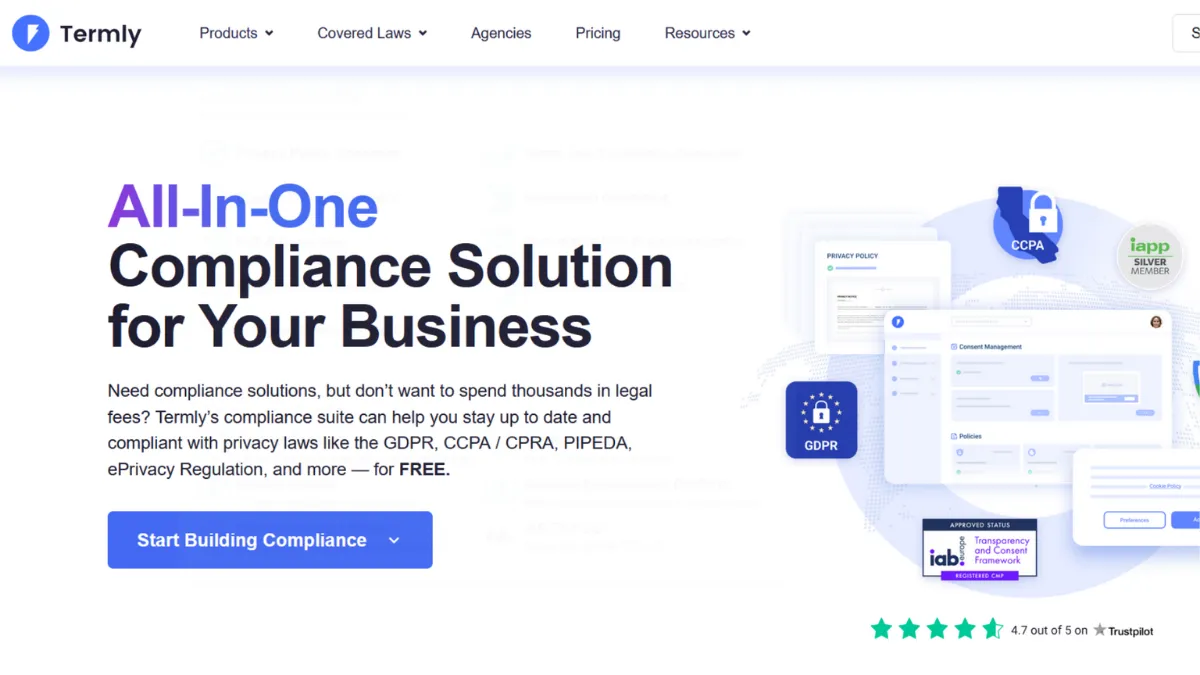
Privacy compliance is one of those operational tasks that most founders underestimate until a GDPR enforcement notice or an app store rejection forces the issue. Termly sits squarely at the intersection of that problem: a platform that handles cookie consent management and legal policy generation without requiring you to hire a solicitor or wade through regulatory documentation yourself. The verdict is that Termly is genuinely good at what it does for small businesses and lean teams, offering enough coverage at the free and entry paid tiers to get compliant quickly. Where it stretches thin is on customisation and advanced consent configuration, which matter more than you might expect once you start operating across multiple jurisdictions.
The platform combines two distinct products: a policy generator and a consent management platform (CMP). The policy generator uses structured questionnaires to produce attorney-reviewed documents, covering privacy policies, terms and conditions, cookie policies, EULAs, and a range of other templates. The CMP handles the operational side: scanning your site for cookies, categorising them, surfacing a consent banner to visitors, and blocking non-essential cookies until consent is granted. The two products share a dashboard, and the integration between them is tighter than you find from competitors who bolt a CMP onto a document tool as an afterthought. What most founders get wrong is treating the consent banner as the completion of the process. Installing the banner makes you visible, but if cookies fire before consent is given, you remain non-compliant. Termly's Auto Blocker feature is designed to prevent this, though it requires careful configuration to avoid breaking third-party scripts your site depends on.
Expect to spend a couple of hours on initial setup if you connect Termly to Google Analytics via Google Tag Manager, which is Termly's most robust integration pathway. The cookie scanner will surface trackers you may not have known existed. Policy documents generate in under ten minutes per document. Compliance monitoring runs on a regular scan cycle, flagging any new cookies that appear after initial setup. The realistic expectation is that Termly brings you to a defensible compliance posture for GDPR, CCPA, and several US state-level laws without specialist input. It does not substitute for legal advice in genuinely complex situations, and it will not cover edge cases that fall outside its questionnaire templates.
Termly is the right fit for solo operators, early-stage startups, and SMBs running one to three websites. E-commerce brands on Shopify or WooCommerce that collect customer data will find particular value in the combination of policy generation and consent enforcement in one dashboard. App developers targeting regulated markets will also find the mobile app policy generators useful for meeting app store requirements.
The main limitation is that meaningful customisation, including multi-language banner support, consent logs, and custom banner styling, sits behind the Pro+ plan. On the Starter tier, the banner is functional but constrained. If your brand or user experience requires a tailored consent interface, you will feel that restriction before long. Some users have also reported that the Auto Blocker can be overly aggressive, interrupting essential website scripts when not configured correctly.
The sections below cover how the platform works mechanically, what the key features deliver in practice, and how Termly compares against the main alternatives in the privacy compliance space.
What Is Termly?
Termly is a privacy compliance platform built for businesses that need to manage cookie consent and generate legal policy documents without in-house legal resource. It addresses the problem that privacy regulation creates for small teams: the rules are complex, the penalties for non-compliance are real, and the cost of hiring specialists to cover every document and every jurisdiction is disproportionate at early stages. What separates Termly from using a static template is the combination of an active consent management platform with attorney-reviewed, regularly updated policy documents, meaning your compliance posture adjusts as regulations evolve rather than becoming stale. The platform serves a broad user base spanning bloggers and single-site operators up to agencies managing compliance across multiple client websites. Understanding how the consent enforcement actually works mechanically is what determines whether your setup is defensible or just decorative.
How Termly Works
Setup starts by entering your website URL. Termly's cookie scanner crawls the site and returns a categorised list of cookies sorted by purpose: strictly necessary, functional, analytics, advertising, and any uncategorised trackers. You review this list, adjust categories where needed, and configure your consent banner through a visual editor. Banner styling options vary by plan, but the core positioning and text are editable across all tiers.
Once configured, Termly provides an embed code for your site header, a WordPress plugin, or a Google Tag Manager route. The GTM pathway is the most flexible option: Termly publishes a community template in the GTM gallery that translates a visitor's banner choices into GTM consent categories, preventing non-consented tags from firing. This pathway also enables Google Consent Mode v2, which matters for maintaining analytics modelling when users decline tracking. When consent is declined, Google uses modelling to fill attribution gaps rather than dropping data entirely.
The policy generator works separately from the CMP. You complete a questionnaire about your business and the data you collect, and Termly assembles a compliant document hosted at a URL you embed or link from your site. When regulations change, Termly updates the relevant policy language and notifies you to review. The counterintuitive detail most users miss is that the hosted policy updates automatically only within the parameters of what you originally declared in the questionnaire. If you add new data-collection tools after initial setup, you need to return and update your inputs, or the auto-updates will reflect an outdated picture of your actual practices. The compliance is a function of your inputs, not a replacement for maintaining them.
Termly Key Features
Cookie Scanner and Auto Categorisation. Termly scans your website and surfaces every cookie it detects, sorting them into consent categories automatically. The practical value is that you start from an accurate baseline rather than manually auditing your own scripts. Scans run on a regular schedule after initial setup, which means newly added third-party tools get flagged rather than silently bypassing the consent framework you configured. Review the categorisation output before publishing: Termly makes reasonable assumptions, but a script labelled as analytics may serve a different function on your specific site.
Consent Management Platform with Auto Blocker. The CMP handles operational enforcement of consent. The Auto Blocker prevents non-essential cookies from firing until a visitor grants permission, which is the component that takes you from a cosmetic banner to actual legal compliance. Routing this through Google Tag Manager gives the most granular control over which tags are consent-gated. The Auto Blocker can be adjusted to whitelist specific scripts, which matters for tools like live chat or embedded video that may be flagged incorrectly as non-essential.
Policy Generator Library. Termly generates over ten policy document types: privacy policies, terms and conditions, cookie policies, EULAs, return and shipping policies, acceptable use policies, and accessibility statements. Each document is produced through a structured questionnaire and covers GDPR, CCPA, CPRA, and a range of US state-level laws. The generator is most useful when treated as a starting point to review, not a finished document that requires no further attention.
Data Subject Access Request Form. Termly includes an embeddable DSAR form allowing website visitors to submit requests to access, edit, or delete their personal data. This is a requirement under GDPR and CCPA that many small business compliance setups omit. The form connects to your dashboard and creates a record of incoming requests, though actioning those requests remains your responsibility.
Google Consent Mode v2 Integration. Termly supports both basic and advanced Consent Mode v2, allowing Google services including Analytics and Ads to adjust data collection behaviour in line with user consent choices. Setting this up requires the GTM integration pathway; it is not automatic on a simple embed. This feature matters most to teams running paid acquisition or relying on GA4 for conversion tracking, since declining users would otherwise create a significant gap in attribution data. The integration and customisation scores below reflect the fact that these capabilities require a degree of technical configuration and that deeper consent management features are plan-restricted.
Termly Pros and Cons
Where Termly delivers:
- Generous free tier. The free plan allows you to generate a policy document and access basic cookie consent tools without payment. For a single small website in early stages, this is enough to establish a visible compliance posture and test whether the platform fits your workflow before spending anything.
- Breadth of policy document types. Ten-plus document types in one platform means you handle privacy policies, terms and conditions, return policies, and EULAs without stitching together different generators. This breadth is unusual at the entry price point and saves time managing separate tool accounts.
- Regulatory monitoring and policy updates. When privacy laws change, Termly updates relevant document language within the parameters of your questionnaire inputs. This passive maintenance is the primary reason most users stay on paid plans rather than reverting to a static template.
- Google Consent Mode v2 compatibility. Support for Consent Mode v2 via the GTM integration keeps analytics modelling functional for non-consenting users, protecting your ability to measure paid acquisition without requiring full consent from every visitor.
- Agency tier for multi-site management. An Agency plan covers multiple websites under one account, which suits freelancers and agencies managing compliance for clients without scaling costs proportionally per domain. This is an overlooked advantage for small web studios where per-site pricing elsewhere becomes prohibitive.
Where Termly falls short:
- Consent log and audit trail access. Proof of consent, the ability to demonstrate to regulators that a specific user consented at a specific time, is locked behind the Pro+ plan. This is a material gap for businesses operating in regulated sectors where audit trails are not optional.
- Limited banner customisation on lower tiers. Custom banner styling and multi-language support are Pro+ features. On the Starter plan, you get a functional but constrained banner interface that you cannot fully adapt to your brand or localise for international audiences.
- Auto Blocker can break site functionality. The script-blocking mechanism has been reported to interfere with essential third-party tools when misconfigured. Whitelisting requires knowing which scripts need exemption, which is not always apparent to non-technical users managing their own sites.
- Integration depth beyond CMS platforms is limited. Beyond WordPress, standard CMS platforms, and Google Tag Manager, Termly does not offer native connections to most marketing or data stacks. Teams wanting to pass consent data into HubSpot or a CRM will need to manage that manually.
- Page view caps on entry plans. The Starter tier applies a monthly page view limit to the consent banner. High-traffic sites on this plan will need to upgrade earlier than the headline pricing suggests, adding cost pressure before you expect it.
How to Get the Most Out of Termly
Before opening the setup wizard, audit what data your site actually collects. Write down every third-party tool installed, including analytics platforms, advertising pixels, chat widgets, and embedded media players. This list feeds directly into the policy questionnaire, and incomplete inputs produce incomplete documents. Accuracy at this stage is more valuable than speed.
During the cookie scanner step, do not accept the automatic categorisation without review. Cross-reference detected cookies against your list of installed tools and correct any that have been miscategorised. An advertising pixel sitting in the analytics category creates a compliance gap: your banner correctly gates it, but your policy does not accurately describe it.
For the GTM integration, install the Termly consent template from the community gallery before publishing your container. Map each tag in GTM to the appropriate consent category so that analytics tags fire only on analytics consent and advertising tags fire only on advertising consent. Test in GTM preview mode before going live. This is the configuration that answers how to set up GDPR-compliant cookie consent with Google Tag Manager: Termly fires the consent signal, GTM reads it, and tags activate or remain blocked accordingly. Verify the setup by checking in your browser's developer tools that non-consented cookies are absent before clicking accept.
Once live, return to the Termly dashboard monthly to review scanner results. New cookies appear when you update plugins, install new tools, or when existing third-party scripts load additional trackers. Catching these promptly prevents a growing gap between your declared cookie policy and your actual data collection practices.
Measure success by confirming that non-essential tags are blocked in GTM until consent is granted, that your DSAR form is reachable from your privacy policy page, and that your policy documents still reflect your current data practices. Treat compliance as a quarterly audit, not a one-time launch task.
Who Should Use Termly?
Termly is well-suited to three specific user profiles. A solo founder or small team running one to three websites who needs GDPR and CCPA compliance without a legal retainer will find it covers the essentials efficiently. An e-commerce operator collecting customer and payment data needs a privacy policy, terms and conditions, a returns policy, and a cookie consent banner working together, and Termly consolidates all of that into a single dashboard. A web developer or small agency managing compliance obligations across multiple client sites benefits from the Agency plan, which covers multi-site management without scaling costs per domain.
App developers targeting regulated markets will also find the mobile app policy generators useful for meeting app store submission requirements, particularly for markets where a published privacy policy is mandatory before approval.
Termly is not the right choice for enterprise compliance teams, legal professionals who need full template editing access, or organisations that require deep consent analytics and audit log access below the Pro+ tier. If you run advertising campaigns at significant scale and need consent records for every user interaction across multiple markets, you will hit the platform's ceiling quickly and find the reporting insufficient for a robust audit response.
Termly Pricing
Termly offers a free plan covering one site, one policy generator, and basic cookie consent features with a capped monthly visitor allowance. This is enough to put a visible privacy policy and a functional banner in place, making it a practical starting point for testing before committing to a paid plan.
Paid plans include Starter and Pro+ tiers, with per-site monthly pricing that reduces on annual billing. The Starter plan adds additional policy generators, monthly compliance scans, and an expanded visitor allowance. The Pro+ plan is where the platform's full capability becomes available: all policy generators, consent logs, multi-language banner support, regional consent rules, advanced banner customisation, and full Google Consent Mode v2 features. An Agency plan covers multi-site management for resellers and agencies on Pro+ terms.
For most solo founders, the Starter plan covers day-to-day compliance needs. If you run paid advertising into regulated markets, need audit-ready consent records, or have users across multiple language regions, the Pro+ plan is the tier that actually serves those needs. Always check Termly's pricing page for current rates, as plan structures and page view limits have been updated previously. Relative to competitors that offer consent management without policy generation, Termly's cost efficiency is strong when you factor in the breadth of documents included.
Termly vs Alternatives
The privacy compliance space has several credible alternatives worth comparing directly. CookieYes focuses tightly on cookie consent and banner management, with more granular consent analytics than Termly on comparable plans. Choose CookieYes when cookie consent is your sole requirement and you will manage policy documents through a separate tool. Termly wins when you need policy generation and consent management under one roof without paying for two separate products.
TermsFeed is the strongest direct competitor on policy document generation, offering a broad legal template library at a competitive per-document price. It does not include a consent management platform or an active cookie scanner. Choose TermsFeed when you need straightforward document generation and already have a separate CMP configured. Termly wins when you want the scanner and the documents drawing from the same source of truth about your data practices.
Cookiebot, now part of Usercentrics, targets a more enterprise-oriented user with stronger consent analytics, IAB TCF support, and deeper banner customisation. Its pricing scales with domain count and skews higher at entry level. Choose Cookiebot when you need enterprise-grade reporting and are prepared to pay for it. Termly wins on simplicity and total cost at the small-business tier, particularly when policy document generation is also part of your requirement.
iubenda offers strong multi-language support and is well-regarded among European businesses that need localisation across multiple languages from day one. It carries a steeper learning curve than Termly. Choose iubenda when localisation is a primary requirement across multiple European markets. Termly wins for English-primary markets where ease of initial setup matters more than linguistic flexibility.
Termly Review: Final Verdict
Termly earns a 4.20 out of 5 overall, a score that accurately reflects a platform doing the right job well within a defined scope. The strongest dimension is ease of use, where the guided questionnaire setup and unified dashboard reduce the compliance burden substantially for non-specialist users. The lower scores on customisation and integrations are not editorial caution: they reflect genuine plan restrictions and the limited native connector depth beyond CMS platforms and Google Tag Manager. The bottom line is that Termly is the most efficient route to defensible privacy compliance for small websites, e-commerce stores, and lean startup teams. Outgrow its plan limits or require enterprise-grade audit capability, and the calculus changes.
How We Rated It:
More Tool Reviews







Subscribe to Stay in the loop
Get the latest AI and technology news, honest tool reviews, and practical guides delivered straight to your inbox.
Success! Check your Inbox!

Tezons Newsletter
The latest technology news, in-depth tool reviews, and practical guides - curated and delivered to your inbox.
Latest News




Have a question?
Have any questions?
Didn’t find what you were looking for? We’re just a message away.