AI tools for small business: a practical guide to getting started


AI tools for small business save the most time when matched to a specific task you do repeatedly, not when adopted in bulk. This guide covers the three areas where small businesses see the fastest return, the tools worth using in each one, and a stage-by-stage framework for building a stack that earns its cost rather than accumulating unused subscriptions.
Before you look at any tool, spend a week logging where your time actually goes. Group tasks into categories: writing and content, email and customer communication, admin and data movement, and reporting. Note how long each takes and how much of it follows a predictable pattern versus requiring genuine judgement. That list is your brief. Any tool you evaluate should address something on it directly.
The tasks that cost the most time and require the least creative judgement are your first candidates. For most small businesses, that points to one of three areas.
Content and written output
ChatGPT is the starting point for most small business content needs. It drafts emails, social posts, product descriptions, and blog outlines at speed, and the gap between a well-prompted output and a finished piece is narrow enough that a non-writer can close it. The limitation worth knowing upfront: it produces fluent, generic prose by default. If your content needs a specific voice or relies on accurate facts, you need to supply both in the prompt. The tool will not fill in either on its own.
Claude is the stronger choice for longer-form content, detailed briefs, or anything where you need the output to hold together across several hundred words. It handles analytical writing, structured guides, and nuanced arguments more consistently than most alternatives at that length. Many small business owners use ChatGPT for short-form tasks and Claude for anything requiring more depth.
Canva covers the visual side. Templates for social posts, email headers, presentations, and branded graphics are all available on the free plan. The AI-assisted features handle image generation and layout suggestions without requiring design knowledge. For a small team producing marketing content regularly, it removes the need to commission graphics for every piece.
Admin and automation
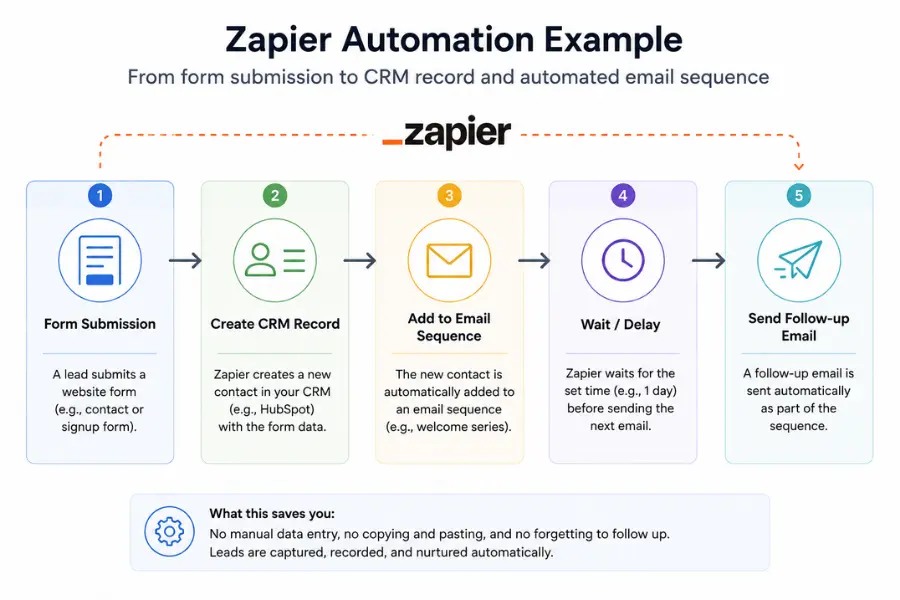
Zapier connects the tools you already use so data moves between them without manual copying. A lead submits a form and appears in your CRM. A support ticket gets assigned based on keywords. A payment triggers an invoice update. None of these are dramatic, but together they remove a significant volume of low-value work from your week.
Zapier's free plan covers 100 tasks per month and 5 single-step automations, which is enough to confirm whether automation solves your specific problem before spending anything. The limitation that catches people out: Zapier works best on simple, linear workflows. If your automation needs conditional branches - if the contact is in this segment do X, otherwise do Y - Make handles that logic more cleanly. Make's interface takes longer to learn, but for anything with more than two steps and a decision point, it gives you more control at each stage.
Customer communication and email
Mailchimp handles automated email sequences for most small business needs. Welcome sequences, follow-up emails, and re-engagement campaigns can all run without manual input once configured. The free plan covers lists up to 500 contacts with basic automation included. It is the fastest starting point if you send regular emails and want them timed to contact behaviour rather than a fixed calendar.
HubSpot's free CRM is the most practical starting point for any business managing more than 20 contacts in a pipeline. It tracks contacts, automates follow-up sequences, and connects to your email without requiring a paid plan. The free tier is more capable than most people realise, the limits only become restrictive once your team grows past around 5 people or your active pipeline exceeds a few hundred contacts. One thing most CRM articles skip: the tool only improves your sales process if your sales process is already documented. Set up the stages before you import contacts, not after.
How to build your AI stack in stages
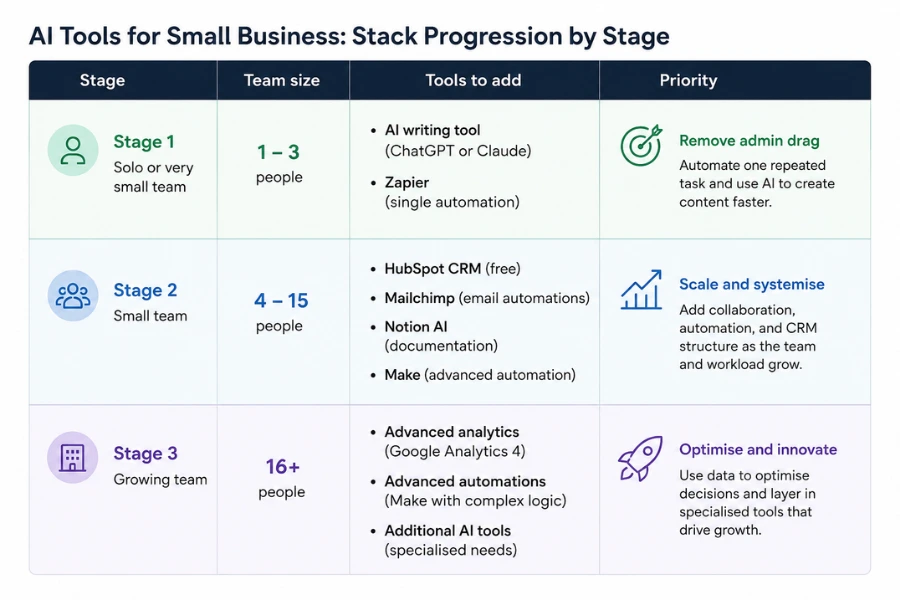
The businesses that get the most from AI tools do not implement everything at once. They build in stages, each grounded in what the previous stage proved was working. The table below sets out what to add and when.
Stage 1 - Solo or very small team (1 to 3 people)
At this size, the priority is removing administrative drag without adding complexity. Two tools cover most of the ground:
- A general-purpose AI writing tool for content, email, and briefs. ChatGPT or Claude both work here. Pick one and learn it properly before evaluating others. Most people who feel underwhelmed by AI writing tools have spent less than 20 minutes on prompt quality, specificity in your instructions changes the output significantly.
- A single automation connecting your most repeated manual task. If you move data from a form to a spreadsheet every day, automate that one thing with Zapier. The first automation you build teaches you more about where automation is useful than any amount of reading about it.
A CRM is often premature at this stage unless you are actively managing more than 20 contacts in a pipeline. A well-maintained spreadsheet is faster to set up and easier to hand off. Add HubSpot when your contact volume or follow-up complexity makes the spreadsheet feel like friction.
Stage 2 - Small team (4 to 15 people)
Once more than one person is producing work and managing relationships, the gaps that emerge are coordination and consistency. The tools that close those gaps:
- CRM: HubSpot free tier. Set it up with your documented sales process before importing any contacts. A CRM applied to an undocumented process tracks disorder at speed.
- Project and knowledge management: Notion handles both in one place. Use it to store your processes, track projects, and centralise information your team currently holds across email threads and local folders. The limitation: Notion's database features require meaningful setup time. The default blank workspace gives you little to work with out of the box. Budget a day to configure it properly before you hand it to the team.
- Email marketing: Mailchimp or Google Analytics to track what your email and content efforts are actually producing. Google Analytics is free, connects to every major platform, and is the data layer that informs every other content decision. The common mistake is setting it up and never building a single report, write down three questions you want it to answer each month before you connect anything.
- Automation: Expand from your Stage 1 automation to cover 2 or 3 more workflows. The highest-value targets at this stage are typically: new contact to CRM, support ticket routing, and weekly reporting pulled automatically from your analytics.
Stage 3 - Growing team (15 or more people, or significant volume)
At this stage the gaps are usually in visibility and hand-off. Managers spend time chasing updates that should be automatic. Data sits in different tools and no one has a single view of performance. The additions that make the most difference here are a reporting layer pulling data from your CRM, analytics, and operations tools into one view, and more sophisticated automation handling conditional logic.
This is where mapping your workflows before automating them pays off significantly. Automating a broken process at scale makes the breakage worse, not better.
Where free plans genuinely cover your needs
The free tier argument is stronger than most paid-plan marketing suggests. Several of the most capable tools offer plans that run a real workflow at no cost, provided you understand where the limits sit:
- HubSpot CRM: Free plan covers contact management, deal tracking, email integration, and basic automation. Limits become meaningful at higher contact volumes and when you need multi-user permissions beyond basic access.
- ChatGPT: The free tier covers most content and drafting use cases for a small team. The paid plan earns its cost if you produce content daily or run complex multi-step prompts.
- Zapier: Free plan covers 100 tasks per month and 5 single-step automations - enough to confirm whether automation solves your specific problem before paying anything.
- Mailchimp: Free up to 500 contacts with basic automation. Sufficient for most small businesses in their first year of email marketing.
- Google Analytics: Entirely free. The GA4 360 upgrade is an enterprise product - the standard free version is sufficient for the vast majority of small businesses.
- Notion: Free for individuals and small teams with unlimited pages. The paid plan adds unlimited file uploads, version history, and admin controls.
One pricing detail that often gets missed: tools that charge per user scale quickly. A tool that costs £15 per person per month is £150 per month for a team of 10. Check the pricing model before you commit, not just the entry price. Upgrade when the free tier's limits are actively slowing you down, not before.

Four questions to ask before adding any new tool
Every tool you add creates a new surface to maintain, a new login to manage, and something your team needs to learn. That cost is real even when the tool is free. Before adding anything new, run through these questions:
- Does it connect to what you already use? A tool that does not integrate with your existing CRM, email, or project management system creates a parallel workflow rather than improving the one you have. Check native integrations before you sign up, not after you have spent an afternoon configuring it.
- Will the people who need to use it actually use it? The most capable tool in a category is worthless if adoption is patchy. If your team found the last tool you introduced confusing, that is a signal about how much onboarding time you need to build in, not a reason to try a different tool.
- Can you measure whether it is working? Define a specific metric before you start. Time saved per week. Number of follow-ups sent. Response rate on email sequences. Without a baseline, you cannot tell whether the tool changed anything.
- What does the process look like without it? Document the current process before you change it. That record becomes the basis for onboarding new team members and for reverting cleanly if the tool does not work out.
Trial periods are worth treating as evaluations, not demos. Run the tool on a real task for 2 to 3 weeks, measure against your baseline, then decide. Most businesses run a free trial, decide it looks good, and move to a paid plan without ever testing whether it changed their output.
The adoption mistake that ends most AI tool rollouts
Announcing a tool to your team is not an adoption plan.
The pattern that works: one person owns the tool. They document the process it replaces and the new process it creates. They run a short session with the team, not a product walk-through, but a demonstration of the specific task the tool improves. They set a 30-day check-in to review whether adoption is holding.
That structure takes less time than dealing with a subscription nobody uses. The tools that quietly die are almost always the ones where no one was made responsible for making them work.
For a broader view of how AI tools fit across every business function, content, sales, operations, and reporting, the guide to choosing AI tools for your business covers the full decision framework including how to prioritise which category to address first.
Data quality determines whether your AI tools perform
AI tools that pull from or feed into your CRM, analytics, or project management systems only work well if the underlying data is accurate. Duplicate contacts in your CRM, inconsistent naming in your project tracker, untagged traffic sources in Google Analytics, these do not get fixed by an AI tool. They get amplified.
Before you add any AI layer to your operations, check three things: your CRM for duplicate or incomplete records, your analytics for correctly tagged traffic sources, and your automation tools to confirm data is landing in the right fields. That audit takes a few hours and prevents a category of problem that is extremely tedious to diagnose once embedded in your workflow.
The businesses that see the clearest return from AI tools share one characteristic: they started with clean data and documented processes, then added automation on top. Notion will not fix a team that does not know where to save things. HubSpot will not close more deals if no one has defined what a qualified lead looks like. Sort those two things before you add any further tooling. For small businesses building their first AI marketing automation setup, that groundwork is the difference between a system that compounds over time and one that requires constant manual correction.
More AI & Tech Blogs





Latest AI & Tech Blogs


Subscribe to Stay in the loop
Get the latest AI and technology news, honest tool reviews, and practical guides delivered straight to your inbox.
Success! Check your Inbox!

Tezons Newsletter
The latest technology news, in-depth tool reviews, and practical guides - curated and delivered to your inbox.
Latest News




Have a question?
Have any questions?
Didn’t find what you were looking for? We’re just a message away.