AI customer service: how to implement it without breaking what works


AI customer service reduces the volume of routine support queries your team handles manually - but only when you define what the AI covers before you turn it on. Most implementations that underperform share the same fault: a chatbot or ticketing tool was deployed with no clear scope, no escalation path, and no review of whether the queries it handles are actually the right ones. This guide sets out a decision framework for getting the scope right, then covers the tools that handle each layer of AI-assisted support.
What AI customer service actually covers
AI customer service sits across three distinct layers, and most businesses conflate them when they start evaluating tools. Understanding the difference determines which tool you need and in what order.
- Chat and deflection - a chatbot or live chat assistant handles incoming queries in real time. It answers common questions, collects contact details, and routes complex issues to a human agent. This is the most visible layer and the one most people mean when they say "AI customer service."
- Ticket management - incoming support requests are automatically sorted, tagged, and prioritised before a human sees them. AI flags tickets likely to escalate based on sentiment, assigns them to the right queue, and suggests response templates. This layer reduces handling time without removing the human from the response.
- Automated follow-up - post-resolution emails, re-engagement sequences, and feedback requests run automatically after a support interaction closes. This layer is often neglected but has a measurable impact on customer retention when done well.
Most small and mid-sized businesses should start with one layer, not three. The right starting point depends on where your support volume is highest and where your current process breaks down.
Set the scope before you touch any tool
The single decision that determines whether AI customer service improves your support operation or creates more work is scope. Scope means: which queries does the AI handle fully, which does it draft for human approval, and which bypass automation entirely.
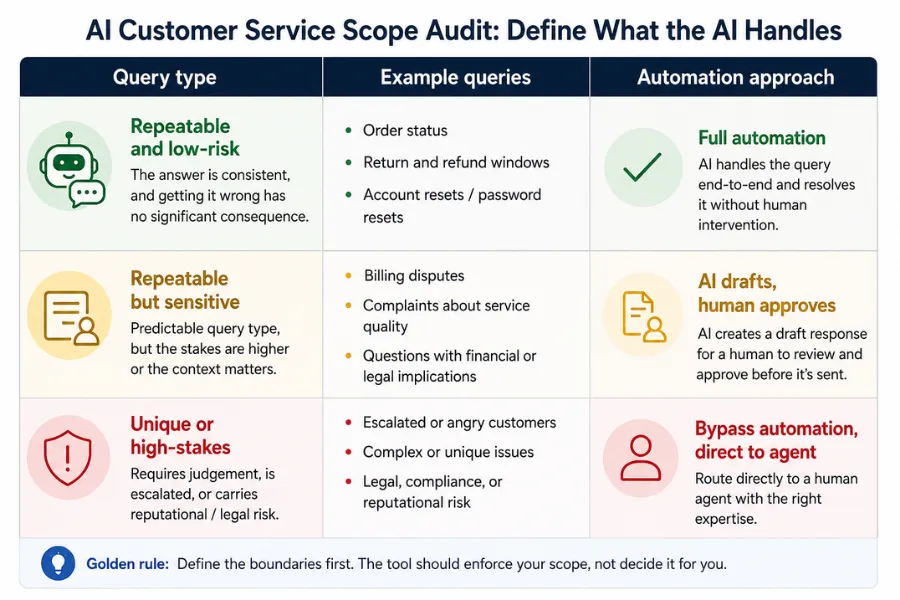
Run this audit before you evaluate a single tool. Take two weeks of support tickets or chat logs and sort them into three buckets:
- Repeatable and low-risk - the same question arrives frequently, the answer does not change, and getting it wrong has no significant consequence. Order status, return windows, account resets, opening hours. These are safe to automate fully.
- Repeatable but sensitive - the query type is predictable but the stakes are higher: a billing dispute, a complaint about service quality, a question involving a legal or financial implication. AI can draft a response, but a human should approve before it sends.
- Unique or high-stakes - queries that require judgement, involve an unhappy customer who has escalated, or carry reputational risk. These bypass automation entirely and go straight to your best-available agent.
That audit takes a few hours and prevents the most expensive category of AI customer service failure: an automated response sent to a frustrated customer who needed a person. Define the boundaries before you configure anything. The tool you choose should be capable of enforcing those boundaries, not the other way around.
Chat, ticket management, or follow-up: which layer to start with
The right starting layer is the one where your current process has the most volume and the least variation. For most businesses, that points clearly to one of the three options above.
Start with chat and deflection if your biggest problem is response time. Customers are waiting hours for answers to questions your team could resolve in seconds if they were not buried in volume. A chatbot covering your top ten queries cuts that wait time immediately. The risk is that a poorly scoped chatbot escalates everything and adds a layer between the customer and a human without reducing the human's workload.
Start with ticket management if your biggest problem is prioritisation. Your team receives queries but spends too long deciding which to answer first, and urgent issues are not always surfaced quickly. AI sorting and sentiment-based flagging solve this without removing any human from the actual response. HubSpot's support ticketing connects every ticket to a full contact record, so your team sees prior interactions, purchase history, and open deals before they respond. That context alone speeds resolution.
Start with automated follow-up if your biggest problem is retention after a difficult interaction. A customer who had a support issue and never heard from you again is a churn risk. A timed follow-up email three days after resolution, asking whether the issue was fully resolved, catches problems before they become cancellations. Mailchimp handles post-resolution sequences without any CRM integration required at the basic level.
The tools worth using at each layer
Tool selection follows scope definition, never the other way around. Once you know which layer you are starting with and which query types it will cover, the shortlist narrows quickly.
Chat and deflection tools
HubSpot's live chat and chatbot builder sits inside the same platform as its CRM, which means every conversation automatically updates the contact record. A visitor who chats on your website and later calls your support line is recognised as the same person, with the same history. That continuity is the feature most standalone chatbot tools cannot offer without a custom integration. The free tier includes basic chatbot functionality, enough to test whether your top ten queries are suitable for automation before committing to a paid plan.
For businesses that want to build more sophisticated chat flows with conditional logic and branching conversations, Zapier connects chatbot platforms to your existing tools without custom development. A chat session ends, the contact details pass to HubSpot, and a follow-up task is created for the sales team, all without a developer. For workflows involving multiple decision points, Make handles the conditional logic more cleanly than Zapier at lower cost per operation.
One limitation most vendor demos skip: AI-driven chat generates responses based on your knowledge base. If your knowledge base is incomplete, the chatbot's answers will be too. Before you go live, audit your FAQ content. Gaps in your documentation become gaps in your chatbot's responses, and customers notice immediately.
Ticket management tools
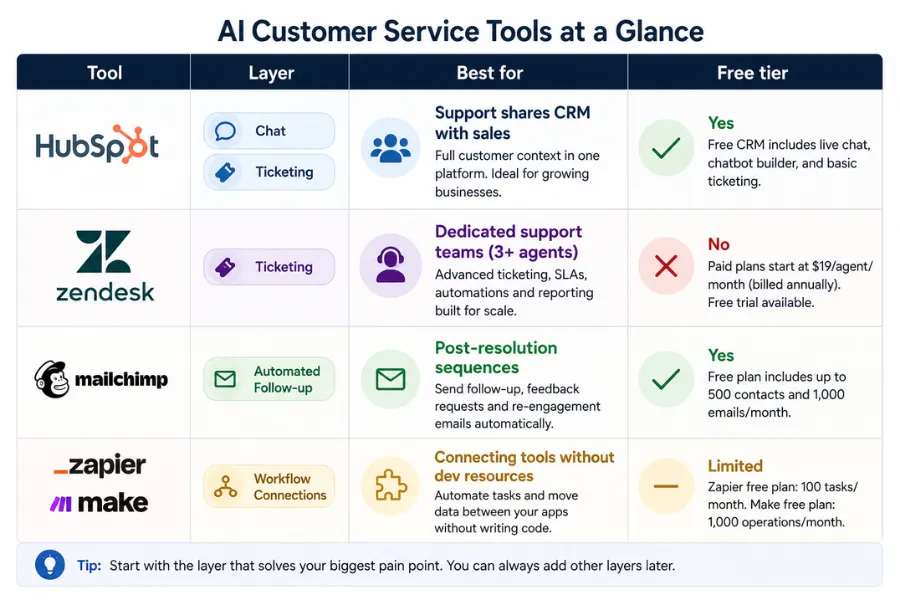
The two tools most businesses compare at this stage are HubSpot and Zendesk. They solve the same core problem - routing, prioritising, and tracking support tickets - but they suit different types of operations.
Zendesk is built specifically for support teams. Its AI layer tags incoming tickets by topic and sentiment, routes them to the appropriate queue, and surfaces suggested responses from your knowledge base before the agent types anything. For businesses where support is a dedicated function with a team of three or more agents, Zendesk's depth of reporting and workflow configuration earns its cost.
HubSpot's ticketing is better suited to businesses where support and sales share the same contact data. If your support team needs to see a customer's purchase history, active deals, or prior sales conversations before responding, HubSpot gives you that in one place. Adding Zendesk alongside HubSpot creates two separate contact records for the same customer, a data hygiene problem that compounds over time.
The practical rule: if support is a standalone function with its own team, Zendesk. If support and sales share a CRM and the same contact base, HubSpot. The tools are not interchangeable; they serve different organisational structures.
Automated follow-up tools
Post-resolution follow-up is where most AI customer service setups leave value on the table. The implementation is straightforward: a trigger fires when a ticket closes, and a timed email sequence starts. The sequence checks whether the issue was resolved, collects a satisfaction rating, and re-engages customers who do not respond.
Mailchimp handles this without requiring a dedicated support platform. You set up a trigger-based sequence, connect it to your support tool via Zapier, and the emails send automatically on the schedule you define. For businesses already using Mailchimp for marketing emails, adding a post-support sequence takes less than a day to configure.
For teams running AI customer service as part of a broader AI marketing automation setup, where support interactions feed back into lead scoring and nurture sequences, HubSpot handles all three layers natively. A customer who raises a support ticket, gets resolved, and then receives a satisfaction email can be automatically moved to the appropriate nurture sequence based on their response. That loop between support data and marketing activity is where AI customer service compounds its value over time.
Use ChatGPT to draft your templates before you automate them
One of the highest-leverage applications of AI in customer service has nothing to do with chatbots or ticketing platforms. ChatGPT is genuinely useful for drafting the response templates, escalation scripts, and chatbot dialogue flows that your automated system will use.
Most businesses go live with AI customer service using whatever default templates came with the tool. Those templates are generic, and customers can tell. Before you configure any automation, use ChatGPT to generate first drafts of your top twenty response templates, then refine them to match your brand voice and the specific nuances of your customer base. A template written for a SaaS customer with a billing query reads very differently from one written for an e-commerce customer whose order has not arrived. Generic templates produce generic experiences.
The same approach applies to chatbot dialogue. Map out the conversation flow on paper first, what does a customer type, what does the bot say, what happens if the reply does not match the expected pattern. Then use ChatGPT to write the dialogue for each branch. Review it, edit it, and test it with internal users before going live. Chatbot conversations that read as robotic or unhelpful are almost always the result of skipping this drafting step and using auto-generated text directly.
For teams managing projects and internal workflows alongside customer support, Notion works well as a centralised knowledge base that feeds your chatbot. When your chatbot pulls answers from a well-maintained Notion database rather than a scattered collection of FAQs, the responses are more consistent and easier to update when your products or policies change.
The implementation sequence that avoids the most common failures
Most AI customer service setups that underperform were rushed into production. A chatbot was connected to a FAQ page and pointed at live traffic before anyone had checked whether it handled real queries accurately. The following sequence is slower, but the output is a system that improves over time rather than one that needs rebuilding six months in.
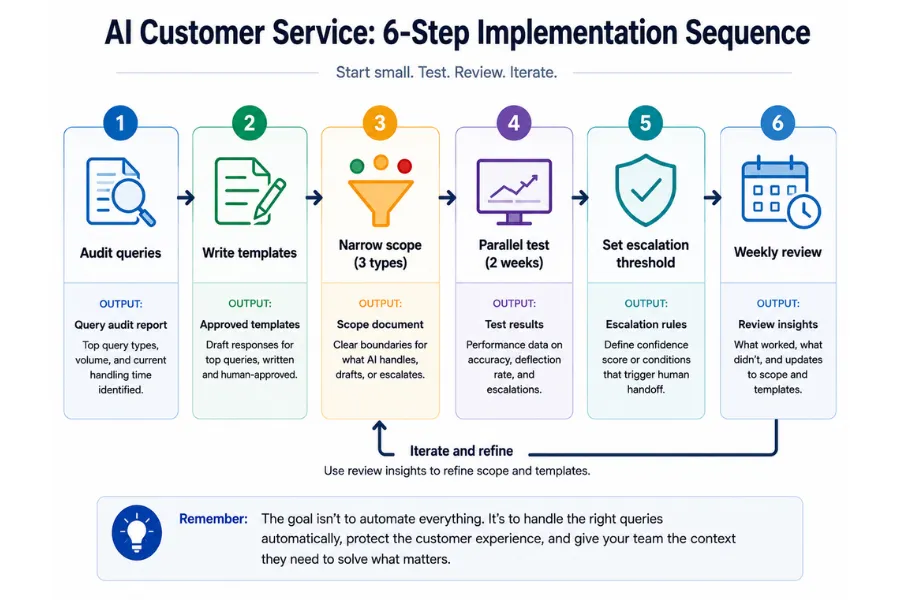
- Audit your query volume. Pull two weeks of support tickets, emails, and chat logs. Sort them by type. Count how many times each query type appears. The categories with the highest volume and the most predictable answers are your starting scope.
- Write and test your response templates. Draft templates for every query type in your starting scope. Use ChatGPT for first drafts, then review and refine each one against real examples of those queries. Before configuring any tool, run the templates past two or three team members who handle support. If they would edit the response before sending it, the template needs more work.
- Configure the tool with a narrow scope first. Go live with your three most common, lowest-risk query types - not ten, not all of them. Three. This gives you a controlled environment to measure whether the automation is working before you expand it.
- Run in parallel with your manual process. For the first two weeks, run automated responses alongside your existing manual process. Compare what the tool sends with what your team would have sent. Fix any gaps before you switch off the manual fallback.
- Set a hard escalation threshold. Define the maximum number of automated exchanges before the system transfers to a human. Three is a reasonable starting point. A customer who has had three automated responses and has not resolved their issue needs a person, not a fourth template.
- Review weekly for the first month. Check your escalation rate, your resolution rate, and any cases where a customer expressed frustration after an automated response. Adjust templates and scope based on what the data shows.
Resolution rate and escalation rate are the metrics that matter — not response time. Response time improves immediately with automation. Resolution rate and escalation rate tell you whether the automation is solving problems or delaying the point at which a human has to get involved.
Three failure patterns and how to avoid them
Automating without a maintained knowledge base. A chatbot not connected to accurate, up-to-date product and policy information will generate plausible-sounding responses that are sometimes wrong. A customer told your return window is 30 days when it is actually 14 is worse off than if no automation existed. Maintain the knowledge base before you connect anything to it. For teams applying workflow automation across their operations, this is the same principle: output quality depends on input quality.
No named owner. Chatbots and ticket routing rules drift out of accuracy when nobody is responsible for reviewing them. Products change, policies change, and customers find new ways to phrase the same questions. Assign a named owner before you go live, with a monthly review on the calendar. Without one, the system degrades gradually and nobody notices until customers start complaining.
Connecting support to marketing before resolution rates are stable. When support data feeds into marketing sequences too early, a customer whose issue is still open, or who left the interaction frustrated, can receive a promotional email two days later. That accelerates churn. Connect support and marketing automation only after your resolution rate has been consistently above 80% for a full month. For context on how these systems fit together in a broader stack, the AI tools for small business guide covers how to sequence tool adoption without creating data conflicts between systems.
The escalation rate after 90 days is the most reliable indicator of whether your AI customer service setup is working. Aim for 15% to 30% in the first quarter. Above 40% means your scope is too wide or your templates are not covering the queries they were designed for. Below 10% means either the scope is too narrow, or customers are abandoning the conversation rather than escalating, both worth investigating. That number, tracked monthly, tells you more than any other metric in your support stack.
More AI & Tech Blogs





Latest AI & Tech Blogs


Subscribe to Stay in the loop
Get the latest AI and technology news, honest tool reviews, and practical guides delivered straight to your inbox.
Success! Check your Inbox!

Tezons Newsletter
The latest technology news, in-depth tool reviews, and practical guides - curated and delivered to your inbox.
Latest News




Have a question?
Have any questions?
Didn’t find what you were looking for? We’re just a message away.