Workflow automation: how to identify what to automate and get it running


Workflow automation is one of the highest-return changes a small business can make, but most teams approach it the wrong way. They grab a tool, build something quickly, and end up with a fragile setup that breaks at the worst moment. This guide walks through a method that works: identify the right processes first, choose the tool that fits your situation, build simple and test thoroughly, then maintain what you have before adding more.
How to identify which processes to automate
Not every repetitive task is worth automating. The ones that are share four qualities: they happen frequently, they follow the same sequence every time, they involve data moving from one system to another, and a mistake in them causes a problem downstream. If a process fails all four, skip it. If it passes two or three, it is worth mapping before you decide.
Start by writing out the process in plain steps. Not a diagram, just a numbered list. What triggers it? What happens first? What happens next? Who else is involved, and at what point? Where does data move between tools? Where do delays typically happen? That last question matters most. Delays almost always sit at the point where one person is waiting for another to complete a mechanical step: copying a form submission into a spreadsheet, logging a sale in the CRM, sending a confirmation email. Those hand-offs are your best automation candidates.
Run this exercise across three to five processes before you build anything. Reviewing them together reveals patterns: the same tools appearing at multiple hand-off points, the same type of data transfer repeating across different workflows. That broader view means you build automations that fit your operation rather than patching one process at a time.
The processes most businesses automate first
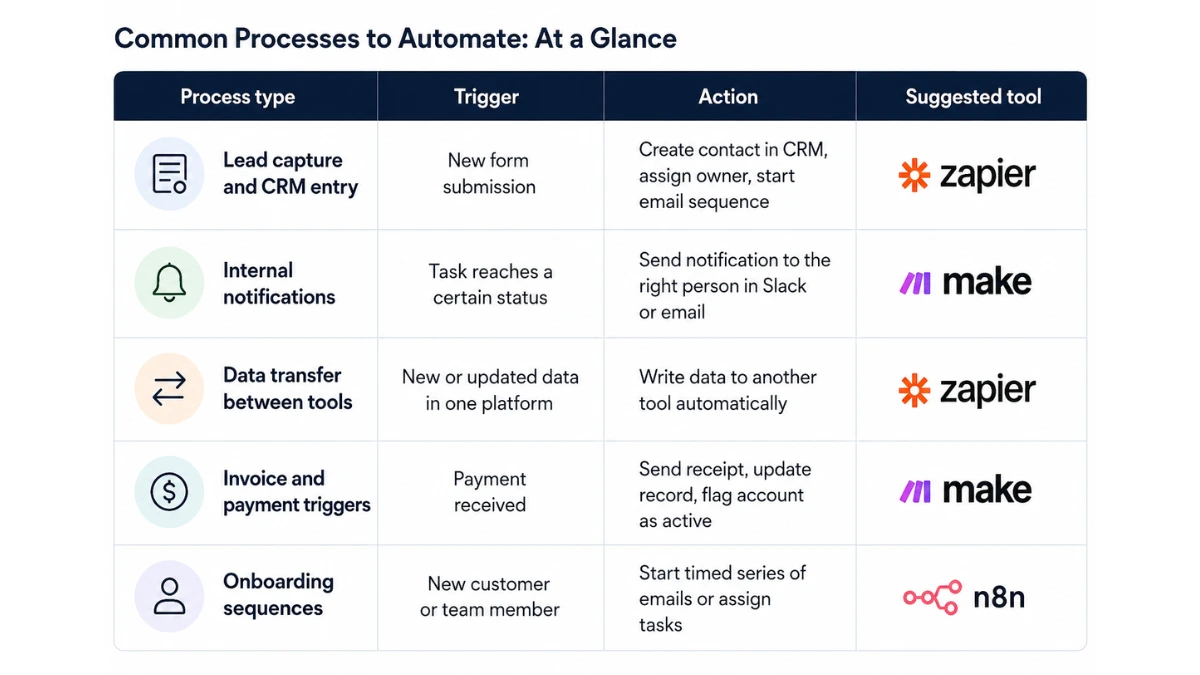
Most small business automation starts in one of these areas:
- Lead capture and CRM entry - a form submission triggers a new contact record, assigns an owner, and starts an email sequence
- Internal notifications - a task reaches a certain status and the right person gets a message in Slack or email
- Data transfer between tools - information entered in one platform is written to another without a person acting as the relay
- Invoice and payment triggers - a payment is received and a receipt is sent, a record is updated, and an account is flagged as active
- Onboarding sequences - a new customer or team member triggers a timed series of emails or task assignments
If your business runs any of these manually, that is where to start. They are well-understood, the automation logic is straightforward, and the time savings show up immediately.
Zapier, Make, or N8N: how to choose
The right automation tool depends on three things: how complex your processes are, how technical your team is, and what your data privacy requirements look like. Each of the three main options occupies a different position on those axes.
Zapier is the fastest way to get a working automation live. It connects to over 7,000 apps through pre-built integrations, and the trigger-and-action interface requires no technical knowledge. You pick a trigger event, define one or more actions, and the automation runs. The limitation is that Zapier's multi-step logic is more expensive and its conditional branching is less flexible than Make's. For straightforward, linear automations - form to CRM, payment to notification, new file to task - Zapier is the right starting point.
Make uses a visual canvas where you drag and drop modules and connect them in a flow diagram. That makes complex, branching workflows easier to design and review. If your process has conditional paths, do this if the value is above a threshold, do something else if it is not - Make handles that more naturally and at a lower cost than Zapier. The trade-off is setup time. Make takes longer to learn, and building your first automation takes longer than it would in Zapier. For teams whose processes involve genuine decision logic, that investment is worth it.
N8N is the option for businesses with data privacy requirements or a technical team that wants full control. It is open-source and can be self-hosted, meaning your data never passes through a third-party cloud. N8N also supports custom code within workflows, which makes it the right choice for integrating with proprietary systems or building logic that the other platforms cannot handle. The cost of that flexibility is that it requires more technical skill to set up and maintain.
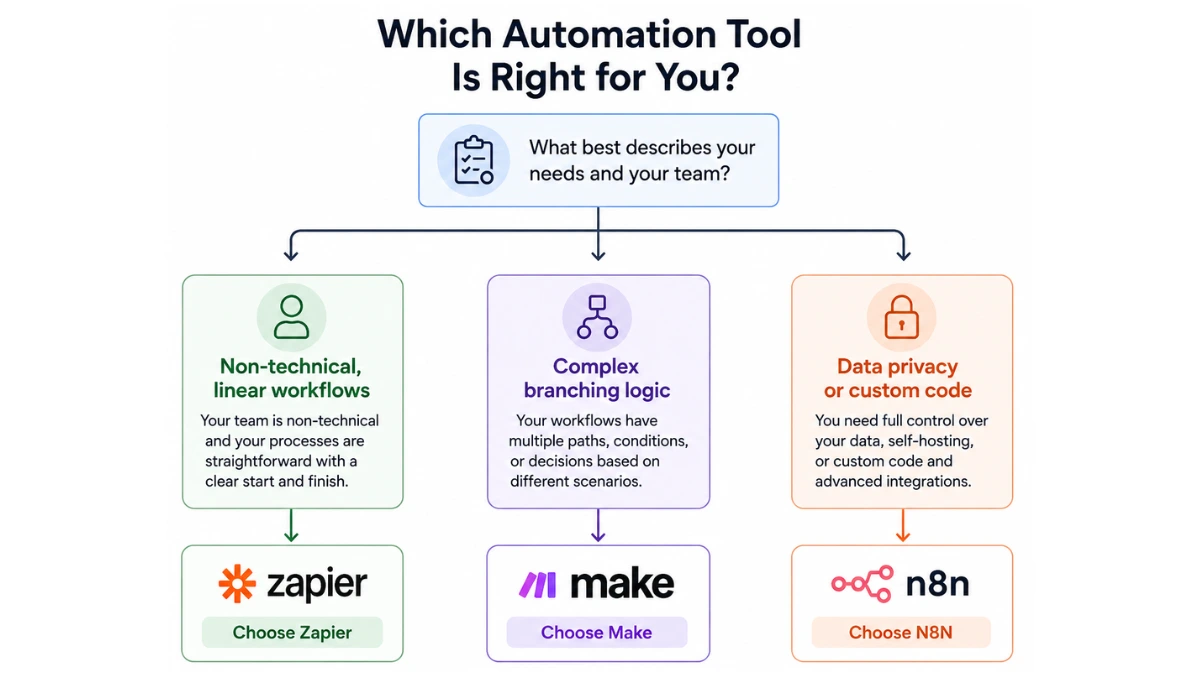
A quick decision framework:
- Building your first automation, non-technical team: Zapier
- Complex workflows with branching logic, cost-conscious: Make
- Data privacy requirements or custom code needed: N8N
For teams running AI marketing automation workflows - email sequencing, lead scoring, campaign triggers - the same platforms apply. The process you are automating determines the configuration, not the category.
Building your first automation: a step-by-step approach
Once you have chosen a tool and identified the process, build in this order:
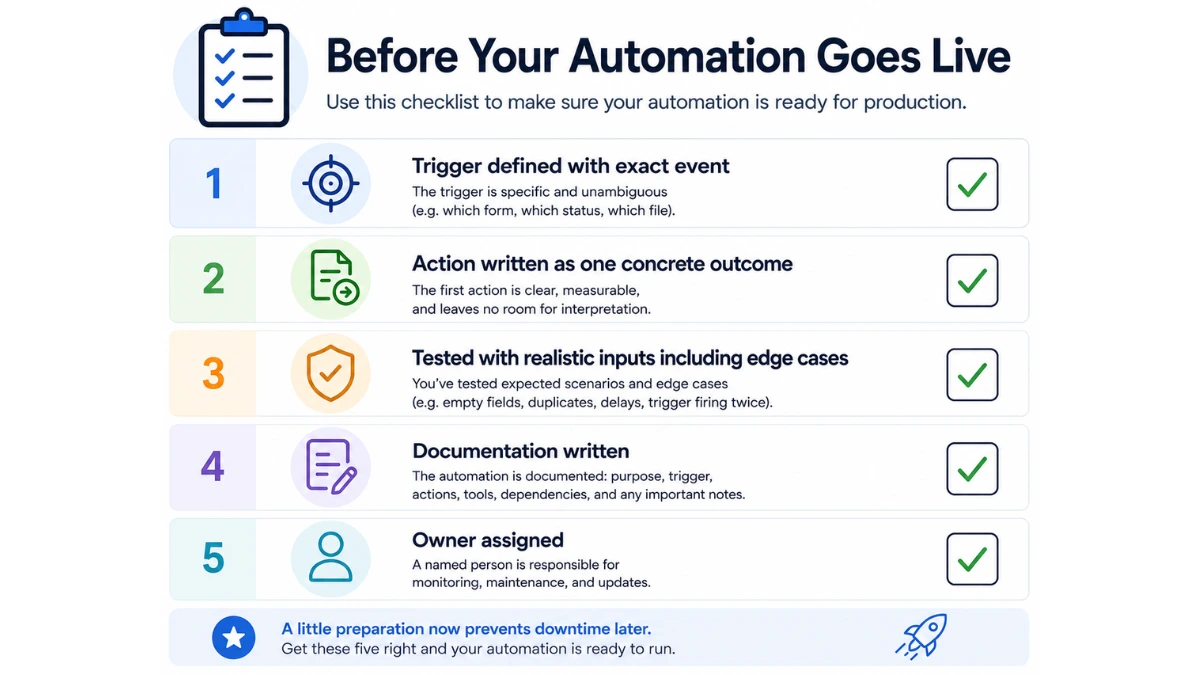
- Map the trigger - define exactly what event starts the automation. A form submission, a new row in a spreadsheet, a payment confirmed, a task moved to a specific status. Be specific: which form, which spreadsheet, which status value.
- Define the action - what should happen immediately after the trigger fires? Write this as one concrete outcome: create a record, send an email, post a message, update a field.
- Add subsequent steps - if the workflow has more than one action, add them in sequence. Keep the first version to three steps or fewer. Complexity comes later, after the core logic is stable.
- Test with realistic inputs - most platforms offer a test mode. Use it. Test the expected case first, then test edge cases: an empty field, a duplicate record, the trigger firing twice in quick succession. Edge cases cause the most damage in production.
- Run in parallel before going live - for automations that touch live data or customer-facing outputs, run the automation alongside your manual process for a week. Compare the outputs. Fix any discrepancies before you switch off the manual process.
- Document immediately - before you build anything else, write a short description of what the automation does, what triggers it, what tools it touches, and who owns it. Airtable works well as a structured register for tracking all active automations and their dependencies.
For small business teams starting lean, steps 1 to 4 are usually enough for a first automation. Parallel testing and documentation become more important as your automation stack grows and more processes depend on each other.
Why automations break and how to stop it happening
Automation failures follow predictable patterns. Knowing them in advance prevents the most common ones.
API and integration changes are the leading cause. When a connected app updates its API, field names change, or endpoints move, automations that relied on the old structure stop working. You will not always get a warning. The fix is to subscribe to changelog notifications from the tools your automations connect to, and to assign someone in your team as the owner of your automation stack - a named person whose job includes monitoring for failures and acting on them.
Overly complex chains create fragility. An automation that connects six or seven tools in a single sequence will fail whenever any one of them has downtime or changes its behaviour. Start with two-to-three-step automations and prove they run reliably before extending them. A simple automation that runs correctly every time outperforms a complex one that requires repair every few weeks.
Undocumented automations become a liability over time. Businesses accumulate automations across multiple tools, and without clear records it becomes impossible to diagnose failures safely or hand over responsibility to a new team member. Every automation should have a written description before it goes live. For teams using team collaboration tools like Notion or a shared workspace, keeping automation documentation alongside process documentation makes both easier to maintain.
Automating unstable processes is the most avoidable mistake. If the steps in a process change frequently, automating it produces a system that is constantly breaking and being rebuilt. Run a process manually until it is stable, then automate it. If it changes again after you have automated it, pause the automation, update the process, then update the automation to match.
Your next step in workflow automation
Pick one process from the list above that your business currently handles manually. Write out its steps. Identify the trigger and the first action. Build a two-step automation in Zapier, test it with three realistic inputs, and run it alongside your manual process for one week.
That single automation, done properly, teaches you more about how your tools interact than any amount of planning. Once it runs without errors for three weeks, build the next one. Within a few months of consistent building, you will have a set of stable, documented automations covering your most repetitive operational tasks, and your team will have the capacity that was previously spent maintaining them manually.
For a broader view of where workflow automation fits within your full technology setup, the AI for small business guide covers how automation connects to the other tools most small businesses already use.
More AI & Tech Blogs





Latest AI & Tech Blogs


Subscribe to Stay in the loop
Get the latest AI and technology news, honest tool reviews, and practical guides delivered straight to your inbox.
Success! Check your Inbox!

Tezons Newsletter
The latest technology news, in-depth tool reviews, and practical guides - curated and delivered to your inbox.
Latest News




Have a question?
Have any questions?
Didn’t find what you were looking for? We’re just a message away.