How to build an AI marketing automation stack


AI marketing automation works when you build it in layers: start with the highest-frequency, most predictable tasks, get those running reliably, then expand. Most businesses that struggle with it try to automate everything at once and end up with a fragile setup that breaks when one trigger misfires. The ones that get durable results pick one channel, one goal, and one tool, prove it works, then build from there.
This guide walks through how to build a practical AI marketing automation stack in stages. Each section covers one layer of the system, what it does, which tools handle it best, and where the common failure points are. The goal is a setup that keeps running without constant manual intervention.
Start with email sequences: the foundation of any automation stack
Email is the highest-return starting point for most businesses. It has clear triggers, measurable outcomes, and the AI tooling is mature enough that you can get a functional sequence running in a day. More importantly, the data email generates feeds every other part of your automation stack later.
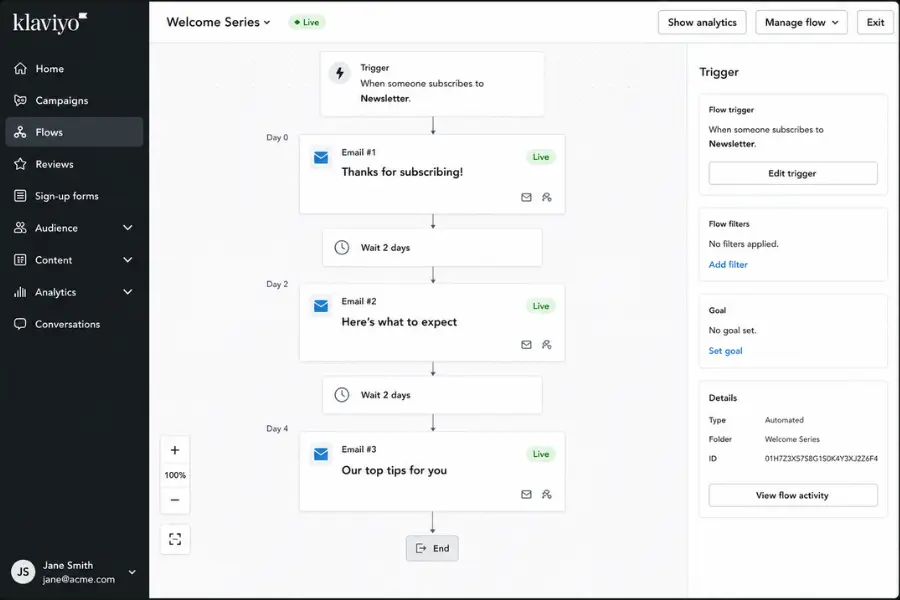
A basic AI-assisted email sequence has three components: a trigger event (a new subscriber, a form fill, a purchase), a series of messages spaced over time, and a conversion goal. AI adds personalisation at scale, predictive send-time optimisation, and automated subject line testing. None of those require you to manage them manually once the sequence is live.
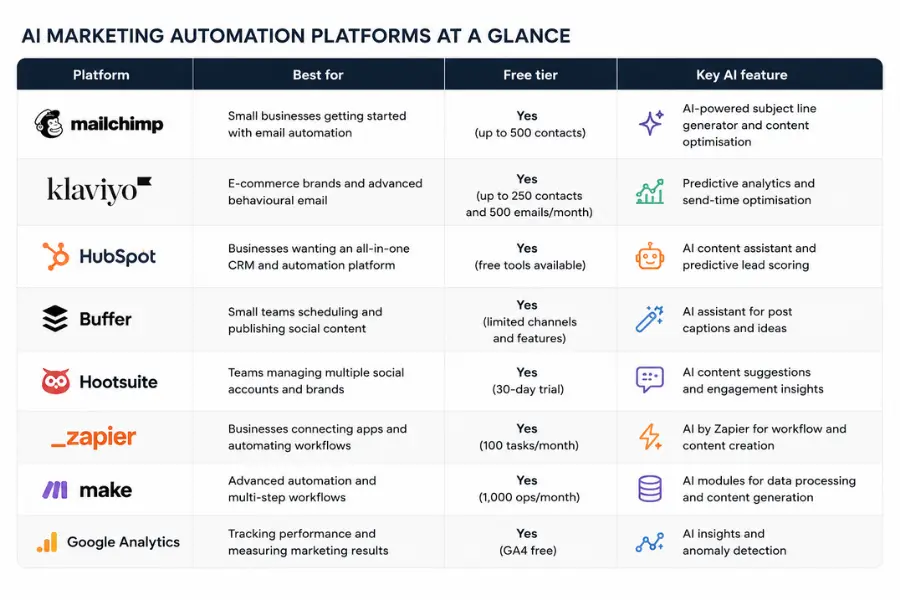
Mailchimp is the right starting point for businesses that need reliable automation without complex setup. It handles segmentation, A/B testing, and basic behavioural triggers with a free tier that is functional enough for early-stage sequences.
Klaviyo is the stronger choice for e-commerce, with tighter product data integration and more granular triggers built around purchase behaviour and browsing activity. One limitation that catches teams out: AI-generated subject lines improve open rates but do not fix a sequence built around the wrong offer. If your email automation is producing opens but no clicks, the problem is the content and call to action, not the sending logic.
For a deeper look at the platforms in this space, the AI email marketing tools guide covers the major options side by side, including pricing tiers and feature differences that matter at different list sizes.
Connect email to your CRM: where automation starts compounding
Email sequences in isolation give you open rates and clicks. Email sequences connected to your CRM give you a picture of where every contact sits in your pipeline and what triggered their last action. That connection is what turns a collection of messages into a nurture system.
The core mechanic is simple: when a contact's status changes in your CRM, the right sequence starts automatically. When they reply to an email, the automation pauses and routes the conversation to a person. When they visit your pricing page three times in a week, they get flagged as high-intent and moved into a shorter, more direct sequence.
HubSpot is the most complete option for teams that want CRM and email automation in one platform. It covers lead capture, contact scoring, email sequences, and pipeline reporting without requiring integration between separate tools. The free tier handles basic automation; the paid tiers add AI-assisted content, predictive scoring, and more granular behavioural triggers. For smaller businesses not ready for an all-in-one platform, connecting Mailchimp or Klaviyo to a basic CRM via Zapier achieves the same result with more flexibility over tool choice.
Lead scoring is where the compounding effect of this layer becomes visible. A contact who downloads a guide, opens two follow-up emails, and visits your pricing page in the same week is signalling very different intent from one who opened the first email and went quiet. AI scoring surfaces that distinction automatically and adjusts how each contact is treated without manual review of every record.
Social scheduling: the layer most businesses set up wrong
Social media scheduling is often treated as an afterthought, something to configure after the important automation is in place. The problem with that approach is that content distribution requires content, and if you have not planned how content gets created and approved before it reaches the scheduling tool, you end up with an automated system queuing an empty calendar.
The right sequence is to solve your content creation process first, then automate distribution. AI scheduling tools do the output work well: they analyse when your audience is most active, suggest publish times per platform, and flag when engagement on a piece is dropping. But they cannot generate the strategy behind what you are publishing or tell you whether the content is worth distributing.
Buffer is the practical starting point for smaller teams. It covers scheduling across major social platforms, queue management, and basic analytics with a clean interface that does not require long onboarding.
Hootsuite is the better fit for teams managing multiple brands or accounts, with more advanced reporting, team approval workflows, and a broader set of integrations. Both tools have AI features for caption generation and hashtag suggestions, but neither replaces a content plan.
The strongest social distribution setups treat scheduling as the final step in a documented workflow. Your team decides what to publish and in what format. The scheduling tool handles when and where it goes out. That separation keeps human judgement in the decisions that require it and automation in the tasks that do not.
Cross-platform automation: connecting tools that do not talk to each other
Once you have email, CRM, and social scheduling running, the next layer is connecting them so data flows between platforms without manual exports. A contact who clicks through from a social post should land in your CRM. A lead who reaches a score threshold should trigger a task for your sales team. A form fill on your website should start the right email sequence immediately.
Zapier handles most of these connections with a trigger-action model that requires no code. You set a trigger in one app, such as a new form submission in HubSpot, and an action in another, such as adding that contact to a Mailchimp sequence, and the automation runs whenever the trigger fires.
Make covers more complex multi-step workflows with a visual builder that maps the full data path between tools. Both are worth having in your stack: Zapier for straightforward point-to-point connections, Make for workflows that branch or require conditional logic.
The failure mode here is over-engineering the connections before the underlying tools are working well. If your email sequences are not producing useful data yet, connecting them to your CRM via Zapier propagates incomplete information faster. Get each layer working in isolation first, then connect them.
Measuring performance: what to track and when to act
Marketing automation generates a large volume of data. The mistake most teams make is tracking everything and acting on nothing. A tighter approach is to define three to five metrics per layer before you build anything, so you know in advance what a working setup looks like versus one that needs adjustment.
For email sequences, the metrics that matter most are:
- Open rate per sequence (benchmark: 25-35% for B2B, 20-25% for B2C)
- Click-through rate (benchmark: 2-5% across most industries)
- Reply rate for sales sequences (anything above 2% is strong)
- Conversion events tied to the sequence goal: form fills, purchases, or booked calls
For social scheduling, reach per post and engagement rate tell you whether your distribution is working. Declining reach on consistent posting usually signals an algorithm change or audience fatigue with the content format, not a scheduling problem.
Google Analytics sits at the centre of most performance tracking setups because it captures what happens after someone clicks through from an email or social post. You can see which automation-driven traffic converts, which pages those visitors land on, and where they exit. Combined with the data from your email platform, it closes the loop from first touch to final action.
A monthly review cadence works better than checking metrics daily. Daily checks produce noise. Monthly reviews let you see trends, catch sequences that have gone stale, and make one deliberate change at a time. Run one test per review cycle: a subject line variant, a send day, or a call-to-action change. One variable at a time tells you what caused the movement.
Building the stack in order: a staged approach
The order you build your AI marketing automation stack matters more than which tools you choose. Every layer depends on the one below it working well.
- Email sequences first. Pick one trigger and one goal. A welcome sequence for new subscribers is the most common starting point because the trigger is clean and the goal is measurable. Get this running in Mailchimp or Klaviyo, connect it to your CRM, and leave it running for 60 to 90 days before changing anything.
- Lead scoring second. Once your email data is accumulating, set up basic lead scoring in your CRM. Assign points for email opens, clicks, page visits, and form fills. Use that score to separate contacts who are ready for a sales conversation from those who need more nurturing.
- Social scheduling third. Start with one platform, not five. Pick the channel where your audience is most active and schedule two to three posts per week through Buffer or Hootsuite. Measure engagement for 30 days before expanding to additional platforms.
- Cross-platform connections fourth. Once all three layers are producing data, use Zapier or Make to connect them. Push email engagement data into your CRM. Trigger task notifications when a lead hits a score threshold. Connect form fills to the right email sequence automatically.
- Performance reporting last. Set up a Google Analytics view that tracks conversions from each automation source. Schedule a 60-minute review every four weeks.
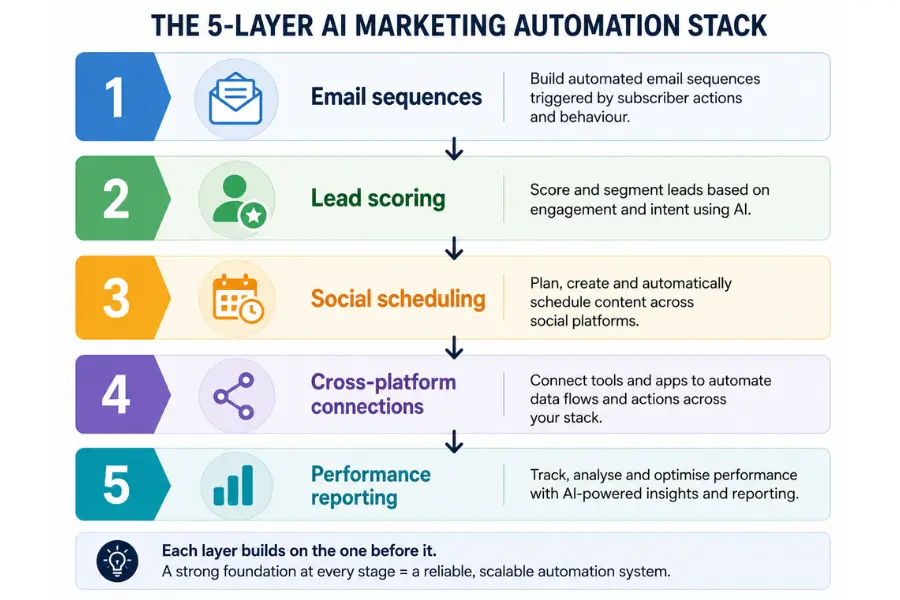
Teams that build all five layers simultaneously typically have none of them working well after three months. Teams that build in order usually have a functional, data-generating stack within the same timeframe.
One practical note on compliance: automated email sequences must respect unsubscribe requests, honour opt-in permissions, and meet GDPR or CAN-SPAM requirements depending on where your contacts are based. Most major platforms handle the technical side automatically, but the list hygiene and permission structure that feeds into them is your responsibility.
The expectation worth setting early: AI marketing automation replaces the manual execution of processes you have already figured out. It does not replace the strategic thinking behind those processes. The welcome sequence still needs a reason for someone to stay subscribed. The lead scoring model still needs criteria that reflect how your actual buyers behave. Start with a clear picture of what you are trying to achieve at each stage, then build the automation around it.
If you are comparing platforms before committing to a stack, the marketing automation platforms guide covers the major options across different business sizes, including how to choose between them based on your model and budget. The right combination of HubSpot, Mailchimp or Klaviyo, Buffer or Hootsuite, Zapier or Make, and Google Analytics covers most of what businesses need at each stage. Start narrow, run one test at a time, and expand as you learn what your audience responds to.
More AI & Tech Blogs





Latest AI & Tech Blogs


Subscribe to Stay in the loop
Get the latest AI and technology news, honest tool reviews, and practical guides delivered straight to your inbox.
Success! Check your Inbox!

Tezons Newsletter
The latest technology news, in-depth tool reviews, and practical guides - curated and delivered to your inbox.
Latest News




Have a question?
Have any questions?
Didn’t find what you were looking for? We’re just a message away.