Grammarly Review
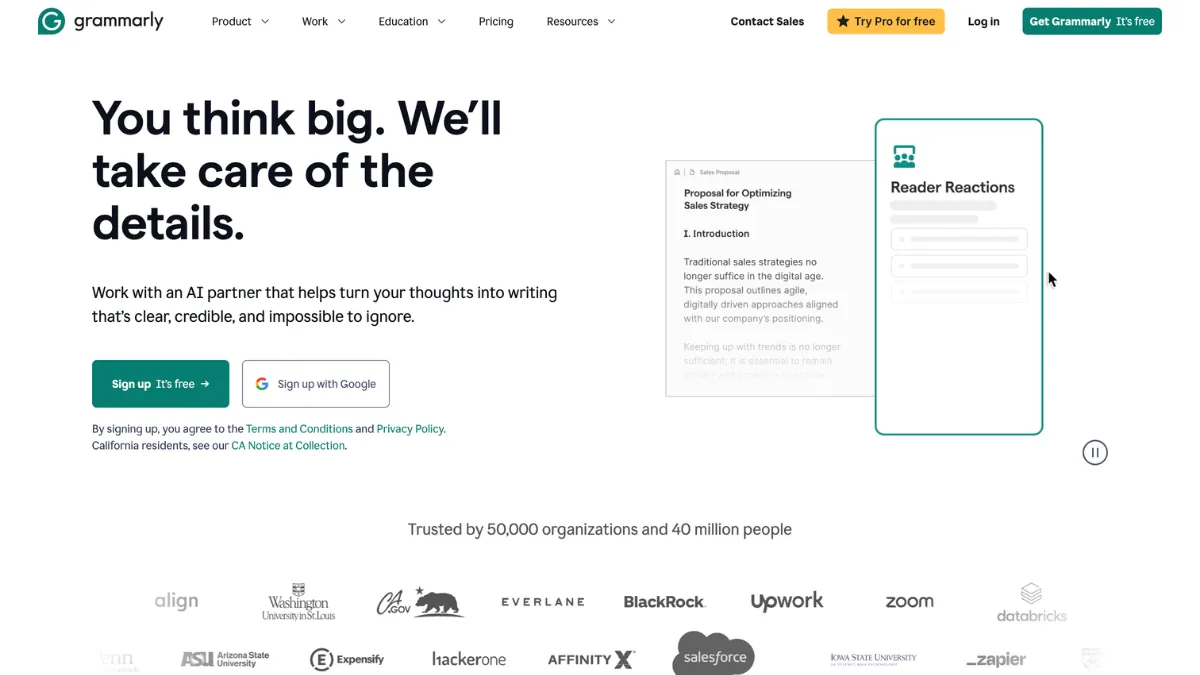
Grammarly checks your writing for grammar, spelling, punctuation, tone, and clarity as you type, in almost every place you type it. The browser extension follows you into Gmail, Google Docs, LinkedIn, and Slack, underlining problems and offering one-click fixes with a short explanation for each. It is built for people who write in English every working day: sales teams sending outreach, managers drafting policies, students polishing essays, and non-native speakers who want their written English to land the way they intend. This Grammarly review covers where the tool delivers, where it falls short, and which tier deserves your money.
Tezons scores Grammarly 4.29 out of 5. Ease of use leads at 4.7, and that number reflects the tool's defining strength: there is almost nothing to learn. Install the extension, keep writing, and the corrections arrive where you already work. The weakest dimension is data privacy at 3.8, because the tool sends your text to Grammarly's servers for analysis. That is a structural fact of how it works, and it matters for anyone handling confidential material.
Two boundaries are worth stating before anything else. Grammarly works in English only, with support for American, British, Australian, and Canadian spelling conventions. And it corrects writing rather than producing it: the built-in AI, GrammarlyGO, drafts short professional messages competently but is not a content engine. Writers who need long-form generation should look at Jasper for that job and keep Grammarly for the editing pass.
Grammarly in a real writing workflow
Setup takes under 2 minutes. Install the browser extension for Chrome, Safari, Firefox, or Edge, sign in, and every editable text field on the web becomes a checked surface. Errors appear as coloured underlines: red for grammar and spelling, blue for clarity and conciseness, green for engagement and style. Hover over any underline to see the correction, a plain-English reason for it, and the option to accept or dismiss.
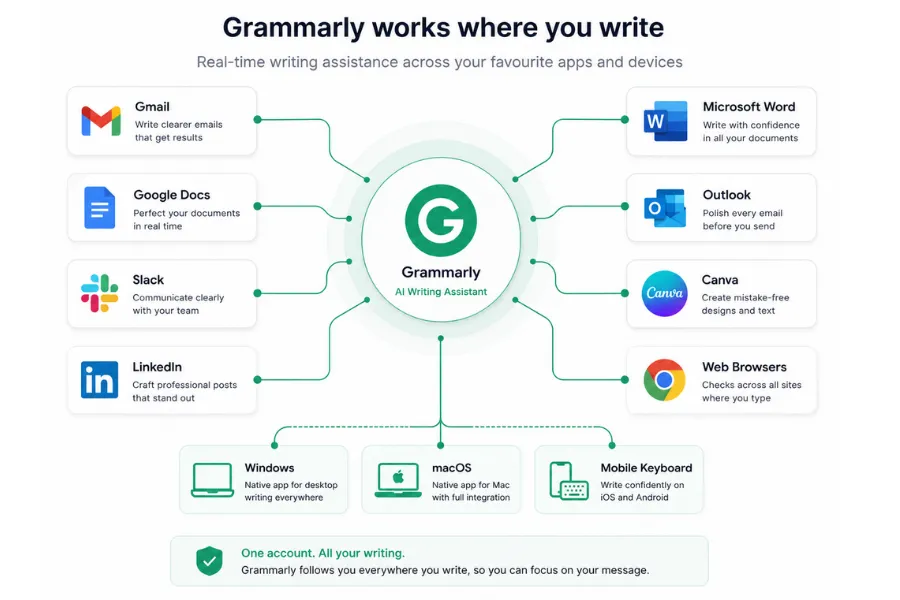
Beyond the browser, native apps for Windows and Mac handle documents you draft or paste in, a mobile keyboard covers iOS and Android, and dedicated add-ins cover Microsoft Word, Outlook, and Google Docs. The reach is the point: your writing gets checked wherever it happens, with no copying into a separate editor. Teams producing marketing visuals in Canva get the same inline suggestions inside the Canva text editor through the extension.
The step most new users skip is the goals panel. Before drafting, you can tell Grammarly your audience, formality level, and intent, and the suggestions recalibrate to match. A formal report and a friendly follow-up email should not receive the same advice, and with goals set, they do not. Thirty seconds of configuration here removes most of the irrelevant suggestions people complain about, and it is the closest thing the tool has to customisation on the free tier. Deeper controls, such as a shared style guide, sit on the Business plan.
The explanations attached to each correction are where the tool earns long-term value. Reading why a sentence is passive or a comma is misplaced builds the habit of not repeating the error. Users who accept fixes blindly get a corrected document. Users who read the reasons get a corrected document and a slow, compounding improvement in their first drafts, which is the main reason teachers and non-native speakers rate the tool so highly.
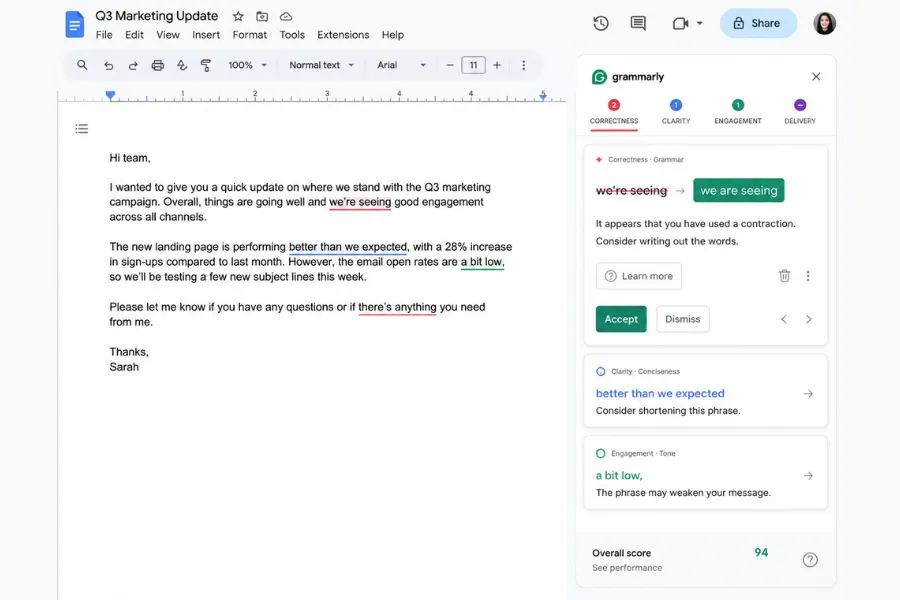
Speed and accuracy both hold up in daily use. Suggestions appear within a second or two of typing, with no visible lag even in long documents. The correction engine catches contextual errors a standard spell checker passes, such as affect versus effect, where the right word depends on meaning rather than spelling. It is not infallible: technical jargon and deliberate stylistic choices sometimes draw suggestions you should ignore, so treat each flag as a prompt for judgement rather than an instruction. For a wider look at how correction tools sit alongside drafting tools, the Tezons guide to AI writing assistants maps the category.
Where Grammarly earns its subscription
Five capabilities do most of the work, and each one matters to a different kind of writer.
- Real-time correction everywhere. Grammar, spelling, punctuation, and commonly confused words are flagged as you type across browsers, desktop apps, Word, and Google Docs. The catches go beyond spell-check grade because the engine reads context, not letters, which is where its accuracy rating of 4.5 comes from.
- Tone detection. The tool labels how your message reads, such as confident, friendly, formal, or assertive, before you send it. Paid plans add tone rewriting, so a blunt sentence can be softened in one click. This matters most in sales and customer-facing roles, where the register of a message affects reply rates.
- Clarity and conciseness suggestions. Wordy phrases, buried verbs, and passive constructions get flagged separately from grammar errors. These are the suggestions with the most commercial value, because a grammatically correct sentence can still be hard work to read, and clarity problems are the hardest to spot in your own writing.
- Plagiarism checking and AI detection. The Pro plan scans text against billions of web pages and academic sources and cites potential matches. A newer detector flags text likely produced by AI tools. Both come inside the subscription with no separate fee or usage cap.
- GrammarlyGO drafting. A prompt-based AI layer that rewrites selected text, summarises documents, and drafts short replies. Its limits are as important as its abilities, so it gets its own section below.
Support resources score 4.2: the help centre is thorough and searchable, and response times from human support are faster on paid tiers than on free accounts. Customisation scores 4.0, held back by the fact that team-level controls, including the style guide and shared snippets, require the Business plan.
Where Grammarly falls short
The limitations are specific, and each one rules the tool out for a particular kind of user.
- English only. Grammarly offers no meaningful help in any other language. Bilingual teams need a second tool for non-English work.
- Your text goes to Grammarly's servers. Real-time analysis requires transmission. The company states it does not sell user content, and Enterprise adds data-loss prevention controls, but organisations handling privileged or regulated material should review the data policy before rolling the tool out.
- Misreads on technical and creative writing. Precise jargon and deliberate rule-breaking draw suggestions that are conventionally right and contextually wrong. Novelists and specialist writers will dismiss more flags than they accept.
- Its own rewrites can trip AI detectors. Text passed through Grammarly's rephrase features has been flagged by third-party AI detection tools, a known issue across the user community. Students submitting work through detection software should keep their drafts as evidence of their own revisions.
- The strongest features sit behind the paywall. Tone rewriting, sentence rewrites, vocabulary suggestions, and plagiarism checking all require Pro. The free tier is a working product rather than a crippled demo, but daily professional writers will feel the gap within a week.
GrammarlyGO and the limits of the AI layer
GrammarlyGO handles four jobs: drafting new text from a prompt, rewriting selected text in a different tone, summarising documents, and generating email replies. The output is clean, professional, and deliberately unremarkable, which is the right register for business communication and the wrong one for content that needs a distinctive voice. Anyone producing marketing copy at volume should compare Writesonic, which is built for that workload.
Prompt limits are the operational constraint. The free tier includes 100 prompts per month, Pro includes 500, and Business includes 1,000 per user. A daily email user asking for one or two rewrites a day will never hit the ceiling. Anyone hoping to generate blog posts at volume will hit it within days, and would be reaching for the wrong tool in the first place.
The habit that produces usable output is specificity. A prompt that names the reader, the goal, the length, and the constraint returns a draft worth editing. A vague prompt returns a paragraph you will rewrite from scratch. Since the prompt count is capped, precision is also economy. Writers weighing correction against generation more broadly can compare the two categories in the Tezons guide to AI for writers.
Grammarly pricing and the tier worth paying for
Grammarly runs a freemium model with three main tiers and a negotiated Enterprise level. Check the current pricing page before subscribing, as promotional rates change.
- Free. Grammar, spelling, and punctuation correction, basic tone detection, and 100 GrammarlyGO prompts per month. Enough for casual writers to stay on indefinitely.
- Pro. Around $12 per month on annual billing. Adds tone rewriting, sentence rewrites, vocabulary enhancement, full clarity suggestions, plagiarism checking, and 500 prompts. The practical tier for anyone who writes daily.
- Business. Priced per user per month. Adds a shared style guide, team snippets, admin controls, usage analytics, and 1,000 prompts per user. The style guide is the reason to upgrade: it keeps a team's terminology and tone consistent without manual policing.
- Enterprise. Custom pricing with single sign-on, automated user provisioning, and data-loss prevention. Relevant for organisations where the privacy question needs a contractual answer.
Cost efficiency scores 4.1 because the value is real but conditional. A professional writing several documents a day recovers the Pro cost in saved review time within the first week of each month. A casual writer sending a few emails a week will never need more than the free tier, and paying for Pro would buy features that sit unused. The honest test is volume, not skill: if writing is a daily part of your job, Pro pays for itself.
Grammarly against QuillBot, ProWritingAid and Hemingway
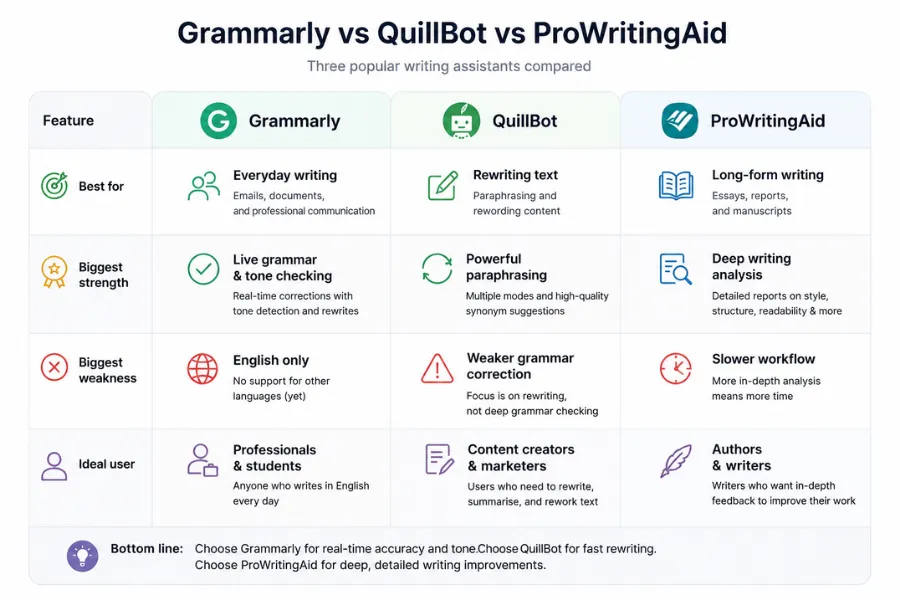
QuillBot is a paraphrasing tool first and a checker second. Its rewriting engine produces stronger rephrases than Grammarly's, and its subscription costs less. Grammarly wins on correction depth, integration reach, and the explanations that teach as they fix. Choose QuillBot if your main task is rephrasing existing text; choose Grammarly if it is catching errors in new text.
ProWritingAid is the stronger tool for book-length work. It produces chapter-level readability reports and genre-specific style feedback that Grammarly does not attempt, at the cost of a less polished interface and weaker real-time coverage across the web. Novelists and editors should trial ProWritingAid first; daily professional writers get more from Grammarly's breadth.
Hemingway Editor does one job: it highlights sentences too long or too passive to read comfortably. It does not correct grammar, so it complements Grammarly rather than competing with it. Running a finished draft through Hemingway after a Grammarly pass covers a layer of readability the underlines miss.
Grammarly review verdict: worth Pro if you write in English daily
The 4.29 overall reflects a tool that does its one job better than anything else in its category. Ease of use at 4.7 and accuracy at 4.5 carry the score. The 3.8 on data privacy is the deduction that organisations with sensitive content need to weigh rather than wave through, and the English-only scope is the line that decides whether the tool is relevant to you at all.
Start on the free tier, use it for a fortnight across your real writing, and upgrade to Pro the first time you want a tone rewrite the free plan will not give you. If your work is in another language, or your compliance team cannot accept text leaving the building, that is the point to pick a different tool. For anyone who writes in English for a living, Grammarly remains the default for a reason.
How We Rated It:
More Tool Reviews





Subscribe to Stay in the loop
Get the latest AI and technology news, honest tool reviews, and practical guides delivered straight to your inbox.
Success! Check your Inbox!

Tezons Newsletter
The latest technology news, in-depth tool reviews, and practical guides - curated and delivered to your inbox.
Latest News




Have a question?
Have any questions?
Didn’t find what you were looking for? We’re just a message away.