
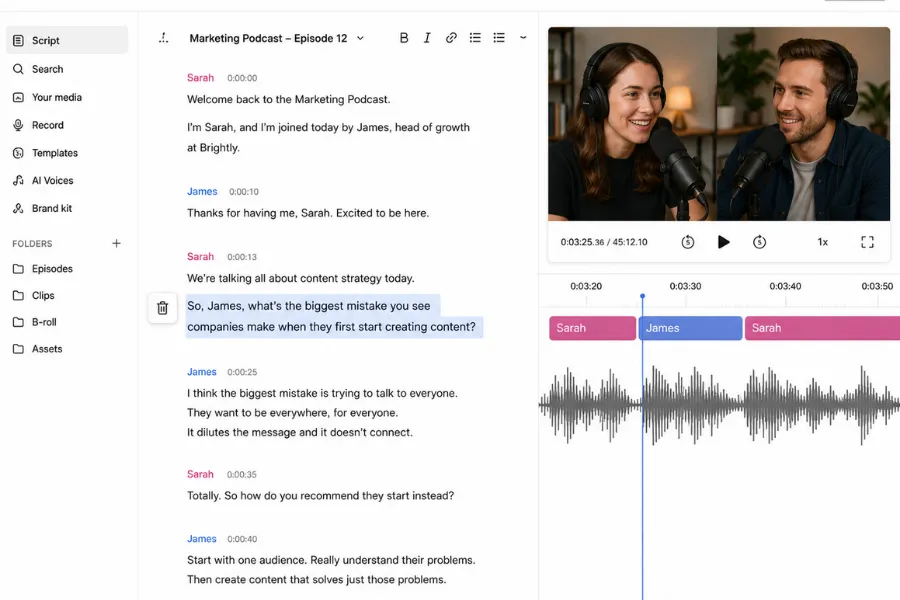
Editing a 45-minute podcast interview by scrubbing a timeline is one of the most tedious tasks in content production. You hear a stumble, drag a cursor back, make a cut, then do it another 60 times. Descript removes that loop entirely: it transcribes your recording, links every word to the corresponding audio or video, and lets you edit the media by deleting text from a document. For creators whose output is primarily speech, it is the fastest editing workflow available at this price point. The ceiling appears when projects demand precise visual cuts, complex colour work, or footage where the transcript adds little navigational value.
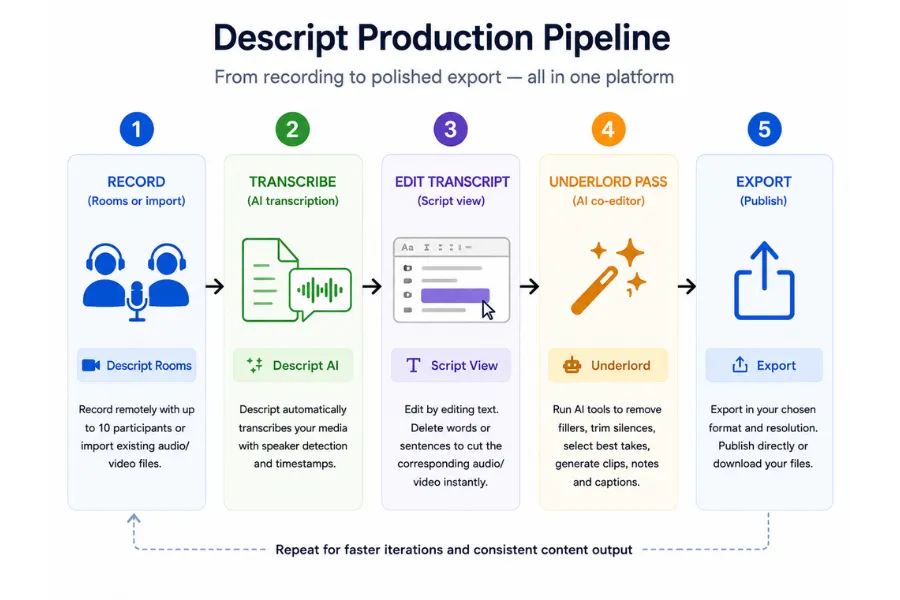
Descript is built for podcasters, YouTubers producing talking-head or tutorial content, and small teams making training videos. Over 6 million creators have used the platform, including teams at organisations like Amazon and Spotify. The AI layer, called Underlord, handles the automated work: removing filler words, trimming silences, selecting best takes, generating short-form clips, and drafting show notes from a prompt. The tool also records remotely through its Rooms feature, capturing separate audio tracks per speaker without a third-party recording tool. For a solo creator managing their own production stack, replacing a transcription service, a noise reduction plugin, a caption tool, and a remote recording platform with one subscription changes the economics of running a content operation.
The workflow takes two to three sessions to feel natural. Descript splits into two views: a script view for content decisions and a timeline view for visual adjustments. Knowing when to use each is not immediately obvious to a first-time user, and the onboarding does not resolve this quickly. Transcription accuracy is high for clear English speech, and 25 languages are supported, though domain-specific vocabulary and heavy accents produce errors that need manual correction. Setting up a custom transcription glossary under account settings, adding brand names, technical terms, and recurring vocabulary, takes ten minutes and improves accuracy on every subsequent recording. It is the most consistently skipped setup step and the one that pays back the most.
The most significant limitation is stability on longer projects. Users editing raw footage over 30 minutes report lag, slowdowns, and occasional crashes. Autosave reduces data loss, but the interruptions are a genuine cost on long edits. Export compression is a secondary concern: the platform offers limited granular export settings, and some users report that 4K exports are smaller in file size than expected. Run a test export on your first project before committing to a full production workflow. For YouTube uploads the results are generally acceptable; for broadcast-quality delivery, you will need to finish in a dedicated NLE.
Descript's AI tools and what they deliver
- Text-based editing. Every word in the transcript is a direct handle on the media. Highlight a sentence and delete it, and that segment disappears from the timeline. Corrections to filler words, repeated phrases, and unwanted tangents take seconds rather than minutes of timeline scrubbing. The model breaks down for footage that is not dialogue-led, but for interview, podcast, and talking-head content it is the fastest editing method available at this price point.
- Underlord AI co-editor. Underlord handles automated tasks via a prompt interface: removing filler words, trimming silences, selecting the best takes, generating short-form clips, drafting show notes, and producing social captions. The Creator plan includes 800 AI credits per month, which covers consistent weekly publishing. Heavier users can purchase top-up credits. Underlord performs best on shorter segments rather than full hour-long recordings in a single pass: the precision of its cuts improves when the scope is tighter, so structure sessions around 15-to-20-minute segments rather than importing an entire recording as one block.
- Studio Sound. One-click audio enhancement that removes background noise, reduces room echo, and brightens vocal clarity. It works well on consumer microphone recordings and saves the cost of a separate audio restoration tool. The results are not equivalent to professional audio software, but they set a listenable baseline for podcasts and YouTube content recorded in untreated spaces. Run it on import, before making any edits, so the cleaned audio is the base you are working from.
- Overdub and Voice Regenerate. Overdub lets you clone your voice and correct spoken mistakes by typing the replacement text. The AI regenerates the audio to match your natural tone and mouth movement in the video. This removes the need to re-record for small script errors and is particularly useful for course creators who cannot easily schedule reshoots. Voice model data is stored on Descript's servers, which is worth noting before using the feature on sensitive content.
- Remote Recording via Rooms. Descript Rooms records each participant on a separate local track and uploads them to a shared project automatically. Up to ten participants can join a session, with recordings cloud-backed as a fallback. For podcast hosts managing distributed guests, this consolidates remote recording into the same platform where editing happens, removing the need for Riverside.fm or a comparable tool.
Descript's limitations: stability and exports
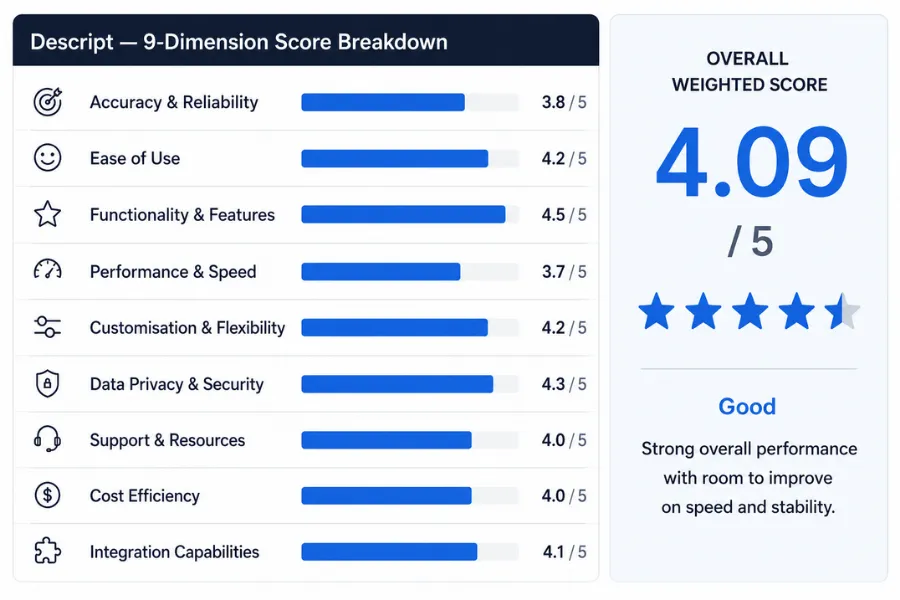
Stability is the most documented issue on user review aggregators. Projects over 30 minutes of raw footage produce lag and occasional crashes frequently enough to treat as a structural constraint rather than a rare bug. Autosave reduces data loss risk, but the interruptions add up over a long edit. The practical workaround is to save versions manually and work in shorter sessions rather than importing a full recording as one project. This is the primary reason performance and speed scores 3.7 out of 5 in this review.
Export compression control is limited compared to dedicated video editors. Some users find 4K exports visually softer than expected, with file sizes smaller than the source. For YouTube uploads the results are generally acceptable. For broadcast-quality delivery, finish in a dedicated NLE. The export limitation is not a dealbreaker for the primary audience, but it is a real gap for teams whose output needs to meet broadcast specifications.
The AI credit system can constrain heavy users. The Creator plan's 800 monthly credits cover regular publishing, but users running multiple long-form projects or relying heavily on Underlord for batch processing may exhaust the allowance before the month ends. The Business plan raises the limit to 1,500 credits. Top-up packs are available but add unpredictable cost to a subscription that is already metered by media hours.
Ease of use scores 4.2 out of 5. The platform is accessible to non-technical users once the script-versus-timeline mental model clicks, but the initial learning curve is steeper than the marketing suggests. Customisation scores 4.2 as well: layout packs give creators control over caption style and title cards, and brand templates on the Business plan let teams maintain visual consistency across distributed contributors. Integration with publishing platforms is limited compared to dedicated editing tools, though Descript connects to standard output formats and cloud storage via its export options. Integration capabilities scores 4.1 out of 5.
Descript holds SOC 2 Type II certification and states that project content is confidential even from Descript staff. Data privacy and security scores 4.3 out of 5. Support resources score 4.0: the documentation is thorough, and community forums are active, though response times on live support vary by plan tier. Cost efficiency scores 4.0 out of 5, reflecting strong value for creators who use the full feature set and lower value for users who need only a subset of what the platform offers.
Descript pricing: what each tier covers
- Free ($0/month): Approximately 60 media minutes per month, 100 one-time AI credits, 720p export with a Descript watermark. Sufficient for evaluating the transcript editing workflow on a short project, but not viable for regular publishing.
- Hobbyist ($16/month billed annually, $24 month-to-month): Approximately 10 media hours per month, 400 monthly AI credits, 1080p watermark-free export, access to Underlord and Studio Sound. The right entry point for a solo creator publishing one piece of content per week at a consistent cadence.
- Creator ($24/month billed annually, $35 month-to-month): Approximately 30 media hours per month, 800 monthly AI credits, 4K export, full Underlord feature set including video generation, and unlimited royalty-free stock media. The realistic baseline for active podcasters and YouTubers publishing at least weekly.
- Business ($50/month per person billed annually, $65 month-to-month): Approximately 40 media hours per month, 1,500 monthly AI credits, Brand Studio for visual consistency across contributors, translation dubbing with proofread, and priority support. Built for small teams producing video content at volume.
- Enterprise (custom pricing): Adds SSO, SCIM provisioning, security review, dedicated account support, and custom invoicing. Contact Descript sales for a quote.
The media hours cap is the main decision driver, not the sticker price. A busy week of interviews or recording sessions can exhaust a Hobbyist allowance faster than the feature list suggests, because the meter counts every hour of media you transcribe, not only the minutes that survive into the final edit. Size your plan by footage volume first. Annual billing saves up to 35% against monthly rates. Always confirm current pricing at descript.com/pricing before subscribing, as tier contents and prices change.
Descript against the alternatives
Runway targets a different creative problem entirely. It is built for generative AI video effects, inpainting, and stylised visual output rather than dialogue editing. Choose Runway when the visual treatment of your footage is the centrepiece of the project. Descript is the stronger choice when content is speech-led and the goal is editing speed.
CapCut is the dominant free option for short-form social video. It has a broader template library for fast-turnaround Reels and TikTok content, and its mobile app is more capable than Descript's for on-the-go editing. For short-form creators who do not produce long-form audio content, CapCut covers more ground at no cost. Descript is the stronger choice when you need transcription, remote recording, and voice cloning alongside your editing workflow, or when your primary output is a 30-minute podcast rather than a 60-second clip.
Riverside.fm is the closest head-to-head alternative for podcast-focused teams who prioritise remote recording quality above everything else. Riverside's separate track recording and video quality match Descript's Rooms feature in most conditions, but its editing capabilities are narrower. Descript wins on breadth of workflow; Riverside wins for teams whose recording quality is the non-negotiable priority and who are content to edit in a separate tool. For a broader comparison of tools in this category, the AI video editor guide sets out the main options.
Descript scores 4.09/5. Functionality and features lead at 4.5; performance and speed trail at 3.7, reflecting documented stability issues on longer recordings. For podcasters and talking-head video creators who spend more time editing speech than grading footage, the Creator plan earns its cost. The transcript workflow, Underlord automations, Rooms recording, and voice correction in one subscription replaces three or four point solutions at a lower combined cost. Test the free tier on a real project before upgrading, and commit to Creator only once you have confirmed the transcript-first workflow suits your content type.
How We Rated It:
More Tool Reviews






Subscribe to Stay in the loop
Get the latest AI and technology news, honest tool reviews, and practical guides delivered straight to your inbox.
Success! Check your Inbox!

Tezons Newsletter
The latest technology news, in-depth tool reviews, and practical guides - curated and delivered to your inbox.
Latest News




Have a question?
Have any questions?
Didn’t find what you were looking for? We’re just a message away.