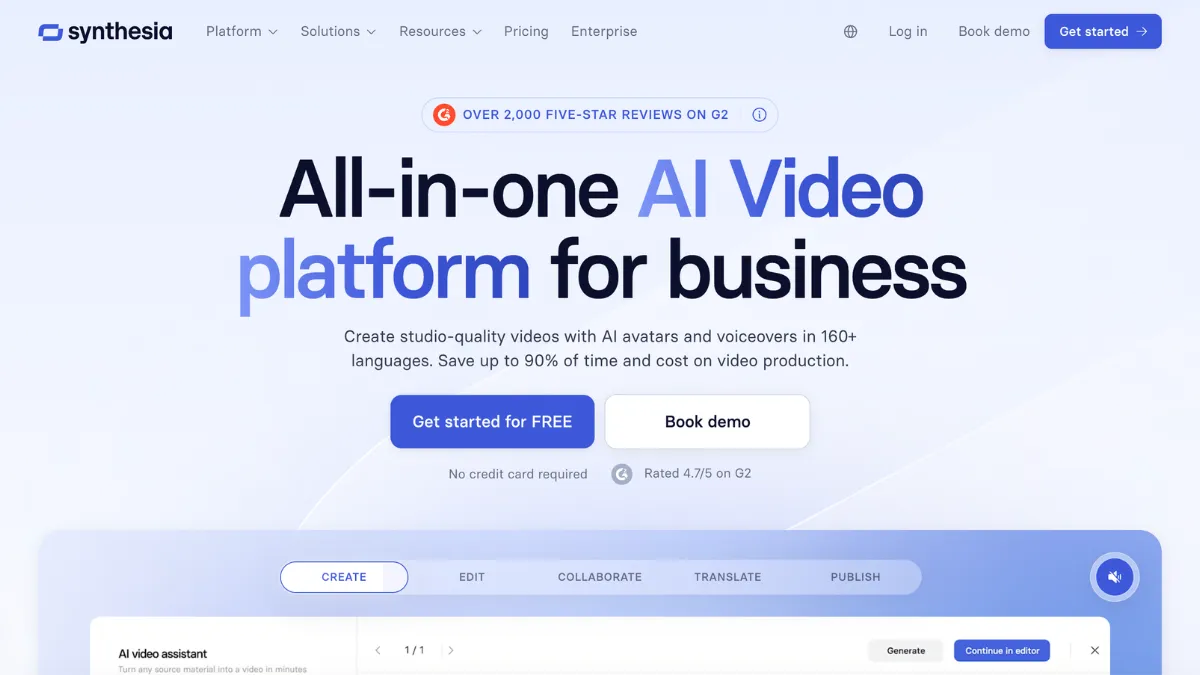
Synthesia converts written scripts into talking-head presenter videos using AI avatars, no camera, no studio, no voiceover artist needed. You type or paste a script, choose from a library of over 240 stock avatars, add a background, and generate a finished video. The output is a polished MP4 with a speaking presenter, auto-generated captions, and optional background music. It is built for L&D managers, HR teams, internal comms leads, and marketing professionals who need video at volume but lack a production budget or film crew.
How Synthesia's avatar editor actually works
The editor is slide-based. Each slide holds one scene: an avatar on a background, a script block in a text field, and optional text overlays or media. You build a video the way you build a presentation, except the output plays as continuous video rather than a slideshow. Zoom's instructional design team reduced video production time by 90% using this approach. The practical reality is that a 5-minute training module that would take a week to film, edit, and subtitle can be done in an afternoon.
For first-time users, there is no steep learning curve. The avatar selection sits in a left-hand panel. Backgrounds draw from a built-in media library sourced from Getty Images and Pexels on paid tiers. You paste your script, click Generate, and Synthesia queues the video for rendering. Most return within minutes. Every video goes through content moderation before delivery. Synthesia applies both human and AI review to all content, and the standard queue can add unpredictable latency at busy periods. Enterprise plans access a priority moderation queue; Starter and Creator do not. For campaigns or urgent deadlines, this is worth factoring into your timeline.

Ease-of-use scores 4.6, and that score is accurate for the core creation flow. The AI Video Assistant, available from Starter upward, takes a prompt, document, or URL and generates a script and video structure. For teams producing large numbers of short explainer videos quickly, this removes the script-writing bottleneck. You supply the source material; the assistant produces a structured first draft you refine in the editor.
Synthesia's avatar library and what sets it apart from competitors
The avatar library is the central differentiator. Basic accounts get 9 stock avatars. Starter gets 125+, Creator gets 180+, and Enterprise unlocks the full 240+ library. The avatars vary in age, gender, ethnicity, clothing style, and speaking register, covering a wider demographic range than most competing tools. The range matters for organisations producing training content for global workforces where representation in presenter choice is a stated requirement.
From Creator upward, you can create a Personal Avatar: a digital likeness of yourself, cloned from a short video recording. The process takes a few days. Once complete, the avatar mimics your appearance and pairs with your cloned voice to deliver any script you write, in any supported language. Studio Express-1 Avatars are higher-resolution likenesses with more controlled facial rendering, available as a paid add-on at $1,000/year on annual plans only, taking up to 10 days to process.
- 240+ stock AI avatars on Enterprise: varied in appearance, speaking register, and clothing across a wide demographic range
- Personal Avatars: digital likenesses cloned from a short recording; Starter includes 1, Creator includes 5, Enterprise is unlimited subject to fair use
- Voice cloning: pairs your voice with your avatar so scripts play in your own voice, carrying across any supported language on translation
- Customisable avatar environments: avatars can be placed in different settings and prompted to perform physical actions, though each action b-roll asset costs 96 credits from your shared pool
- Multiple avatars per scene: available from Creator upward, supporting dialogue sequences between two presenters in the same frame
Customisation and flexibility scores 4.0. The stock library is strong, the personal avatar pipeline is functional, and action prompting adds life to otherwise static presenters. The constraint is that avatar expressions and physical gestures are limited compared to motion-captured alternatives. In a corporate training or internal comms context, the output is convincing. In scenarios requiring genuine emotional range or dramatic delivery, a human presenter will still outperform an AI avatar at any fidelity level Synthesia currently offers.
For teams coming from traditional video production, scripting a shoot, booking a studio, hiring a presenter, editing rushes, the shift to Synthesia removes four separate workflow stages and replaces them with a text field and a Generate button. The AI video editing category has many entrants, but the combination of avatar delivery, voice cloning, multilingual output, and SCORM export in one interface is a specific proposition that few tools outside Synthesia currently cover end-to-end.
Translation and dubbing: Synthesia's most commercially significant feature
1-click translation is available from Creator upward and is the feature that best justifies Synthesia's pricing for global organisations. You create a video in English, select target languages, and Synthesia generates dubbed versions with the avatar's lips synchronised to the new audio. Mondelez reported compressing 100 hours of localisation work into 10 minutes using this feature. That figure is plausible: a 10-minute English training video that would require 10 professional translators for 10 language versions can be processed as a batch operation without any additional human input beyond quality review.
The AI Dubbing tool extended this to external video in 2026. You upload an MP4 or paste a YouTube link, and Synthesia translates and re-dubs the audio into 70+ languages on Starter and Creator, or 140+ on Enterprise. The original speaker's voice, accent, and tone are preserved through voice cloning in the dubbed output. Lip sync, where mouth movements in the original footage are adjusted to match the translated audio, uses 2x credits when enabled, a meaningful cost on tighter plans. A Custom Glossary feature lets you define brand terms, product names, and technical jargon so pronunciations remain consistent across languages, which addresses the most common quality failure in enterprise localisation projects.
The critical limitation: dubbed minutes draw from the same shared credit pool as video generation. On Starter, 10 minutes per month covers both creation and dubbing combined. If you plan to use Synthesia primarily to dub existing video assets from your archive, a Starter plan will be exhausted quickly. Creator's 30 minutes per month, or 360 minutes annually, gives substantially more room, but heavy dubbing workflows combined with new video production will still require careful allocation across the month.
Accuracy and reliability scores 3.8. Translation quality is strong for standard business English into major European languages: German, French, Spanish, Italian, and Portuguese are the most polished outputs. For technical domains with specialist vocabulary, the Custom Glossary reduces errors but does not eliminate them. Asian language outputs show more variance, and some regional accents in the dubbed voice clones drift from the original speaker's cadence. For organisations producing compliance training where precision of language matters legally, a native speaker review stage remains necessary regardless of the platform used.
Limitations that only surface under production conditions
Several constraints are not obvious from the pricing page or the free trial:
- Non-rollover credits: unused video and dubbing minutes do not carry forward at the end of a billing period on any plan. A quiet month does not bank minutes for a busy one. On annual plans, the full year's allocation is available from day one, but it expires at renewal regardless of how much remains.
- Shared credit pool compression: the credit system introduced in mid-2026 pools all AI feature usage together. Generating a 5-minute video, dubbing it into 3 languages with lip sync, and running avatar action scenes in the same billing cycle can exhaust Starter allocation in a single project.
- No plan between Creator and Enterprise: the jump from Creator at $89/month (or $64/month on annual billing) to custom Enterprise pricing is the largest gap in the pricing structure. Teams that have outgrown Creator's 30 minutes but cannot justify an Enterprise contract have no intermediate option.
- Content moderation queue: every video is reviewed before delivery. For urgent production timelines, the standard queue adds unpredictability. Enterprise priority moderation reduces this; Starter and Creator users queue with everyone else.
- Action b-roll credit cost: prompting an avatar to perform a physical gesture or action draws 96 credits per asset from the shared pool. A video with frequent avatar actions in multiple scenes erodes monthly allocation faster than minute duration alone suggests.

Data privacy and security scores 4.5, the highest dimension rating in this review. Synthesia holds SOC 2 Type II certification, GDPR compliance, and ISO 42001 certification, which is the AI-specific governance standard. Enterprise plans include SAML/SSO for centralised identity management. For procurement teams at financial services or healthcare organisations, this compliance posture is often the prerequisite that makes Synthesia approvable. The AI content creation software category rarely matches this security baseline at comparable price points. Functionality and features scores 4.2 overall, reflecting the breadth of the platform relative to what you pay at Creator tier.
Synthesia pricing: what each tier limits and includes
- Basic (Free): 10 minutes of video per month, 9 stock avatars, 160+ languages, no MP4 downloads (share via link only), 1 editor seat, AI chat support
- Starter - $29/month (monthly) or $18/month billed annually: 10 min of video and dubbing per month (120 min/year on annual), 125+ avatars, 1 personal avatar, AI Video Assistant, AI Dubbing (70+ languages), Synthesia logo removed from videos, 1 editor and 3 guests, chat and email support
- Creator - $89/month (monthly) or $64/month billed annually: 30 min of video and dubbing per month (360 min/year on annual), 180+ avatars, 5 personal avatars, API access (360 min/year, deducted from plan allocation), multiple avatars per scene, interactive video branching and quizzes, branded video pages, 1 editor and 5 guests, priority chat and email support
- Enterprise - custom pricing: unlimited video minutes, 240+ stock avatars, unlimited personal avatars, SAML/SSO, live team collaboration, Brand Kits, SCORM export for LMS integration, AI Dubbing (140+ languages), dedicated Customer Success Manager, priority content moderation, tailored onboarding
One pricing detail that catches teams out: Starter's 10 min/month on monthly billing becomes a 120-minute annual bucket on the yearly plan. The annual allocation is larger but non-rolling — it expires at renewal whether you used it or not. Creator's API access is also deducted from the same 360-minute annual pool, meaning API-heavy teams building automated video pipelines will exhaust Creator allocation faster than the per-month figure implies.
Synthesia vs Runway and ElevenLabs: where each tool fits
Runway and Synthesia operate in the same AI video space but serve different production scenarios. Runway generates cinematic clips from text prompts and excels at effects, motion graphics, and non-linear editing. Synthesia produces presenter-led talking-head content from scripts and excels at structured delivery, avatar variety, and multilingual output. A compliance training module with a named presenter and 10 translated versions is a Synthesia job. A product launch video with generative visuals and B-roll effects is a Runway job. Neither replaces the other for teams with both needs.
ElevenLabs overlaps with Synthesia on voice cloning and multilingual voiceover. ElevenLabs produces finer-grained voice output with more expressive emotional controls. For audio-only content, its voice models are more sophisticated. For full video output with a visible presenter, Synthesia covers ground ElevenLabs does not: avatar delivery, slide-based editing, SCORM export, and LMS integration. Organisations building multimedia training programmes frequently use both: ElevenLabs for high-quality audio narration on slides, Synthesia for presenter-led video segments.

Support and resources scores 3.9. The Synthesia Academy covers the core workflows with video tutorials. Live community sessions are available. The Help Centre is comprehensive. Priority support is reserved for Creator and above; Basic users get AI chatbot assistance only. Dedicated CSM access is Enterprise-only, which means smaller teams on Creator tier are managing themselves through support tickets for anything beyond self-serve documentation.
Is Synthesia worth the cost for your use case?
For L&D teams at large organisations producing recurring training content across multiple languages, Synthesia's case is clear. The combination of avatar delivery, 1-click translation, SCORM export, and LMS integration covers the full training video lifecycle in a single tool. Enterprise pricing is justified for organisations that would otherwise spend on studio time, presenter fees, and localisation services. Cost efficiency scores 3.5, not because the tool is poor value in absolute terms, but because the Starter and Creator caps penalise volume users, and the Enterprise gap leaves mid-sized teams without a natural upgrade path.
For solo creators or small teams producing occasional videos, the Starter plan's 10-minute monthly cap is a real constraint. Creator adds meaningful headroom and unlocks the API for automation, but at $89/month it requires consistent usage to justify. The right entry point is Creator annual ($64/month, 360 minutes/year), which offers enough room for a team producing 2-4 short videos per week without hitting the ceiling every month. Teams already using Canva for graphic assets will find Synthesia a natural addition for the video layer of the same content workflow.
How We Rated It:
More Tool Reviews


Subscribe to Stay in the loop
Get the latest AI and technology news, honest tool reviews, and practical guides delivered straight to your inbox.
Success! Check your Inbox!

Tezons Newsletter
The latest technology news, in-depth tool reviews, and practical guides - curated and delivered to your inbox.
Latest News


Have a question?
Have any questions?
Didn’t find what you were looking for? We’re just a message away.