AI video editors: short-form vs long-form, and how to choose


AI video editors split into two distinct categories, short-form social tools and long-form repurposing tools, and picking the wrong one for your content format costs more time than editing manually. The distinction matters because the features that make CapCut fast for a 60-second Reel do nothing useful for a 40-minute podcast edit, and the transcript-based workflows that make Castmagic essential for long-form content are irrelevant for vertical video publishing. This guide covers both formats, names the tools that perform in each, and shows you how to build a stack that matches your actual output.
Before choosing any AI video editor, understand what the category automates. Transcript-based editing lets you cut footage by deleting lines of text rather than scrubbing a timeline. This alone saves 30 to 60 minutes on a standard talking-head video. AI caption generation has reached a point where accuracy is high enough that correction takes under five minutes for a clean recording. Silence removal, basic colour grading, background removal, and social format presets are standard features across most tools at every price point.
AI does not automate editorial judgment. Pacing decisions, the choice between two takes, knowing when a pause is deliberate versus dead air, these stay with you. The tools below remove the mechanical work. The craft remains yours.
Source footage quality determines how much these tools can give you. Clean audio, recorded close to the microphone in a quiet space, produces accurate transcripts. Accurate transcripts are the foundation of every AI editing workflow that works from speech. Shaky footage, echo, and background noise all reduce output quality. Record well and the AI multiplies your results. Record poorly and no editor, AI or otherwise, fixes the problem cleanly.
AI video editors for short-form and social media content
CapCut is the most capable short-form AI video editor available without a steep learning curve. It handles auto-captioning across multiple languages, AI background removal, template-based editing for vertical formats, and direct export to TikTok, Instagram Reels, and YouTube Shorts. For creators publishing at volume across multiple platforms, CapCut eliminates the manual steps that eat the most time: syncing captions, reformatting for different aspect ratios, and applying consistent fonts and colour treatment across videos. The free tier covers most social content needs; the paid plan removes watermarks and adds higher-resolution exports.
Caption accuracy in CapCut is strong for standard English and improving for accented speech and other languages. The AI-generated captions require a review pass; budget five minutes per video for corrections, but they start from a high baseline. Auto-sync with background music and AI-suggested B-roll are part of the editing suite, though B-roll suggestions work better as a starting point than a finished output.
Runway occupies a different position in the short-form stack. It adds generative capabilities that CapCut does not offer: extending the duration of a clip beyond its original length, removing or replacing objects within a frame, and generating short video sequences from a text or image prompt. For social content that requires a polished visual edge, product showcases, stylised brand content, or creative series, Runway adds production value that would otherwise require a motion graphics background or a dedicated designer.
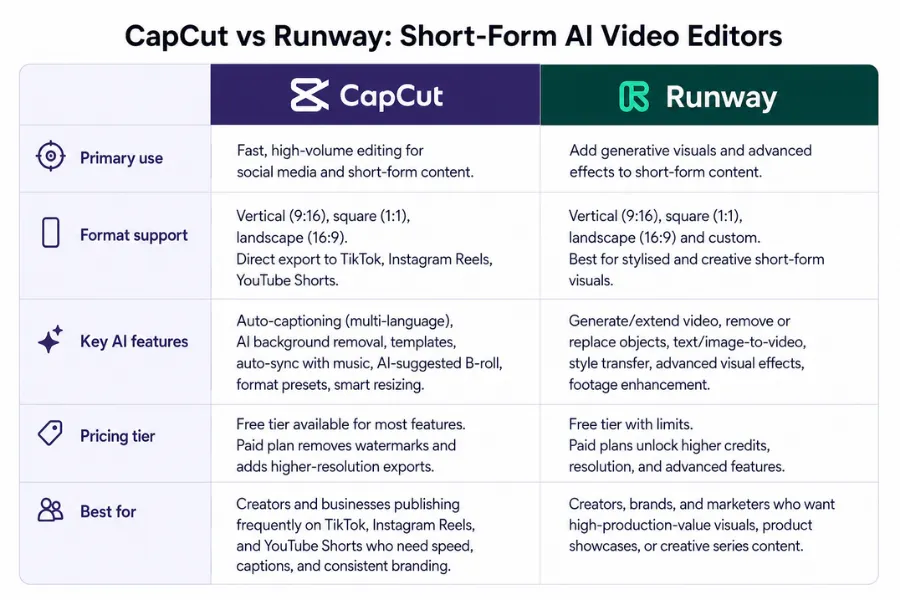
The two tools work well in combination. CapCut handles the speed layer: captions, format conversion, template application. Runway handles the visual layer: generated sequences, object removal, and footage enhancement. Running both on a single project adds time but produces results that neither achieves alone.
Captions are the single highest-impact edit in short-form video. Captioned video retains viewers longer, and the majority of social video is watched without sound. Get caption accuracy and timing right before focusing on any other AI feature. Both CapCut and Runway cover this without requiring manual caption creation from scratch.
Short-form creators building a broader social media content toolkit will find that video editing sits at the centre of the workflow, with content repurposing, scheduling, and analytics all connecting to what you produce here.
AI video editors for long-form content and professional production
Long-form video has different problems. A 45-minute interview, a course module, or a recorded webinar generates hours of raw footage with complex audio and no obvious structure. The tools that produce a TikTok in 20 minutes are not designed for this. Long-form repurposing requires tools built around transcript extraction, clip identification, and multi-format output from a single source file.
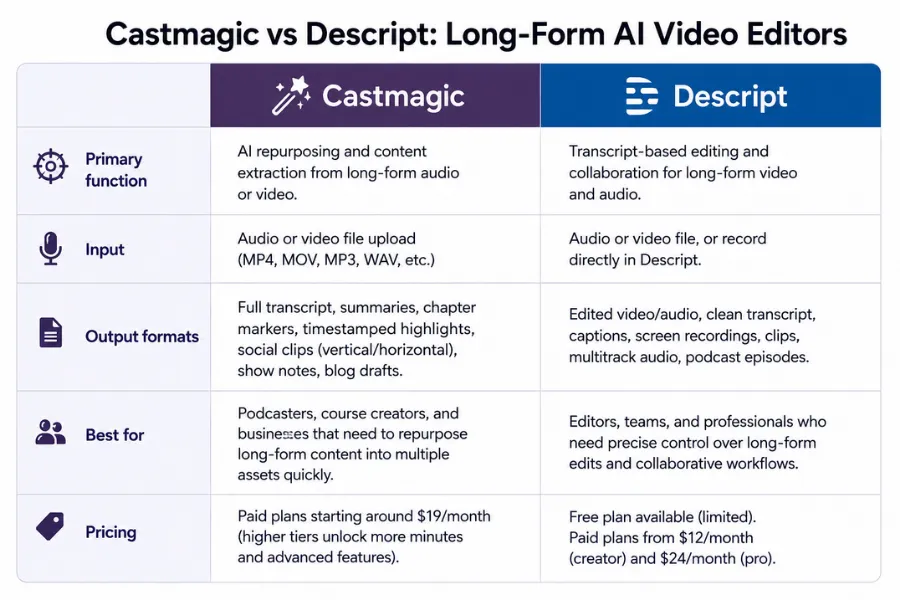
Castmagic is the strongest long-form repurposing tool in this category. It takes an audio or video file and outputs a full transcript, a structured summary, timestamped highlights, social media clips, show notes, and chapter markers, all from a single upload. For podcasters, course creators, and businesses that run regular recorded interviews, Castmagic reduces a multi-hour post-production process to roughly 30 minutes of review and editing. The output quality on highlights and social clips is high enough to use with light edits rather than starting from scratch.
Descript takes a different approach to long-form editing. It generates a full transcript of your footage, then lets you edit the video by editing the text. Deleting a sentence in the transcript removes that segment from the timeline. Filler words and silence can be removed in one click across an entire recording. For creators who find timeline-based editing slow or unintuitive, Descript changes how long-form editing works. It also includes AI voice cloning, which means you can re-record lines as text without going back in front of a camera or microphone.
The practical difference between Castmagic and Descript is in the intended output. Castmagic is built for repurposing: its strength is generating multiple content formats from one source. Descript is built for editing the primary video: its strength is making the long-form cut faster and more intuitive. Many professional content teams use both. Descript produces the edited video; Castmagic extracts everything else from the raw transcript afterward.
ElevenLabs solves the voiceover problem in long-form video. Recording narration, dubbing footage into another language, and producing consistent AI voiceover for automated video series are all capabilities the platform handles at a professional standard. The voice quality has reached the point where it is used in commercial production, not only internal or experimental work. For long-form video, voiceover is the stage where production time and studio cost are highest. ElevenLabs addresses both.
Adobe Express handles branded video assets for teams that need consistent visual identity across video and static content. Templates, brand kits with locked fonts and colours, and export formats suited to web and marketing production make it practical for businesses producing video as part of a wider design output. It works alongside dedicated video editors rather than replacing them. Its strength is consistency across formats, not deep editing capability.
For an overview of how these tools connect to the broader AI content picture, the generative AI tools guide covers text, image, and video tools together, which helps when building a production stack that spans multiple content formats.
Building your AI video stack and measuring what it delivers
The tool decision is secondary to the workflow decision. Creators who struggle with AI video editing are almost always dealing with an inconsistent production process: different settings each time, no shared templates, no defined step where the AI handles its part and human review handles the rest. A coherent workflow makes every tool perform better and makes quality control faster.
Map your current process from brief to publish before choosing any new tool. Identify where the most time goes. For most short-form creators, it is captioning, format conversion, and colour treatment. For long-form producers, it is the initial cut, transcript review, and extracting secondary content formats from the main recording. These are different bottlenecks requiring different tools.
For a short-form video stack, the practical starting point is CapCut as the primary editor and Runway for projects needing visual generation or footage enhancement. Both have free tiers capable of real work. Run five complete videos through each tool before committing to a monthly plan. Measure time from raw footage to export. This single metric tells you more than any feature comparison.
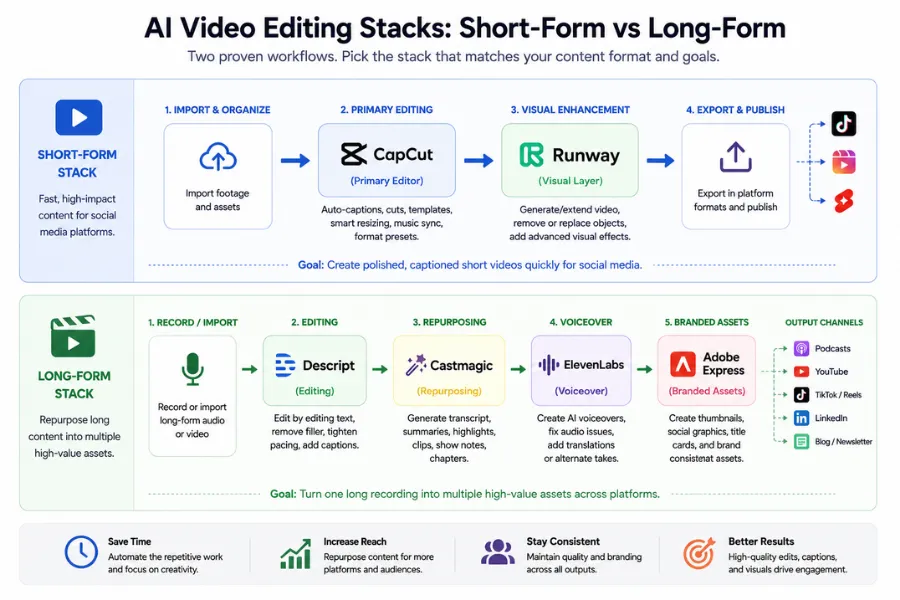
For long-form production, Descript handles the editing workflow and Castmagic handles repurposing. If your content includes narration or requires dubbing for international audiences, add ElevenLabs to the stack. Adobe Express is worth adding when you produce branded video assets across multiple formats and need a single system for visual consistency. The full long-form stack, Descript, Castmagic, ElevenLabs, and Adobe Express, covers every production stage from raw footage to published asset. You do not need all four from the start. Begin with whichever step costs you the most production time each week.
Whichever stack you build, apply the same settings to every video from the first session: caption style, colour grade preset, aspect ratio defaults, and brand elements. Inconsistency in AI-assisted video almost always traces back to inconsistent starting conditions, not to the tool itself. A shared template applied before every edit eliminates most of it.
Track two numbers before and after introducing any AI video tool: time per video from brief to export, and output volume per week. If neither improves after 30 days of consistent use, the tool does not fit your workflow. Most creators who get strong results from AI video editing commit to one workflow for a full month, measure it, and then refine rather than switching tools at the first sign of friction.
Set a five-minute review checklist for every video before it publishes: audio levels consistent throughout, captions accurate and timed correctly, opening frame attention-grabbing, and the main message clear without sound. This catches the errors AI tools introduce: misread words in captions, awkward cuts at silence boundaries, and colour inconsistency between clips, all before they reach the audience.
The gap between creators who use AI video tools and those who do not is measurable in output volume and production cost. That gap only compounds when the tools sit inside a coherent system. Descript cutting your long-form edit time in half only matters if the rest of your process, scripting, recording conditions, distribution, is consistent enough to keep up with the increased output. The AI content creation stack you build around your video workflow determines how much that advantage grows over time.
Start with the tool that addresses your biggest bottleneck. Run it for 30 days across real projects. Measure time per video before and after. The creators who extract the most from AI video editing are not the ones who use the most tools. They are the ones who use the right tool consistently, track the results, and refine the workflow each month.
More AI & Tech Blogs





Latest AI & Tech Blogs


Subscribe to Stay in the loop
Get the latest AI and technology news, honest tool reviews, and practical guides delivered straight to your inbox.
Success! Check your Inbox!

Tezons Newsletter
The latest technology news, in-depth tool reviews, and practical guides - curated and delivered to your inbox.
Latest News




Have a question?
Have any questions?
Didn’t find what you were looking for? We’re just a message away.