AI for writing: how to use it at each stage without losing your voice


AI for writing saves time at every stage of the process, but only if you know exactly where to use it and where to stop. The writers who get the most from these tools are not handing over their drafts wholesale, using AI for specific tasks at specific moments, then taking back control before the output loses what makes their writing worth reading.
Most AI writing guides tell you which tools to use. This one tells you something more useful: the precise point in research, outlining, drafting, and editing where AI adds value, and the point at which you need to step back in. That handoff is different at each stage, and getting it wrong in either direction costs you either time or quality.
The four stages where AI fits into a writing process
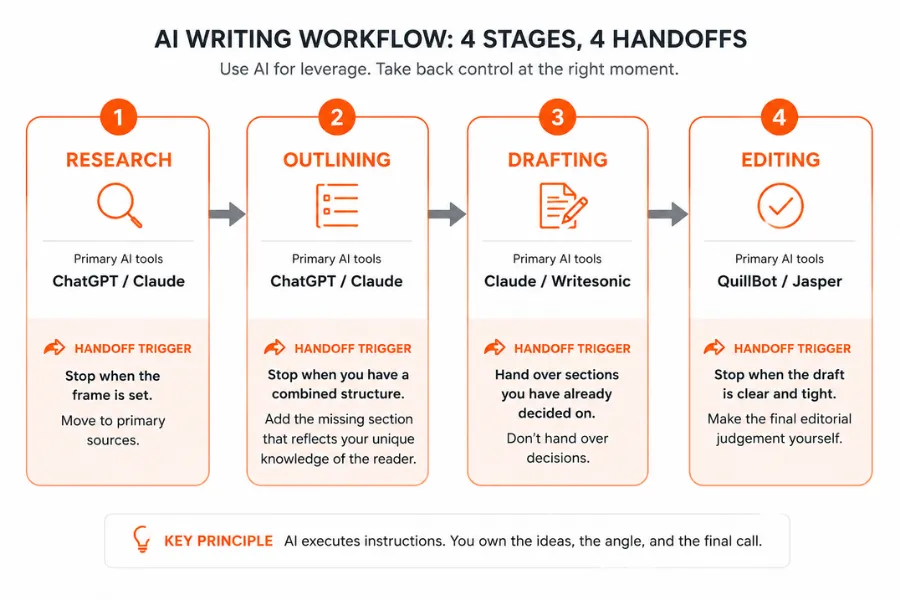
A writing process has four distinct phases, and AI performs differently across each one. Understanding that difference is what separates a productive AI setup from a frustrating one.
- Research: AI compresses orientation time. It surfaces angles, questions, and background quickly. It cannot replace primary research but it reduces the time before primary research can begin.
- Outlining: AI handles structural logic reliably. It produces working frameworks fast. Your job is to stress-test the structure and add the angle that makes your version distinct.
- Drafting: AI generates competent prose from clear instructions. The quality depends almost entirely on how specific your prompt is. Vague prompts return generic output.
- Editing: AI catches sentence-level problems efficiently. It flags passive constructions, repetition, and clarity issues. It cannot make editorial judgements about what belongs in the piece.
The writers who struggle with AI writing tools are usually applying the same tool to all four stages without adjusting how they use it. Each stage needs a different approach and a different handoff point.
Research and outlining with AI: where to start and what to expect
Research is the lowest-risk place to introduce AI into a writing process. Tools like ChatGPT and Claude compress hours of orientation into minutes. Ask either tool to summarise the background on a topic, generate a list of questions a sceptical reader would want answered, or surface angles that mainstream coverage tends to skip. You are not using the AI's summary as your research. You are using it to get oriented faster so your actual research time is more focused.
The handoff point in research: the moment AI has given you the frame, stop using it and go to primary sources. AI training data has a cutoff, and anything time-sensitive needs verifying directly.
For outlining, there is a technique that produces better results than a single AI pass. Ask the tool to generate two competing outlines for the same piece, with different structural approaches. One might lead with the problem, the other with the solution. One might open with a framework, the other with a specific example. Take the strongest elements of each and combine them. This takes under ten minutes and produces a structure with more range than a standard AI outline. From there, the article has shape before you write a sentence.
The handoff point in outlining: once you have a combined structure, take it back. Add the section that the AI did not include, the one that reflects your specific knowledge of the reader. That section is usually the most valuable part of the finished piece, and AI will not put it there unprompted.
For higher-volume content operations where consistent structure across multiple pieces matters, connecting your outlining workflow to a broader workflow automation setup can reduce the manual steps between brief, outline, and draft.
Drafting with AI: what to hand over and what to keep for yourself
Drafting is where AI writing gets misused most often. The default approach: asking AI to write the piece, then editing the output, produces writing that sounds assembled. The result is technically correct prose that lacks the specific detail, the unexpected angle, and the distinctive phrasing that makes an article worth reading a second time.
A more reliable approach is to write the opening paragraph yourself, every time. Two to three sentences in your own voice, establishing your register and the specific angle you are taking. Then hand the body section to AI with those sentences included in the prompt as a style reference. Claude performs particularly well on analytical and structured content when given a concrete example of the tone you want. Writesonic is built for structured blog and marketing formats and works well when you need consistency across multiple pieces in the same format.
The handoff point in drafting: hand over sections you have already decided on. Do not hand over decisions. AI can execute a clear instruction. It cannot determine what the piece should argue, which example is right for this reader, or when a paragraph is doing the wrong job. Those calls are yours.
One practical technique: write the first and last sentence of each section yourself before giving the section to AI to fill in. The first sentence tells AI exactly what the paragraph needs to establish. The last sentence tells it where the paragraph needs to land. AI fills in the middle. You edit the result. This produces drafts that need editing rather than rebuilding.
For AI writing assistants compared side by side, the options range from general-purpose tools to platforms built around specific content types, and the right choice depends on what stage of the process you need most support with.
Editing with AI: the stage most writers skip
Most writers focus AI usage on generation and skip AI-assisted editing entirely. That is a missed opportunity. Editing is where AI delivers some of its most consistent value, with the least risk to your voice.
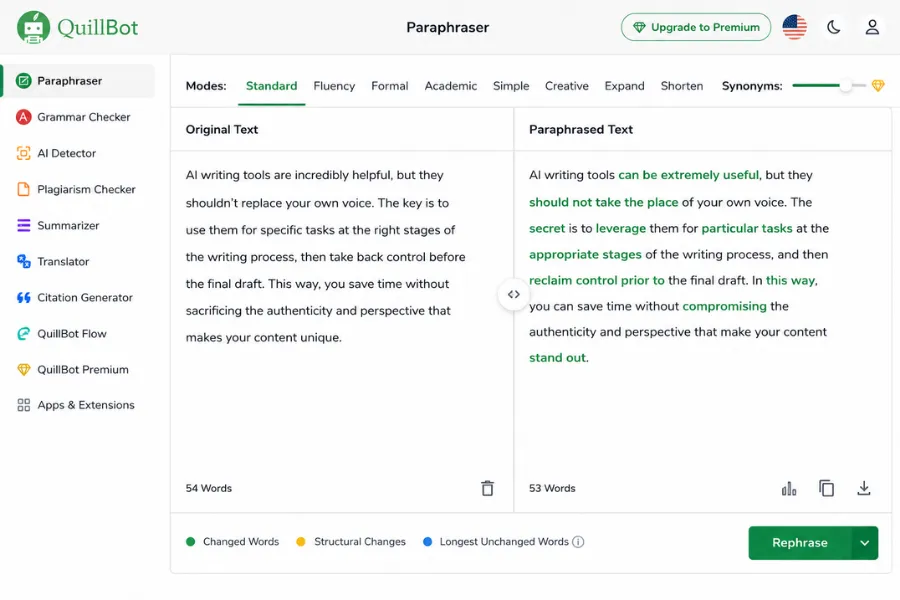
Feed your finished draft to Quillbot to handle paraphrasing alternatives and sentence-level rewrites without constructing a new prompt from scratch. For grammar, style consistency, and passive voice flagging, Grammarly catches sentence-level problems fast. Neither tool replaces your editorial judgement about what belongs in the piece. Both save you time on the mechanical work of line editing.
A second AI editing pass on your own draft is underused by most writers. Take your finished piece, feed it to Claude or ChatGPT, and ask it to flag three things: sentences that run longer than necessary, paragraphs that circle back on a point already made, and transitions that slow the reader without adding information. The responses are not always right, but they surface problems you have stopped seeing because you are too close to the material.
The handoff point in editing: accept or reject each suggestion individually. Do not run AI edits and accept all suggestions in one pass. Your register, your rhythm, and your deliberate stylistic choices are not bugs. AI will flag them as inconsistencies. Your job is to tell the difference between an edit that improves the piece and an edit that flattens it.
Which AI writing tool fits which stage
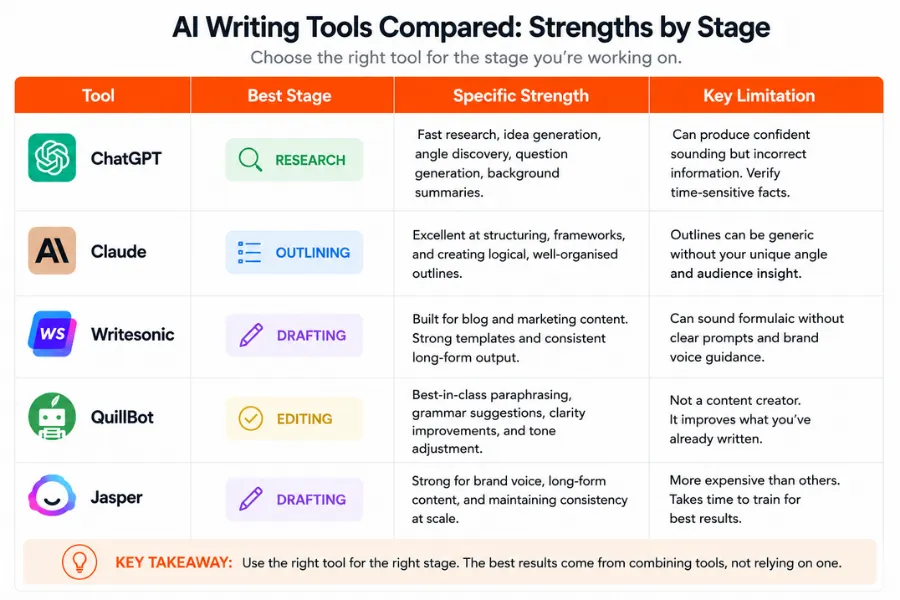
The five tools covered in this guide each perform best at a specific stage. Using the right tool for the right task saves you time and reduces the editing load at the end.
ChatGPT: research, outlining, and drafting
- Best for: Getting oriented on a topic fast, generating competing outline structures, and drafting across a wide range of formats and tones.
- Strength: Flexible across content types. Handles conversational and analytical writing equally well when the prompt is specific.
- Limitation: Output drifts toward the generic without very precise instructions. Vague prompts return vague drafts.
Claude: drafting and structural editing
- Best for: Analytical and structured content where logical flow matters. Follows a style reference more closely than most tools when you include one in the prompt.
- Strength: Produces cleaner paragraph structure and tighter reasoning on complex topics than ChatGPT in most direct comparisons.
- Limitation: Less flexible on highly creative or unconventional formats. Works best when given clear structural guidance.
Writesonic: drafting structured content at pace
- Best for: Blog posts and marketing content where format consistency across multiple pieces matters.
- Strength: Built around templates that hold format steady across high-volume output. Reduces per-piece setup time significantly.
- Limitation: Less suited to opinion pieces or content where individual voice is the primary asset.
Quillbot: sentence-level editing and paraphrasing
- Best for: Reworking specific sentences and paragraphs without constructing a new prompt from scratch.
- Strength: Fast paraphrasing alternatives with multiple mode options. Useful for tightening prose you have already written.
- Limitation: Does not make structural or editorial decisions. It edits what you give it, not what the piece needs.
Jasper: volume drafting for content teams
- Best for: Teams producing structured copy across multiple formats where template consistency and workflow integration matter more than individual voice.
- Strength: Template-driven workflows designed for scale. Performs well for product descriptions, ad variants, and landing page copy.
- Limitation: Higher cost than general-purpose tools. Most value comes at team scale, not for individual writers.
Building a prompting habit that preserves your voice
The most common complaint about AI writing tools is that the output sounds the same regardless of the prompt. The fix is not a better tool. It is a more specific prompt.
Build a short prompt template for each content type you produce regularly. Include four things: the tone you want in concrete terms (not "professional" but "direct, second person, short sentences"), the audience (not "marketers" but "marketing managers running a team of 3 to 5 people"), the format (word count, heading structure, opening style), and two or three sentences from your own writing that demonstrate the phrasing you want the AI to match. That last element is the most important. AI matches style from examples far more reliably than from descriptions.
Save the template. Reuse it. The first time you run it, the output will need editing. By the fifth time, the editing load is a fraction of what it was. That reduction compounds across every piece you produce.
Voice is the most common concern writers raise about AI, and it is a legitimate one. AI tools trained on large datasets produce phrasing that sits in the middle of what they have seen. That middle ground is coherent, but it is rarely distinctive. Your voice comes from the specific things you notice, the examples you reach for, and the positions you are willing to take. None of that comes from a prompt. Protect it by keeping the decisions that require it in your hands, and use AI for the execution once those decisions are made.
The one pattern worth avoiding: reaching for AI the moment a paragraph feels difficult. That habit trains you out of working through difficulty, which is where a lot of the best writing comes from. Grammarly and Quillbot are useful for cleaning up prose you have already written. They are less useful for supplying the idea you have not formed yet. Use AI to execute clear thinking, not to replace it.
More AI & Tech Blogs





Latest AI & Tech Blogs


Subscribe to Stay in the loop
Get the latest AI and technology news, honest tool reviews, and practical guides delivered straight to your inbox.
Success! Check your Inbox!

Tezons Newsletter
The latest technology news, in-depth tool reviews, and practical guides - curated and delivered to your inbox.
Latest News




Have a question?
Have any questions?
Didn’t find what you were looking for? We’re just a message away.