AI image generators: how to choose one and get results you can actually use

Picking an AI image generator comes down to three things: the visual quality your work demands, whether the output is cleared for commercial use, and how the tool fits into the workflow you already have. Most comparisons skip straight to a ranked list. This guide doesn't, because the right answer genuinely varies depending on what you're producing.
How AI image generators work (and why the tool you pick matters)
AI image generators are trained on large datasets of images paired with text descriptions. The model learns to associate words with visual patterns, then constructs a new image by predicting what pixels should appear based on those associations. Enter a prompt and the model builds an image from those learned relationships, not from a database of stored images.
The differences between tools come from four sources:
- Model architecture: the underlying approach to image synthesis, which affects style range and accuracy
- Training data: what the model has seen, which determines how well it handles specific subjects, styles, and contexts
- Resolution and post-processing: whether the output is production-ready at the scale you need
- Prompt interpretation: how precisely the model translates your description into a visual
These four variables explain why the same prompt produces strikingly different results across tools. A brief for a product shot of a ceramic mug on a linen surface with soft natural light will look polished in one tool and flat in another. Testing two or three tools with the same brief is the fastest way to see the differences concretely.
Commercial licensing terms add a fifth dimension. Some tools include commercial rights at all paid tiers. Others restrict them to higher plans or charge separately. If your generated images appear in paid advertising, client work, or published editorial, confirming your licence terms before you build a tool into a production workflow saves problems later.
Comparing the main AI image generators
- Midjourney: editorial, artistic, high-impact output. Interface: Discord. Free tier: no. Commercial use: paid plans (confirm your tier before using in campaigns).
- Canva: clean, brand-safe, polished illustration style. Interface: browser and app, integrated with design tools. Free tier: limited credits. Commercial use: Canva Pro required.
- Adobe Express: versatile, brand-consistent, Firefly-powered output. Interface: browser and app, part of the Adobe ecosystem. Free tier: yes, with restrictions. Commercial use: paid plans.
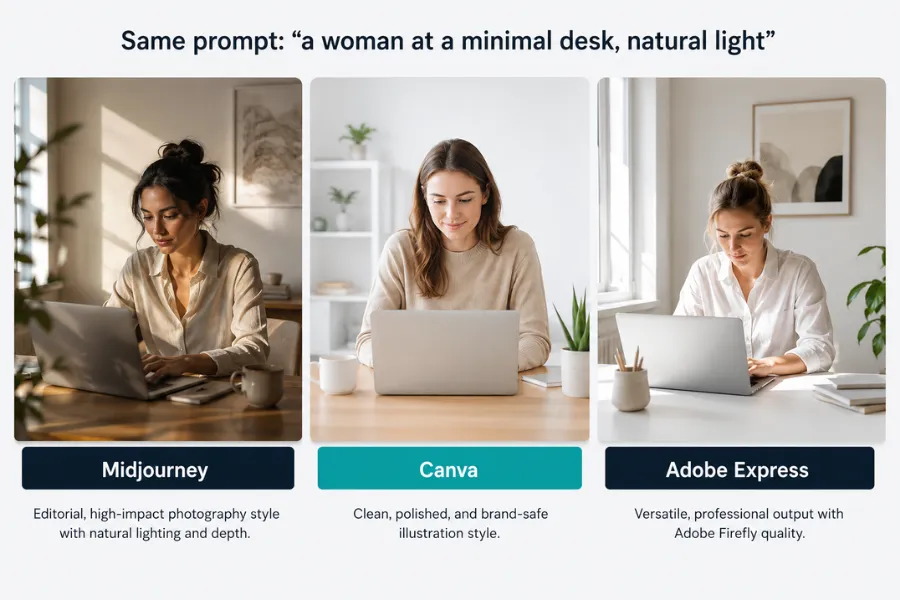
Midjourney: best for editorial and campaign quality
Midjourney produces the most visually striking outputs of any AI image tool currently available. Its results lean toward an editorial, considered quality that holds up in campaign imagery, brand content, and any context where the image needs to look crafted rather than generated. Prompts for scenes, compositions, and conceptual images tend to produce strong results with less iteration than most alternatives.
The interface runs through Discord, which creates a small learning curve for new users. Most people find it manageable after a single session. You enter prompts as commands in a Discord channel, receive four image variations, and select or refine from there. Midjourney also has a web interface in development that simplifies this, though the Discord route remains the primary workflow for most users.
Licensing for commercial use is tied to your subscription tier. The Basic plan includes commercial use for individuals and companies under $1 million annual revenue. Above that threshold, the Pro or Mega plan applies. Checking which tier your situation requires before using outputs in paid campaigns is worth doing once and documenting for your team.
Midjourney's primary limitation is that it does not integrate with a design tool. You generate images and then import them into your design environment separately. For teams with an established design workflow this is a minor friction. For teams that want to generate and design in a single environment, Canva or Adobe Express remove that step.
Canva: best for teams already in a design workflow
Canva integrates AI image generation directly into its design environment. For marketing teams already producing social posts, presentations, and branded materials in Canva, the integration means you generate an image and place it into a designed template without switching tools or managing exports. That reduction in workflow friction is the primary reason to choose Canva over a standalone image generator.
The output style sits closer to polished illustration than photorealism. For social content, marketing collateral, and brand materials where a clean, contemporary visual is the goal, this works well. For editorial photography-style imagery or campaign visuals that need to feel documentary, Midjourney produces results that Canva doesn't currently match.
The free tier includes a limited number of AI image generation credits per month. For light use, occasional social posts, or testing the feature before committing to a paid plan, the free tier covers the basics. Unrestricted commercial use requires a Canva Pro subscription.
Adobe Express: best for teams inside the Adobe ecosystem
Adobe Express brings AI image generation into Adobe's creative suite via its Firefly model. Teams that already work across Photoshop, Illustrator, or Premiere will find the integration reduces friction considerably. Brand kits, asset libraries, and colour palettes you've already set up in Adobe's tools carry across into Express, which makes producing brand-consistent generated images faster than starting from scratch in a separate generator.
Firefly is trained on licensed and public domain content, which gives Adobe's outputs a stronger position on commercial use than tools trained on scraped web data. This matters for organisations with legal review processes around content provenance. Firefly's outputs tend to be cleaner and more conservative than Midjourney's, which suits contexts where brand safety is a priority over visual impact.
The free plan includes AI generation with some restrictions. Paid plans unlock higher output volumes and full commercial rights. If your team is already paying for Adobe Creative Cloud, Adobe Express is often included, making it the lowest-friction option to trial first.
Free AI image generators and what you actually get without paying
The free tier landscape for AI image generation has improved, but the limitations are worth understanding before you build a free tool into a content workflow.
Canva's free plan includes a monthly credit allowance for AI image generation. The number of images is limited, but for occasional use it covers most needs. The images sit inside your Canva designs, so the free plan is most useful if you're already using Canva for other design work rather than as a standalone generation tool.
Adobe Express offers free AI generation through Firefly, with restrictions on output volume and commercial use. The free plan is enough to evaluate the tool's style and quality before upgrading. Full commercial rights require a paid plan.
For supplementary visuals where uniqueness isn't the priority, Pexels remains a strong free option. Stock photography from Pexels covers use cases where a generated image isn't quite right, such as a specific real-world location, a particular product, or a supporting image where stock quality is sufficient. Many content teams use Pexels for secondary visuals and reserve AI generation for hero images where a custom, original look matters.
The key distinction across all free tiers is commercial licensing. Most tools restrict commercial use to paid plans. Free outputs are often appropriate for personal projects or internal materials, but placing them in paid advertising, client deliverables, or published editorial without confirming the licence terms is a risk worth avoiding. Each tool states its licence restrictions clearly on its pricing page.
How to write prompts that produce usable AI images
Prompt quality determines output quality more than tool choice does. Most people who feel underwhelmed by AI image generators have written prompts that are too vague, then assumed the tool is limited. The tool can usually deliver what you need, but only if your prompt gives it enough to work with.
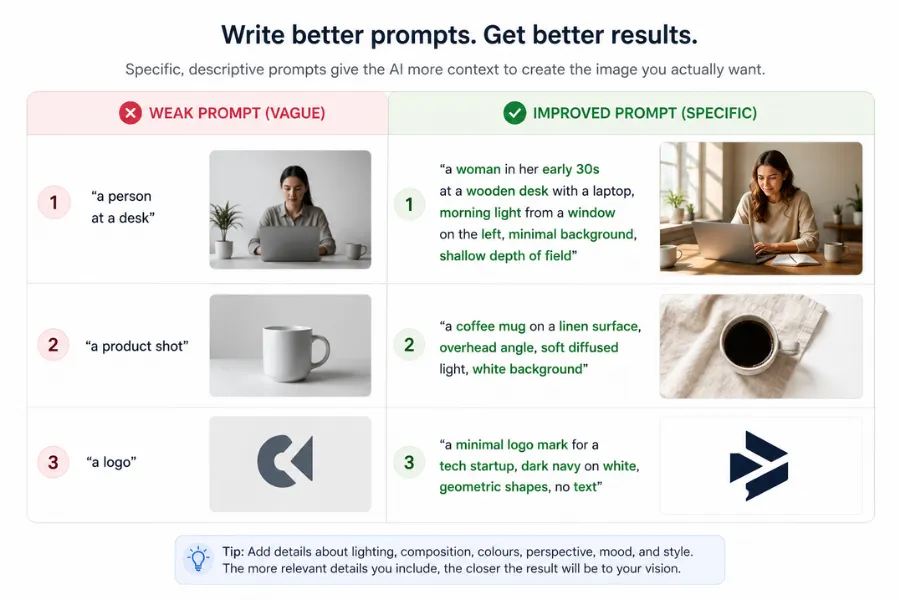
Be specific about the subject. "A person at a desk" produces something generic. "A woman in her early 30s at a wooden desk with a laptop, morning light from a window on the left, minimal background, shallow depth of field" produces something usable. Think of the prompt as a brief to a photographer, not a search query.
Include style and mood references. Words like "editorial", "cinematic", "flat design", "product photography", "studio lighting", or "photorealistic" steer the model toward the visual register you want. Different tools respond to style words differently, so a few test iterations help you learn which terms produce the best results in the specific tool you're using.
Specify dimensions or aspect ratio at the point of generation. Generating at the wrong dimensions and then cropping produces awkward results. A LinkedIn banner, a square social post, and a website hero image have different proportions. Most tools let you set this before generating, which saves a round of resizing later.
Use negative prompts where the tool supports them. If you consistently get cluttered backgrounds, extra limbs, or unwanted visual elements, adding those as negative terms cleans up the output without rewriting the main prompt from scratch. Midjourney and several others support this directly in the prompt syntax.
Iterate from a near-miss rather than starting again. Most tools let you generate variations of an existing image or refine with a follow-up prompt. Treating the first output as a draft changes how useful the tool becomes. The gap between a first output and a final image is usually closed by two or three prompt refinements, not by switching to a different tool.
Choosing the right AI image generator for your workflow
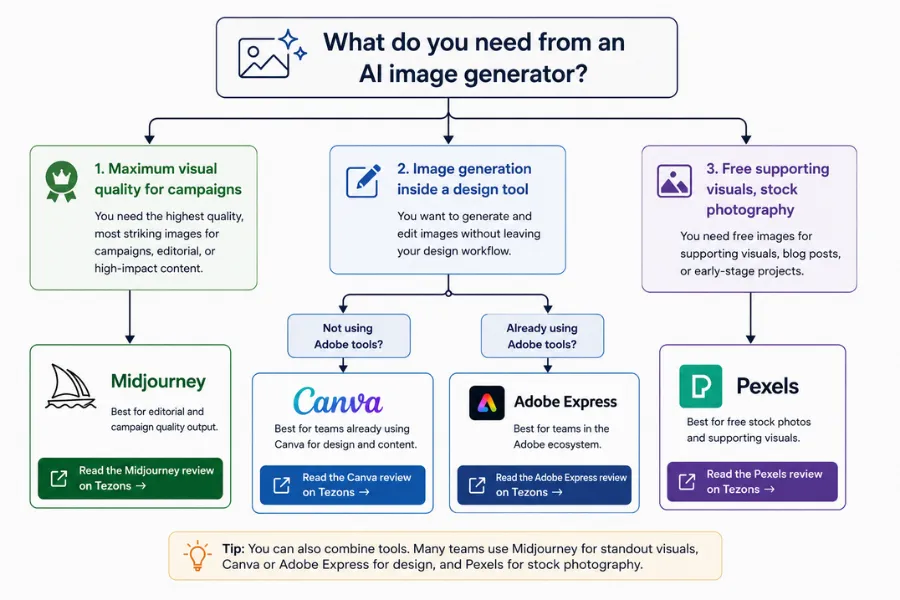
Three decisions narrow the choice quickly. First: does the output need to be photorealistic or editorial in quality, or is a clean, brand-safe illustration style sufficient? If visual impact is the priority, Midjourney is the current standard. If brand consistency and design integration matter more, Canva or Adobe Express suit the use case without adding a separate tool to your stack.
Second: does image generation need to sit inside a broader design workflow? If you're already in Canva producing social content, the integrated generation makes sense. If you're in the Adobe ecosystem, Express connects to your existing assets without a separate login. If you're producing images as standalone assets that then go into another tool, Midjourney's output quality justifies the separate step.
Third: what are your commercial licensing requirements? Confirm the tier you need before committing to a subscription. Most teams using generated images in paid advertising need a paid plan from whichever tool they choose. Building that cost into your content budget before you start production avoids a mid-campaign tool switch.
The most common mistake is trialling four tools briefly in the same afternoon. Spending two to three hours with a single tool, working specifically on prompt refinement against your actual briefs, tells you more about what the tool can produce than shallow sampling across all of them. Start with the tool that fits your existing workflow, learn its prompt language, and judge outputs against the work you actually need to produce.
For the full picture of how image generation connects to written content, video, and repurposing tools, the generative AI tools list maps the category across all content formats. The AI content creation tools guide covers which tools work well together across a complete production workflow, and where AI image generation fits within a broader content stack.
More AI & Tech Blogs





Latest AI & Tech Blogs


Subscribe to Stay in the loop
Get the latest AI and technology news, honest tool reviews, and practical guides delivered straight to your inbox.
Success! Check your Inbox!

Tezons Newsletter
The latest technology news, in-depth tool reviews, and practical guides - curated and delivered to your inbox.
Latest News




Have a question?
Have any questions?
Didn’t find what you were looking for? We’re just a message away.