Generative AI tools: a guide to what each output type can do

Generative AI tools now cover five distinct output types: text, images, video, audio, and code. The right starting point is not the tool with the most coverage, but the one that fits the output you produce most often. This guide breaks down each category, names the tools that lead it, and gives you a framework for building a stack without paying for capabilities you will rarely use.
The five output types and what generative AI can do with each
Each generative AI output type has developed separately, with its own tools, prompting approaches, and quality ceiling. Understanding the differences before comparing tools saves time and prevents mismatched purchases.
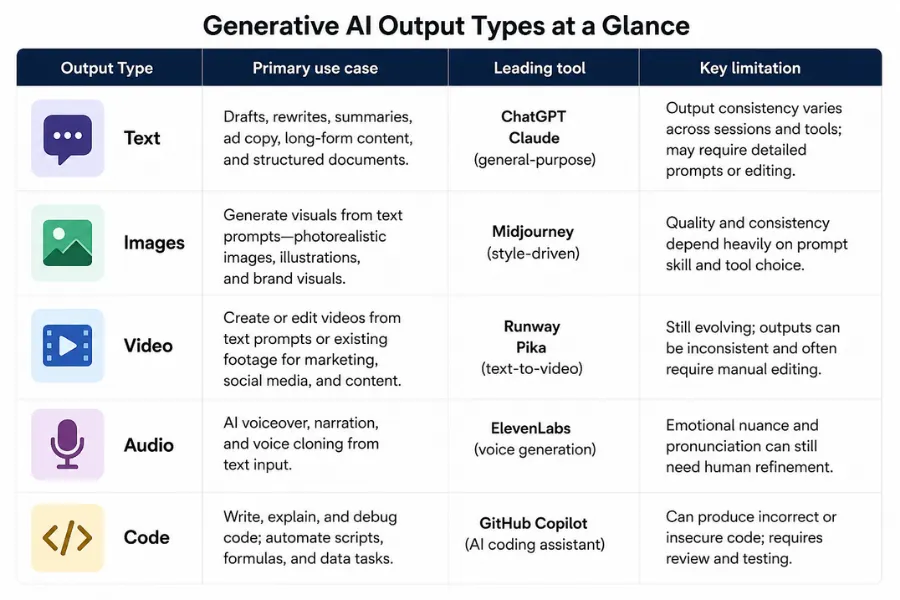
- Text: drafts, rewrites, summaries, ad copy, long-form content, and structured documents. The most mature category, with the widest range of tools at different price points.
- Images: visuals generated from a written description, from photorealistic renders to stylised illustrations. Quality varies significantly between tools depending on prompt structure.
- Video: either generated from scratch using a text prompt, or produced by editing and repurposing existing footage. Capabilities have expanded rapidly since 2025, and the category is still moving fast.
- Audio: AI-generated voiceover, narration, and voice cloning from text input. The gap between AI voice and recorded audio has narrowed to the point where most listeners cannot reliably tell the difference.
- Code: AI-assisted coding and code generation, where the tool writes, explains, or debugs code from a natural-language description. Useful well beyond developers, covering automation scripts, spreadsheet formulas, and data tasks.
Most teams start with one output type and expand from there. Trying to cover all five from the start creates complexity without proportional benefit. Identify your primary output first, trial the leading tools in that category, then add others as the need becomes clear.
Generative AI text tools: what each one is built for
Text generation is the largest category, and the differences between tools matter more than most reviews acknowledge. The question is not which tool writes the best generic paragraph. It is which handles your specific content type at the volume you need.
General-purpose text tools
ChatGPT handles the widest range of text tasks of any tool in this category. It covers drafts, rewrites, summaries, structured documents, and conversational tasks without requiring significant setup. The limitation is consistency: outputs vary in tone and structure across sessions, which makes it harder to use for teams with defined brand guidelines unless you build a detailed system prompt.
Claude performs better on long-form content. For blog posts, guides, reports, and any piece where argument and tone need to hold together across 1,500 words or more, it produces more consistent output than most general-purpose competitors. It also follows complex instructions more reliably, which matters for structured formats like SEO articles or product documentation.
Perplexity AI sits in a different category from the writing tools above. It is an AI search tool that generates answers with citations from live web sources. It is not a content creation tool, but it is useful for research tasks that feed into writing: fact-checking, finding up-to-date figures, and summarising recent developments on a topic.
Marketing copy tools
Marketing-specific tools are structured around formats rather than open-ended prompts. This reduces the time between brief and usable output, which matters for teams producing high volumes of short-form copy.
Jasper is built for marketing teams. It includes brand voice settings that carry tone and terminology across outputs, which reduces the editing required to bring AI copy in line with your brand. It works best for teams that have already defined their voice and want to scale it, not for teams still working out what they sound like.
Writesonic covers ad copy, landing page text, product descriptions, and email subject lines. The templates reduce prompting friction, which is the main advantage for high-volume production. Output quality on short-form copy is strong. For longer pieces, general-purpose tools tend to produce better results.
Copy.ai focuses on sales and outreach copy. It handles cold email sequences, LinkedIn messages, and short-form persuasion formats well. The output requires less editing for sales-specific formats than a general tool would, because the templates are built around conversion objectives rather than generic writing quality.
Editing and refinement tools
Grammarly is not a content generation tool, but it integrates with most writing environments and catches grammar, clarity, and tone issues that generative tools frequently introduce. Pairing a generative tool with Grammarly for review is a practical workflow for teams that need clean, polished output without a dedicated editor.
QuillBot handles paraphrasing and rewriting. It is useful for repurposing existing content into different formats or lengths. For teams producing content across multiple channels from a single source, it reduces the time spent manually adapting copy.
NotebookLM sits outside the standard creation workflow. It analyses documents you upload, generates summaries, answers questions about the source material, and produces audio overviews. It is the most useful tool in this list for research-heavy workflows where you need to synthesise large volumes of existing content rather than generate new material from scratch.
Generative AI image tools: quality versus speed
Image generation tools split into two groups. Tools that prioritise output quality require more time and effort to prompt well. Tools that prioritise speed and ease trade some ceiling on quality for a faster production workflow. Picking the wrong type for your use case means either slow output or mediocre results.
High-quality image generation
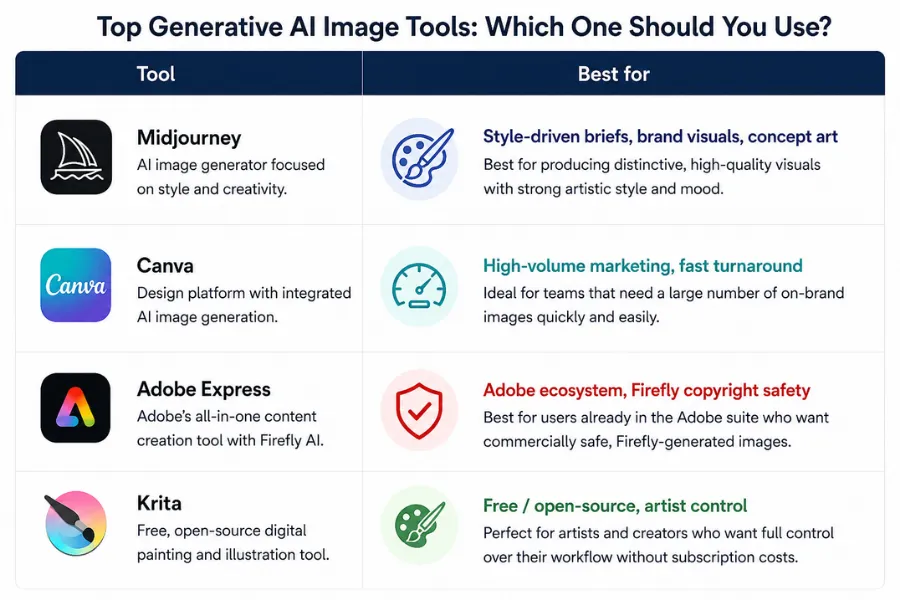
Midjourney produces the highest-quality output of any image generation tool at this writing. The results on style-driven briefs, covering editorial illustration, atmospheric photography, and brand visuals, are consistently stronger than competing tools. The trade-off is the prompting requirement. Midjourney rewards specific, structured prompts. Vague descriptions produce vague images. Teams that invest time learning to prompt it well get results that most stock libraries cannot match.
All-in-one design tools with AI generation
Canva is the most practical image tool for marketing teams that need to move fast. The AI generation feature sits inside a full design environment: you generate an image, place it into a template, resize it for different formats, and export in one workflow. The output quality ceiling is lower than Midjourney, but the end-to-end speed advantage for high-volume marketing production is significant.
The AI image generation guide covers the full range of options for teams comparing tools built for specific commercial applications.
Adobe Express integrates Adobe Firefly for image generation inside a template-based design environment. It is the strongest option for teams already in the Adobe ecosystem, because assets stay within the same file management system. Firefly is trained on Adobe Stock content, which reduces copyright risk for commercial use compared to some competing generation models.
Free and open-source image tools
Krita is a free, open-source image editor with AI-assisted painting and generation features. For artists and designers who want precise control over AI-assisted image creation without a subscription, it is the most capable free option available.
Generative AI video and audio tools
Video and audio tools have the most variation in capability across the price range. The gap between free tiers and paid plans is larger here than in text or image generation.
Video generation and editing
Runway covers the widest range of video tasks in a single tool. It handles text-to-video generation, video-to-video style transfer, background removal, and clip editing. The Gen-3 Alpha model produces footage quality that is usable in commercial contexts without additional post-processing. One limitation is clip length: quality and motion coherence drop noticeably beyond 10 seconds per generation.
CapCut is built for short-form video. It handles TikTok, Instagram Reels, and YouTube Shorts editing with AI-assisted features including auto-captions, background removal, and template-based editing. For teams producing high volumes of short social content, it is faster than Runway and requires less technical knowledge to get polished output.
Descript approaches video editing differently from any other tool in this list. It transcribes your footage and lets you edit the video by editing the transcript: delete a sentence from the text, and the corresponding footage is cut. This makes it the fastest tool for editing podcast episodes, interview content, and long-form video where you are working primarily with spoken word.
The AI video editor guide covers the broader video editing category, including tools for professional post-production workflows.
AI voice and audio
ElevenLabs is the strongest tool in the AI audio category. It covers voice cloning, branded narration, product demos, and multilingual voiceover. The output quality at the Professional plan tier is close enough to recorded audio that most listeners cannot distinguish between the two in standard conditions. For businesses producing content across multiple markets, the multilingual output removes the need to hire voice talent in each language. The free tier generates 10,000 characters per month, which is sufficient for evaluation but not for regular production.
Generative AI code tools
Code generation tools are relevant beyond software teams. Automation scripts, spreadsheet formulas, data processing tasks, and web scraping can all be handled with AI-generated code by someone with no programming background, provided the tool is structured for that use case.
Cursor is an AI-native code editor that embeds large language model assistance directly into the coding environment. It suggests completions, explains errors, and generates code from natural-language descriptions inside the editor. For developers, it reduces time spent on boilerplate and repetitive code tasks. For non-developers, the value is more limited: Cursor assumes you can read and run the code it produces, which requires at least basic familiarity with the language in question.
For non-developers needing code help, general-purpose text tools like ChatGPT and Claude handle code generation tasks adequately for simple scripts and formulas. The advantage of dedicated code tools becomes apparent at higher complexity, where the integrated environment and error context produce better results than a chat interface.
Choosing generative AI tools for your workflow: a decision framework
Start with the output type you produce most often, then work through the following steps before committing to a paid plan.
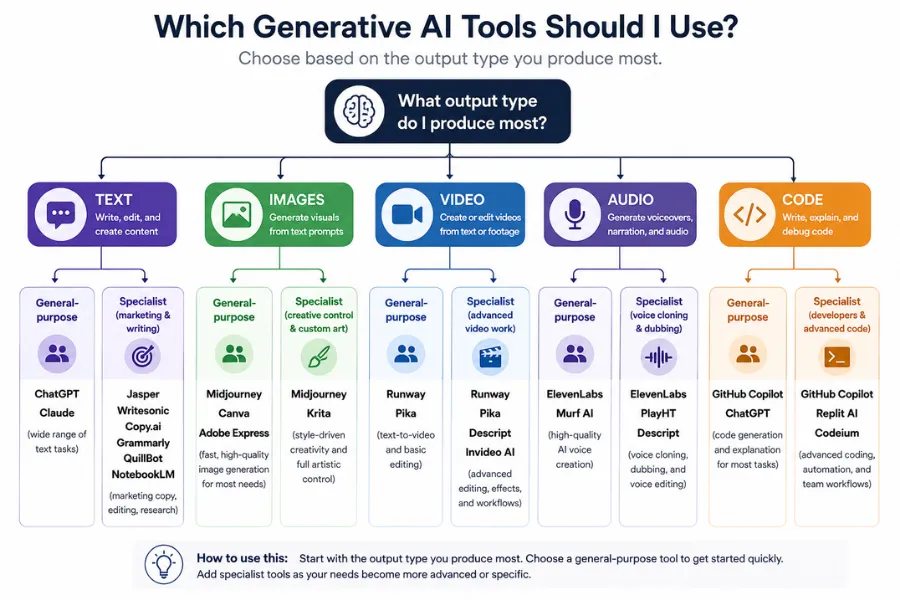
- Define your primary output type. Text, images, video, audio, or code. If you produce more than one type regularly, rank them by volume.
- Identify whether you need general-purpose or specialist output. High-volume, single-format production (ad copy, social images, podcast clips) benefits from specialist tools. Varied, lower-volume production benefits from general-purpose tools that cover multiple tasks without switching platforms.
- Trial with a real brief, not a test prompt. Run the free tier against an actual piece of work with your real constraints: brand tone, format requirements, and niche subject matter. Generic test prompts do not reveal the differences that matter in production.
- Assess the editing burden. The time you save generating content is only valuable if the output requires less editing than writing from scratch. Count the editing steps, not just the generation time.
- Check how the tool fits your existing stack. A text tool that outputs into your CMS, a design tool that exports directly to your ad platform, or a video tool with built-in scheduling integration removes transfer work that adds up at volume.
The AI tools for business guide covers how to evaluate and build a full business stack across all categories if you are making decisions beyond content production alone.
Building a generative AI stack without overcomplicating it
Most teams need fewer tools than they think. The common mistake is trialling every category at once and ending up with overlapping subscriptions and no clear workflow for any of them.
A practical starting stack covers three tools: one for your primary text output, one for your primary visual output, and one that handles the format-specific task you produce most often (video clips, voiceover, or code generation). For most content teams, that means a text tool, Canva for design, and either Runway or Descript for video, with ElevenLabs added if audio production is a regular requirement.
The higher-order question, once you have a working stack, is connection. Tools that pass output directly into the next step save more time than any individual feature list. Look for native integrations before relying on copy-paste between platforms.
For teams doing a full rebuild of their content workflow, start with Claude or ChatGPT for text, Canva for images, and Descript for long-form video. These three cover the majority of content production tasks at a combined cost well under £100 per month, and each integrates with the other tools in this guide when you need to expand.
More AI & Tech Blogs





Latest AI & Tech Blogs


Subscribe to Stay in the loop
Get the latest AI and technology news, honest tool reviews, and practical guides delivered straight to your inbox.
Success! Check your Inbox!

Tezons Newsletter
The latest technology news, in-depth tool reviews, and practical guides - curated and delivered to your inbox.
Latest News




Have a question?
Have any questions?
Didn’t find what you were looking for? We’re just a message away.