Canva vs Adobe Express: which design tool is right for you?


Canva and Adobe Express are the two most popular design tools for people who are not designers. Both use a template-first editor, both include AI-assisted features, and both offer a free plan. The difference comes down to three things: how much you will pay as your needs grow, how many people need to work on the same assets, and whether you already pay for Adobe software. Get those three answers right and the choice is obvious.
How Canva and Adobe Express approach design differently
Canva is built around volume. It has a larger template library, a more generous free tier, and collaboration tools designed for teams where multiple people touch the same assets. The platform is engineered for marketers and content teams who produce a high number of assets across multiple formats every week. Its Magic Switch feature, which reformats a single design into every required channel size in one click, is its clearest differentiator for teams publishing across social media, email, and print simultaneously.
Adobe Express takes a narrower path. Its template library is smaller, its collaboration tools are more basic, and its free tier exports carry a watermark on some content types. The trade-offs are intentional. Adobe Express is designed to sit inside an existing Adobe workflow, not to replace a full content production system. Its two real advantages are price and AI image quality. The Premium plan costs $9.99 per month, versus $18 per month for Canva Pro. And the AI image generation in Adobe Express runs on Firefly, which produces commercially licensed output. That matters to any team using AI-generated images in marketing materials where rights clearance is not optional.
One detail most comparisons miss: Adobe Express Premium is included inside most Creative Cloud subscriptions at no extra cost. If your team already pays for Photoshop, Illustrator, or InDesign, Adobe Express Premium is likely already available to you. That changes the pricing comparison entirely.
What the free plans actually give you
Both tools have genuine free tiers, but they are not equivalent.
Canva's free plan includes millions of templates, real-time collaboration, 5 GB of storage, 1 Brand Kit, and 50 AI credits per month. The Brand Kit inclusion on the free plan is notable: it lets you store your logo, brand colours, and fonts so every project starts on-brand without manual setup. For a solo founder or small team producing occasional content, this free plan is often enough to run a real publishing workflow without paying anything.
Adobe Express's free plan gives you access to 100,000 templates, over a million Adobe Stock assets, 4,000 fonts, 5 GB of storage, and 25 AI credits per month. Some content types export with a small Adobe watermark on the free tier. Premium templates and the brand kit are locked behind a paid plan. The free plan suits evaluation and occasional personal use, but it will frustrate most business users at the point where brand consistency matters.
The verdict on free tiers: Canva wins for anyone who needs to work with brand assets and collaborate with others without paying. Adobe Express's free plan is a trial in practice.
Canva vs Adobe Express pricing: the real numbers in 2026
Pricing is where the gap between these two tools is most significant, and where most comparisons use outdated figures. Here is what both tools actually cost as of August 2026.
Canva pricing:
- Free - $0. Templates, 5 GB storage, 1 Brand Kit, 50 AI credits/month, basic collaboration.
- Pro - $18/month or $12/month billed annually. Full Magic Studio AI suite, Brand Kit across multiple projects, background removal, 500 AI credits/month, 1 TB storage. Solo users only.
- Business (formerly Teams) - $25/user/month or $20.83/user/month billed annually. No seat minimum. Adds shared Brand Hub, template locking, admin controls, approval workflows.
- Enterprise - custom pricing, designed for 150+ seats.
Adobe Express pricing:
- Free - $0. 100,000+ templates, 1M+ Adobe Stock assets, 25 AI credits/month, 5 GB storage. Watermark on some exports.
- Premium - $9.99/month or $99.99/year. All templates, 200M+ Adobe Stock assets, 30,000+ fonts, 250 AI credits/month, 100 GB storage, background removal, brand kits. Also included with most Creative Cloud subscriptions.
- Teams - $4.99/user/month or $49.99/user/year. Everything in Premium plus collaboration tools, shared asset management, and 1 TB per user.
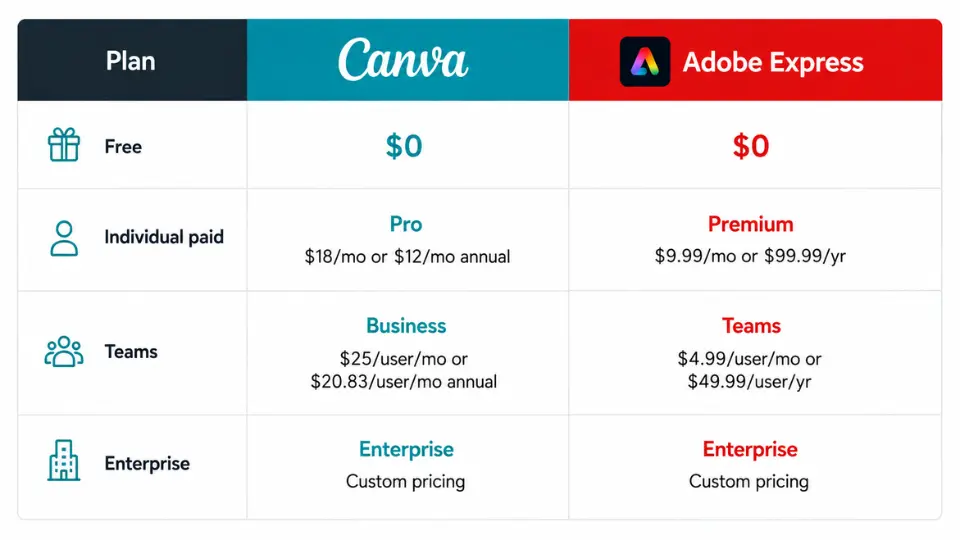
The price difference is stark. Adobe Express Premium at $9.99/month costs 44% less than Canva Pro at $18/month. For teams, the gap is even wider: Adobe Express Teams at $4.99/user/month versus Canva Business at $25/user/month. That is not a small difference. A five-person team pays approximately $300/year on Adobe Express Teams versus $1,250/year on Canva Business.
The caveat on both sides: AI credits are metered on every plan. Canva Pro's 500 monthly credits can run out before month-end for heavy generative users, at which point you pay for more or wait. Adobe Express Premium's 250 credits run out faster. If AI image generation is a core part of your workflow, factor in supplementary costs or consider a dedicated tool like Midjourney for the high-volume image work.
AI image tools: Firefly vs Magic Studio
Both platforms include AI image generation, but the tools differ in meaningful ways.
Adobe Express uses Firefly, Adobe's own generative AI model. Firefly is trained on licensed content, which means the output is commercially safe by Adobe's terms. You can use Firefly-generated images in marketing materials, advertising, and client work without the legal uncertainty that applies to some competing AI image tools. The image quality is solid for contextual backgrounds, product mockups, and editorial imagery. It is not at the level of a dedicated image generator for complex creative briefs, but for in-context content creation, it is faster and more practical than exporting to an external tool.
Canva's Magic Studio uses a mix of its own AI models and third-party providers. The output is generally usable for social media and editorial work. Magic Eraser (object removal) and Magic Expand (background extension) are consistently reliable. The image generator itself produces results that are convenient but fall short of Firefly in both prompt accuracy and commercial clarity. Canva does not offer the same explicit commercial indemnification that Adobe provides for Firefly output, which matters for teams producing work for clients or in regulated industries.
For teams where AI image generation is a regular part of the workflow and commercial licensing matters, Adobe Express has a meaningful advantage here. For teams where AI images are a secondary feature and the priority is overall design system productivity, the difference is less significant.
Collaboration: where Canva pulls ahead
This is the clearest category win for Canva. If multiple people need to create, review, or approve design assets, Canva's collaboration infrastructure is significantly more developed.
Canva Business includes template locking, which prevents team members from moving the logo, changing the primary typeface, or overriding brand colours. This is not a minor feature. Without template locking, brand consistency across a team is a discipline problem rather than a system problem, and discipline problems get worse as teams grow. The shared Brand Hub, approval workflows, and comment threads on specific design elements all sit inside the same platform, reducing the round-trip between design, review, and sign-off.
Adobe Express Teams adds collaboration tools, shared asset libraries, and admin controls, but the collaboration experience is lighter. Multiple people can access and edit assets, but the approval workflow and the element-level locking that Canva offers are absent. For a team of two or three working loosely on the same content, Adobe Express Teams is functional. For a marketing team where brand consistency is a live operational problem, it is not enough.
The collaboration gap also shows up in third-party integrations. Canva connects to scheduling tools like Buffer and Hootsuite, storage platforms, and email marketing tools. Adobe Express integrates well within the Adobe ecosystem but has a thinner connection to the broader marketing stack most teams already use.
Which features each tool handles better
Rather than a generic side-by-side, here is where each tool has a concrete advantage over the other.
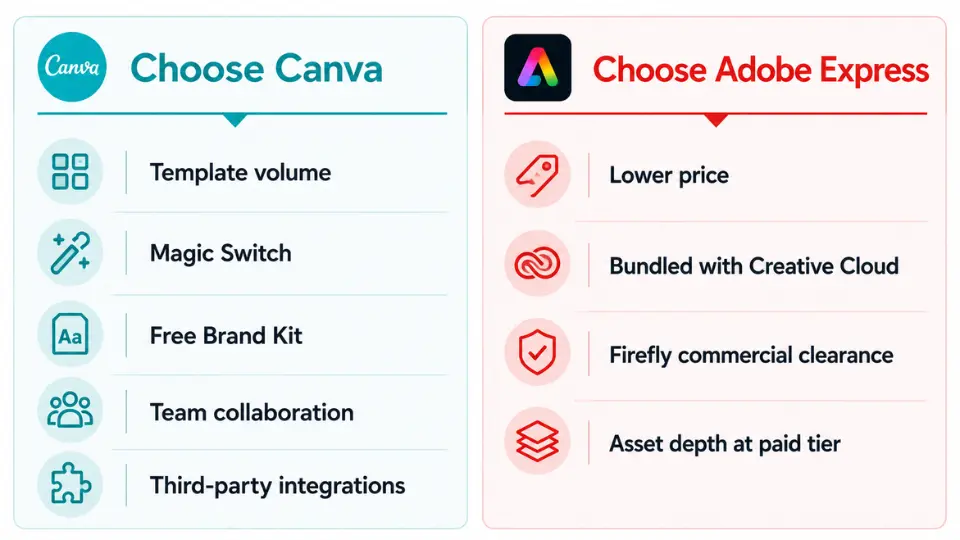
Canva does better on:
- Template volume. Canva's library is larger, updated more frequently, and covers a wider range of content types including whiteboards, websites, and presentations at a depth Adobe Express does not match.
- Magic Switch. Reformatting a finished design into every required channel size in one step is Canva's most practical differentiator for teams with multi-channel publishing schedules.
- Free-tier brand tools. The Brand Kit on the free plan is genuinely unusual. Adobe Express locks brand kits behind a paid plan.
- Team collaboration. Template locking, approval workflows, and a shared Brand Hub are available at the Business plan level and have no equivalent in Adobe Express.
- Third-party integrations. Canva's connection to broader marketing and publishing tools is deeper than Adobe Express's, which focuses on the Adobe ecosystem.
Adobe Express does better on:
- Price. Premium at $9.99/month is 44% cheaper than Canva Pro at $18/month. Teams pricing is even more favourable, at $4.99/user/month versus $25/user/month.
- Creative Cloud inclusion. If you already pay for any Adobe app, Premium is likely bundled at no additional cost. Check your Creative Cloud account before purchasing separately.
- Firefly commercial clearance. AI-generated images from Adobe Express are covered by Adobe's commercial use terms. Canva does not offer equivalent indemnification.
- Asset depth at the paid tier. 200M+ Adobe Stock assets and 30,000 fonts at the Premium level outpaces what Canva includes at the Pro level.
Who should use Canva
Canva suits you if your team produces a high volume of content across multiple channels and brand consistency is a real operational concern. The template locking and Brand Hub on the Business plan are the right tools for a marketing team where several people produce content and none of them should be making brand decisions independently.
It also suits solo founders and freelancers who want to stay on a free plan while maintaining brand assets. The inclusion of 1 Brand Kit on the free tier makes Canva the better free option for anyone building a brand identity and publishing content regularly.
Content creators who work across Instagram, LinkedIn, email, and print simultaneously will find Magic Switch saves meaningful time. Producing one hero design and generating every format variant before exporting is a workflow that compounds across every piece of content you make.
Who should use Adobe Express
Adobe Express suits you if you or your team already pay for any Creative Cloud subscription. Check your account at adobe.com before purchasing a separate design tool. Premium is bundled with Photoshop, Illustrator, InDesign, and most other single-app plans. If it is already there, use it.
It also suits solo operators and freelancers who need a capable design tool without paying Canva Pro rates. At $9.99/month, Adobe Express Premium delivers the full feature set including AI generation, background removal, brand kits, and 200M+ assets. The value at that price is strong, and for an individual who does not need team collaboration tools, the gap with Canva's feature set is narrower than the price difference suggests.
For teams producing content where AI image licensing clarity is a requirement, Adobe Express's Firefly integration removes a risk that Canva does not address with equivalent specificity. Marketing agencies working on client campaigns, regulated industry teams, and anyone producing assets for advertising should weigh this carefully.
Adobe Express is not the right tool if your team is larger than a couple of people and brand consistency is a live problem. The collaboration infrastructure does not match Canva at the Business plan level, and the operational cost of maintaining brand standards without template locking is real.
The decision between Canva and Adobe Express
Choose Canva if team collaboration, template volume, and a functional free tier matter more than price. Choose Adobe Express if you already pay for Creative Cloud, if price is a primary factor, or if AI image commercial clearance is a requirement. For individuals choosing between the two paid plans on budget alone, Adobe Express Premium at $9.99/month delivers enough of what Canva Pro offers at $18/month to be the default recommendation for most solo users. Teams evaluating the collaboration plans face a straightforward cost comparison: $4.99/user/month versus $25/user/month, with Canva justifying that premium only if the Brand Hub and template locking are genuinely needed. Both tools are covered in depth in the individual Canva review and Adobe Express review on Tezons. For broader options in this category, the best software for content creation guide covers the wider market.
More AI & Tech Blogs





Latest AI & Tech Blogs


Subscribe to Stay in the loop
Get the latest AI and technology news, honest tool reviews, and practical guides delivered straight to your inbox.
Success! Check your Inbox!

Tezons Newsletter
The latest technology news, in-depth tool reviews, and practical guides - curated and delivered to your inbox.
Latest News




Have a question?
Have any questions?
Didn’t find what you were looking for? We’re just a message away.